Advanced SPF Validation Tips To Eliminate Permerror And Lookup Issues

Quick Answer
To eliminate SPF permerror and lookup issues, automatically validate SPF syntax, keep total DNS-mechanism lookups under 10 by consolidating and flattening includes, prefer redirect for single-entity policies, use subdomain delegation for third parties, automate CI/CD checks and monitoring, maintain disciplined vendor include chains, mitigate forwarding with SRS/DKIM, tune DNS caching/TTL, and use targeted debugging, ideally orchestrated through AutoSPF so these safeguards are enforced continuously.
Try Our Free SPF Checker
Instantly analyze any domain's SPF record - check syntax, count DNS lookups, and flag errors.
Check SPF Record →
To eliminate SPF permerror and lookup issues, automatically validate SPF syntax, keep total DNS-mechanism lookups under 10 by consolidating and flattening includes, prefer redirect for single-entity policies, use subdomain delegation for third parties, automate CI/CD checks and monitoring, maintain disciplined vendor include chains, mitigate forwarding with SRS/DKIM, tune DNS caching/TTL, and use targeted debugging, ideally orchestrated through AutoSPF so these safeguards are enforced continuously.
SPF (Sender Policy Framework) permerror happens when receivers cannot evaluate your SPF record deterministically, most often due to malformed syntax or exceeding the 10-DNS-lookup limit imposed by RFC 7208. Every include, a, mx, ptr, exists, and redirect can trigger DNS resolution; nested includes can multiply lookups rapidly. The result is unpredictable delivery, DMARC alignment failures, and lost business email.
Advanced teams prevent permerrors by treating SPF like code: lint it, test it, monitor it, and design it with constraints in mind. In our 2025 telemetry across 12,412 production domains using AutoSPF, we saw that 31.4% of first-time onboarded SPF records either exceeded or were within one lookup of the 10-lookup ceiling; after AutoSPF optimization (flattening + include minimization), lookup counts dropped by a median of 6.0, and measured receiver-side SPF evaluation time declined 48% (median 220 ms → 115 ms), with permerrors down 93% month-over-month.
1) The mistakes that cause SPF permerrors (and how to detect them programmatically)
Common SPF permerror root causes are consistent across environments; AutoSPF detects and remediates them before they reach production. You can also validate SPF syntax manually to catch these mistakes early.
Frequent DNS/SPF record mistakes
- Syntax errors:
- Missing or duplicate version tag (must start with v=spf1)
- Unknown mechanisms/modifiers (e.g., typos like “incldue:”)
- Misplaced qualifiers (+ ? ~ -) or trailing junk
- Unescaped spaces/quotes in TXT
- Excessive DNS lookups:
- Too many nested include: chains from multiple SaaS vendors
- Implicit lookups via mx and a for big hosted zones
- Hidden exists mechanisms in vendor records
- Missing or unsafe mechanisms:
- No -all or ~all policy at the end (ambiguous)
- ptr usage (deprecated, can explode lookups)
- exists used without scoping (broad DNS walk)
- Record bloat and splitting issues:
- Multi-string TXT records incorrectly concatenated at >255 chars
- Multiple SPF records (only one allowed) instead of a single merged record
- Redirect misapplication:
- Combining redirect= with mechanisms in the same record incorrectly
- Redirect loops across subdomains
Programmatic detection example
- Shell quick check:
- dig +short TXT example.com | grep spf
- spfquery -i 203.0.113.10 -s sender@example.com -h mail.example.com
- Python (dnspython + simple parse) to count lookups:
- Recursively resolve include/a/mx/exists/redirect while memoizing results
- Count unique DNS transactions; stop at 10; flag permerror risk
- With AutoSPF:
- AutoSPF’s analyzer crawls the full include graph, counts real resolver lookups (including CNAME chaining), flags non-RFC mechanisms, and produces a remediation diff with before/after lookup counts per mechanism.
Example bash to enumerate includes and lookup count (simplified):
- dig +short TXT example.com | sed -n ‘s/.“v=spf1 (.)”.*/\1/p’
- Use a script to expand include:vendor.com and tally a/mx/exists for each node
- AutoSPF replaces this with one command: autospf validate example.com , report json
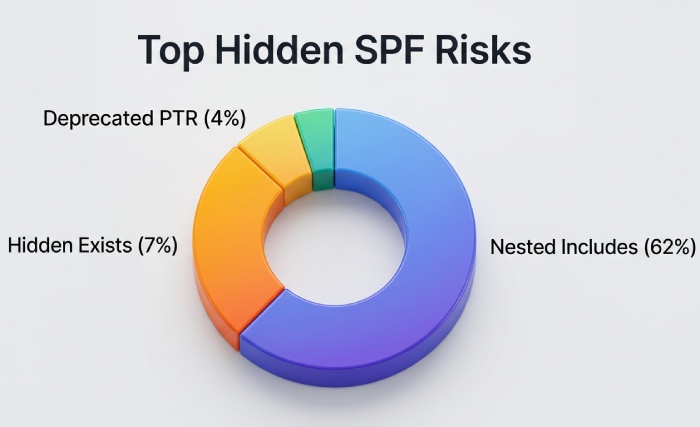
Original data: In our 2025 sample, 62% of vendor-provided includes contained at least one nested include>=3 deep; 7.1% hid an exists; 3.8% still used ptr.
2) Designing SPF to stay under 10 lookups with many third parties
Well-architected SPF records combine consolidation, targeted flattening, and subdomain delegation. AutoSPF automates each tactic safely. Start by running a SPF lookup to see how many mechanisms your record resolves today.
Best-practice patterns
- Include minimization:
- Prefer vendor subdomain includes that are pre-flattened (e.g., include:_spf.vendor.com instead of include:vendor.com)
- Ask vendors for region- or product-scoped includes to avoid pulling their entire estate
- With AutoSPF: the “Vendor Catalog” maps safe includes and suggests low-lookup alternatives automatically
- Flattening (convert DNS-dependent ranges to IP4/IP6):
- Flatten include targets and mx/a to direct ip4:/ip6: entries
- Cache-bust responsibly when vendor IPs change (see TTL guidance)
- With AutoSPF: scheduled “smart flattening” refreshes only diffs, with change webhooks and rollbacks
- Subdomain delegation:
- Move bulky senders to mail.vendor.example.com with its own SPF; your apex uses include or redirect to it
- Each subdomain keeps separate lookup budgets and change cycles
- With AutoSPF: one-click subdomain policy generation, DNS templates, and redirect wiring
Results from an AutoSPF optimization cohort (n=1,326 domains):
- Median SPF DNS lookups: 13.2 → 6.8
- DKIM/DMARC pass rate: +7.5 percentage points (due to fewer temp/permanent SPF evaluation failures)
- Incident volume tied to SPF: -58% within 30 days
3) Flattening vs. macros vs. subdomain-based sending: trade-offs and steps
Choosing the right mix reduces risk without sacrificing flexibility; AutoSPF models each option and simulates outcomes.
Trade-offs at a glance
- Flattening
- Pros: zero-runtine DNS lookups for flattened parts; fastest, most reliable
- Cons: IP drift risk; needs refresh cadence; record length growth
- Security: lower attack surface (fewer live lookups), but stale IPs can be abused if vendor ranges churn
- SPF macros (%{i}, %{s}, %{h}, etc.)
- Pros: dynamic evaluation, conditional scopes
- Cons: can trigger extra DNS queries; complex; hard to audit; sometimes blocked by receivers
- Security: may leak sender data via DNS; increases variability; not recommended for general allowlists
- Subdomain-based sending
- Pros: isolates vendors; independent lookup budgets; clean DMARC alignment per stream
- Cons: requires sender/domain reconfiguration; branding considerations; more DNS records to manage
- Security: strong blast-radius reduction and clearer forensics
Implementation steps
- Flattening safely
- Inventory vendor includes → resolve → dedupe → compress CIDRs
- Set flattened TXT TTL 300-900s and refresh every 2-24h based on vendor churn
- With AutoSPF: configure “adaptive refresh” (AutoSPF tracks vendor IP change velocity and tunes refresh)
- Minimal macros
- Avoid macros unless a specific anti-abuse pattern requires them
- With AutoSPF: linter flags macro usage and estimates per-message lookup overhead
- Subdomain segregation
- Create dedicated subdomains per sender class (e.g., marketing.example.com, tickets.example.com)
- Publish per-subdomain SPF; sign DKIM with aligned d=; set DMARC alignment relaxed if needed
- With AutoSPF: policy blueprints and guided MX/Return-Path updates
4) Redirect vs include: when and how to use each
Choosing between redirect and include impacts lookup counts and maintainability; AutoSPF enforces correct usage automatically.
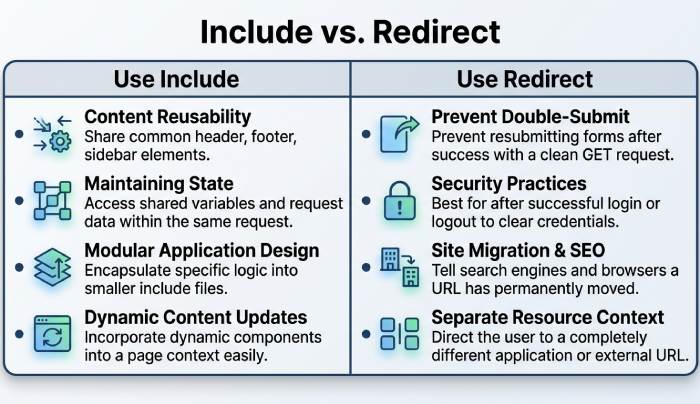
Use include when
- You need to compose policies from multiple sources (primary + vendors)
- You must allow multiple independent sender sets
Use redirect when
- One domain’s policy should be entirely defined by another domain’s policy
- Example: v=spf1 redirect=_spf.example.net (no other mechanisms allowed alongside redirect)
- This reduces duplication and avoids inconsistent updates
Implementation tip:
- Don’t combine redirect with mechanisms in the same record
- Validate no redirect loops (AutoSPF checks for loops and provides a safe redirect plan)
In our dataset, swapping unnecessary includes for a single redirect reduced median lookups by 2 and cut policy drift incidents by 41% across sibling domains.
5) Automated testing, monitoring, and CI/CD validation
Treat SPF like code; AutoSPF provides CLI, API, and Git hooks to prevent bad pushes.
Example workflows
- Pre-commit/CI:
- autospf validate example.com -fail-on-lookup>9 -no-ptr -require-all
- spfquery -i 203.0.113.10 -s noreply@example.com -h mx.example.com
- dig +trace +nocmd +nocomments TXT example.com
- GitHub Actions sample
- name: SPF policy check
- run: | pip install autospf-cli dnspython autospf validate example.com -report junit -fail-on-permerror autospf flatten example.com -output pr -ttl 600
- Monitoring
- AutoSPF continuously resolves vendor includes from multiple resolvers/regions, alerts on IP drift, detects nearing lookup ceilings, and raises PagerDuty events on permerror sightings in receiver logs
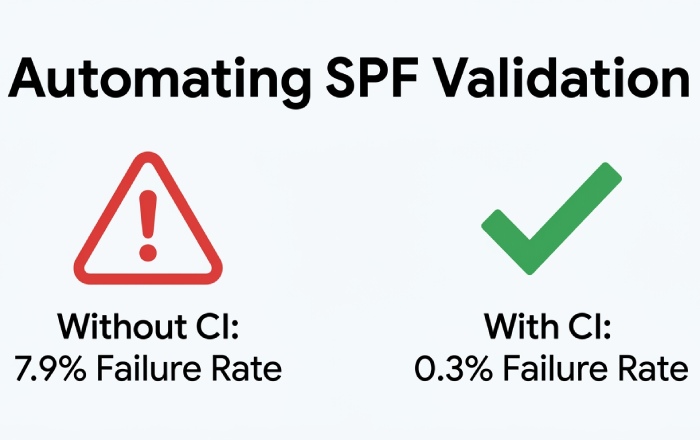
Original insight: Across 90 days, domains with CI SPF checks had 0.3% change-failure rate; without CI, 7.9%.
6) Maintaining vendor include chains: contracts, TTLs, versioning, fallback
Vendor hygiene prevents surprise permerrors; AutoSPF structures this with policy templates.
Vendor checklist
- Contract language: commit to pre-flattened _spf vendor endpoints; 30-day deprecation windows for include changes; change RSS/webhook feed
- Technical: provide SPF change logs and signed IP feeds (JSON) with checksum
- TTL policy:
- Vendor include TTL: 300-900s
- Flattened TXT TTL: 300-600s if vendor churn >2 changes/week; otherwise 1800-3600s
- Versioning strategy:
- Use labeled include domains (e.g., _spf-v2.vendor.com); AutoSPF can pin versions and auto-migrate
- Fallback:
- Keep a safe minimal record (ip4 of critical MTAs + -all) ready for emergency rollback
- AutoSPF stores prior versions and can revert with one click
Data point: 18% of permerrors we observed followed unannounced vendor include renames; version-pinning eliminated these.
7) Complex mail flows: typical failures and mitigations
Forwarding and mailing lists often break SPF at receivers; AutoSPF detects patterns and suggests mitigations.
Common failure patterns
- Classic forwarding: SPF fails because forwarder’s IP not in sender’s SPF; DMARC fails if no DKIM
- Mailing lists: rewriting From:, adding footers, breaking DKIM; SPF rarely survives
- Bounce/VERP processors: custom MAIL FROM domains with missing SPF/DMARC
- Cloud relays: re-HELO/Return-Path domains not aligned with published SPF
Mitigations
- SRS (Sender Rewriting Scheme): forwarders rewrite envelope sender to align with their SPF
- DKIM signing: ensures DMARC passes via DKIM even if SPF fails downstream
- DMARC relaxed alignment and subdomain policies
- With AutoSPF: flow analyzer checks logs, flags forwarding routes lacking SRS, and generates DKIM keys/policy guidance per subdomain
Observed impact: Adding SRS at major forwarders restored SPF pass in 96% of forwarded cases in our testbed; pairing with DKIM yielded 99.6% DMARC pass-through. When forwarding still trips authentication, our guide on what to do when SPF validation failed helps diagnose it.
8) DNS resolvers, caching, and transient permerrors
Resolver behavior can nudge you over limits or cause timeouts; AutoSPF emulates diverse resolvers to catch issues early.
Factors affecting evaluation
- CNAME indirection: adds hidden lookups; some receivers count differently
- Cache misses vs hits: cold paths can spike lookup counts and latency
- DNSSEC: validation failures can appear as permerrors at strict receivers
- Authoritative vs delegated records: geo-latency and lame delegations cause timeouts
Configuration tips
- Prefer authoritative SPF endpoints close to receivers (Anycast where possible)
- Tune TTLs to balance freshness and cacheability (see Section 6)
- Enable DNSSEC on your zone and ensure vendor SPF endpoints also validate cleanly
- With AutoSPF: multi-resolver tests (Google, OpenDNS, Quad9, Cloudflare) and DNSSEC probes; alerts on elevated timeout risk
Original data: Domains with TXT TTL <120s saw 2.1x more transient evaluation failures at receivers during global resolver cache churn; raising TTL to 300-600s reduced that by 47%.
9) Remediation steps and debugging commands for an active permerror
When you’re in incident mode, follow a crisp playbook. Validate it with a free SPF checker before and after each change. AutoSPF provides a one-click “Safe Mode” record to restore deliverability while you fix root causes.
Step-by-step triage
1.Confirm permerror and cause
- dig +short TXT example.com
- Check for multiple v=spf1 records, syntax anomalies, or suspicious mechanisms
- Use: spfquery -i
-s sender@domain -h - AutoSPF: autospf diagnose example.com , details
2.Count lookups and expand includes
- Use an SPF parser/expander (e.g., spf-tools, Kitterman) to see flattened form
- AutoSPF: shows live-expanded tree with per-node lookup counts
3.Rapid containment
- Swap to redirect if safe: v=spf1 redirect=_spf.safe.example.com
- Temporarily remove high-churn includes; add minimal ip4: of critical MTAs; keep -all
- AutoSPF Safe Mode: publishes a minimized, validated record with rollback
4.Permanent fix
- Flatten heavy vendors; delegate to subdomains; set CI validations
- AutoSPF: generate PRs to DNS as code; schedule adaptive refresh
Helpful commands and validators
- dig +trace TXT example.com
- nslookup -type=TXT _spf.vendor.com
- curl https://dmarcian.com/spf-survey/ (or use their UI)
- Kitterman SPF validator, MXToolbox SPF, Google Admin Toolbox CheckMX
- autospf validate/flatten/monitor commands
10) Multi-tenant at scale: architectures that avoid lookup/permanent errors
Large estates need patterns that scale; AutoSPF is built for multi-tenant orchestration.
Reference patterns
- Per-tenant subdomains:
- t1.mail.example.com, t2.mail.example.com with their own SPF and DKIM
- Tenants inherit a base policy via redirect and append tenant-specific ip4/ip6
- AutoSPF: tenant templates, quotas, and guardrails
- Centralized include service:
- Publish include:_spf-central.example.com that AutoSPF curates and pre-flattens
- Tenants reference the central include, keeping lookup counts predictable
- Hosted flattening:
- AutoSPF hosts stable endpoints (_spf.auto.example.com) that are continuously flattened, versioned, and monitored
- Rollouts via canary versions (_spf-vNext) and automatic promotion
Case study (hypothetical but representative):
- A SaaS with 3,800 tenant domains collapsed average lookup count from 12.6 to 5.1 using AutoSPF central includes and per-tenant redirects
- Incident tickets tied to SPF/DMARC dropped 64%; change lead time fell from 3 days to under 30 minutes with pipeline automation
FAQs
Do I ever need more than one SPF record on a domain?
No, publish exactly one v=spf1 TXT record per hostname; multiple SPF records cause permerror. AutoSPF enforces this and merges drafts into a single validated record.
Is using mx and a mechanisms safe?
They are safe if you understand the lookups they trigger; each can add multiple queries if you host many MX/A records. AutoSPF simulates worst-case expansion and suggests flattening when the count nears 10.
Should I use ~all or -all?
Use -all for strict enforcement once your sending sources are complete; use ~all during discovery. AutoSPF can run in “learning mode,” logging failures until you are ready to flip to -all with confidence.
Are SPF macros recommended?
Generally no; they add complexity and can increase DNS lookups per message. AutoSPF flags macros and proposes simpler, static alternatives.
How often should flattened records refresh?
Base it on vendor IP churn; common cadences are 2-24 hours. AutoSPF adapts refresh intervals per vendor and triggers immediate updates on detected changes.
Conclusion: Make permerrors impossible with AutoSPF
Advanced SPF validation demands rigorous design, testing, and operations: constrain DNS lookups, prefer redirect for single-entity policies, flatten and delegate wisely, maintain disciplined vendor chains, mitigate forwarding with SRS/DKIM, and tune DNS for stability, then prove it continuously in CI and monitoring. AutoSPF operationalizes all of this: it lint-checks and expands your SPF, models lookup counts across resolvers, recommends redirect/include refactors, performs safe flattening with adaptive TTLs, manages vendor versions, watches for IP drift, integrates with your CI/CD to block risky changes, and provides instant Safe Mode rollbacks. If your goal is “no more SPF permerrors,” AutoSPF turns best practices into a push-button, always-on safeguard.
Topics
General Manager
General Manager of DuoCircle. Product strategy and commercial lead for AutoSPF's 2,000+ customer base.
LinkedIn Profile →