Troubleshooting the ‘SPF alignment failed’ error for unaffected email authentication and delivery

Quick Answer
When you create an SPF record, the most important step you perform is mentioning all the mail servers or IP addresses allowed to send emails as your brand’s representatives. So, when the domains in the ‘From’ address and the ‘Envelope From’ address, also known as ‘Return-Path;’ match, SPF alignment passes.

When you create an SPF record, the most important step you perform is mentioning all the mail servers or IP addresses allowed to send emails as your brand’s representatives. So, when the domains in the ‘From’ address and the ‘Envelope From’ address, also known as ‘Return-Path;’ match, SPF alignment passes. In simpler words, SPF alignment means verifying that the sender’s IP address is officially authorized to be used for sending emails.
For a complete walkthrough of every SPF error type, see our SPF Errors and Troubleshooting Guide.
So, if you receive a warning that your SPF alignment has failed, you can troubleshoot it by following the steps in this blog.
What does SPF alignment mean?
SPF alignment is the comparison between the ‘envelope sender’ domain (the domain in the RFC5321.MailFrom address) and the ‘header sender’ domain (the domain in the RFC5322.From address) of an email with the domain mentioned in the SPF record of the sender’s domain.
When both domains match, you get the ‘SPF pass’ result. SPF alignment also passes if there is a parent/ child domain match. This indicates that the sender is legitimate, and hence, emails sent by them land in the inboxes of the intended recipients.
On the other hand, you get the ‘SPF fail’ result if these domains don’t match, indicating the possibility of a spoofed sender attempting to send fraudulent emails on your behalf.
SPF alignment is one component of email authentication that ensures only genuine emails sent from your domain land in inboxes, reducing spam and phishing attempts.
Example: SPF in alignment
MAIL FROM: <sam@mydomain.com>From: sam@mydomain.comIn this example, SPF is in alignment as RFC5321.MailFrom parameter and the RFC5322.From fields have identical DNS domains, i.e., mydomain.com.
Example: SPF in alignment (parent)
MAIL FROM: <sam@finance.mydomain.com>From: sam@mydomain.comIn this example, since sam@finance.mydomain.com is a subdomain of mydomain.com, SPF alignment passes because the sender’s subdomain is allowed by the SPF record of the parent domain (mydomain.com). This alignment check helps ensure that emails are more likely to be genuine and not forged.
Example: SPF not in alignment
MAIL FROM: <sam@company.com>From: sam@mydomain.comIn this example, SPF is not in alignment as RFC5321.MailFrom parameter and the
RFC5322.From fields don’t have identical DNS domains.
Reasons for failed SPF alignment
The default SPF alignment mode is relaxed, but some domain owners prefer setting their SPF records to the strict mode. The latter configuration triggers alignment failures if the ‘Return-Path’ domain is the subdomain of the parent domain, while the From: header has the parent domain (like example 2).
This happens because for SPF to align in the strict mode, both the domains should be exactly the same. However, this isn’t necessary in the relaxed mode.
Another reason for failed SPF alignment is domain spoofing, which is an attempt by bad actors to take over your identity by forging your domain name or address to send fraudulent emails on your behalf. So, if the From: domain is yours, but the Return-Path address is that of the spoofer, SPF alignment will fail for good.

How Do You Fix the ‘SPF alignment failed’ error?
Review your SPF record for alignment modes and other configurations. Ensure the settings align correctly with the domains used in your emails. Here’s what you need to check-
1. Review your SPF record
Give a thorough look at your SPF record and ensure it has all the legitimate sources that send emails from your domain, including those of third-party vendors. Also, if you send emails from subdomains, then ensure they are correctly included in the SPF record of the parent domain.
2. Identify the alignment issue
Verify if the domain in the ‘Return-Path’ matches the domain allowed in the SPF record of the ‘From’ address domain.
3. Configure SPF Mechanisms
Use SPF mechanisms (include:, a:, mx:, etc.) to specify which servers are allowed to send emails from your domain. Understanding how SPF syntax works makes it easier to combine these mechanisms correctly. For example:
-
include:_spf.example.com (include another domain’s SPF record)
-
a:smtp.example.com (allow the A record of smtp.example.com to send emails)
-
mx (allow the MX records of the domain to send emails)
4. Seek professional help
Seeking professional help to manage SPF records can save time, reduce risks, and ensure that email systems remain secure and effective. Moreover, as your company grows, your email infrastructure will undergo changes and may also become too dynamic, requiring frequent changes and updates by professionals.
Managing SPF requires technical experts, and if you don’t have one onboard, then get in touch with AutoSPF. We help fix SPF issues, including dealing with the ‘too many DNS lookups’ error. Our SPF flattening service ensures your SPF records are optimized and compliant.
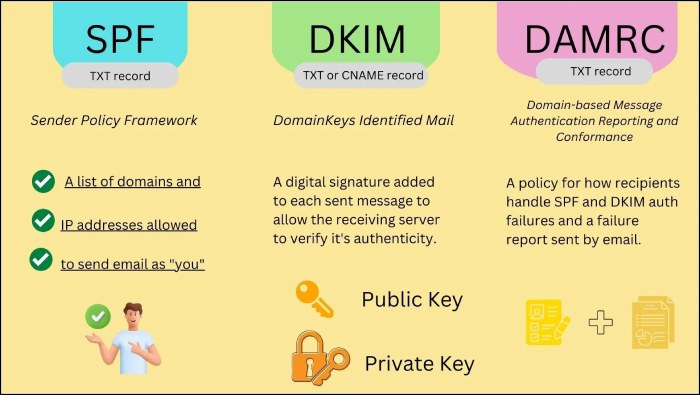
We will also help you integrate DKIM and DMARC for your domain, as they can help overcome SPF’s shortcomings and strengthen your email ecosystem.
Topics
General Manager
Founder and General Manager of DuoCircle. Product strategy and commercial lead for AutoSPF's 2,000+ customer base.
LinkedIn Profile →