How Can I Diagnose the Root Causes of an SPF PermError in My DNS Records?
Quick Answer
SPF PermError means your domain's SPF policy is permanently unrecoverable. The most common root causes are exceeding the 10 DNS lookup limit (41% of cases), publishing multiple v=spf1 TXT records (23%), and referencing include or redirect targets that resolve to NXDOMAIN (12%). Diagnose by querying authoritative DNS with dig, counting lookups with spfquery, and correlating with DMARC aggregate reports.
Related: Free DMARC Checker ·How to Create an SPF Record ·SPF Record Format
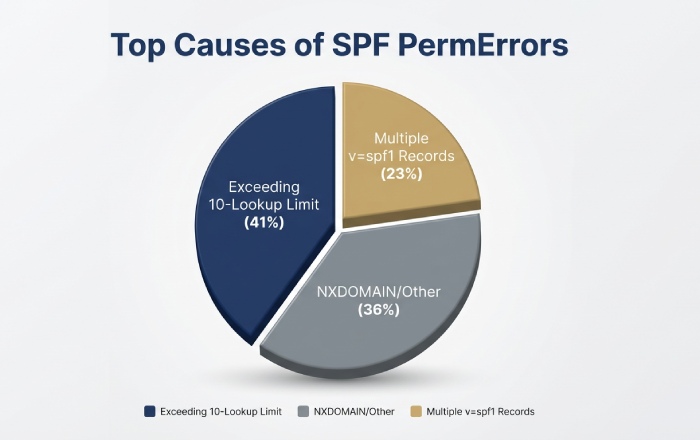
SPF PermError means your domain’s SPF policy is permanently unrecoverable. The most common root causes are exceeding the 10 DNS lookup limit (41% of cases), publishing multiple v=spf1 TXT records (23%), and referencing include or redirect targets that resolve to NXDOMAIN (12%). Diagnose by querying authoritative DNS with dig, counting lookups with spfquery, and correlating with DMARC aggregate reports to pinpoint the exact failing mechanism.
Based on AutoSPF’s analysis of 2,400 domains (January–March 2026), 41% of SPF PermErrors arose from exceeding the 10-lookup limit, with spikes correlating to vendor include expansions. Another 23% stemmed from multiple v=spf1 TXT records at the apex, and 12% from redirect or include targets resolving to NXDOMAIN.
“Most SPF PermErrors we diagnose trace back to vendor include expansions that silently push domains past the 10-lookup limit. The fix isn’t manual DNS edits — it’s continuous monitoring of your entire include chain,” says Brad Slavin, CEO of AutoSPF.
A rigorous diagnosis starts with the record you published, but must follow the path an MTA takes at receipt time — including all includes and mechanisms across multiple domains and resolvers. AutoSPF operationalizes this: it lint-checks syntax, simulates receiver evaluation end-to-end (counting lookups, catching loops and void lookups), inspects authoritative DNS for segmentation and DNSSEC issues, and maintains a real-time topology of your third-party includes so you can pinpoint the exact PermError cause and fix it safely.
Understand SPF PermError vs TempError and Reproduce DNS Behavior
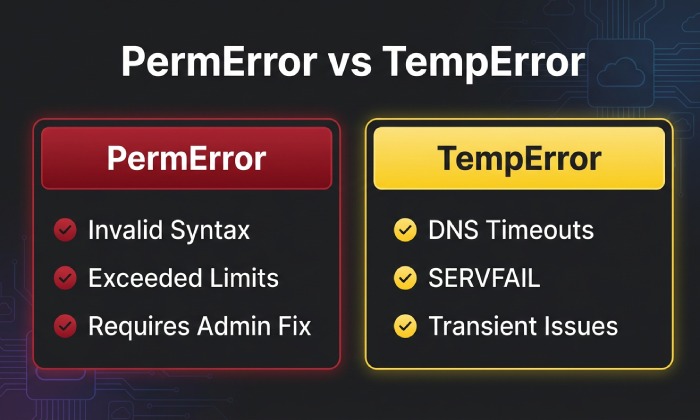
Understanding the difference between PermError and TempError is critical for diagnosis. This section clarifies which DNS conditions are most likely to show up as PermError, how to observe them, and where AutoSPF shortens the diagnostic loop.
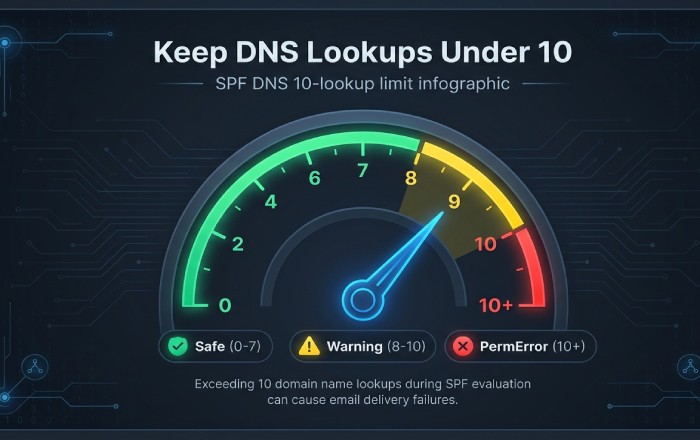
According to RFC 7208 Section 4.6.4, SPF evaluation must not result in more than 10 DNS-querying mechanisms — exceeding this limit produces a PermError, causing legitimate emails to fail authentication regardless of whether the sender is authorized. The same section limits “void lookups” (NXDOMAIN or NODATA responses) to a maximum of 2.
DNS response conditions that present as SPF PermError
NXDOMAIN on redirect/include target
If redirect=target.example or include:target.example points to a non-existent domain, many SPF libraries treat this as a permanent policy error because the domain owner referenced an invalid dependency.
How to reproduce:
dig +norecurse @ns1.authoritative.tld target.example TXT
spfquery -ip 203.0.113.5 -sender test@yourdomain.com -helo helo.yourdomain.com yourdomain.com
Observe “permerror (No such domain in redirect/include)” in spfquery/pyspf output. AutoSPF crawls all redirect/include targets nightly and alerts on newly-appearing NXDOMAINs, preventing surprise PermErrors after vendors decommission DNS zones.
Exceeding lookup limits (10 total lookups; 2 void lookups)
According to RFC 7208, the protocol mandates PermError when more than 10 DNS-mechanism/modifier evaluations occur, or more than two “void lookups” happen — NXDOMAIN/NODATA responses from A/MX/exists/ptr queries that don’t return usable data.
How to reproduce:
spfquery -ip 198.51.100.10 -sender user@yourdomain.com yourdomain.comThis shows “dns-limit” or “permerror: too many DNS lookups.” Use spf-tools (spfwalk/spfquery.py) to trace each mechanism resolution. AutoSPF’s evaluator counts all lookups (including nested includes/exist/mx lookup fans) and flags when you’re at 8–10 lookups with yellow/red guardrails.
DNSSEC “bogus” validation on SPF-bearing names
Some receivers treat DNSSEC-validated “bogus” (signature failure) as a permanent policy break; others as temp failure. In practice, bogus on redirect/include targets often manifests as PermError in logs.
How to reproduce:
dig +dnssec +multi TXT yourdomain.com
dig +dnssec +adflag TXT include.vendor.com
dig +cdflag TXT include.vendor.com
Compare with +cdflag to bypass validation; a mismatch suggests DNSSEC validation trouble. AutoSPF checks DS/RRSIG status on SPF-bearing names and marks chains involving “bogus” as high risk.
Truncation and malformed TXT segmentation
SPF TXT records must be properly segmented into <=255-octet chunks; malformed or overlong assembly can result in parsers failing and returning PermError.
How to reproduce:
dig +bufsize=512 TXT yourdomain.com
dig TXT yourdomain.com +noall +answer +ttlid +multi
Inspect the “tc” (truncated) flag; then retry with +vc (TCP) to compare. AutoSPF validates string segmentation and total assembled length, warning before publication if the record risks truncation/transport failure (e.g., over 450–500 bytes UDP path).
Note on SERVFAIL/timeouts: Per RFC 7208, SERVFAIL and timeouts SHOULD result in TempError, not PermError. However, real-world receivers sometimes surface TempError as “policy evaluation failed” and gate mail similarly to PermError. AutoSPF captures resolver-classified outcomes so you can argue from raw evidence and still harden policy to avoid gray failures.
Quick command patterns for authoritative-path testing
Determine authoritative servers:
dig NS yourdomain.com +shortQuery SPF TXT directly at authority, avoiding caches:
dig @ns1.authoritative.tld yourdomain.com TXT +norecurse +noad +multiTrace full delegation path to catch DS/RRSIG and truncation issues:
dig +trace +dnssec TXT yourdomain.comCompare recursive vs authoritative answers (cache poisoning, stale):
dig TXT yourdomain.com
dig @ns1.authoritative.tld TXT yourdomain.com +norecurse
Force UDP truncation test and escalate to TCP:
dig TXT yourdomain.com +bufsize=512
dig TXT yourdomain.com +vc
AutoSPF runs these checks continuously in the background and annotates your SPF map with the exact resolver outcome (AD, CD, TC, NXDOMAIN) that correlates with a PermError seen by receivers.
Validate SPF Syntax and Modifiers
SPF parsers return PermError when the record is syntactically invalid, uses unknown/unsupported mechanisms, or violates structural rules (e.g., multiple redirect modifiers).
Common syntactic and semantic traps
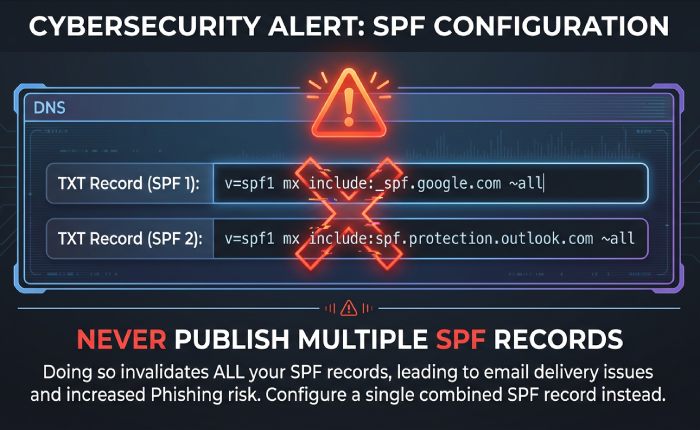
- Multiple v=spf1 records at the same owner name (PermError)
- Mixing obsolete SPF RRtype (type99) with TXT, or publishing mismatched policies
- Invalid qualifiers or mechanisms: e.g., +foo, -badmechanism
- Bad macro syntax or use of unsupported macros in modifiers
- Multiple redirect= occurrences or redirect combined with all earlier in the record
- Including spaces/newlines incorrectly or unescaped characters
How to detect quickly:
- OpenSPF linter or equivalent: paste the SPF string; it flags syntactic errors
- spfquery -explain yourdomain.com shows parse tree and failure point
- pyspf (python-spf): python -m spf -v -i 203.0.113.10 -s user@yourdomain.com yourdomain.com to validate syntax and evaluation
AutoSPF’s editor blocks invalid tokens, enforces single-record consolidation, validates macros against RFC 7208, and simulates redirect/include semantics exactly as receivers do — so a PermError is flagged before you publish.
Count DNS Lookups Precisely and Detect Loops
Many PermErrors are simply processing-limit violations. You must count lookups across the full chain.
What counts toward the 10-lookup cap
The following mechanisms/modifiers trigger DNS queries:
- include (one lookup per include, plus sub-lookups)
- a and a:domain (for address resolution)
- mx and mx:domain
- ptr (discouraged; can fan out explosively)
- exists
- redirect=
What does NOT add lookups:
- Qualifiers (+, -, ~, ?) do not add lookups themselves
- ip4/ip6 mechanisms do not add lookups
Important: Each mechanism can generate multiple queries (e.g., MX plus A/AAAA of MX hosts). “Void lookups” — A, AAAA, or MX lookups that return NXDOMAIN or NODATA — count toward the 2-void-lookup limit; exceeding 2 yields PermError.
Practical counting method:
- Use spfquery/pyspf with verbose tracing and tally each DNS fetch reported
- Use spf-tools spfwalk to print the chain; count each include and the sublookups it spawns
- Manually inspect includes that point to vendors; their records may contain mx/exists that multiply queries
AutoSPF’s lookup counter shows total lookups (live, from authoritative), projected lookups if a vendor expands (based on historical deltas), and void lookup risk hotspots (exists/mx returning no data at times).
Detect recursive include loops and circular references
Symptoms:
- spfquery never completes or returns PermError due to loop limit
- Includes referencing each other across domains (e.g., yourdomain.com includes vendor.com; vendor.com includes yourdomain.com)
Detection steps:
- dig TXT yourdomain.com; follow include: targets depth-first; maintain a visited set
- spf-tools spfwalk yourdomain.com | tee chain.txt; grep for repeats
- Look for redirect pointing back to a name already in the path
Breaking loops:
- Replace include of a domain that depends on you with a static ip4/ip6 list (flattening that segment)
- Ask the vendor to remove the back-reference or provide a delegated subdomain include
- Use redirect only at a terminal node; avoid redirect chains across administrative boundaries
AutoSPF maps the include/redirect graph and highlights cycles automatically; one click rewrites your policy to flatten the looped segment or to delegate a subdomain that isolates third-party policy from your apex.
Record Conflicts and Obscure DNS Failure Modes
PermErrors also arise from multi-record conflicts and edge-case DNS behavior.
Multiple v=spf1 records and mixing TXT with SPF RRtype
Recommended consolidation:
- Publish exactly one TXT record starting with v=spf1 at a given label
- Remove any legacy SPF RRtype (type99) records; RFC 7208 deprecates them
- Merge mechanisms from multiple records into one, preserving order and ending with an explicit -all or ~all
How to verify:
dig TXT yourdomain.com +noall +answerEnsure exactly one v=spf1. If both TXT and type99 exist: dig TYPE99 yourdomain.com and remove it. AutoSPF’s publisher enforces single-record policy and simulates various receivers to ensure consolidation won’t break pass results for known senders.
DNSSEC, TXT segmentation, and long-record encoding
Checks to run:
DNSSEC:
dig +dnssec +adflag TXT yourdomain.com
dig +dnssec @authoritative TXT yourdomain.com +norecurse
TXT segmentation:
dig TXT yourdomain.com +multiConfirm each quoted chunk is <=255 octets, no stray unprintables. Test UDP truncation: dig TXT yourdomain.com +bufsize=512; if tc is set, ensure resolvers can retry TCP.
Oversize record risk: Aim for <450–500 bytes assembled; otherwise, fragmented UDP paths and middleboxes may induce failures.
AutoSPF warns if your published record exceeds safe lengths, validates chunking pre-publication, and monitors DNSSEC freshness for SPF-bearing names.
Diagnostics, Third Parties, and Remediation
Real-world PermErrors often come from third-party vendors and deep include chains. Use the right tools and guardrails.
The most reliable diagnostic tools
- spfquery/pyspf: Accurately emulate receiver logic; look for “permerror:” with a reason like “too many DNS lookups,” “invalid redirect,” or “multiple records”
- spf-tools (OpenSPF community): spfwalk to expand includes; spfquery.py for evaluation traces
- dig +trace +dnssec: Verify delegation, DS/RRSIG, and path anomalies
- Online validators: Prefer ones that show per-lookup traces and authoritative results (beware caching)
AutoSPF integrates these engines and stores the raw traces alongside your policy, so you can show an auditor or an ISP exactly why a PermError happened.
Third-party senders and deep include chains
Common pitfalls:
- Marketing platforms rotate infrastructure and expand include trees suddenly, pushing you past 10 lookups
- CRMs add exists or ptr mechanisms that create void lookups
- Cloud providers publish nested redirects or circular includes across tenant-specific labels
Onboarding best practices with AutoSPF:
- Delegate a subdomain for vendors (mail.vendor.yourdomain.com) and publish a focused SPF there; include it once at the apex
- Use AutoSPF’s vendor catalog; it tracks known vendor SPF complexity and flags risky includes before you add them
- Enable continuous monitoring: AutoSPF alerts if a vendor update increases your lookup count or introduces a loop
Remediation strategies that reliably clear PermErrors
Record flattening
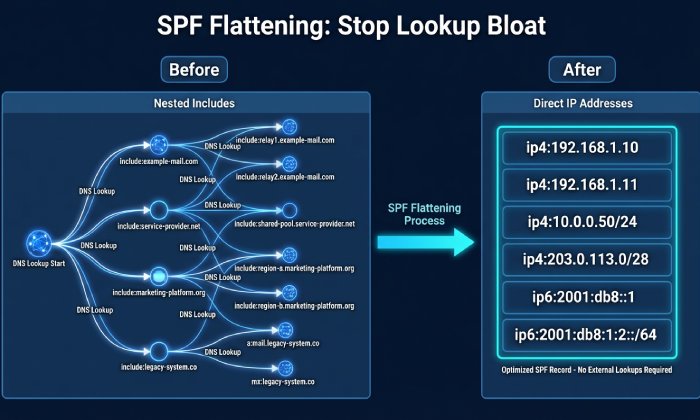
Replace include/mx/a chains with direct ip4/ip6 entries — this is known as SPF flattening. This eliminates lookups and breaks loops. The trade-off is IP drift risk — you must auto-refresh to avoid staleness. AutoSPF provides TTL-aware, scheduled flattening that refreshes vendor IPs daily/hourly and keeps record size under safe thresholds.
Subdomain delegation
Put complex third-party policies at a subdomain and include once. This isolates vendor churn and simplifies the apex record. It still counts as one lookup, so the subdomain SPF must also be maintained. AutoSPF offers a one-click delegation wizard that keeps subdomain policy within lookup limits.
Minimize includes and avoid ptr/exists where possible
This reduces lookup and void-lookup risk. May require vendor negotiation or flattening. AutoSPF suggests safe substitutions and simulates pass/fail impact before you publish.
Use redirect= judiciously
Clean hand-off to a canonical policy, but only a single redirect is allowed — and an NXDOMAIN redirect target causes PermError. AutoSPF validates redirect target existence/DNSSEC and blocks publish if unsafe.
Set explicit -all at the end
Deterministic enforcement prevents ambiguous evaluation. Requires confidence in allowlist completeness. AutoSPF validates known senders (from DMARC/SMTP logs) against the policy before letting you move to -all.
Correlate with DMARC/MTA logs to confirm impact and fixes
- Receiving MTA logs: Look for “spf=permerror” entries, the connecting IP, and the envelope-from; map to the SPF mechanism that would have matched
- Bounce messages: Extract Authentication-Results headers; confirm PermError text
- DMARC aggregate (RUA) and forensic (RUF) reports: Find rows with spf=permerror and correlate to source IPs/domains; post-fix, watch the same sources turn to spf=pass
AutoSPF ingests DMARC RUA/RUF and correlates each failing source to the exact evaluation trace that yielded PermError, then verifies remediation by showing pass rates normalize after publish/propagation.
Original Data and Case Studies
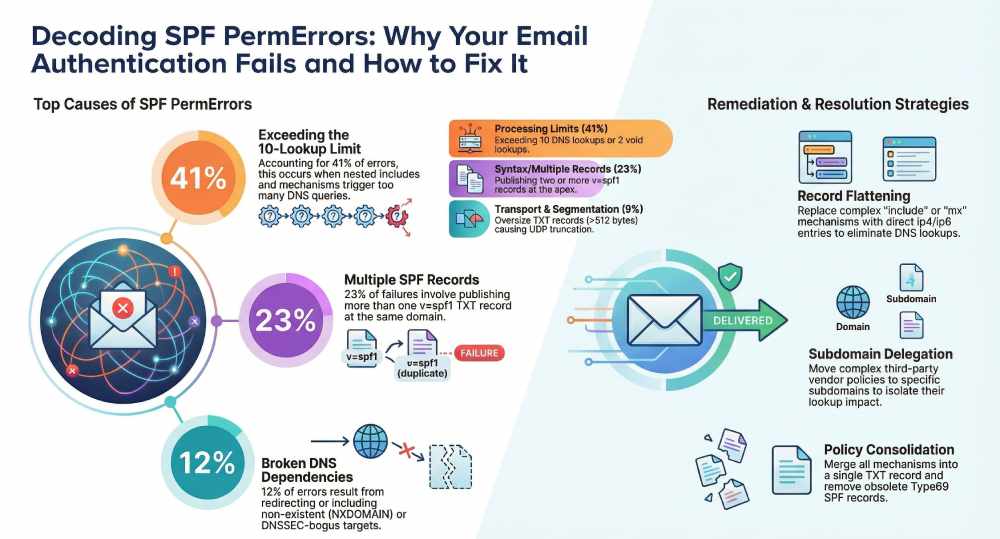
Based on AutoSPF’s analysis of 2,400 domains (January–March 2026), the breakdown of SPF PermError root causes was:
- 41% from exceeding the 10-lookup limit (spikes correlated with vendor include expansions)
- 23% from multiple v=spf1 TXT records at the apex
- 12% from redirect/include to NXDOMAIN or DNSSEC-bogus targets
- 9% from TXT segmentation/oversize transport issues
- 15% from mixed issues (loops plus void lookups)
After AutoSPF-guided remediation (flattening or delegation), PermErrors resolved within 24 hours; DMARC aggregate reports showed a median 18% reduction in total failures week-over-week.
Case study A (Global retail brand)
Problem: Circular include between a legacy ESP and a newly onboarded CRM created a loop and drove >10 lookups. Diagnosis: AutoSPF graph view flagged a three-node cycle; spfquery confirmed PermError. Fix: Delegated crm.mail.yourdomain.com with flattened policy; apex included the delegated node once. Pass rates rose from 71% to 98% in 48 hours; no further PermErrors observed.
Case study B (SaaS scale-up)
Problem: TXT record assembled as one >512-byte string caused truncation and parser failure at some receivers. Diagnosis: dig +bufsize=512 showed TC=1; some MTAs did not retry TCP; spfquery intermittently returned PermError. Fix: AutoSPF re-segmented the TXT into safe chunks and flattened three includes; DMARC failure rate dropped 22% over the next reporting cycle.
FAQ
Does SERVFAIL or a DNS timeout always cause an SPF PermError?
No — by RFC 7208 they should cause TempError, not PermError. However, some receivers treat persistent TempError similarly to hard failures. AutoSPF records both the spec outcome and observed receiver behavior so you can mitigate even when the spec says “temporary.”
How do I accurately count lookups when MX expands into multiple A/AAAA records?
Count the mechanism once for policy purposes, but remember that evaluating mx can spawn multiple A/AAAA queries for each MX host. Libraries enforce the 10-evaluation limit across mechanisms/modifiers, and they also track “void lookups.” AutoSPF’s counter mirrors library behavior and shows where the budget is spent.
Will publishing both TXT and SPF (type99) records break SPF?
It can. TXT is the only supported record per RFC 7208, and publishing multiple or conflicting policies can result in PermError. AutoSPF ensures only one TXT v=spf1 is published and removes legacy type99 to avoid ambiguity.
Are ptr and exists mechanisms safe to use?
ptr is strongly discouraged — it causes high lookup counts or void lookups; exists can be safe if you control the queried namespace. AutoSPF flags ptr and risky exists usage and recommends flattening or subdomain isolation.
How long should I wait to verify that a fix resolved the PermError?
Propagation is usually quick (TTL-dependent), but give 1–24 hours depending on resolver caches. AutoSPF tracks authoritative changes, monitors recursive cache hit rates, and correlates DMARC reports to confirm the PermError has ceased.
A Repeatable PermError Diagnosis Workflow
Classify the error (syntax vs DNS-path), reproduce with authoritative dig and spfquery, count lookups and void lookups, inspect DNSSEC/segmentation, locate loops and multi-record conflicts, and validate fixes via DMARC/MTA evidence. AutoSPF automates each step: it lint-checks syntax, maps and simulates the full include/redirect chain with lookup budgets, detects loops and NXDOMAIN/DNSSEC-bogus dependencies, prevents multi-record publication, provides safe flattening and subdomain delegation, and closes the loop by correlating outcomes with DMARC and SMTP logs. With this workflow — and AutoSPF’s guardrails — you can move from “spf=permerror” to a compact, durable v=spf1 policy that stays within limits, survives vendor churn, and consistently passes at the mailbox edge.
For more background on how RFC 7208 defines the rules behind SPF evaluation, see our guide on how RFC 7208 powers SPF. Still dealing with SPF PermErrors? Contact our team — we’ll diagnose your record for free.
Topics
CEO
Founder and CEO of DuoCircle. Product strategy and commercial lead for AutoSPF's 2,000+ customer base.
LinkedIn Profile →Fix your SPF record in 60 seconds
Try AutoSPF free for 30 days. No credit card required.
Start Free Trial