Microsoft Office 365 has millions of users across the globe. As much as this platform is easy to use and collaborative, it has higher chances of misconfigurations causing an SPF validation error. Domain owners create SPF TXT records to enlist all the IP addresses (ipv4 and ipv6) and mail servers allowed to send email messages on their behalf.
Domain owners or administrators should regularly use an SPF record check tool to see what all errors are there in their domains’ TXT records and must get them fixed immediately. This averts hackers from exploiting the names of reputed organizations and sending spam messages in their names while also ensuring a smooth DKIM and DMARC processing.
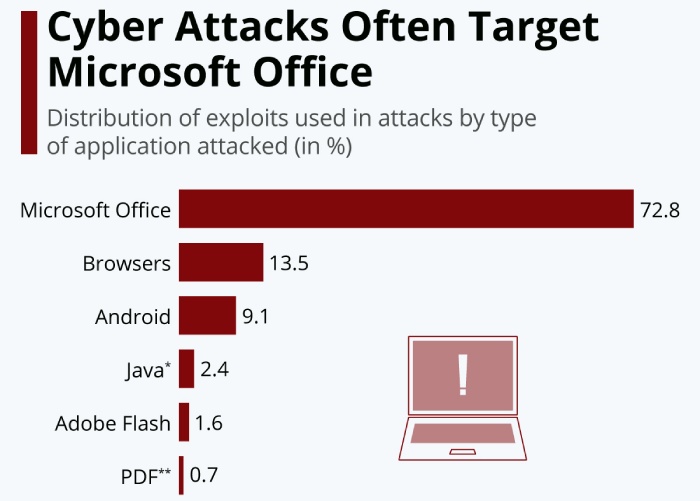
Image sourced from statista.com
What Are Common Ways to Fix Your DNS SPF Records Issues are:?
- Correcting the use of syntax in the SPF TXT record.
- Removing all invalid senders.
- Excluding ptr or mx mechanism.
- Following steps for SPF flattening in case there’s no other way to stay within the lookup limit.
- Using either ~all (softfail) or -all (fail) tag and not the +all tag to instruct recipient servers.
- Including the IP address or mail server of an external sender who sends emails on behalf of your organization. For example, an outsourced marketing agency.
- Ensuring that the domain used in the “from” field of a message has no issue.
Valid and error-free SPF records protect recipients from becoming victims of phishing and spoofing attacks attempted in the name of legitimate organizations.