Automating SPF Record Management: A Smarter Approach For MSSPs

Quick Answer
MSSPs often manage dozens or even hundreds of client domains, each with its own SPF configuration. Handling this manually can quickly become overwhelming. Every time a client adds a new email service, marketing tool, or CRM, the SPF record needs to be updated.
Automating SPF Record Management: A Smarter Approach For MSSPs

MSSPs often manage dozens or even hundreds of client domains, each with its own SPF configuration. Handling this manually can quickly become overwhelming. Every time a client adds a new email service, marketing tool, or CRM, the SPF record needs to be updated. These frequent changes increase the chances of errors and make it easy to exceed the SPF lookup limit. When that happens, emails can fail to deliver or land in spam. It also opens the door to spoofing risks, which can damage client trust.
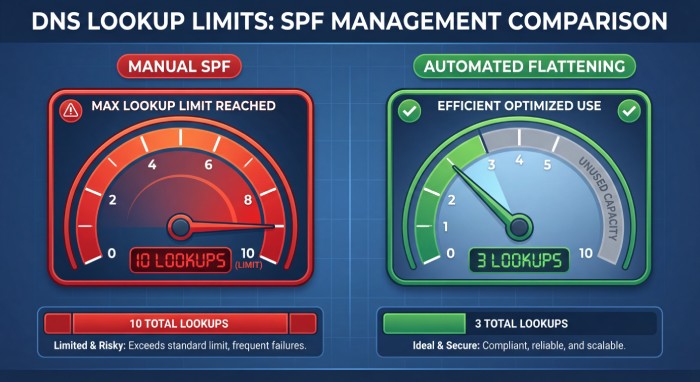
Per RFC 7208, SPF evaluation is capped at 10 DNS mechanism lookups and 2 void lookups per check - exceeding either limit produces a PermError that fails authentication for every message from the domain.
Over time, this constant manual effort slows teams down and creates avoidable issues. To keep up with growing client demands and maintain reliable email authentication, automation is no longer optional. It has become essential for scaling operations and ensuring consistent performance across all managed domains.
Why SPF management becomes complex for MSSPs
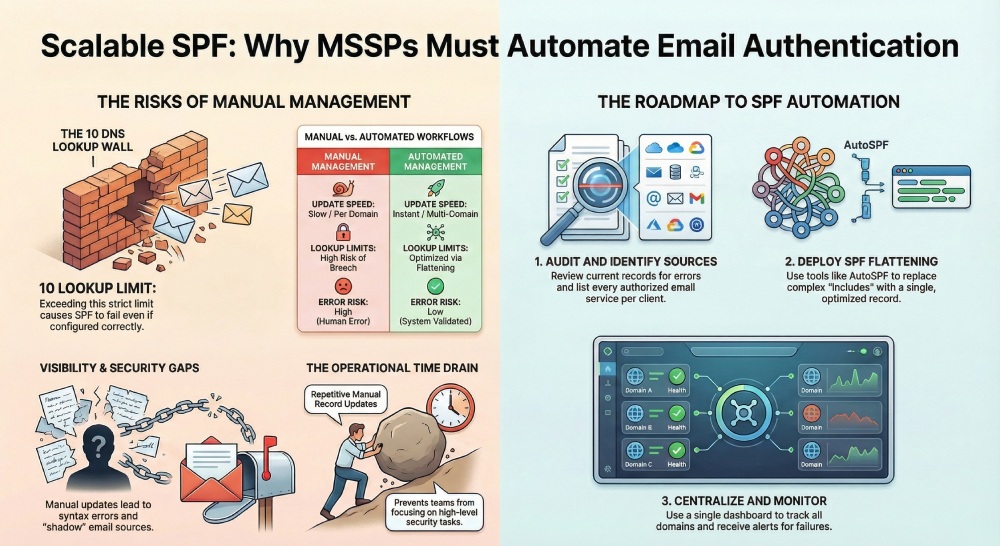
Managing SPF sounds simple at first, but for MSSPs, it can lead to the following challenges:
Multi-client, multi-domain environments
MSSPs usually manage many clients, and each client has one or more domains. Every domain has its own SPF record. On top of that, each client uses different email vendors and tools. One client may use Google Workspace, another may use Microsoft 365, and a third may rely on multiple marketing platforms. This creates a mix of configurations that are hard to standardize and manage consistently. Client domains that send from subdomains add further nuance, which our guide to configuring subdomain SPF covers.
Constant changes in sending sources
SPF records are not static.* Clients keep adding or removing sending services, and these changes need to be reflected to the SPF record.* If this is not done correctly or on time, emails can fail. Keeping up with these changes across all clients becomes a continuous task.
SPF lookup limit (10 DNS lookups)
SPF has a strict limit of 10 DNS lookups. When multiple services are added using the “include” mechanisms, this limit can be reached very quickly. Once the limit is exceeded, SPF fails even if everything else is properly configured. Managing this limit across many domains requires careful tracking and optimization.
Lack of visibility across client environments
Most MSSPs do not have a single dashboard to view all SPF records. This means issues are often noticed only after something breaks. Without centralized control, teams end up reacting to problems instead of preventing them, which increases effort and risk.
The risks of manual SPF management for MSSPs
Here are some of the issues that MSSPs and their clients can run into when managing SPF manually:
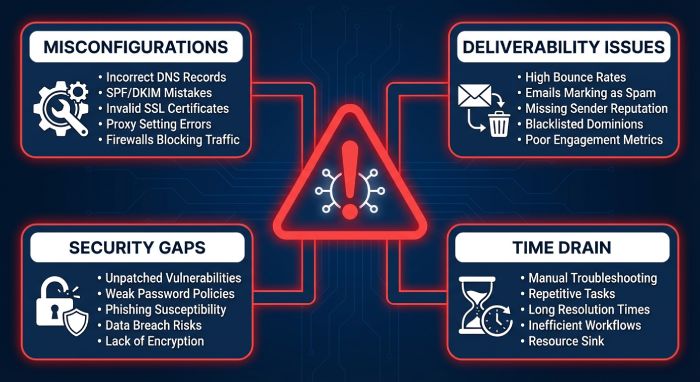
Increased chances of misconfigurations
SPF records require precise formatting. A small syntax error or a missing include can break the entire record. When MSSPs manually handle many domains, these mistakes become more common.* Even a single incorrect entry can cause SPF to fail, and it is not always easy to spot the issue quickly.*
Email deliverability issues
When SPF fails, emails may not reach the inbox. They can land in spam or be completely rejected. This affects important communications such as client emails, invoices, and marketing campaigns. Over time, poor deliverability can damage a client’s reputation and trust.
Security gaps
*Incorrect SPF records can allow unauthorized senders to slip through. If all valid sources are not properly defined, or if the record is too loose, attackers may exploit it. *This increases the risk of spoofing and phishing attacks, which can harm both the client and their customers.
Time drain for MSSP teams
Manual SPF management takes a lot of time. Teams need to repeatedly update records, check for errors, and fix issues. This is repetitive work that adds little value. Instead of focusing on higher-level security tasks, teams get stuck handling routine updates and troubleshooting.
What does SPF automation actually mean?
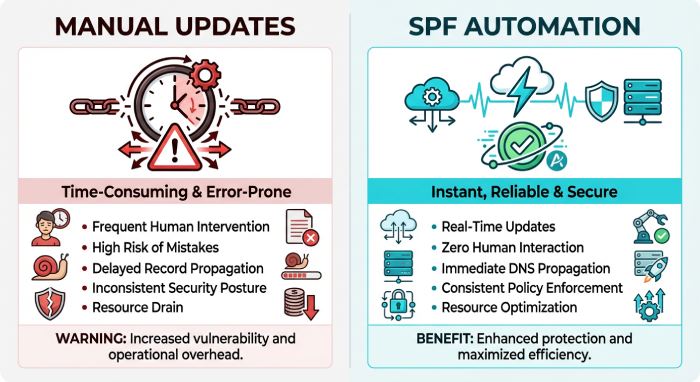
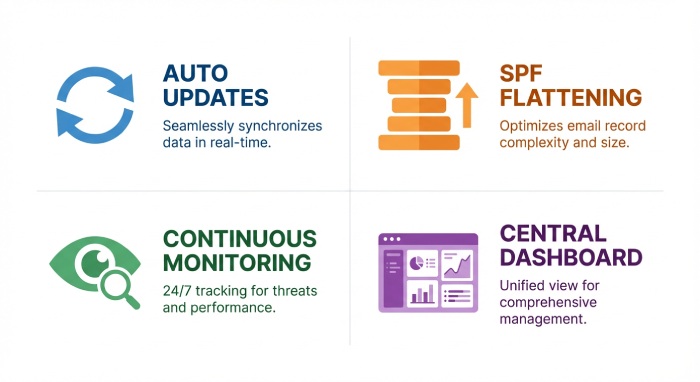
SPF automation means using tools and systems to manage SPF records without doing everything manually. Instead of updating records one by one, automation helps MSSPs handle changes faster, with fewer errors, and across many client domains at the same time. Here is a breakdown of the concept:
Automatic SPF record updates
With automation, SPF records can update automatically when a new sending service is added or removed. The system stays in sync with all authorized email sources, reducing the need for manual edits and the risk of missing important updates.
SPF flattening and optimization
Automation tools can simplify SPF records by flattening them. This means replacing multiple include statements with a cleaner version that stays within the DNS lookup limit. See how SPF flattening works for a closer look at the process. It helps prevent SPF failures caused by too many lookups and keeps the record efficient and easy to manage.
Continuous monitoring
Automation also includes ongoing monitoring of SPF records. The system checks for errors, failures, or unusual changes. If something goes wrong, alerts are generated early. This allows MSSPs to fix issues before they affect email delivery or security.
Centralized management dashboard
Instead of logging into different systems for each client, automation provides a single dashboard. MSSPs can view, manage, and update SPF records for all client domains in one place. This improves visibility, saves time, and makes it easier to maintain consistency across all environments.
How MSSPs can implement SPF automation
SPF automation does not have to be complicated. MSSPs can use this approach to reduce errors and manage records more efficiently across all clients:
Step 1: Audit existing SPF records across clients
Start by reviewing the current SPF records for all client domains. Look for common issues like incorrect syntax, duplicate entries, and too many include statements. Also, check if any records are already close to or exceeding the lookup limit. This step helps you understand what needs to be fixed.
Step 2: Identify all authorized sending sources
List all the services that are allowed to send emails for each client. This includes email providers, marketing tools, CRMs, and support platforms. Having a clear list helps you** build a clean and accurate SPF record** without unnecessary entries.
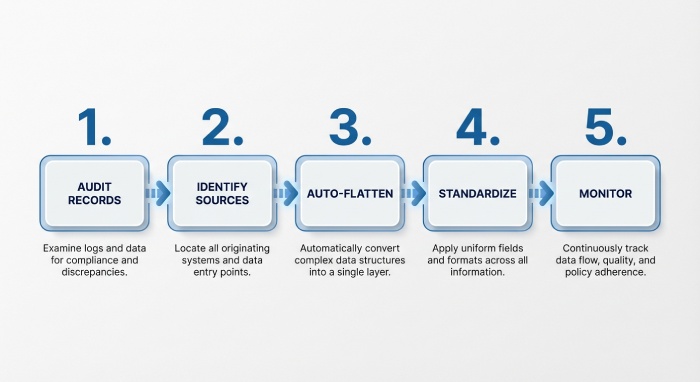
Step 3: Use an SPF automation tool with auto-flattening
Instead of manually managing complex SPF records, use AutoSPF’s SPF flattening tool. This helps reduce the number of DNS lookups and keeps the record within limits. It also updates the record when changes happen and keeps everything optimized without constant manual effort.
Step 4: Set policies and standardization
Create simple rules for how SPF records should be managed across clients. You can use templates based on common setups. This makes it easier to onboard new clients and keeps everything consistent.
Step 5: Monitor and optimize continuously
SPF is not a one-time setup. Keep checking records regularly to ensure they remain up to date and within limits. Continuous monitoring helps catch issues early and keeps email delivery smooth.
Topics
General Manager
General Manager of DuoCircle. Product strategy and commercial lead for AutoSPF's 2,000+ customer base.
LinkedIn Profile →