Best SPF Flattening Tools in 2026: The Complete Guide

Quick Answer
Full disclosure: AutoSPF is one of the tools reviewed below, and this guide is published by AutoSPF. We have aimed to be fair and accurate about every product listed. If any characterization is inaccurate, contact us and we will correct it.
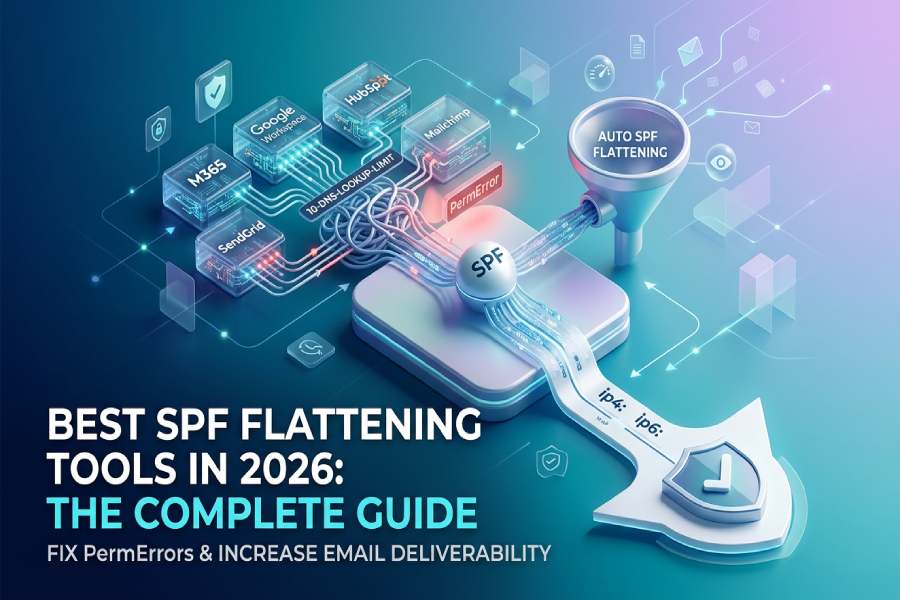
In this guide, we cover what SPF flattening is, why it matters for every organization sending email in 2026, the key features to look for in an SPF management tool, and an honest review of the eight most commonly evaluated platforms. Whether you manage one domain or one thousand, this resource will help you make an informed decision.
Full disclosure: AutoSPF is one of the tools reviewed below, and this guide is published by AutoSPF. We have aimed to be fair and accurate about every product listed. If any characterization is inaccurate, contact us and we will correct it.
What Is SPF Flattening?
SPF flattening is the process of resolving every include:, a, mx, and redirect mechanism in a Sender Policy Framework (SPF) record down to its underlying ip4: and ip6: addresses. Because IP-literal mechanisms consume zero DNS lookups, a flattened record can authorize dozens of email-sending services while staying well under the 10-lookup limit defined by RFC 7208.
Every modern business that relies on three or more email-sending services - Google Workspace, Microsoft 365, SendGrid, Mailchimp, Salesforce, HubSpot, Zendesk, and others - eventually hits the 10-lookup wall.
When that happens, the SPF check returns a PermError, meaning SPF authentication fails for every message sent from that domain. Under Google’s February 2024 bulk sender requirements, any domain sending 5,000 or more messages per day to Gmail must authenticate with SPF, DKIM, and DMARC. A broken SPF record turns a best-practice recommendation into a compliance failure.
Why SPF Flattening Matters in 2026
The email authentication landscape has shifted dramatically. Compliance mandates from Google, Yahoo, and Microsoft now require SPF, DKIM, and DMARC for bulk senders. Here is why SPF flattening has become a necessity rather than a nice-to-have:
- Compliance with bulk sender rules. Google, Yahoo, and Microsoft began enforcing stricter requirements starting in February 2024. A PermError from exceeding 10 lookups means SPF fails for every email, putting your domain at risk of having messages rejected or routed to spam.
- Growing SaaS stacks. The average mid-market company uses between five and eight email-sending services. Each service adds one or more include: mechanisms, consuming DNS lookups. Shadow IT compounds the problem - teams adopt SaaS tools that send email without notifying IT, and each one eats into the 10-lookup budget.
- Vendor IP rotation. Google, Microsoft, and SendGrid all rotate their sending IP ranges periodically. A manually flattened record goes stale when this happens, silently de-authorizing legitimate senders and causing deliverability failures that are difficult to diagnose.
- DMARC enforcement dependencies. Organizations cannot move their DMARC policy to p=quarantine or p=reject without first ensuring that every legitimate sender is properly authorized in SPF. A broken SPF record blocks the path to full DMARC enforcement.
- Cyber insurance and regulatory requirements. CISA BOD 18-01 requires p=reject for US federal domains. PCI DSS v4.0 mandates DMARC for organizations processing payment card data. Cyber insurers increasingly require DMARC enforcement as an underwriting condition. All of these depend on a working SPF record.
Benefits of Using an SPF Flattening Tool
Automated SPF flattening and management delivers several measurable benefits:
- Improved email deliverability. Eliminating PermErrors means SPF passes consistently, which improves inbox placement rates for transactional and marketing email alike. Organizations that fix their SPF records typically see fewer soft bounces and higher inbox placement.
- Reduced IT overhead. Manual SPF management requires monitoring vendor IP changes, editing DNS records, and troubleshooting delivery failures. Automated tools handle this in the background with rescan cycles as frequent as every 15 minutes.
- Faster DMARC enforcement. A clean, always-valid SPF record removes one of the biggest blockers to moving from p=none to p=reject, reducing enforcement timelines from months to weeks.
- Protection against spoofing and phishing. A properly configured SPF record, combined with DKIM and DMARC, prevents attackers from sending email that appears to come from your domain.
- Compliance readiness. Automated SPF management generates audit logs and maintains compliance documentation needed for SOC 2, PCI DSS, CISA mandates, and cyber insurance applications.
Key Features to Look For in an SPF Flattening Tool
Not all SPF management tools are created equal. When evaluating solutions, prioritize these eight capabilities:
Automatic flattening with scheduled rescans. The tool should automatically resolve all include: mechanisms to IP addresses and re-publish the flattened record on a regular schedule. Look for rescan intervals of 15 minutes or less. Longer intervals increase the window during which vendor IP changes can cause silent authentication failures.
SPF macro support. SPF macros (RFC 7208 §7) delegate per-query resolution to a dynamic DNS service, bypassing the 10-lookup limit entirely without flattening. Macros are an alternative or complement to traditional flattening, and the best tools offer both approaches.
Unlimited email volume. Some tools meter your monthly email volume and charge overages. Look for tools that manage your SPF record the same way whether you send 1,000 or 10 million emails, with no overage charges.
Multi-domain management. Enterprise and MSP environments may manage hundreds or thousands of domains. The tool should support adding domains without friction, with centralized dashboards and role-based access control.
DNS rollback and change logging. If a change causes problems, you need the ability to roll back to a previous known-good state. Change logs also provide audit trails for compliance.
Vendor-agnostic integration. The tool should work with any DNS provider (Cloudflare, AWS Route 53, Azure DNS, GoDaddy) and any email platform (Microsoft 365, Google Workspace, Salesforce, HubSpot) without requiring you to migrate your existing infrastructure.
De-duplication and IP obfuscation. De-duplication removes redundant IP entries across includes, keeping the record compact. IP obfuscation prevents competitors and attackers from seeing which services you use by inspecting your DNS records.
Enterprise compliance features. For regulated industries and larger organizations, look for SOC 2 certification, SLAs with defined uptime guarantees, Data Processing Agreements (DPAs), SSO/SAML support, and role-based access control (RBAC).
SPF Flattening vs. SPF Macros: Which Approach Is Right for You?
There are two primary technical approaches to solving the 10-lookup limit: traditional flattening and SPF macros. Many modern tools offer both, but understanding the trade-offs helps you choose the right configuration for your environment.
| Criteria | Traditional Flattening | SPF Macros |
|---|---|---|
| How it works | Resolves includes to static IPs published in DNS | Delegates per-query resolution to a managed DNS service |
| Lookup count | Reduced to near zero | Bypassed entirely |
| Vendor IP changes | Requires periodic rescan to stay current | Handled dynamically per query |
| Legacy compatibility | Works with all mail servers | Some legacy gateways may not support macros |
| Record visibility | IPs visible in DNS | IPs hidden behind macro resolution |
| Best for | Organizations needing broad compatibility | Organizations with many sending services or privacy needs |
The strongest tools offer both approaches, allowing you to choose flattening for maximum compatibility or macros for unlimited scalability, depending on your environment.
How SPF Works: A Quick Primer
Before choosing a flattening tool, it helps to understand the mechanics of SPF evaluation. SPF (Sender Policy Framework) is a DNS-based email authentication protocol defined in RFC 7208. When your domain publishes an SPF record, it tells receiving mail servers which IP addresses and services are authorized to send email on your behalf.
Here is what happens when a receiving server evaluates your SPF record:
Step 1: DNS query. The receiving mail server looks up the TXT record for the sending domain. This returns the SPF policy string, which contains a series of mechanisms specifying authorized senders.
Step 2: Mechanism evaluation. The server evaluates each mechanism in order. Mechanisms like ip4: and ip6: are resolved immediately with no additional DNS queries. Mechanisms like include:, a, mx, and redirect require additional DNS lookups to resolve.
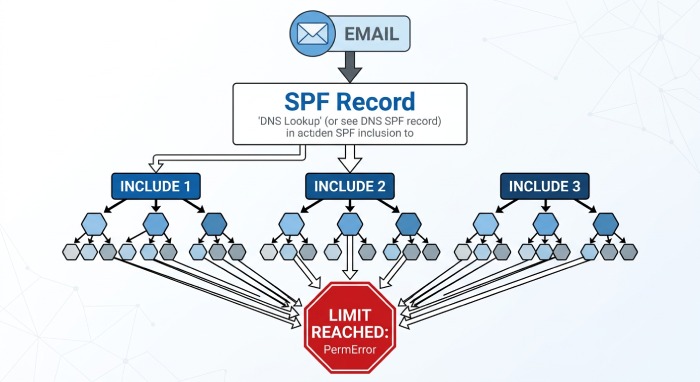
Step 3: The 10-lookup limit. RFC 7208 specifies that SPF evaluation must stop after 10 DNS mechanism lookups. This count includes not only the domains explicitly listed in your record, but also any nested lookups within those included domains. If your record requires more than 10 lookups, the server returns a PermError and the SPF check fails.
Step 4: Result. The evaluation produces one of several results: Pass (the sending IP is authorized), Fail (it is not), SoftFail (not authorized but not definitively rejected), Neutral, or PermError (the record is broken). Only Pass contributes positively to DMARC alignment.
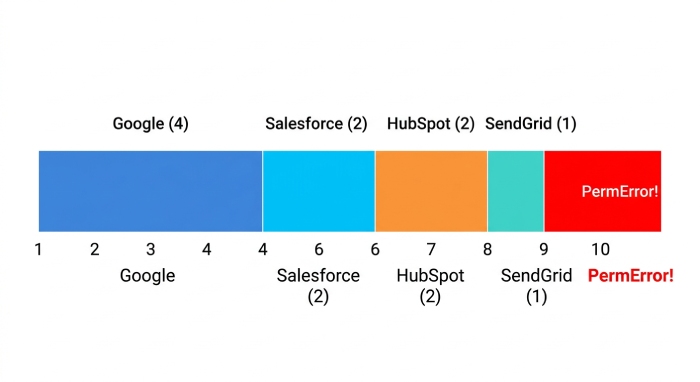
The critical issue is that a single include: mechanism often triggers multiple nested lookups. For example, adding Google Workspace to your SPF record via include:_spf.google.com consumes four of your ten available lookups because Google’s SPF record itself contains nested includes. Microsoft 365 uses a similar chain. By the time you have added three or four sending services, you may already be at or over the limit.
How Many Lookups Do Common Services Use?
To understand why the 10-lookup limit is so easy to exceed, here is an approximate breakdown of how many DNS lookups common email-sending services consume:
| Service | Include Mechanism | Approx. Lookups |
|---|---|---|
| Google Workspace | include:_spf.google.com | 3-4 |
| Microsoft 365 | include:spf.protection.outlook.com | 2-3 |
| Salesforce | include:_spf.salesforce.com | 1-2 |
| SendGrid | include:sendgrid.net | 1 |
| Mailchimp | include:servers.mcsv.net | 1-2 |
| HubSpot | include:_spf.hubspot.com | 1-2 |
| Zendesk | include:mail.zendesk.com | 1 |
| Freshdesk | include:email.freshdesk.com | 1 |
Note: Lookup counts are approximate and can change as vendors update their infrastructure.
A mid-market company running Google Workspace (4 lookups) plus Salesforce (2) plus SendGrid (1) plus HubSpot (2) plus Zendesk (1) is already at 10 lookups. Adding a single additional service - a customer support tool, a billing platform, or a marketing automation system - pushes the record into PermError territory.
Common SPF Management Mistakes to Avoid
Whether you use a tool or manage SPF manually, these are the most common mistakes that lead to authentication failures:
- Manual flattening without monitoring. Manually resolving includes to IP addresses works once, but vendor IP ranges change without notice. Google, Microsoft, and SendGrid all rotate sending IPs periodically. A static, manually flattened record goes stale silently, de-authorizing legitimate senders without triggering any alert. This is the single most common cause of unexpected SPF failures.
- Exceeding the 255-character TXT record limit. DNS TXT records are limited to 255 characters per string. SPF records that exceed this limit must be split into multiple strings within a single TXT record. Some flattening approaches produce records so long that they hit this limit, causing parsing failures at the DNS level before SPF evaluation even begins.
- Publishing multiple SPF records for the same domain. RFC 7208 specifies that a domain must have at most one SPF record. If you publish two TXT records that both start with v=spf1, the SPF check returns a PermError. This commonly happens when teams add a new SPF record without removing the old one.
- Using deprecated mechanisms. The ptr mechanism is deprecated in RFC 7208 because it is slow and unreliable. Some legacy SPF records still include it, wasting a lookup on a mechanism that many receiving servers skip entirely.
- Ignoring subdomain SPF. If your primary domain has a strong SPF record but your subdomains do not, attackers can spoof subdomains (e.g., billing.yourdomain.com) to send phishing email. Ensure subdomains either inherit the parent’s policy or have their own explicit SPF records.
- Not aligning SPF with DMARC. SPF checks the envelope sender (Return-Path), not the From header that recipients see. For SPF to contribute to DMARC alignment, the Return-Path domain must match (or be a subdomain of) the From domain. Misconfigured Return-Path addresses are a common reason SPF passes but DMARC still fails.
Enterprise vs. SMB SPF Requirements
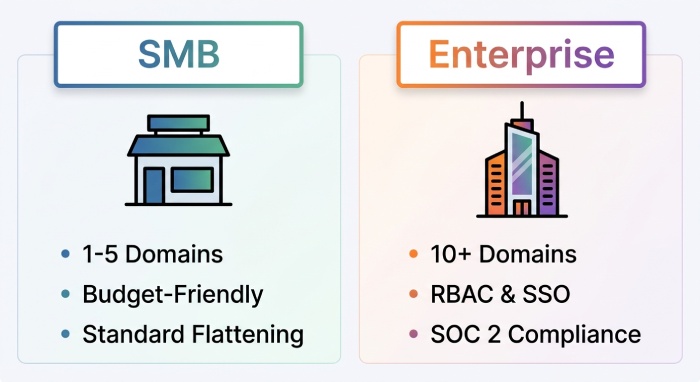
The features you need from an SPF management tool vary significantly based on your organization’s size and complexity. This comparison helps frame the evaluation:
| Requirement | SMB (1-5 domains) | Enterprise (10+ domains) |
|---|---|---|
| Flattening method | Traditional flattening is usually sufficient | Macros preferred for unlimited scalability |
| Rescan frequency | Hourly or daily may be acceptable | 15 minutes or less is critical |
| Access control | Single admin is typical | RBAC with SSO/SAML required |
| Compliance needs | Minimal - basic audit log | SLAs, DPAs, SOC 2, audit trails, NDAs |
| DNS rollback | Nice to have | Essential for change management |
| Pricing sensitivity | Budget is a primary factor | Value and SLA coverage matter more |
| Support expectations | Email support is usually sufficient | Priority support with defined SLAs |
How to Choose the Right SPF Flattening Tool
Before evaluating specific products, map your requirements against three decision axes:
1. Dedicated SPF tool vs. full DMARC platform. If your only problem is the 10-lookup limit and you already have DMARC reporting handled separately, a dedicated SPF management tool will be faster to deploy, simpler to maintain, and significantly less expensive. If you need SPF, DKIM, DMARC, BIMI, and MTA-STS managed from a single dashboard, a full platform makes more sense - but expect higher costs and longer onboarding.
2. Number of domains and sending services. Organizations managing fewer than five domains with straightforward sending stacks can often get by with a budget-friendly or free solution. Multi-domain enterprises and MSPs managing client portfolios need tools with centralized management, RBAC, and scalable pricing.
3. Compliance and enterprise requirements. If your organization requires SLAs, DPAs, SSO/SAML, SOC 2 attestation, or audit logs for regulatory compliance, your shortlist narrows to enterprise-tier tools that provide these as standard.
The 8 Best SPF Flattening Tools in 2026
The following section reviews the eight most commonly evaluated SPF flattening and management tools in 2026. Each product is assessed using the same structure: overview, top features, pricing, best-fit segment, and competitive context.
Summary Comparison Table
| Tool | Approach | Starting Price | Best For | G2 Rating | Not Ideal For |
|---|---|---|---|---|---|
| AutoSPF | Flattening + Macros | $37/mo | Dedicated SPF management for business and enterprise | 5.0/5 (21) | Teams wanting a full DMARC suite in one tool; teams on a zero budget; orgs that want zero DNS control |
| PowerDMARC PowerSPF | Hosted macros | Custom quote | Full DMARC + SPF from one vendor | 4.9/5 (238) | Orgs that only need SPF management; SMBs seeking low-cost solutions |
| MxToolbox Delivery Center | Flattening | Custom quote | DNS diagnostics + SPF as one capability | 4.4/5 (82) | Teams wanting purpose-built SPF automation; those needing macro support |
| DMARCLY Safe SPF | Flattening | $17.99/mo | Budget-friendly for small teams | 4.7/5 (13) | Complex SPF setups that may exceed character limits; enterprises needing SLAs |
| Redsift OnDMARC (Dynamic SPF) | Dynamic flattening | Custom quote | Enterprise email security + brand protection | 4.8/5 (140+) | SMBs seeking standalone SPF tool; teams on tight budgets |
| Valimail Instant SPF | Patented macros | Enterprise quote | Enterprise DMARC automation with zero-DNS maintenance | 4.6/5 (441) | SMBs or budget-conscious teams; orgs wanting hands-on DNS control |
| EasyDMARC EasySPF | Dynamic flattening | $35.99/mo | Teams new to DMARC wanting guided setup | 4.8/5 (176) | Advanced users who find guided UI slow; those needing dedicated SPF-only tool |
| DMARCDuty DynamicSPF | Dynamic flattening | Free tier available | Budget-conscious teams or individuals | N/A | Enterprises needing SLAs, RBAC, or compliance docs |
Pricing sourced from G2.com product profiles and published vendor websites, April 2026.
1. AutoSPF
AutoSPF is a dedicated, enterprise-grade SPF management platform built exclusively to solve the 10-DNS-lookup limit through both automatic flattening and SPF macros for organizations of any size.
Unlike full DMARC suites that bundle SPF as one feature among many, AutoSPF focuses entirely on SPF record optimization. This single-purpose approach means faster deployment, simpler maintenance, and pricing that reflects only the problem you are solving. The platform is built by DuoCircle LLC, a San Diego-based email infrastructure company that has been operating since 2014. AutoSPF currently serves more than 2,000 businesses worldwide, ranging from small businesses to Fortune-class enterprises.
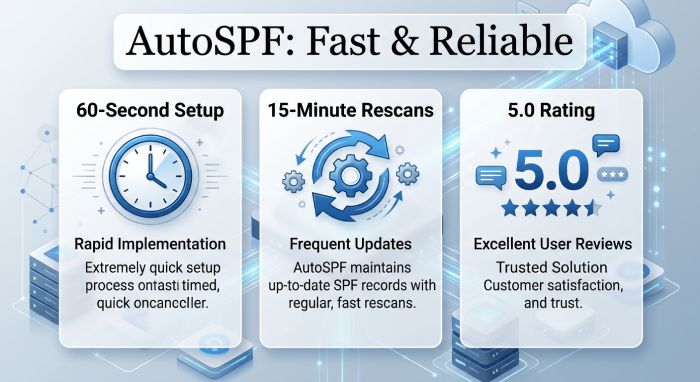
Setup follows a copy-paste-replace workflow that takes under 60 seconds for most domains. You add a single include: directive to your existing SPF record that points to AutoSPF’s server, and the platform handles everything from there. There is no need to rip out existing DMARC infrastructure; AutoSPF sits alongside your current tools.
AutoSPF rescans upstream vendor IP ranges every 15 minutes and automatically re-publishes an optimized, de-duplicated SPF record. When vendor IPs change - as they frequently do with Google, Microsoft, and SendGrid - the update happens in the background with zero manual intervention. For organizations with complex sending environments, the Premium and Enterprise plans offer SPF macros, which bypass the 10-lookup limit entirely by delegating per-query resolution to AutoSPF’s managed DNS infrastructure.
Enterprise customers get signed SLAs with 99.99% uptime guarantees, Data Processing Agreements (DPAs), NDAs, SSO/SAML authentication, role-based access control for team management, audit logs for compliance, and DNS rollback to revert to a known-good record state if needed. The platform is SOC 2 Type II certified and backed by Cloudflare DNS for infrastructure reliability.
On G2, AutoSPF holds a perfect 5.0 out of 5 rating from 21 verified reviews. Reviewers consistently highlight the ease of setup, the quality of customer support, and the transparent pricing model. According to one G2 reviewer, the support team provided a Zoom session within minutes and resolved a complex deliverability issue in under 30 minutes - even though the root cause turned out to be an unrelated DKIM configuration problem. Another long-term user noted they had been using the service for nearly four years with essentially zero maintenance.
Top Features:
- Automatic SPF flattening with 15-minute rescan cycles
- SPF macro support for unlimited includes (Premium and Enterprise plans)
- De-duplication of netblocks across all includes
- IP obfuscation to hide sending infrastructure from DNS inspection
- DNS rollback to revert to previous record states
- Change logging and audit trails for compliance
- SSO/SAML, RBAC, and team management (Enterprise)
- SOC 2 Type II certification and 99.99% uptime SLA (Enterprise)
Pricing: Plus plan starts at $37/month (1 domain, 1 user). Premium plan is $97/month (5 domains, 5 users, includes macros). Enterprise plan is $387/month (10 domains, 25 users, full enterprise features). Additional domains are $10-20/month each depending on plan. All plans include unlimited email volume, 15-minute rescans, and a 30-day free trial with no credit card required.
Best for: Organizations of any size that need dedicated, fast SPF management without migrating their existing DMARC stack. Particularly strong for enterprises requiring SLAs, compliance documentation, and SSO, as well as MSPs managing multiple client domains.
2. PowerDMARC PowerSPF
PowerDMARC is a comprehensive, full-stack email authentication platform that provides DMARC, SPF, DKIM, BIMI, MTA-STS, and TLS-RPT management from a single dashboard with AI-powered threat intelligence.
PowerSPF, the platform’s SPF optimization module, uses hosted macros to flatten and manage SPF records as part of the broader PowerDMARC ecosystem. The tight integration with DMARC reporting and analytics makes it a natural choice for organizations that want a single vendor for all email authentication needs. PowerDMARC supports over 2,000 organizations across more than 80 countries and is SOC 2 Type 2 and ISO 27001 certified.
On G2, PowerDMARC holds a 4.9 out of 5 rating from 238 verified reviews. Reviewers consistently praise the customer support quality and the platform’s user-friendly interface for managing complex authentication setups.
Top Features:
- Hosted SPF macros with automatic netblock updating
- Full DMARC analytics and reporting dashboard
- AI-powered threat intelligence for spoofing detection
- BIMI and MTA-STS management
- MSP/MSSP-ready with multi-tenancy and white-label support
Pricing: PowerDMARC pricing is tied to platform subscriptions and varies by domain volume and feature tier. Contact the vendor for a quote.
Best for: Organizations that want DMARC, SPF, DKIM, and BIMI managed from a single dashboard with a single vendor contract.
How does it compare? According to G2 reviews, some users note initial setup complexity, and several reviewers mention that pricing can be challenging for SMBs and clients with multiple domains. According to Trustpilot, at least one MSP partner reported concerns about the refund policy and review management practices.
3. MxToolbox Delivery Center
MxToolbox is a long-established DNS diagnostic and email deliverability platform that has been in the industry for nearly two decades, offering SPF flattening as one capability within its broader Delivery Center suite.
T_he platform is best known for its free diagnostic tools - MX lookup, blacklist checks, DNS queries, and SMTP testing - which are widely used by IT administrators for quick troubleshooting._ The paid Delivery Center adds DMARC, SPF, and DKIM monitoring with inbox placement testing and reputation tracking.
Top Features:
- SPF flattening within the Delivery Center suite
- Free DNS diagnostic tools (MX, blacklist, SMTP, DMARC checks)
- Inbox placement testing for email campaigns
- Blacklist and IP reputation monitoring
Pricing: MxToolbox Delivery Center requires a Delivery Center Plus subscription. Contact the vendor for current pricing.
Best for: IT administrators who need a Swiss Army knife for all DNS and email diagnostics, with SPF flattening as one capability within a broader toolkit.
How does it compare? According to G2 reviews, some users note that the UI is basic and the search functionality can be inaccurate. MxToolbox is widely regarded as a diagnostics platform rather than a dedicated SPF automation or DMARC enforcement tool. It does not currently offer SPF macro support.
4. DMARCLY Safe SPF
DMARCLY is a budget-friendly DMARC and SPF platform designed for small businesses and teams new to email authentication, offering a straightforward interface for SPF optimization through its Safe SPF feature.
Top Features:
- Safe SPF flattening with a simple, beginner-friendly interface
- DMARC monitoring and reporting
- Budget-friendly pricing tiers
Pricing: Starts at approximately $17.99/month according to published pricing.
Best for: Small businesses and teams new to email authentication who need a budget-friendly solution without enterprise complexity.
How does it compare? According to PowerDMARC’s competitive analysis, DMARCLY’s traditional flattening method means that overly complicated SPF setups may result in exceeding the DNS character limit, leading to errors. The platform does not offer macro-based SPF management.
5. Redsift OnDMARC (Dynamic SPF)
Redsift OnDMARC is an enterprise email security platform that offers Dynamic SPF as part of a broader suite covering DMARC, DKIM, BIMI, and MTA-STS, with a focus on brand protection and compliance.
Redsift’s Dynamic SPF dynamically flattens and compacts IP records and supports macros without relying exclusively on them, ensuring compatibility with legacy email infrastructure. The platform also includes AI-powered troubleshooting through Redsift Radar. Redsift has over 1,000 global customers including Capgemini, Domino’s, and Telefonica.
Top Features:
- Dynamic SPF with real-time updates and macro support
- AI-powered troubleshooting (Redsift Radar)
- End-to-end BIMI solution with integrated VMC provisioning
- MSP multi-tenant management
Pricing: Contact Redsift for enterprise pricing. The platform is positioned for mid-market and enterprise organizations.
Best for: Large enterprises that want SPF management integrated with broader email security, brand protection, and compliance initiatives.
How does it compare? Redsift is a comprehensive platform, which means the cost and complexity may exceed what organizations need if their primary concern is only SPF management. The platform is not positioned for SMBs or teams seeking a standalone, low-cost SPF fix.
6. Valimail Instant SPF
Valimail is an enterprise-focused DMARC automation vendor offering Instant SPF, a patented macro-based approach that dynamically generates SPF records in milliseconds per query, bypassing the 10-lookup limit entirely.
Valimail was acquired by DigiCert in 2025, which changed its market positioning and product direction. The platform offers two products: Valimail Monitor (free DMARC visibility) and Valimail Enforce (paid DMARC automation with Instant SPF). Valimail holds a 4.6 out of 5 rating on G2 from 441 reviews.
Top Features:
- Patented Instant SPF technology for unlimited lookups
- Automated DMARC enforcement with sender identification by name
- Free Monitor tier for DMARC visibility
- Zero-DNS-maintenance approach to authentication
Pricing: Valimail targets the enterprise market with five-figure annual commitments for the Enforce product. Monitor is free. Contact the vendor for current pricing.
Best for: Enterprise organizations with strong compliance requirements that want a differentiated, patented approach to SPF management and full DMARC automation.
How does it compare? According to G2 reviews, some users find insufficient granular data and limited reporting in the free tier. Multiple reviewers noted frustration with the gap between free and premium features, and one reviewer commented that the platform focuses more on the “what” than the “why and how.” Valimail’s enterprise-only pricing and the DigiCert acquisition have prompted some teams to re-evaluate alternatives.
7. EasyDMARC EasySPF
EasyDMARC is a user-friendly DMARC platform with guided onboarding and EasySPF, a dynamic SPF flattening feature that replaces complex SPF records with a single managed include.
Top Features:
- EasySPF dynamic flattening with managed include
- Guided DMARC journey from monitor to enforce
- Smart DNS scanning and one-click Cloudflare setup
- Sender identification by name in the dashboard
Pricing: Starts at $35.99/month for 100K emails and 2 domains, according to published pricing.
Best for: Teams new to DMARC who want guided setup with contextual explanations alongside the data.
How does it compare? EasyDMARC’s strength is onboarding and education. According to AutoSPF’s competitive analysis, advanced users who already understand SPF, DKIM, and DMARC may find the guided approach slows them down. Dedicated SPF tools like AutoSPF offer faster rescan cycles (15 minutes vs. EasyDMARC’s standard interval) and deeper macro support.
8. DMARCDuty DynamicSPF
DMARCDuty is a lightweight SPF flattening service that offers automatic SPF record management with a free tier, making it accessible for budget-conscious teams and individuals.
Top Features:
- Free tier for basic SPF flattening
- Automatic dynamic flattening without self-hosting
- Simple interface for quick SPF optimization
Pricing: Free tier available for basic use. Paid plans available for additional features.
Best for: Budget-conscious teams or individuals who want basic SPF flattening without a paid subscription.
How does it compare? DMARCDuty fills a gap for teams that need a free starting point. However, the platform lacks enterprise features such as SLAs, RBAC, audit logs, and SSO. Organizations that outgrow the free tier will need to migrate to a more capable solution.
How to Choose the Right Tool: Decision Framework
Use the following questions to narrow your shortlist based on your organization’s specific requirements:
| Question | Recommended Direction |
|---|---|
| Is the 10-lookup limit your only problem? | Choose a dedicated SPF tool (AutoSPF, DMARCDuty) rather than a full DMARC platform. |
| Do you need SPF, DKIM, DMARC, and BIMI from one vendor? | Choose a full platform (PowerDMARC, Redsift, EasyDMARC, Valimail). |
| Do you manage 10+ domains or multiple clients? | Prioritize multi-domain management and MSP pricing (AutoSPF Enterprise, PowerDMARC, Redsift). |
| Do you require SLAs, DPAs, and SOC 2 compliance? | Look for enterprise tiers with documented compliance (AutoSPF Enterprise, Redsift, Valimail Enforce). |
| Is your budget under $50/month? | Start with AutoSPF Plus ($37/mo), DMARCLY ($17.99/mo), or DMARCDuty (free). |
| Do you need macro support for unlimited includes? | Choose tools that offer macros: AutoSPF Premium/Enterprise, PowerDMARC PowerSPF, Valimail Instant SPF. |
| Are you new to email authentication? | Consider guided platforms like EasyDMARC for education-first onboarding. |
Role-Based Buyer Guidance
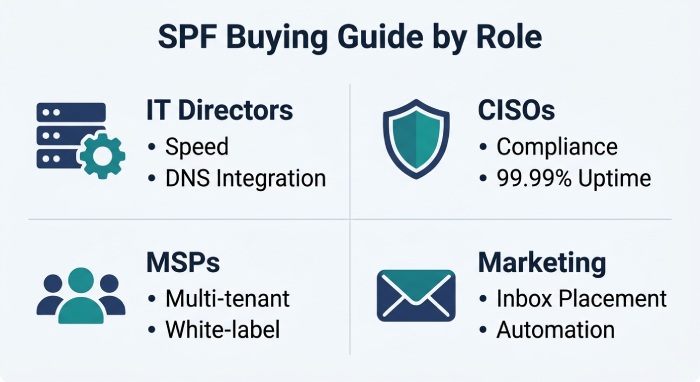
For IT Directors and System Administrators: Prioritize deployment speed, rescan frequency, and integration with your existing DNS infrastructure. A dedicated tool that deploys in under 60 seconds and rescans every 15 minutes will save the most operational time. Evaluate whether you need the tool to integrate with a broader DMARC platform or operate independently alongside your current stack.
For CISOs and Security Leaders: Prioritize compliance documentation (SLAs, DPAs, SOC 2, audit logs), vendor security posture, and DMARC enforcement support. Your SPF tool is a dependency in the authentication chain - if it goes down, SPF fails for every email. Look for 99.99% uptime SLAs and DNS rollback capabilities.
For MSPs and Managed Service Providers: Prioritize multi-tenant management, per-domain pricing, white-label options, and centralized dashboards. Evaluate whether the tool can scale from a handful of client domains to hundreds without pricing surprises.
For Email Marketing and Deliverability Teams: Prioritize the impact on inbox placement rates and the tool’s ability to keep SPF valid as your sending stack grows. Every new ESP, CRM, or marketing automation tool you onboard adds lookups - your SPF management tool should absorb that growth without requiring manual DNS changes.
Implementation Considerations
Regardless of which tool you select, keep these practical trade-offs in mind:
Cost vs. features. Dedicated SPF tools like AutoSPF solve the lookup limit at a fraction of the cost of full DMARC platforms. However, if you need DMARC reporting, BIMI, and MTA-STS, buying separate tools may cost more in aggregate than a bundled platform. Map your actual requirements before comparing prices.
Vendor lock-in vs. flexibility. Some tools require you to delegate DNS management entirely, which creates a dependency. Others, like AutoSPF, work by adding a single include: to your existing record, leaving you in full control of your DNS. Consider how difficult it would be to migrate away if the vendor changes pricing, gets acquired, or discontinues the product.
Flattening vs. macros vs. both. Traditional flattening has the broadest compatibility but requires regular rescans to stay current. Macros are more elegant but may not work with every legacy mail gateway. The safest approach is a tool that supports both, allowing you to choose per domain based on your infrastructure.
Free tiers and their limits. Free tools are excellent for getting started, but they typically lack the automation, uptime guarantees, and support needed for production environments. If your domain sends business-critical email, the cost of a paid tool is trivial compared to the cost of a deliverability failure.
Frequently Asked Questions
What is SPF flattening? SPF flattening is the process of resolving all include:, a, mx, and redirect mechanisms in an SPF record down to their underlying IP addresses. This reduces the DNS lookup count to stay within the RFC 7208 10-lookup limit, preventing PermErrors that break email authentication.
Why does SPF have a 10-lookup limit? RFC 7208 imposes the 10 DNS mechanism lookup limit to prevent SPF evaluation from creating excessive DNS traffic. Without this cap, a deeply nested SPF record could trigger dozens of recursive DNS queries for every inbound email, slowing down mail delivery infrastructure.
Is manual SPF flattening safe? Manual flattening works as a one-time fix, but it becomes a liability over time. Email-sending services like Google, Microsoft, and SendGrid regularly rotate their sending IP addresses. When those IPs change and your manually flattened record is not updated, legitimate email silently fails SPF authentication. Automated tools that rescan and re-publish on a schedule are the recommended approach for production environments.
What is the difference between SPF flattening and SPF macros? Flattening resolves includes to static IP addresses published in your DNS record. Macros (defined in RFC 7208 Section 7) delegate per-query resolution to a managed DNS service, generating a tailored SPF response for each incoming mail server query. Macros bypass the 10-lookup limit entirely but require a managed service to operate. Both approaches solve the same problem through different mechanisms.
Do I need SPF flattening if I already have DMARC? Yes. DMARC depends on either SPF or DKIM (or both) passing and aligning with the From header domain. If your SPF record exceeds the 10-lookup limit and returns a PermError, SPF fails for every message. Unless DKIM alone is passing and aligned, your DMARC policy will not be enforced correctly. A valid, functioning SPF record is a critical component of the DMARC authentication chain.
How often should my SPF record be updated? Automated tools typically rescan upstream vendor IP ranges every 15 minutes to several hours, depending on the tool. For most organizations, a 15-minute rescan cycle provides the best balance of freshness and reliability. If you are managing SPF manually, you should audit and update your record at least monthly, though weekly is safer.
Getting Started
We hope this guide has given you a clear framework for evaluating SPF flattening tools in 2026. The right choice depends on your specific requirements: the number of domains you manage, your compliance obligations, your existing DMARC infrastructure, and your budget.
If you would like to see how AutoSPF handles your specific SPF record, you can start a free 30-day trial with no credit card required. Setup takes less than 60 seconds for most domains. You can also use AutoSPF’s free SPF Record Checker to audit your current record and see exactly how many lookups you are using.
Topics
General Manager
Founder and General Manager of DuoCircle. Product strategy and commercial lead for AutoSPF's 2,000+ customer base.
LinkedIn Profile →