Best SPF Management Tools for SaaS in 2026 A Buyer’s Guide

Quick Answer
SPF (Sender Policy Framework) record management is the ongoing process of maintaining the DNS TXT record that tells receiving mail servers which IP addresses are authorized to send email on behalf of your domain. It includes adding new sending services, removing decommissioned ones, monitoring DNS lookup counts, and ensuring the record stays within the 10-lookup limit defined by RFC 7208.
What Is SPF Record Management?
SPF (Sender Policy Framework) record management is the ongoing process of maintaining the DNS TXT record that tells receiving mail servers which IP addresses are authorized to send email on behalf of your domain. It includes adding new sending services, removing decommissioned ones, monitoring DNS lookup counts, and ensuring the record stays within the 10-lookup limit defined by RFC 7208.
For most businesses, SPF starts as a simple configuration task: publish a TXT record, add a few includes for Google Workspace or Microsoft 365, and move on, often without fully grasping what SPF records are or how they will grow over time. The complexity emerges over time as the number of email-sending services grows. Every SaaS tool that sends email on behalf of your domain, from CRM platforms to marketing automation to customer support systems, requires its own include mechanism in your SPF record, and each include consumes one or more of your 10 allotted DNS lookups.
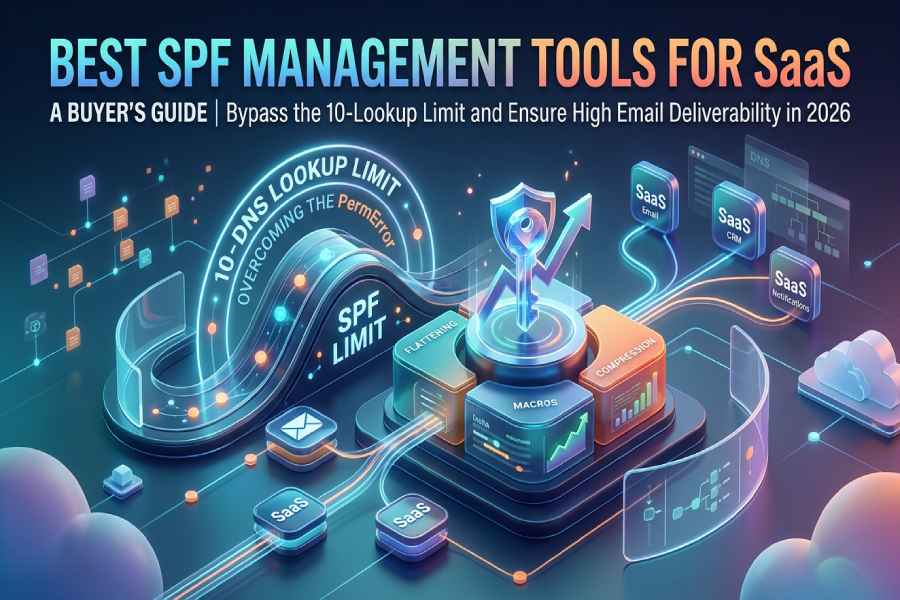
SPF record management tools automate this process by either flattening include mechanisms into IP addresses (reducing lookup counts), using macros to bypass the limit entirely, or compressing records to optimize within the existing constraints. For SaaS companies that use 10 to 20 email-sending services as a routine part of their operational stack, these tools are not optional. They are infrastructure.
Why SaaS Companies Hit the SPF Limit Faster Than Anyone
SaaS companies have a unique relationship with the SPF 10-lookup limit. Their business model, operational structure, and technology stack create an email sending architecture that is fundamentally more complex than traditional enterprises.
SaaS companies use more email-sending services per employee than any other business type**.** A typical SaaS company with 100 employees may operate 10 to 15 distinct services that send email from the company domain: Google Workspace or Microsoft 365 for corporate email, Salesforce or HubSpot for CRM, Marketo or Pardot for marketing automation, SendGrid or Amazon SES for transactional email, Intercom or Zendesk for customer support, Stripe or Chargebee for billing notifications, Jira or Linear for engineering notifications, Notion or Confluence for collaboration alerts, and Mixpanel or Amplitude for product notifications. Each of these services needs its own SPF include. Knowing the types of SPF records helps you compose one that authorizes them all.
The SaaS buying cycle is decentralized. In SaaS companies, engineering teams adopt tools independently. Marketing teams sign up for campaign platforms without IT approval. Customer success teams deploy survey tools. Product teams integrate analytics services. Each team adds a sending service without coordinating with whoever manages the SPF record, and each service pushes the lookup count closer to or past the 10-lookup limit.
SaaS companies scale their tooling rapidly. A SaaS startup using 5 sending services at Series A may be using 15 by Series C. Every funding round, every new product launch, and every department expansion adds tools to the sending stack. The SPF record grows organically and silently, often breaking only when a routine email to a prospect bounces and someone investigates.
Product email is a critical channel. For SaaS companies, product-generated email (onboarding sequences, usage alerts, billing notifications, security alerts) is not marketing. It is the product experience. When SPF breaks and these transactional emails fail, the product itself feels broken to the customer, which directly impacts retention and NPS.
SaaS companies frequently send from multiple domains and subdomains**.** Many SaaS companies separate their sending across domains: marketing on marketing.company.com, transactional on mail.company.com, support on help.company.com. Each domain and subdomain has its own SPF record and its own 10-lookup budget. Managing SPF across 5 to 10 domains multiplies the operational burden.
Anatomy of a SaaS Company’s SPF Record: A Worked Example
To illustrate why the 10-lookup limit creates a crisis for SaaS companies, let us walk through a realistic SPF record for a mid-stage SaaS company.
This company uses Google Workspace for corporate email, Salesforce for CRM, HubSpot for marketing automation, SendGrid for transactional email, Intercom for customer support, and Stripe for billing notifications. Their SPF record looks like this:
v=spf1 include:_spf.google.com include:_spf.salesforce.com include:spf.protection.outlook.com include:sendgrid.net include:email.freshdesk.com include:intercom-mail.com ~allAt first glance, this record has 6 include mechanisms. But the 10-lookup limit counts nested lookups, not just top-level includes. Let us count the actual DNS lookups each include triggers:
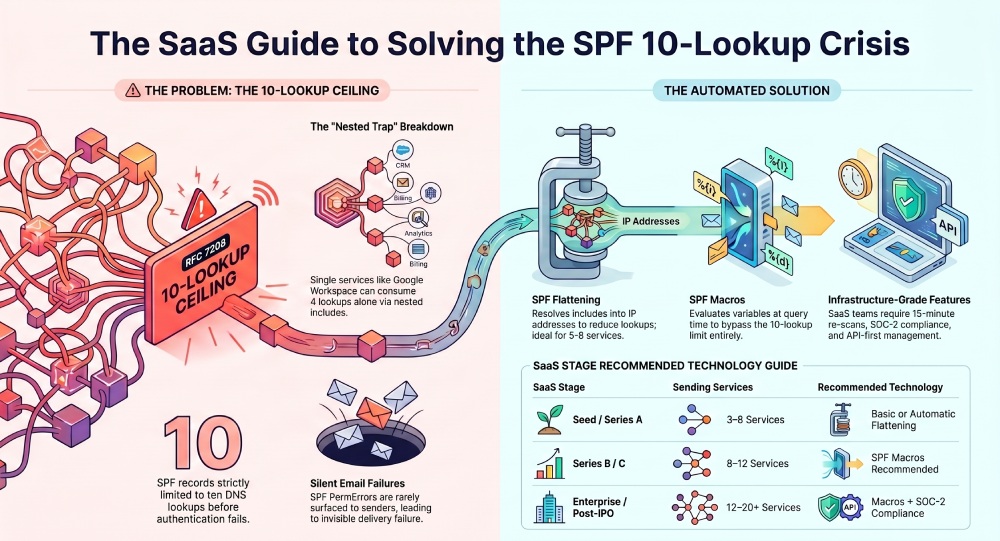
_spf.google.com expands to include _netblocks.google.com, _netblocks2.google.com, and _netblocks3.google.com. That is 4 DNS lookups consumed by Google alone. _spf.salesforce.com triggers 2 additional lookups through its own nested includes. sendgrid.net triggers 1 lookup. The remaining includes each trigger at least 1 lookup.
Total: approximately 11 to 13 DNS lookups, exceeding the 10-lookup limit. SPF returns a PermError. Every email from this domain fails authentication. And the company does not know it is happening because most email providers do not surface SPF PermErrors to senders.
Now the company wants to add Stripe for billing notifications and Mixpanel for product emails. There is no room. Every new service they add makes the PermError worse, but the PermError was already happening before they tried to add anything new.
This is the exact scenario that SPF management tools solve. Flattening resolves those nested includes into flat IP addresses that consume zero lookups. Macros bypass the lookup mechanism entirely. Either approach brings the record back within the limit and creates room for the company to grow its sending stack without fear of breaking email.
SPF Flattening vs. SPF Macros vs. SPF Compression: A Technical Deep Dive

SaaS companies evaluating SPF tools need to understand the three technical approaches to solving the 10-lookup limit. Each has different trade-offs for reliability, scalability, and security.
SPF Flattening
Flattening resolves all include mechanisms in your SPF record into their underlying ip4 and ip6 addresses. Since IP-literal mechanisms consume zero DNS lookups, a flattened record can authorize dozens of sending services while using only 2-3 lookups for the flattening infrastructure itself.
- How it works: The tool queries each include mechanism, retrieves all underlying IP addresses, and publishes them as ip4 and ip6 entries in a managed SPF record. Because vendor IPs change periodically, the tool must re-scan upstream records on a regular interval (the best tools re-scan every 15 minutes) and update the flattened record automatically.
- Advantages: Widely supported, well-understood by DNS administrators, no compatibility concerns with receiving mail servers.
- Limitations: Flattened records can become very long. RFC 7208 limits a single DNS TXT record to 255 characters per string (though multiple strings can be concatenated), and the total record size must fit within a UDP DNS response (typically 512 bytes without EDNS0). Extremely complex sending stacks may push against these size limits.
SPF Macros
Macros are defined in RFC 7208 section 7 and take a fundamentally different approach. Instead of pre-resolving IP addresses, macros embed variables in the SPF record that are evaluated at query time by the receiving mail server. The receiving server passes the connecting IP, the sender domain, and other variables to a managed DNS service, which returns a dynamic, per-query SPF result.
- How it works: Your SPF record contains a macro expression like include:%{i}._spf.provider.com. When a receiving server evaluates this, it substitutes the connecting IP address into the macro, queries the provider’s DNS, and gets a pass or fail result for that specific IP. The provider’s DNS infrastructure maintains the mapping of authorized IPs and returns the appropriate result dynamically.
- Advantages: Bypasses the 10-lookup limit entirely (typically 1-2 lookups regardless of how many services are authorized). No TXT record size concerns. Adds IP obfuscation because competitors cannot enumerate your authorized senders by querying your SPF record.
- Limitations: Not all tools offer true macro support. Receiving mail servers must support macro evaluation (all major providers do, but some edge cases exist). The architecture creates dependency on the macro provider’s DNS infrastructure, making the uptime SLA critical.
SPF Compression
Compression is a middle ground. It optimizes an existing SPF record by removing redundant IP ranges, consolidating overlapping CIDR blocks, and eliminating duplicate mechanisms. Compression reduces the record size and may bring a borderline record back within the 10-lookup limit, but it does not fundamentally change the lookup architecture.
Advantages: Does not require changing the SPF mechanism structure. Simple to implement.
Limitations: Only works for records that are slightly over the limit. A SaaS company with 15 sending services cannot compress its way back to 10 lookups. Compression is a tactical fix, not a strategic solution.
Which approach is right for SaaS companies?
For SaaS companies with 5 to 8 sending services, flattening is typically sufficient. The record stays within size limits, and 15-minute re-scanning keeps it current.
For SaaS companies with 10 or more sending services, macros are the optimal approach. They eliminate the lookup limit entirely and scale without concern for record size. The IP obfuscation benefit is also valuable for SaaS companies in competitive markets.
Compression is rarely a complete solution for SaaS companies. It may buy time for a company currently at 11-12 lookups, but as the sending stack grows, flattening or macros will be needed regardless.
Benefits of Automated SPF Management for SaaS Companies
Eliminates the hidden email failure risk. SPF PermErrors are silent. Most email platforms do not alert senders when SPF fails. Automated SPF management prevents the scenario where transactional emails (password resets, billing notifications, security alerts) fail silently for weeks before someone notices. An automated SPF flattening service keeps the record within the 10-lookup limit as your sending stack grows.
Supports rapid SaaS tool adoption. SaaS companies add new sending services frequently. With automated SPF management, adding a new tool is a one-click operation in the SPF management dashboard rather than a DNS change request that risks breaking the record.
Protects product-generated email. For SaaS companies, product email is the product. Onboarding sequences, usage alerts, and security notifications must reach users reliably. SPF failures make the product feel broken to customers.
Enables DMARC enforcement. DMARC at p=reject is the gold standard for domain protection, and it depends on SPF alignment. A broken SPF record is the most common blocker for SaaS companies trying to move from p=none to p=reject. Solving SPF unlocks the path to full DMARC enforcement.
Reduces engineering and IT overhead. In SaaS companies, DNS management often falls to an engineer who has 50 other priorities. Automated SPF management removes the ongoing maintenance burden and frees engineering time for product work.
Key Features SaaS Companies Should Prioritize
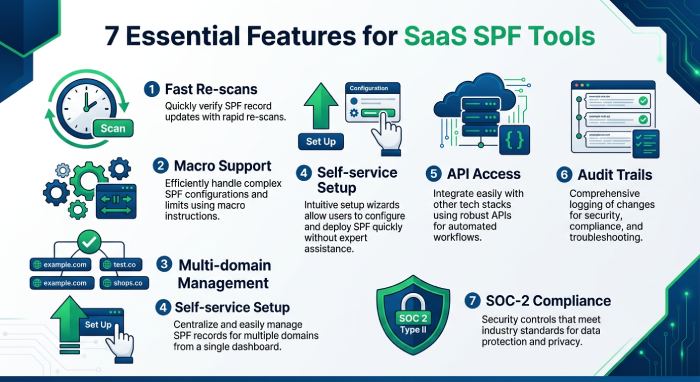
Fast re-scan intervals. SaaS companies rely on cloud services that rotate IPs frequently. A 15-minute re-scan interval is the baseline. Daily re-scanning creates a 24-hour window during which your flattened record can be stale.
Macro support for scaling beyond 10 services. If you use 10 or more email-sending services today, or plan to within 12 months, macro support eliminates the lookup limit entirely. Not all tools offer this.
Multi-domain and subdomain support. SaaS companies that segment sending across multiple domains or subdomains need a tool that manages SPF for each one from a centralized dashboard.
Self-service setup. SaaS teams expect tools that work immediately. Look for setup processes measured in minutes, not days, with copy-paste DNS instructions rather than professional services engagements.
API access. SaaS engineering teams want to integrate SPF management into their infrastructure-as-code workflows. API access enables programmatic domain onboarding, status monitoring, and alerting through existing DevOps tooling.
Change logs and audit trails. When email breaks, the first question is “what changed?” A tool that logs every SPF record change, who made it, and when provides the forensic trail SaaS teams need for incident response.
SOC-2 compliance. SaaS companies selling to enterprises increasingly need SOC-2 Type II compliance across their vendor stack. Your SPF management tool handles a critical piece of your email infrastructure and should meet the same compliance bar as your other vendors.
Subdomain Segmentation: An Alternative Strategy
Some SaaS companies address the 10-lookup limit by splitting their sending across subdomains rather than using flattening or macros. Each subdomain gets its own SPF record and its own 10-lookup budget.
For example: Corporate email sends from company.com (Google Workspace: 4 lookups). Marketing sends from marketing.company.com (HubSpot, Mailchimp: 3 lookups). Transactional email sends from mail.company.com (SendGrid, Amazon SES: 2 lookups). Support sends from support.company.com (Intercom, Zendesk: 2 lookups).
This approach works but has trade-offs. It requires DKIM and DMARC configuration for each subdomain. It fragments your sending reputation across multiple domains. It complicates onboarding when a new service needs to be assigned to the right subdomain. And it does not eliminate the need for SPF management. It just distributes it.
For SaaS companies that already use subdomain segmentation, SPF management tools are still valuable because each subdomain’s SPF record still needs monitoring, and the aggregate management burden across 5 to 10 subdomains is significant.
How to Evaluate SPF Tools as a SaaS Company
1. Count your current sending services. Audit every service that sends email from your domain. Include corporate email, CRM, marketing, transactional, support, billing, engineering notifications, and product alerts. If the count is 8 or more, macro support should be on your requirements list.
2. Count your DNS lookups. Run your domain through a free SPF checker. If you are at 8 to 10 lookups, you are one vendor addition away from breaking. If you are already over 10, you have a PermError affecting every outbound email right now.
3. Map your sending architecture. Do you send from one domain or multiple domains and subdomains? The answer determines whether you need a single-domain tool or multi-domain management.
4. Assess your compliance requirements. If you sell to enterprise customers, your SPF management vendor likely needs SOC-2 Type II certification. Check whether the tool provides DPAs, SLAs, and audit logs.
5. Evaluate the operational model. SaaS teams want self-service tools, not professional services engagements. Prioritize tools with 60-second setup, clear documentation, and API access.
Summary Comparison Table
| Tool | Flattening | Macros | Re-scan Interval | Multi-Domain | API | SOC-2 | Starting Price | Best For | Not Ideal For |
|---|---|---|---|---|---|---|---|---|---|
| AutoSPF | Yes | Yes (Premium+) | 15 min | Yes | Yes | Yes (Type II) | $37/mo | SaaS companies needing dedicated SPF with macros and compliance docs | Solopreneurs, all-in-one seekers, budget startups |
| PowerDMARC (PowerSPF) | Yes | Yes (hosted) | Dynamic | Yes | Yes | Yes (Type II) | From $8/mo | SaaS wanting full auth stack from one vendor | Teams needing dedicated SPF SLA |
| EasyDMARC (EasySPF) | Yes | No | Dynamic | Yes | Limited | Check vendor | $35.99/mo | SaaS teams new to email auth wanting guided setup | SaaS with 10+ services needing macros |
| Redsift (Dynamic SPF) | Yes | No | Dynamic | Yes | Full REST | Check vendor | Contact sales | SaaS at enterprise scale with API-first needs | Small SaaS; no macro support |
| Valimail (Instant SPF) | Yes | Yes (patented) | Real-time | Yes | Yes | Yes | ~$5,000/yr | Enterprise SaaS / post-IPO with premium budgets | Seed-to-Series B SaaS (pricing) |
| DMARCLY (Safe SPF) | Yes | No | Varies | Yes | Enterprise only | No | $17.99/mo | Early-stage SaaS wanting cheapest entry point | SaaS needing macros, API, or SOC-2 |
Pricing sourced from published vendor pages, G2, Capterra, and TrustRadius as of April 2026. Contact vendors for current rates.
Tool Reviews
AutoSPF
AutoSPF is a dedicated, enterprise-grade SPF management platform built exclusively for solving the SPF 10-DNS-lookup limit through automatic flattening and macro-based optimization, purpose-built for organizations with complex sending stacks like SaaS companies.
For SaaS companies, AutoSPF addresses the core challenge: managing an SPF record that must authorize 10 to 20 email-sending services without exceeding the 10-lookup limit. The standard flattening approach re-scans upstream vendor IPs every 15 minutes, ensuring that when Google, SendGrid, or any other provider rotates their sending infrastructure, the flattened record updates automatically within minutes rather than breaking silently.
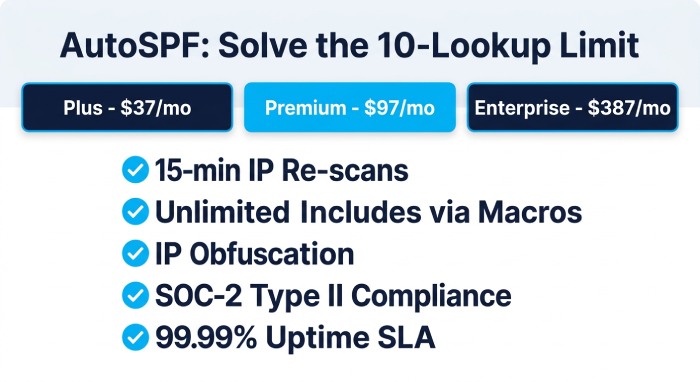
For SaaS companies that have outgrown what flattening can handle, SPF macros on Premium ($97/mo) and Enterprise ($387/mo) plans bypass the 10-lookup limit entirely. Macros allow truly unlimited include mechanisms using just 1-2 DNS lookups, which means a SaaS company using 20 sending services consumes the same number of lookups as one using 3. The IP obfuscation benefit is particularly relevant for SaaS companies in competitive markets where competitors might otherwise audit sending infrastructure through SPF record analysis.
Setup takes 60 seconds: replace your existing SPF TXT record with a single managed include pointing to AutoSPF’s Cloudflare-backed DNS infrastructure (99.99% uptime SLA). AutoSPF has been in operation since 2018 and serves over 2,000 businesses. SOC-2 Type II certification, signed SLAs, DPAs, SSO/SAML, RBAC, and audit logs are available on Enterprise plans. According to G2, AutoSPF holds High Performer, Easiest to Use, Best Support, and Easiest Setup badges.
Top Features:
- Automatic SPF flattening with 15-minute re-scan cycles
- True SPF macro support for unlimited includes with 1-2 DNS lookups
- IP obfuscation via macros for competitive security
- 99.99% DNS uptime SLA on Cloudflare infrastructure
- SOC-2 Type II with SLAs, DPAs, SSO/SAML, audit logs
- 60-second copy-paste-replace setup
- Unlimited emails on all plans
- Multi-domain management from a single dashboard
Pricing: Plus: $37/mo (1 domain). Premium: $97/mo (5 domains, macros). Enterprise: $387/mo (10 domains, full compliance). 30-day free trial.
Best For: SaaS companies at any stage that need SPF solved as dedicated infrastructure with macro support for complex stacks, fast self-service setup, and SOC-2 compliance for enterprise sales.
How Does It Compare: AutoSPF is the only dedicated SPF tool on this list that combines 15-minute re-scanning, true macros, and SOC-2 certification. It does not include DMARC reporting (handled by sister product DMARC Report) or DKIM management. SaaS companies wanting everything in one dashboard should evaluate PowerDMARC or EasyDMARC.
PowerDMARC (PowerSPF)
PowerDMARC is a full-stack email authentication platform managing DMARC, SPF, DKIM, BIMI, MTA-STS, and TLS-RPT from a single dashboard, with PowerSPF using hosted macros for SPF optimization, suitable for SaaS companies wanting a single-vendor authentication stack.
For SaaS companies, PowerDMARC’s appeal is consolidation: manage the entire authentication stack from one platform. PowerSPF handles SPF optimization using hosted macros. The AI-powered DMARC reporting provides visibility into all sending sources, which is particularly useful for SaaS companies where decentralized tool adoption means unknown services may be sending email from the domain. On G2, PowerDMARC holds a 4.9/5 rating across 238 reviews. According to G2 feedback, some users note pricing can scale upward with many domains.
Top Features:
- PowerSPF hosted macros for unlimited SPF includes
- AI-powered DMARC reporting identifying all sending sources
- Full protocol coverage: DMARC, SPF, DKIM, BIMI, MTA-STS, TLS-RPT
- SOC-2 Type II and ISO 27001 certified
Pricing: From $8/mo. Enterprise pricing is quote-based. 15-day free trial.
Best For: SaaS companies that want their entire email authentication stack managed from one platform with one vendor relationship.
How Does It Compare: Most complete all-in-one platform. SPF is one feature among many, so SaaS companies needing dedicated SPF uptime SLAs or faster re-scan intervals may prefer a specialist tool. According to G2 reviewer feedback, users managing many domains note that pricing can scale upward. For SaaS companies that already have DMARC reporting through another tool, PowerDMARC’s SPF component alone may not justify the full platform cost.
EasyDMARC (EasySPF)
EasyDMARC is a user-friendly DMARC platform with EasySPF for dynamic SPF flattening, designed for teams that want guided email authentication setup without deep DNS expertise, trusted by over 200,000 domains across 130 countries.
EasySPF uses dynamic flattening to manage the 10-lookup limit but does not offer SPF macros. For SaaS companies with fewer than 10 sending services, EasySPF handles the lookup limit effectively. The guided enforcement workflow helps SaaS teams progress from DMARC p=none to p=reject. On G2, a reviewer operating a small MSP praised the platform for taking “the guesswork out of configuring SPF, DKIM, and DMARC records.” According to independent reviewers, pricing escalates with domain count and email volume.
Top Features:
- EasySPF dynamic flattening for the 10-lookup limit
- Guided DMARC enforcement workflow
- AI-powered DMARC report analyzer with sender identification
Pricing: Free (1 domain). Plus: $35.99/mo. Premium: $71.99/mo. Enterprise: custom.
Best For: Early-stage SaaS companies new to email authentication that want guided setup and an intuitive interface.
How Does It Compare: Most approachable for beginners. The lack of macro support means SaaS companies with 10+ sending services may outgrow EasySPF’s flattening approach as their stack expands.
Redsift OnDMARC (Dynamic SPF)
Redsift OnDMARC is an enterprise email security platform with Dynamic SPF technology, an API-first architecture, and multi-tenant management designed for large organizations and service providers managing complex email ecosystems.
Dynamic SPF addresses the 10-lookup limit. The full REST API enables SaaS engineering teams to integrate SPF management into infrastructure-as-code workflows, CI/CD pipelines, and DevOps monitoring. The free Investigate tool provides instant email security assessments for any domain. According to Redsift’s published data, organizations using OnDMARC reach DMARC enforcement in an average of 6-8 weeks. Dynamic SPF does not offer true macros.
Top Features:
- Dynamic SPF for the 10-lookup limit
- Full REST API for infrastructure-as-code integration
- Free Investigate assessment tool
- Full protocol support: DMARC, BIMI, MTA-STS
Pricing: Contact Redsift for pricing.
Best For: Post-Series C or enterprise SaaS companies with engineering teams that want API-first SPF management integrated into their DevOps stack.
How Does It Compare: Strongest API depth on this list. No macro support. The platform’s complexity may be more than early-stage SaaS companies need.
Valimail (Instant SPF)
Valimail is an enterprise-grade DMARC automation platform with patented macro-based SPF management, designed for large organizations wanting automated enforcement with minimal manual DNS work, acquired by DigiCert in 2025.
Instant SPF uses a patented macro approach that bypasses the 10-lookup limit entirely. The platform’s intelligent sender identification automatically labels IPs by service name, which is valuable for SaaS companies with large, decentralized sending stacks. On G2, Valimail holds a 4.6/5 rating across 441 reviews. According to independent analysis, pricing starts at approximately $5,000/year for Enforce, positioning it at the enterprise end of the market.
Top Features:
- Patented Instant SPF with macro-based approach
- Automated DMARC enforcement with zero DNS maintenance after setup
- Intelligent sender identification by service name
Pricing: Monitor: free. Enforce: approximately $5,000/year. Enterprise: quote-based.
Best For: Post-IPO or enterprise SaaS companies with premium budgets that want zero-maintenance SPF and DMARC automation.
How Does It Compare: Deepest automation and strongest macro technology. The pricing does not fit seed-to-Series B SaaS company budgets. According to G2 feedback, the push toward automation is not ideal for teams wanting granular control.
DMARCLY (Safe SPF)
DMARCLY is a budget-friendly DMARC and SPF platform with Safe SPF flattening, offering the most affordable entry point for SaaS companies beginning to address email authentication without significant upfront investment.
Safe SPF uses traditional flattening to resolve include mechanisms into IP addresses. The platform covers DMARC, SPF, DKIM, BIMI, MTA-STS, and TLS-RPT. Pricing starts at $17.99/mo, making it the cheapest option on this list. DMARCLY does not offer macros, and API access is limited to the Enterprise plan. The platform has a limited review presence on G2 compared to competitors.
Top Features:
- Safe SPF flattening for the 10-lookup limit
- Budget-friendly starting at $17.99/mo
- Full protocol coverage: DMARC, SPF, DKIM, BIMI, MTA-STS, TLS-RPT
Pricing: Professional: $17.99/mo (2 domains). Growth: $39.99/mo (8 domains). Enterprise: custom.
Best For: Pre-seed to seed-stage SaaS companies that need the cheapest possible entry into SPF and DMARC.
How Does It Compare: Lowest cost. No macros, limited API, no SOC-2, no dedicated MSP program. SaaS companies that grow beyond 8 domains or need enterprise compliance will outgrow the platform.
How to Choose: Decision Framework
| Your SaaS Stage | Sending Services | Recommended Approach | Recommended Tool |
|---|---|---|---|
| Pre-seed / Seed (1-5 services) | 3-5 | Basic flattening | DMARCLY or EasyDMARC |
| Series A (5-8 services) | 5-8 | Automatic flattening with fast re-scanning | AutoSPF (Plus) or EasyDMARC |
| Series B (8-12 services) | 8-12 | Macros recommended | AutoSPF (Premium) or PowerDMARC |
| Series C+ (12-20 services) | 12-20 | Macros essential | AutoSPF (Enterprise) or PowerDMARC |
| Enterprise / Post-IPO (20+ services) | 20+ | Macros + full compliance stack | AutoSPF Enterprise, Valimail, or Redsift |
Role-Based Buyer Guidance
For SaaS CTOs and Engineering Leads: SPF management is infrastructure, not a security project. Evaluate tools the way you evaluate any infrastructure dependency: uptime SLA, API access, monitoring capabilities, and what happens when the vendor goes down. AutoSPF’s 99.99% Cloudflare-backed SLA and Redsift’s REST API are the benchmarks for engineering-led evaluation.
For SaaS IT and Security Teams: Focus on SOC-2 compliance, audit logs, and DMARC enforcement. Your enterprise customers will ask whether your email authentication vendors are SOC-2 certified. Ensure your SPF tool passes the same vendor security review your customers apply to you.
For SaaS Marketing and Growth Teams: Your campaigns depend on deliverability, and deliverability depends on SPF. If your SPF record is broken, every campaign you launch fails authentication before it reaches any inbox. SPF management is not your responsibility to configure, but it is your responsibility to ensure IT has solved it. Ask your IT team: “How many DNS lookups does our SPF record use?” If the answer is “I don’t know” or “over 10,” escalate immediately.
For SaaS Founders and CEOs: SPF management costs $37-387/mo. A single day of broken email (missed invoices, failed onboarding sequences, bounced sales emails) costs orders of magnitude more. This is a low-cost, high-impact infrastructure investment that prevents an invisible failure mode.
Implementation Considerations
Audit before you buy. Run your domain through AutoSPF’s free SPF Checker (autospf.com/tools/spf-checker) before evaluating tools. If your SPF record is within the 10-lookup limit, you may not need a management tool yet. If it is over, you have an active PermError affecting every outbound email right now. If any of this terminology is unfamiliar, our SPF glossary defines the key terms.
Fix SPF before pursuing DMARC enforcement. DMARC enforcement (p=reject) depends on SPF alignment. If your SPF record is broken, DMARC cannot align on the SPF pillar, and enforcement either blocks legitimate email or cannot be enabled. Fix SPF first, then enforce DMARC.
Communicate the DNS change internally. Deploying an SPF management tool requires replacing one DNS TXT record. Coordinate with whoever manages your DNS to ensure the change is made correctly and that the old record is removed (publishing two SPF records causes a PermError).
Plan for growth. If you are at 7 lookups today and adding 2-3 services per year, you will exceed 10 within 12 months. Choose a tool that supports macros so you do not need to migrate again when flattening reaches its limits.
Monitor after deployment. The tool manages your SPF record, but you should still monitor DMARC aggregate reports to verify that SPF is passing for all legitimate sending sources. This confirms that no services were missed during the initial setup.
Frequently Asked Questions
How many DNS lookups does my SPF record use right now?
Run your domain through a free SPF checker tool (such as autospf.com/tools/spf-checker or mxtoolbox.com) to see the exact count. Remember that nested includes are counted, so a record with 6 top-level includes may consume 12 or more total lookups.
Can I solve the 10-lookup limit by splitting services across subdomains?
Yes, subdomain segmentation gives each subdomain its own 10-lookup budget. However, it requires DKIM and DMARC configuration for each subdomain, fragments your sender reputation, and multiplies the operational burden. It is an alternative to flattening and macros, not necessarily a simpler one.
What happens if my SPF management tool goes down?
If the tool that serves your flattened or macro-based SPF record experiences downtime, receiving servers cannot resolve your SPF, and authentication fails for every outbound email. This is why the DNS uptime SLA is the most critical metric: 99.99% uptime means a maximum of approximately 53 minutes of downtime per year.
Should I choose flattening or macros?
If you use 8 or fewer sending services, flattening is simpler and sufficient. If you use 10 or more, or plan to grow past 10 within 12 months, macros eliminate the lookup limit entirely and are the more scalable choice.
Is SPF management enough, or do I also need DMARC?
You need both. SPF management solves the 10-lookup limit and ensures SPF authentication passes. DMARC ties SPF and DKIM together and adds policy enforcement (what happens when authentication fails) and reporting (visibility into your sending ecosystem). Many SPF tools integrate with or are offered alongside DMARC reporting products.
We hope this guide has helped you evaluate SPF management options for your SaaS company. If your SPF record exceeds 10 DNS lookups, fixing that foundation is a 60-second deployment. Try AutoSPF free for 30 days at autospf.com/pricing, or check your SPF record instantly with our free SPF Checker at autospf.com/tools/spf-checker. No credit card required.
This guide is maintained and updated regularly. Last updated: April 2026. If you believe any characterization in this guide is inaccurate, please contact us at autospf.com/contact-us and we will investigate and correct it promptly.
Topics
General Manager
General Manager of DuoCircle. Product strategy and commercial lead for AutoSPF's 2,000+ customer base.
LinkedIn Profile →