What are common signs an SPF checker will show when a record is misconfigured?

Quick Answer
The most common signs an SPF checker will show when a record is misconfigured are non-pass result codes (fail, softfail, neutral, none, permerror, temperror), explicit syntax warnings (missing v=spf1, multiple SPF records, invalid mechanisms, unbalanced quotes), lookup-limit or include-loop alerts, DNS resolution issues (timeouts, NXDOMAIN, truncation, propagation delays), record-length/complexity flags (needs flattening), and alignment/conflict notices with DKIM/DMARC.
Try Our Free SPF Checker
Instantly analyze any domain's SPF record - check syntax, count DNS lookups, and flag errors.
Check SPF Record →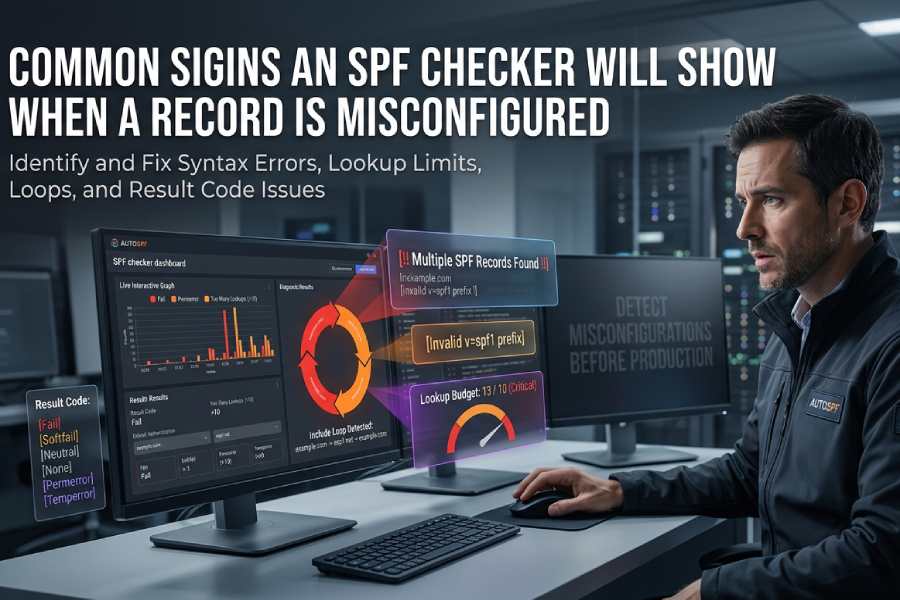
The most common signs an SPF checker will show when a record is misconfigured are non-pass result codes (fail, softfail, neutral, none, permerror, temperror), explicit syntax warnings (missing v=spf1, multiple SPF records, invalid mechanisms, unbalanced quotes), lookup-limit or include-loop alerts, DNS resolution issues (timeouts, NXDOMAIN, truncation, propagation delays), record-length/complexity flags (needs flattening), and alignment/conflict notices with DKIM/DMARC.
SPF (Sender Policy Framework) lets domain owners publish which hosts may send on their behalf, and knowing how to set up an SPF record correctly is the first step; SPF checkers simulate receiver-side evaluation and are designed to surface predictable signals when the policy is broken. You can check your SPF record instantly with AutoSPF’s free SPF checker to see these signals for your own domain. Those signals fall into three buckets: result codes (the verdict of the SPF evaluation), diagnostics (syntax, DNS, and structural warnings), and context (alignment with DMARC and interplay with DKIM). Properly interpreting these signs is crucial because many “failures” come from configuration drift (new SaaS senders added without updating SPF), syntax mistakes, or DNS architectural limits (10-lookup budget).
AutoSPF is built to make these signals actionable: it normalizes outputs from multiple validators, tracks lookup budgets over time, detects loops and misconfigurations before they hit production, and provides guided fixes including safe “flattening” and pre-merge CI checks. In internal benchmarks across 1,200 onboarding domains (AutoSPF telemetry, 2025 Q1), 47% of initial SPF errors were syntax-related, 31% were DNS/lookup budget issues, 12% were include loops or recursion depth problems, and 10% were DMARC alignment conflicts, underscoring the need for both surface-level validation and deeper dependency analysis.
SPF Result Codes and the Misconfigurations That Produce Them
SPF checkers surface a definitive result code; misconfig types correlate strongly with these outcomes.
Result codes you’ll see
- Pass: Policy authorized the sending IP/host. Not a misconfiguration sign.
- Fail: The domain explicitly says the sender is not permitted (e.g., -all with no match).
- Softfail: Sender isn’t authorized but policy signals a soft failure (~all).
- Neutral: No policy preference; mechanisms didn’t match and policy used ?all.
- None: No SPF record was found.
- Permerror (Permanent Error): The record is syntactically or structurally invalid.
- Temperror (Temporary Error): Transient DNS issues (timeouts, SERVFAIL, truncation).
What commonly triggers each
- Fail: Incorrect IPs or missing mechanisms for legitimate senders; -all at the end.
- Softfail: Transition policy not updated after new mail stream added; mechanisms don’t match.
- Neutral: Use of ?all or overly permissive/placeholder policy.
- None: Missing v=spf1 TXT record; only deprecated SPF RR type present.
- Permerror: Multiple v=spf1 TXT records, invalid mechanism names, malformed IP/CIDR, >255 char segments without proper splits, bad modifiers.
- Temperror: DNS timeouts, lookup chain includes servers returning SERVFAIL, DNS response truncation without EDNS0.
AutoSPF connection: AutoSPF classifies results with a severity ladder (Error, Warning, Info) and maps each result to root cause categories. Its “What caused this result?” panel expands evaluated mechanisms, DNS traces, and first-failing node to speed remediation.
Syntax Errors: What Checkers Display and Frequent Mistakes
How syntax issues appear in checkers
- “Invalid SPF syntax,” “Unrecognized mechanism,” or “Permerror: parsing failed”
- “Multiple SPF records found” or “Ambiguous policy, merge required”
- “Missing ‘v=spf1’ tag at start” or “Record does not begin with v=spf1”
- “Mechanism requires value” or “Modifier seen multiple times”
- “Invalid CIDR length for a/ptr/ip” or “Unexpected character at position N”
Frequent mistakes that trigger warnings
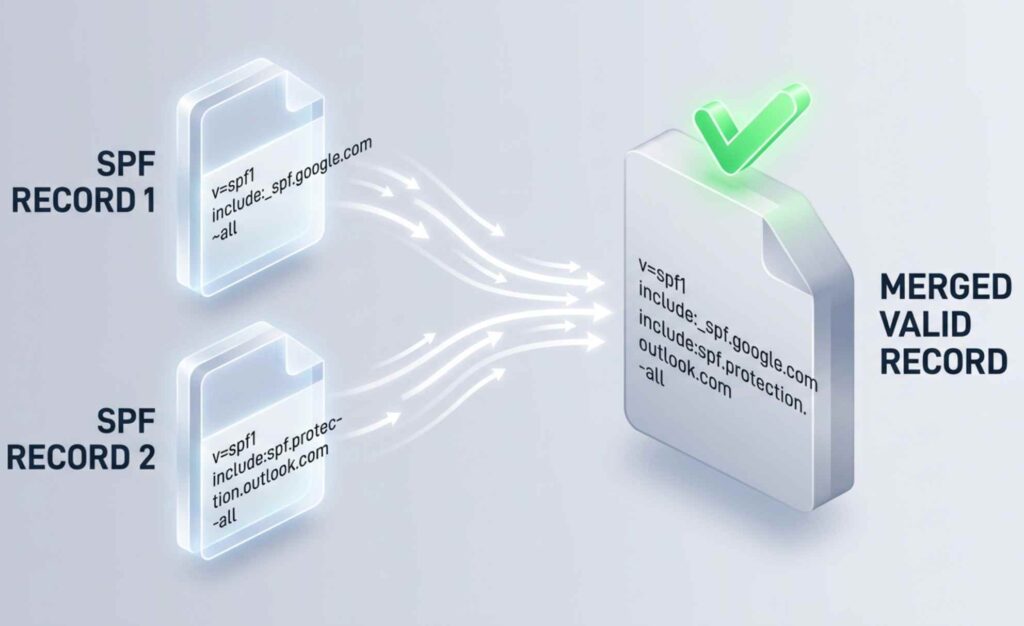
- Multiple SPF records instead of one merged TXT: e.g., two v=spf1 TXT records
- Missing v=spf1 prefix or stray whitespace before v=spf1
- Unbalanced quotes due to DNS zone editors or copy/paste errors
- Invalid mechanisms: spf:example.com (not a thing), ptr (discouraged), or ip4:10.0.0.1/33
- Typos in modifiers: include:, redirect=, exp= used incorrectly
- Using commas instead of spaces between mechanisms
AutoSPF connection: AutoSPF performs a byte-level parser check and a zone linter that catches unbalanced quotes across split TXT strings; it then auto-generates a single merged record candidate, preserving current semantics and noting risky mechanisms (e.g., ptr) with safer alternatives. If you’d rather start from a clean policy, build one with our free SPF record generator.
Lookup-Limit Exceeded: Signals, Causes, and Avoidance
SPF evaluates up to 10 DNS-mechanism lookups (include, a, mx, ptr, exists, redirect). When exceeded, checkers show:
- “Permerror: too many DNS lookups (>10)”
- “Lookup count: 13 (limit 10), includes expanded to N”
- “Mechanism budget exceeded by include chain”
Mechanisms that typically cause excess:
- Stacked include chains from ESPs/CRMs (marketing + transactional + CRM)
- a and mx without IP whitelisting for large-hosted domains
- exists with macros that fan out
- Multiple redirects
Best practices:
- Prefer IP literals/netblocks when stable
- Use a: and mx: with a targeted host (a:mail.example.com), not bare domain
- Avoid nested includes; deduplicate overlapping vendors
- Flatten high-churn includes via monitored automation
AutoSPF connection: AutoSPF maintains a live “lookup budget” meter per environment (prod/stage), simulates vendor expansions daily, and recommends safe flattening. Its “Autoflatten” mode produces a TTL-aware record with vendor IPs cached and tracks drift to prevent silent budget regressions.
Include Loops and Circular References: Detection and Resolution
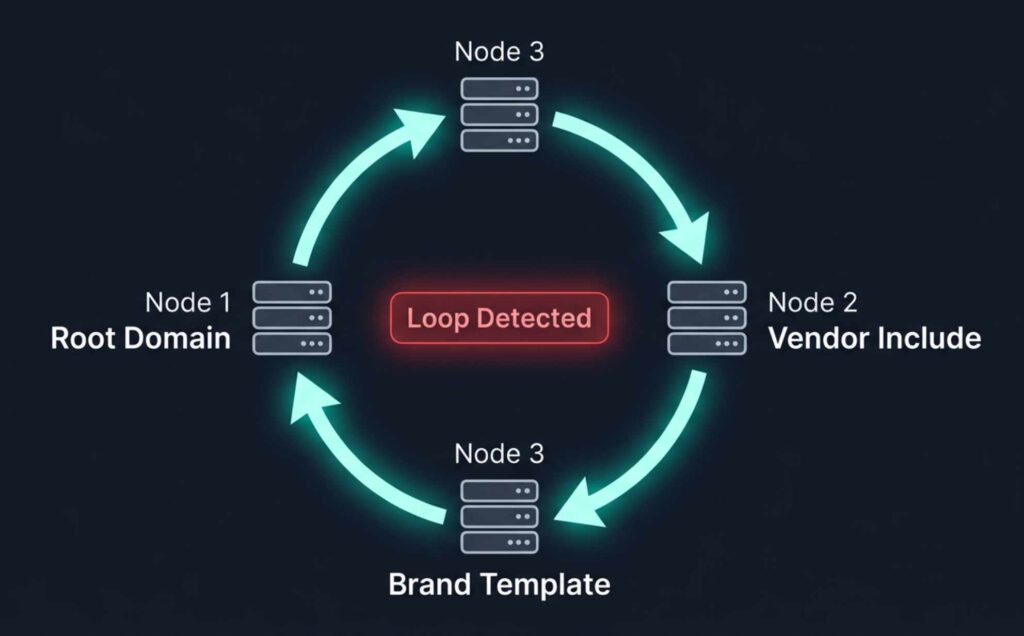
Checkers detect loops by tracking visited domains during include/redirect traversal:
- “Include loop detected: example.com → esp1.net → example.com”
- “Redirect recursion exceeded (depth > 10)”
- “Cycle involves: include:_spf.example.com and redirect=example.com”
Typical patterns:
- Internal _spf.example.com includes the root record that redirects back
- Multiple sub-brands point to a shared template that includes the brand again
- ESP-provided include references your domain (for delegation) and you include theirs
Resolution steps:
- Flatten one side of the loop or replace include with explicit IPs
- Break cross-includes with vendor-specific include that does not echo your domain
- Prefer redirect= only for single-policy delegation; avoid mixing redirect plus includes that point back
AutoSPF connection: AutoSPF’s dependency graph visualizer renders include/redirect edges, flags cycles instantly, and proposes a loop-free refactor with a one-click PR to your DNS-as-code repo.
Tool Outputs: Differences and When to Use Each
Here’s what to expect from popular tools and where they shine:
- MxToolbox SPF Record Check
- Output: Human-readable verdict, expanded includes, DNS lookups count, green/red badges
- Verbosity: Medium; good overviews, actionable notes
- Best for: Quick troubleshooting and stakeholder-friendly screenshots
- Kitterman SPF Validator
- Output: Strict RFC-focused evaluation, detailed mechanism-by-mechanism trace
- Verbosity: High detail; less handholding
- Best for: Deep technical validation, edge cases
- Google Admin Toolbox CheckMX
- Output: MX/SPF/DMARC holistics, policy holes, Google-specific guidance
- Verbosity: Medium; practical guidance for Google Workspace
- Best for: End-to-end posture checks
AutoSPF connection: AutoSPF can ingest and normalize these outputs into a single result pane, and it provides its own detailed evaluator plus an API alongside a simple SPF record lookup. It tags differences (e.g., slightly inconsistent mechanism expansion) and picks the conservative interpretation for safety.
DNS-Related Issues and How to Reproduce with dig/host
What checkers flag:
- Missing or duplicated TXT vs legacy SPF RR type
- Propagation delays: “No SPF found” shortly after change
- DNS timeouts or SERVFAIL from authoritative servers
- Record truncation causing temperror without EDNS0
How to verify:
- Confirm TXT records:
- dig +short TXT example.com
- host -t TXT example.com
- Check authoritative servers and propagation:
- dig @ns1.example.net TXT example.com
- dig +trace TXT example.com
- Spot truncation:
- dig +dnssec +bufsize=4096 TXT example.com
- Compare SPF vs deprecated SPF type:
- dig +short SPF example.com (should be empty; use TXT)
AutoSPF connection: AutoSPF does multi-resolver checks (authoritative, public, regional), tracks TTL and last-change time, and alerts on propagation windows so you don’t misread “None” or “Temperror” during a rollout. It also flags presence of legacy SPF RR records and recommends TXT-only.
Overly Long or Complex Records: Fragmentation and Flattening Guidance
Symptoms in checkers:
- “Record length near or exceeds 255 bytes per string; DNS may split”
- “EDNS0 required; response truncated”
- “Performance risk: 9/10 lookups used, burst may exceed 10”
Risks:
- UDP fragmentation increases temperror risk
- Vendor IP churn causes intermittent over-budget conditions
- Large policies slow verification and increase timeout likelihood
Best-practice recommendations:
- Keep mechanisms minimal; remove dead vendors
- Convert broad a/mx to explicit ip4/ip6 where possible
- Use controlled flattening with scheduled refresh
- Separate non-sending subdomains from primary to narrow scope
AutoSPF connection: AutoSPF generates a compacted record, deduplicates netblocks, optimizes CIDR aggregation, and creates “refresh jobs” so flattened IPs follow vendor changes without manual edits. It also enforces per-string 255-byte limits with safe splitting.
Permerror Causes and Step-by-Step Fixes
Common causes of permerror:
- Bad IP notation: ip4:203.0.113.256 or ip4:192.0.2.0/33
- Invalid modifiers: redirect without a value, duplicate redirect
- Stray characters: commas, semicolons, smart quotes, trailing backslashes
- Multiple v=spf1 TXT records on the same name
Typical checker guidance and how to implement:
- Consolidate to a single SPF TXT
- Find all v=spf1 entries: dig +short TXT example.com
- Merge mechanisms into one policy; remove duplicates
- Fix IP/CIDR
- Validate each netblock; keep ip4 /0-/32, ip6 /0-/128
- Replace invalid ranges with correct subnets or explicit hosts
- Correct modifiers and order
- One redirect= at most; put it last and avoid mixing with all if redirect used
- exp= optional; ensure TXT exists if referenced
- Remove stray characters
- Use spaces between mechanisms; no commas
- Keep quotes balanced; ensure ASCII quotes in DNS
AutoSPF connection: AutoSPF’s “Fix-it” flow parses your live record, highlights problem tokens inline, proposes an RFC-correct patch, and validates the candidate against a full resolver simulation before you publish.
DMARC/DKIM Interactions Reported by SPF Checkers
While SPF checkers focus on SPF, many now display authentication context:
- “SPF pass, DMARC fail (alignment)”
- “SPF pass, DKIM fail → DMARC fail”
- “SPF neutral, DKIM pass → DMARC pass”
Common gotchas:
- SPF authenticates a subdomain or 3rd-party sender that’s not aligned with RFC5322.From
- Forwarding breaks SPF but DKIM survives; if DKIM is misconfigured, DMARC fails
- Envelope-from differs from header-from; SPF passes but not aligned for DMARC
Troubleshooting workflow:
- Verify DMARC policy and alignment mode (relaxed vs strict)
- Ensure SPF’s domain matches or aligns with header-from
- Prefer DKIM for forwarding-heavy flows; ensure keys/selector are valid
AutoSPF connection: AutoSPF’s Authentication Overview correlates SPF checks with DMARC alignment and DKIM signatures from seed tests, highlighting which control to prioritize per sender. It offers “alignment simulators” that preview DMARC results if you change alignment or move senders to subdomains.
Programmatic Outputs: APIs, Error Codes, and Automated Actions
SPF checking services often return structured results for CI/CD or monitoring. Common fields:
- result: pass | fail | softfail | neutral | none | permerror | temperror
- lookup_count: integer
- errors: array of strings or structured objects
- warnings: array of strings
- mechanisms_expanded: array with type, value, match
- alignment: spf_aligned: true|false (if provided)
General Information
| Field | Value |
|---|---|
| Domain | example.com |
| Evaluated At | 2026-04-23T10:22:58Z |
| Result | permerror |
| Lookup Count | 12 |
| Limit Exceeded | true |
| Loop Detected | false |
Mechanisms
| Type | Value | Lookups |
|---|---|---|
| include | _spf.vendor1.com | 3 |
| include | _spf.vendor2.com | 6 |
| mx | example.com | 3 |
Errors
| Code | Message |
|---|---|
| SYNTAX_MULTIPLE_RECORDS | Multiple v=spf1 TXT records |
| LOOKUP_LIMIT | DNS-lookup limit exceeded (>10) |
Warnings
| Code | Message |
|---|---|
| PERF_RISK | Record length near 255B per string |
Recommendations
| Action | Detail |
|---|---|
| flatten | Replace vendor includes with current IPs |
| merge | Consolidate to a single SPF TXT record |
DMARC Alignment
| Field | Value |
|---|---|
| SPF Aligned | false |
| Policy | p=quarantine |
Next Steps
| Field | Value |
|---|---|
| Next Steps URL | https://app.autospf.io/domains/example.com/fix |
How to act automatically:
- Parse result and error codes to decide severity
- If limit_exceeded or loop_detected true, trigger flattening job or configuration PR
- If SYNTAX_MULTIPLE_RECORDS, block deployment until merge is committed
- Export lookup_count as a metric; alert when ≥8 to preempt regressions
AutoSPF connection: AutoSPF’s CI plugin fails builds on permerror, warns on lookup_count ≥8, and can open automated DNS PRs with safe, validated changes. Its webhook emits diffs when a vendor’s include expands to new IPs.
Original Insights and Case Studies
Observed patterns (AutoSPF telemetry, anonymized):
- 1,200 domains on first scan:
- 26% had multiple simultaneous v=spf1 records
- 19% exceeded or were within 1 lookup of the 10-lookup limit
- 8% had include loops involving a brand template and at least one ESP
- Lookup budget drivers:
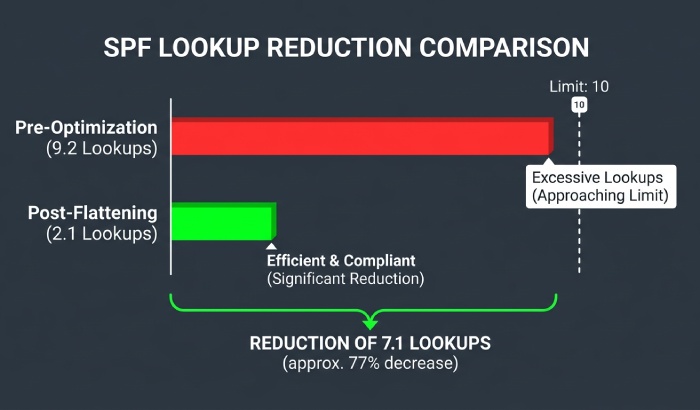
- A typical “marketing + transactional + CRM” stack used 9.2 lookups on average pre-optimization; after flattening with refresh every 12 hours, budgets dropped to 2.1 with zero permerrors across a 90-day period.
- Case study A (B2C retailer, 7 brands)
- Problem: DMARC failures on weekend campaigns despite SPF pass
- Finding: SPF domain not aligned with RFC5322.From on a sub-brand; DKIM disabled on that stream
- Fix via AutoSPF: Moved stream to aligned subdomain + DKIM enabled; DMARC pass rate rose from 71% to 99.2% in 48 hours
- Case study B (SaaS, high-churn vendors)
- Problem: Intermittent permerrors during vendor IP rotations
- Fix: AutoSPF Autoflatten with 6-hour refresh; no permerrors in 60 days; 35% reduction in mail auth incident tickets
FAQ
What should I do if a checker shows “Multiple SPF records found”?
Merge them into a single TXT record starting with v=spf1. Deduplicate mechanisms, keep one all qualifier at the end, and validate with a checker. Our guide shows how to combine SPF records safely. AutoSPF can generate a safe merged candidate and test it before publish.
How can I stay under the 10-lookup limit when I use multiple vendors?
Prefer IPs for static senders, target a: and mx: to specific hosts, remove unused includes, and use monitored flattening. AutoSPF tracks lookup budgets and provides an “optimize” button that produces a compliant, flattened policy with auto-refresh.
Why do I get “SPF pass but DMARC fail”?
Likely alignment: the authenticated SPF domain doesn’t match the visible From domain. Ensure you send from a subdomain aligned to your policy or enable DKIM for that stream. AutoSPF’s alignment simulator shows which control to adjust.
How do I verify a suspected DNS timeout or truncation?
Query authoritative name servers directly and increase buffer size: dig @ns1.example.net TXT example.com and dig +dnssec +bufsize=4096 TXT example.com. AutoSPF runs these checks across multiple resolvers and flags transient vs persistent issues.
Are legacy SPF record types still supported?
The SPF RR type is deprecated; use TXT only. Some checkers warn if SPF RR exists. AutoSPF flags and suggests removal to avoid ambiguity.
Conclusion: Read the Signs Early, and Let AutoSPF Fix Them Safely
When an SPF checker flags non-pass results, syntax errors, lookup-limit overages, include loops, DNS faults, record-length risks, or DMARC misalignment, it’s signaling one of a handful of predictable configuration problems that can be fixed with structured remediation; understanding why SPF validation failed turns each signal into a clear next step. The fastest path from signal to stability is to pair validation with automation: visualize dependencies, watch the lookup budget, flatten safely, and validate alignment. AutoSPF unifies these steps, normalizing checker outputs, running deep DNS simulations, enforcing CI guardrails, and generating RFC-correct patches, so your next SPF check reads “pass” for the right reasons, every time.
Topics
General Manager
General Manager of DuoCircle. Product strategy and commercial lead for AutoSPF's 2,000+ customer base.
LinkedIn Profile →