How Computer Worms Spread Without User Action—and How to Stop Them

Quick Answer
A computer worm is self-replicating malware that spreads automatically through emails, networks, and software vulnerabilities without user action. Prevent infections with regular updates, email filtering, endpoint protection, and SPF, DKIM, and DMARC authentication.
What Is an Email Worm? How It Differs from Viruses, Trojans, and Phishing
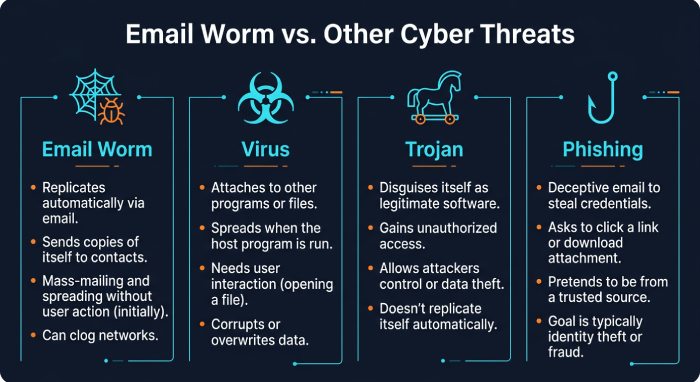
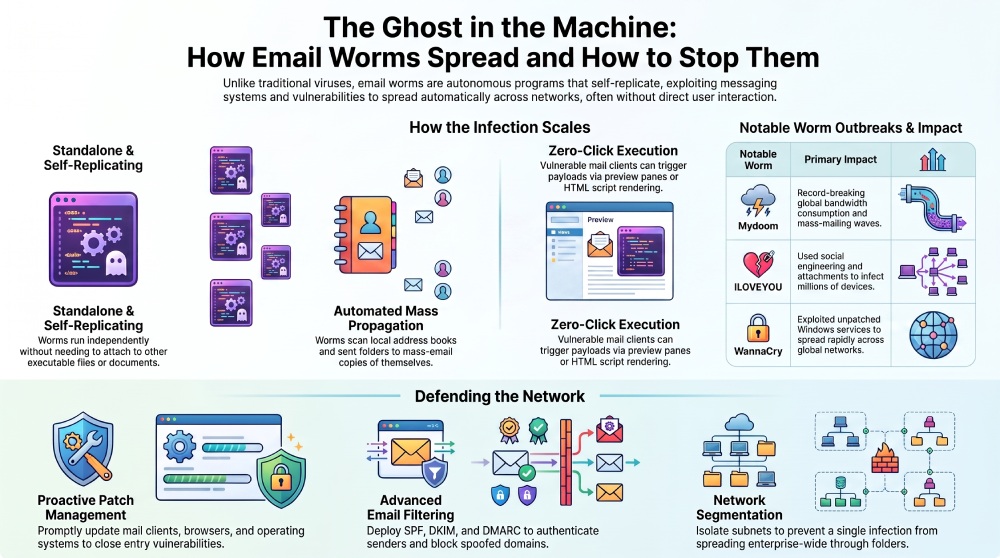
An email worm is a type of computer worm designed to spread primarily through email systems, contact lists, mail clients, and messaging infrastructure. Unlike a traditional virus, which usually needs a host program or document to attach to, a computer worm is typically a standalone program. That means it can run independently, copy itself, and move across systems without being embedded inside another executable file.
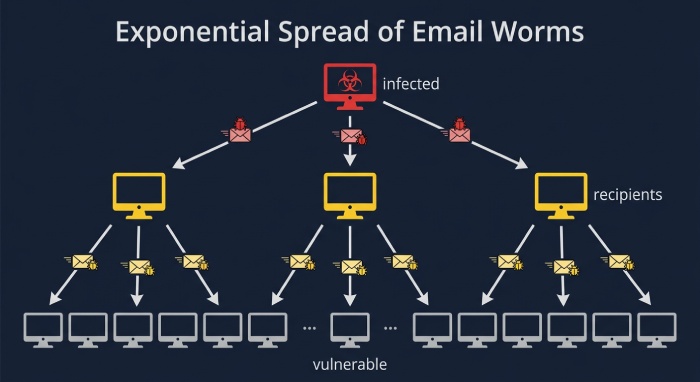
The defining trait of an email worm is that it is self-replicating. Once active, it searches for new recipients, sends copies of itself, and may trigger additional network infection through exposed services, shared folder access, or vulnerable mail clients. This self-replicating behavior creates the risk of exponential growth, where one infected system becomes ten, then hundreds, then thousands.
A virus depends on user-driven execution and file sharing more often than a worm does. A trojan horse, by contrast, disguises itself as legitimate software but does not necessarily replicate. Phishing tricks users into revealing credentials or clicking malicious links, while an email worm focuses on automated propagation. However, modern malware often blends these categories: an email worm may use phishing-style messages, contain malicious code, install a backdoor, or drop ransomware as its payload.
 The concept of computer worms dates back to the early days of networking, but email soon became one of the most effective ways for worms to spread. Notable outbreaks such as Morris, ILOVEYOU, Mydoom, Nimda, ExploreZip, Conficker, and WannaCry demonstrated how unpatched systems, vulnerable Windows services, and malicious email attachments could rapidly infect millions of devices. These incidents also highlighted the importance of layered email security, including timely software updates, user awareness, and email authentication technologies such as SPF, DKIM, and DMARC to help reduce phishing and email-based malware risks.
How Email Worms Spread Without User Action: Address Books, Auto-Execution, and Network Exploits
Address books and mass emailing
A classic email worm scans local address books, cached contacts, inboxes, sent folders, and corporate directories. It then performs mass emailing, sending copies of itself to everyone it finds. This process can generate massive spam waves and extreme bandwidth consumption, especially in organizations with large mailing lists.
The danger is contagiousness: each recipient’s machine can become the next sender. If the email worm runs successfully, it repeats the same process using recursive methods, creating exponential growth in message volume and network traffic. Mydoom, for example, became one of the fastest-spreading email-based malware outbreaks and caused major bandwidth consumption across global networks.
Auto-execution and vulnerable mail clients
Some email worms spread without a user intentionally opening a file. Older mail clients and browsers supported risky features such as preview-pane rendering, VBScript, ActiveX, embedded objects, or a web page script inside HTML email. In these cases, automatic execution could occur when a message was previewed or rendered, enabling HTML infection techniques.
A vulnerable mail client can turn an email message into an exploit attack. If the client has a security vulnerability, the worm may execute its payload silently. That payload might install spyware, open a backdoor, conduct data exfiltration, or enroll the device into a botnet as a zombie computer under remote control.
Why standalone design makes worms dangerous
Because a computer worm is a standalone program, it does not need a user to edit a document, install a game, or launch a known application. The standalone program can copy itself, schedule itself, manipulate registry keys, or abuse the operating system to persist. This is why a self-replicating worm can spread faster than many other forms of malware.
From local probing to global probing
After compromising one endpoint, a worm may use local probing to find nearby systems on the same subnet, then use global probing to search the wider internet. If it discovers a network vulnerability on a network server, it can trigger further network spread and deepen the network infection beyond email alone.
Common Infection Paths: Malicious Attachments, Links, Macros, and Vulnerable Mail Clients
Malicious attachments and macros
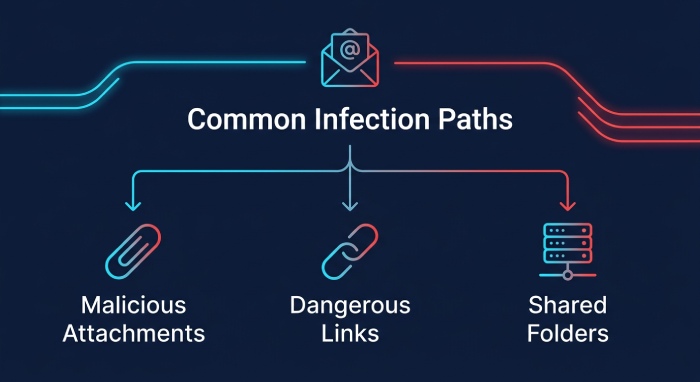
The most familiar email worm path is the infected email attachment. The attachment may appear to be an invoice, résumé, delivery notice, voicemail, or urgent business document. Once opened, macros or scripts launch the worm payload. ExploreZip and ILOVEYOU used social engineering and attachment-based tricks to encourage execution.
Although macro controls have improved, attackers still use document lures, archive files, shortcut files, and script formats. The payload can be simple—send more email—or complex: install ransomware, steal credentials, create persistence, or prepare a later denial-of-service attack.
Links, drive-by content, and exploit chains
An email worm may also include links to malicious sites. Those pages can host exploit kits, credential theft pages, or drive-by downloads. A web page script may attempt to exploit a browser, plugin, or mail-rendering component. If the target has missed a security patch or is exposed to a zero-day attack, the infection may occur with little visible user action.
Nimda is a useful example because it spread through multiple channels, including email, web servers, and network shares. This hybrid approach made it more resilient and increased bandwidth consumption. Similarly, the Blaster worm abused a Microsoft Windows vulnerability, and Conficker exploited weaknesses in Microsoft systems to create large-scale network infection.
Shared folders and enterprise services
Inside a company, an email worm often pivots beyond the mailbox. It may copy itself into a shared folder, scan for weak administrative passwords, or attack a vulnerable network server. The Conficker worm demonstrated how unpatched systems and weak credentials could amplify network spread across enterprises.
Industrial environments are not immune. Stuxnet, which targeted Siemens SIMATIC WinCC systems, showed that worm-like techniques could cross from IT networks into operational technology. While Stuxnet was not simply an email worm, it remains a landmark example of targeted malware using multiple propagation paths and a specialized payload.
Warning Signs and Real-World Impact: Inbox Spam, System Slowdowns, Data Theft, and Business Disruption
Symptoms users and administrators may notice
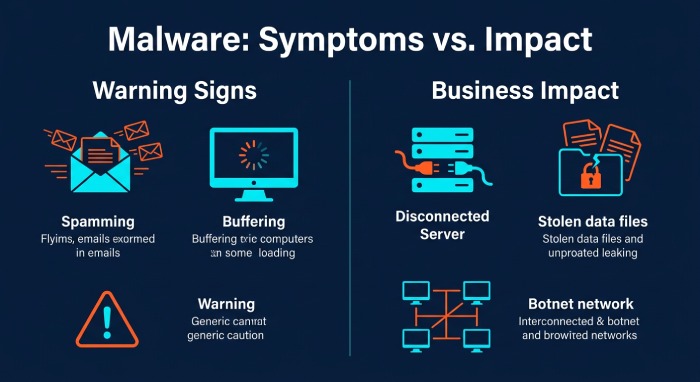
Common warning signs include sudden outbound spam, bounced messages from unknown recipients, unexplained network traffic, slow email delivery, locked mail accounts, disabled security tools, and unusual processes. A single email worm can cause severe bandwidth consumption because its self-replicating engine sends thousands of messages and scans for more targets.
On endpoints, users may see system slowdowns, browser redirects, failed updates, missing files, or alerts from antivirus software. Administrators may observe suspicious SMTP activity, authentication failures, strange DNS lookups, or a spike in connections to external command-and-control servers.
Business impact and incident costs
The business impact can be substantial. A computer worm may trigger mail server outages, customer-facing downtime, compliance issues, lost productivity, and high removal cost. If the payload includes data exfiltration, attackers may steal intellectual property, customer records, or credentials. If the infected device joins a botnet, it may help launch a denial-of-service attack against other targets.
Major outbreaks have shaped security practice. The Morris worm led to the creation of the CERT Coordination Center, and Microsoft’s security response evolved significantly after worms such as Blaster and Conficker. Bill Gates’ Trustworthy Computing memo and processes such as Patch Tuesday reflected the growing need for predictable patching. Security communities, including forums such as the Phage mailing list, also helped researchers coordinate knowledge about worm behavior.
How to Stop Email Worms: Patch Management, Email Filtering, Endpoint Protection, Backups, and User Awareness
Patch management and hardening
The most effective defense is reducing every known security vulnerability before attackers can exploit it. Organizations should apply each software update and security patch promptly across the operating system, mail clients, browsers, plugins, and servers. Patch Tuesday helps Microsoft customers plan routine updates, but emergency patching is critical when an active zero-day attack or worm campaign appears.
Disable unnecessary scripting, restrict macros, remove legacy components such as unsafe ActiveX controls, and limit administrative privileges. Segment networks so that one network infection cannot easily become an enterprise-wide crisis. A properly configured firewall can block unnecessary inbound ports and restrict worm scanning behavior.
Email filtering and authentication controls
Strong filtering blocks known malicious senders, suspicious attachments, executable file types, spoofed domains, and URLs associated with malware. Modern email security programs should combine authentication, reputation analysis, sandboxing, attachment detonation, URL rewriting, and anomaly detection. Keeping SPF within the 10-lookup limit with an SPF flattening service ensures authentication checks resolve reliably, and comparing AutoSPF plans helps automate that upkeep.
Filtering also reduces bandwidth consumption by stopping mass-mailing campaigns before they reach users. Rate limits on outbound mail can prevent one compromised account from fueling exponential growth. Domains that rely on several email providers should also follow best practices for configuring multiple SPF includes so every legitimate sender stays authorized.
Endpoint protection, backups, and response
Use reputable antivirus software, endpoint detection and response, behavior monitoring, and application control. Because a standalone program can execute outside a normal document workflow, detection should focus on behavior: unauthorized email sending, suspicious child processes, credential harvesting, and lateral movement.
Maintain offline, immutable backups in case the worm drops ransomware or corrupts files. Test restoration procedures regularly. During an incident, isolate affected machines, disable compromised accounts, collect logs, remove persistence mechanisms, and verify that no backdoor remains.
User awareness and operational discipline
Technical controls matter, but user awareness remains essential. Train staff to treat unexpected attachments, urgent payment requests, macro prompts, and unusual links with suspicion. Users should report suspicious messages quickly rather than forwarding them. Even though an email worm can spread without deliberate user action, informed employees reduce the chance that the first infection succeeds—and help security teams stop self-replicating malware before exponential growth turns one mailbox into a company-wide outbreak.
General Manager
General Manager of DuoCircle. Product strategy and commercial lead for AutoSPF's 2,000+ customer base.
LinkedIn Profile →