How to Detect Fake Order Confirmation Email Scams Before You Click

Quick Answer
Fake order confirmation emails often use urgent messages, fake links, and trusted brand names to steal credentials or financial information. Verify orders directly through the retailer’s official website or app, never through email links or phone numbers.
Why Fake Order Confirmation Emails Are So Effective
Order confirmation email scams work because they exploit a moment of uncertainty: “Did I buy this?” Attackers know that many people shop frequently on Amazon, Home Depot, and other major retailer sites, so a fake order confirmation can feel plausible even when you do not remember placing the order. These phishing scams often arrive with urgent language such as “Your account charged,” “Confirm immediately,” or “Cancel within 24 hours,” pushing you toward clicking links before thinking.
A fake order confirmation may imitate real order details, shipping notices, invoices, receipts, or delivery scams that claim a package is delayed. These fake emails often blend into the normal stream of online shopping scams, especially during holidays, Prime Day-style events, or major sales weekends. The goal is usually to steal sensitive information, infect your device with malicious software, or send you to a fake login page for credential theft.
The psychology behind the “unexpected purchase” trick
A fraudulent message claiming a high-value purchase—such as electronics, electronics accessories, or an expensive online order—creates anxiety. Scammers want you to fear identity theft, credit card scams, bank account theft, or an unauthorized charge to your credit card or bank account. That emotional pressure makes order confirmation email scams especially effective.
Some messages also use customer service impersonation, telling you to call a fake support number. That can lead to phone scams where a “representative” asks for personal information, remote access to your device, or payment details. Similar text message scams may send a “track order” alert with unverified links.
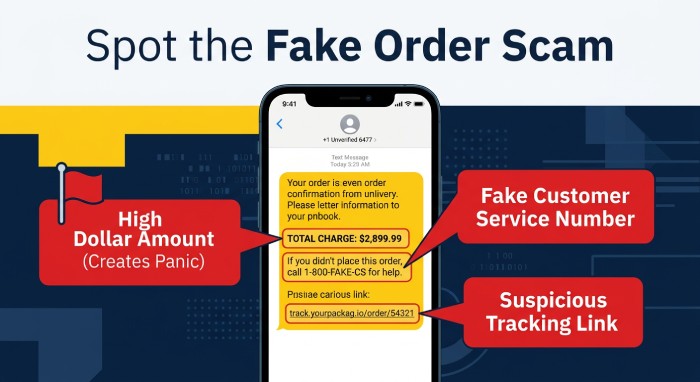 Strong scam awareness starts with slowing down. If an email says your account charged for something you did not buy, do not click. Treat every fake order confirmation as a potential phishing scams attempt until verified through the retailer website or official website.
Red Flags in Sender Addresses, Subject Lines, and Branding
Fake emails often look convincing at first glance, but the clues are usually visible if you inspect the message carefully. As AI phishing threats grow more sophisticated, these fakes look ever more polished. Order confirmation email scams frequently come from an unknown sender, use generic greetings like “Dear Customer,” or rely on inconsistent branding that does not match the retailer’s usual design.
Sender address warning signs
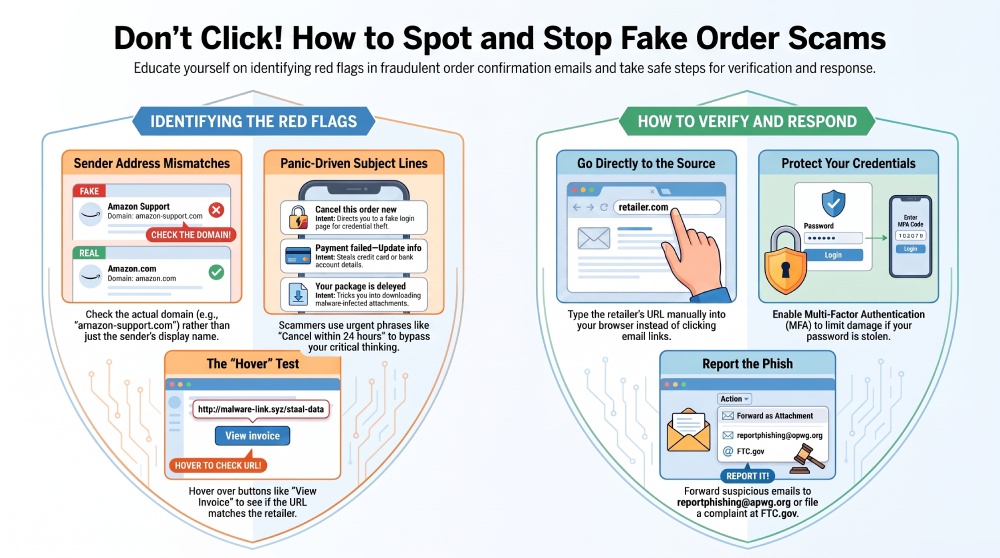
Start by checking the sender address—not just the display name. A message may say “Amazon Support,” but the actual domain could be unrelated. Watch for misspelled domains, extra characters, strange country-code endings, or addresses that mimic trusted brands. For example, “arnazon-support” or “homedepot-orders-secure” are not the same as legitimate company domains.
To verify sender information, compare the sender domain with emails you previously received from the same retailer. If anything feels off, assume it is a suspicious email. Modern email security controls can reduce spoofing, but they cannot eliminate every fraudulent message, especially when criminals use lookalike domains. Managed services — compare AutoSPF pricing — automate the SPF upkeep that reduces spoofing.
Subject lines designed to trigger panic
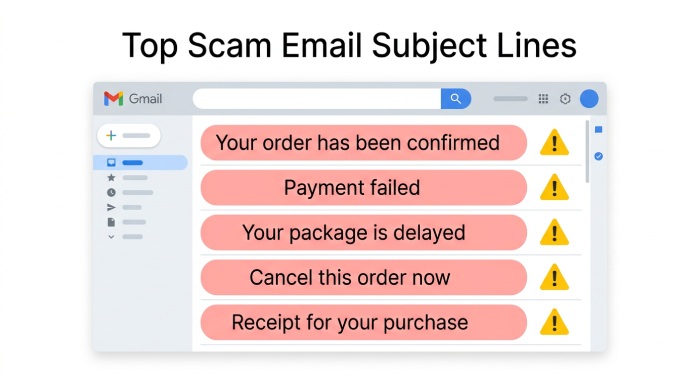 Common subject lines in online shopping scams include:
- “Your order has been confirmed”
- “Payment failed—update your information link”
- “Your package is delayed”
- “Cancel this order now”
- “Receipt for your recent purchase”
The cancel order scam is especially common. The email claims a purchase was made and provides a button to cancel it. That button often leads to a fake login page or a fake customer service flow designed for credential theft.
Branding details scammers often get wrong
Look for poor formatting, outdated logos, blurry graphics, spelling mistakes, broken footers, or policies that do not match the brand. Fake order confirmation emails may imitate Microsoft, Amazon, Home Depot, or a financial institution, but they often combine mismatched fonts, odd colors, and inconsistent branding. A legitimate retailer generally includes accurate order details, clear customer service links, and a recognizable format.
Suspicious Links, Attachments, and “Track Order” Buttons
The most dangerous part of fake order confirmation messages is usually the link, attachment, or “Track Order” button. Phishing scams use these elements to collect sensitive information, install malicious software, or redirect you to a fake login page.
Hover before clicking links
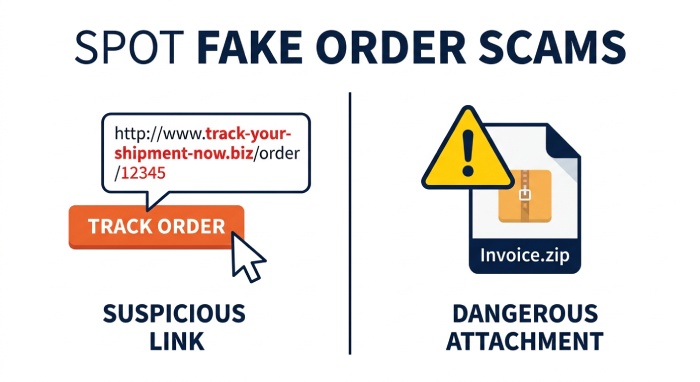
Before clicking links, hover over buttons such as “View Invoice,” “Track Order,” “Cancel Purchase,” or “Update Payment.” If the destination does not match the retailer website, do not proceed. Unverified links may lead to credential theft pages that look like Amazon, Microsoft, a bank, or a delivery company.
A fake login page can ask for your email password, retailer account password, credit card number, security questions, or one-time passcodes. Once attackers collect sensitive information, they may attempt bank account theft, identity theft, or takeover of online wallets and shopping accounts.
Attachments can hide malware
Be cautious if a fake order confirmation includes a PDF, ZIP file, Word document, or Excel spreadsheet. A malware attachment may claim to contain your invoice or shipping label. If it asks you to download attachment files or enable content, stop immediately. Microsoft Word and Excel files that request macros can deliver macros malware, ransomware, or other malicious software.
Delivery scams often use attachment-based tricks because people expect labels, receipts, or shipment confirmations. But legitimate retailers rarely require you to open a document to view basic order details. If a message pressures you to open a file, it may be one of many order confirmation email scams designed to compromise your device.
How to Verify an Order Without Clicking the Email
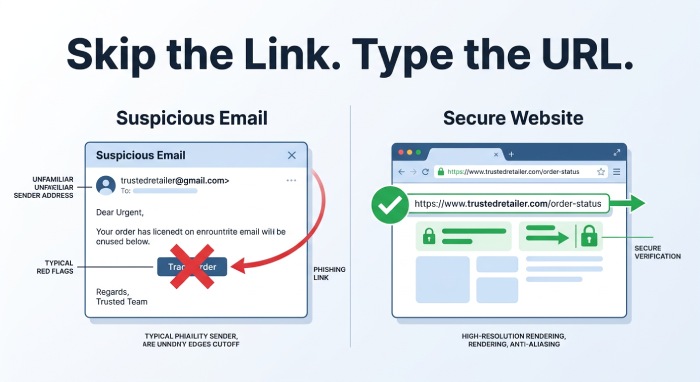
The safest way to investigate a suspicious order is to avoid the email entirely. Do not use embedded buttons, phone numbers, or links from fake emails. Instead, go directly to the retailer’s official website by typing the address into your browser or using the retailer’s verified app.
Check the retailer account directly
Log in to Amazon, Home Depot, or the relevant retailer website from a trusted bookmark or typed URL. Review your order history, shipping status, payment methods, and messages.Delivery scams often use attachment-based tricks because people expect labels, receipts, or shipment confirmations.
If the email claims your account charged a large amount, also check your credit card statement, bank account activity, and alerts from financial institutions. Do not rely on the email’s phone number or customer service link. Contact customer service only through the official website.
Use security tools before taking action
Fraud prevention is stronger when security measures work together. Keep your operating system and applications updated, use reputable antivirus software, enable browser protection, and apply effective email filtering. Email authentication protocols such as SPF, DKIM, and DMARC can also help reduce spoofing and protect against fraudulent messages. Multi-factor authentication can further limit the impact of credential theft if a password is exposed.
Security tools cannot replace judgment, but they help protect yourself from phishing scams, malicious software, ransomware, and fake emails. If you are unsure whether a message is legitimate, verify the order directly through the retailer’s official website or app.
What to Do If You Clicked or Shared Information
If you clicked a link, opened a malware attachment, or entered sensitive information into a fake login page, act quickly. The response depends on what happened, but speed matters because credential theft can lead to account takeover, credit card scams, bank account theft, and identity theft.
Immediate steps after a suspected compromise
If you entered a password, change it immediately from the official website—not from the email. Use a strong, unique password and turn on multi-factor authentication. If the same password was used elsewhere, change it on those accounts too.
If you shared credit card or bank account details, contact your financial institutions, freeze or replace the affected card, and monitor for suspicious activity. If you opened a file and saw prompts to enable content, disconnect from the internet and run antivirus software. Malicious software from fake order confirmation emails may try to steal files, browser passwords, or session cookies.
If remote access was granted during customer service impersonation or phone scams, revoke access, uninstall remote support tools, and have the device checked by a trusted technician.
Report phishing and document the incident
To report phishing, forward suspicious messages to the Anti-Phishing Working Group at reportphishing@apwg.org and consider filing an FTC complaint at FTC.gov through the Federal Trade Commission. The FTC, APWG, law enforcement agencies, ISPs, and security vendors use reports to identify phishing scams, take down fake sites, and warn the public. Businesses may also submit or review an APWG report to strengthen fraud prevention programs.
Keep a copy of the suspicious email, screenshots of the fake login page, transaction details, and any communication with the scammer. This documentation can help customer service teams, financial institutions, and law enforcement agencies investigate.
Order confirmation email scams, fake order confirmation messages, delivery scams, and other online shopping scams are not just annoyances—they are structured attempts to obtain sensitive information, spread malicious software, and enable credential theft. Treat unexpected purchase alerts as fake emails until you verify them independently.
General Manager
General Manager of DuoCircle. Product strategy and commercial lead for AutoSPF's 2,000+ customer base.
LinkedIn Profile →