DKIM Vs SPF In Email Authentication: How They Work Alongside DMARC

Quick Answer
Email authentication is now central to email security because attackers lean on email spoofing, impersonation, and Business Email Compromise to bypass human defenses and Secure Email Gateway controls. As phishing attacks grow more targeted, strong authentication methods, spf (Sender Policy Framework), dkim (DomainKeys Identified Mail), and dmarc (Domain-based Message Authentication, Reporting & Conformance), provide phishing protection and spam prevention at the infrastructure layer.
Try Our Free DMARC Checker
Validate your DMARC policy, check alignment settings, and verify reporting configuration.
Check DMARC Record →
Email authentication is now central to email security because attackers lean on email spoofing, impersonation, and Business Email Compromise to bypass human defenses and Secure Email Gateway controls. As phishing attacks grow more targeted, strong authentication methods, spf (Sender Policy Framework), dkim (DomainKeys Identified Mail), and dmarc (Domain-based Message Authentication, Reporting & Conformance), provide phishing protection and spam prevention at the infrastructure layer. They help mail servers verify whether a message really comes on behalf of a domain and whether it should deliver emails, quarantine, or reject emails based on policy.
Why this matters: recipients increasingly rely on authentication signals for email legitimacy. Large mailbox providers and Secure Email Gateway vendors evaluate dkim, spf, and dmarc results to reduce spam emails and email fraud. If your domain’s dns records are absent or misconfigured, legitimate messages may fail authentication and suffer deliverability problems. The Security Signals Report and similar industry research consistently tie poor configuration to successful phishing attacks.
This ecosystem sits on the Domain Name System (DNS). Your domain’s DNS provider (for example, Cloudflare) hosts the TXT record entries, spf record, dkim record, and dmarc record, that mail servers query over SMTP during message receipt. You can review an SPF record example to understand its shape. Because spf checks the sending IP address and dkim verifies a cryptographic signature in the header, these complementary authentication methods blunt email spoofing and strengthen phishing protection. Even when messages traverse multiple email protocols (SMTP for transport, IMAP for retrieval in an email client), these controls guide policy enforcement at each receiving Mail server.
SPF explained: purpose, DNS syntax, alignment, and common limitations
What SPF does
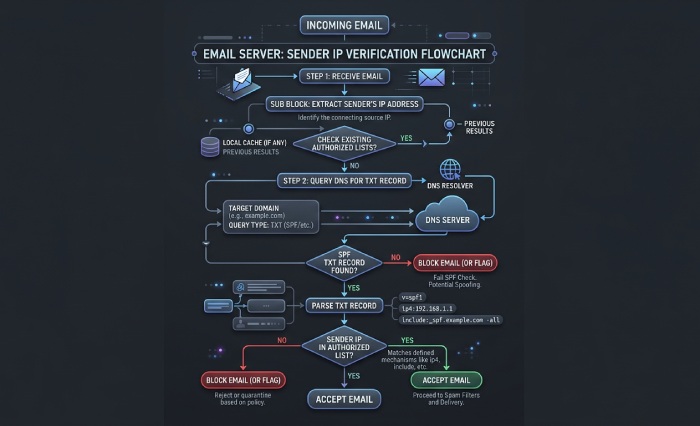
SPF (Sender Policy Framework) is an email authentication method that lists which mail servers are authorized to send on behalf of a domain. A receiving system compares the connecting server’s IP address to the domain’s spf record to determine whether to pass authentication or fail authentication. Its SPF syntax lists which hosts are allowed to send. This supports email security, spam prevention, and basic phishing protection by deterring unauthorized hosts from forging your envelope sender.
DNS syntax and alignment
- Where it lives: an spf record is a dns txt record at your root domain (or a subdomain), e.g., “v=spf1 ip4:203.0.113.10 include:_spf.example.com -all”. It is one of the core dns records used for email authentication.
- Mechanisms: ip4, ip6, a, mx, include, and (discouraged) ptr. Qualifiers (+, ~, ?, -) signal allow, softfail, neutral, and hardfail. See how SPF mechanisms work for details on each one.
- Alignment with dmarc: DMARC checks whether the domain in the SPF-authenticated identity aligns with the RFC5322.From header domain. Alignment can be relaxed (organizational match like mail.example.com vs Example.com) or strict (exact match). Proper alignment boosts phishing protection by ensuring the visible domain matches the authenticated one.
Limitations you must plan for
- Forwarding breaks SPF: when intermediaries forward a message, the IP address changes, and the new server is rarely an authorized server in your sender policy framework. Result: SPF may fail authentication even for legitimate mail.
- Lookup limits: SPF allows up to 10 DNS-mechanism lookups; exceeding this harms reliability and performance.
- Envelope vs. header: SPF authenticates the envelope sender, not the human-visible From header. Attackers can still try impersonation in the header until dmarc enforces alignment.
- Operational friction: marketing platforms sending on behalf of a domain need your spf record updated during setup process. A domain administrator should document each configuration and review dns settings regularly, whether hosted via web hosting panels or a DNS provider like Cloudflare.
Tip: When auditing aggregate DMARC reports, use Ctrl+F or Command+F to search for “spf=fail” patterns and IP address clusters. Tools like Valimail’s dashboards can help triage authorized server gaps quickly.
DKIM explained: keys, signatures, selectors, and why it survives forwarding
How DKIM works
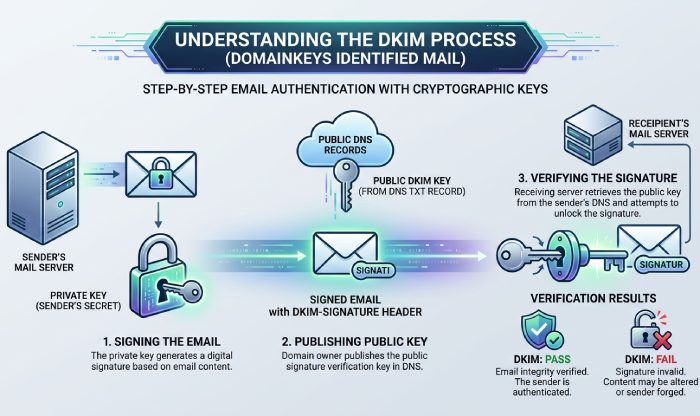
DKIM (DomainKeys Identified Mail) is a complementary email authentication method based on public key cryptography. Your sending platform uses a private key to create a digital signature over selected headers and the message body; recipients fetch the matching public key from a dkim record (a dns txt record at selector._domainkey.example.com) to verify the signature. Because dkim binds content to your domain via a cryptographic header (DKIM-Signature), it materially elevates email security and email legitimacy. You can create the key pair to publish with our DKIM generator.
Key elements:
- Selectors: Allow multiple keys per domain (e.g., s=marketing vs s=transactional), simplifying rotation and configuration.
- Public/private keys: The private key lives on the sending Mail server or platform; the public key lives in DNS. This is classic public key cryptography applied to email protocols.
- Survives forwarding: DKIM checks a signature, not the IP address, so forwarding typically preserves a DKIM pass unless intermediaries alter signed headers or the body beyond canonicalization thresholds. Where forwarding chains break alignment, ARC (Authenticated Received Chain) can help carry upstream authentication results.
Practical notes and troubleshooting
- Alignment with dmarc: As with spf, dmarc can require relaxed or strict alignment between the d= domain in the DKIM-Signature header and the visible From domain.
- Diagnostics: In many email clients, you can “show original” to inspect dkim: pass authentication or fail authentication status. If dkim fails, check selector spelling, dkim record formatting, and DNS propagation at your DNS provider.
- Ecosystem tips: Some platforms publish a CNAME record that points to a vendor-managed key host. Ensure your DNS supports long TXT values; avoid line-wrap errors. While unrelated to DKIM, keep AAAA record and PTR record hygiene for your sending infrastructure to help overall deliverability.
DMARC at a glance: policy (p and t), alignment (relaxed vs strict), and reporting (rua and ruf)
What DMARC adds on top of SPF and DKIM
DMARC coordinates these authentication methods and provides policy enforcement and reporting. A dmarc record (a dns txt record at _dmarc.example.com) states how recipients should handle messages that fail spf and dkim alignment checks and where to send telemetry. In effect, dmarc turns raw signals into actions that improve phishing protection and spam prevention while protecting your brand from email spoofing.
Core tags:
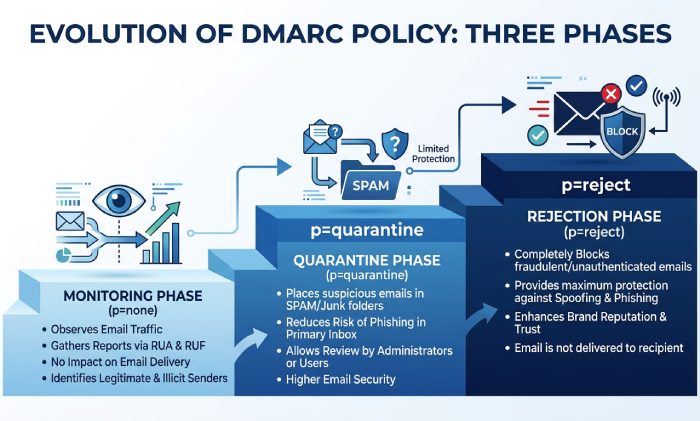
- p (policy): none, quarantine, or reject emails. Move from none to quarantine to reject emails as confidence grows. This is your dmarc policy.
- t (testing): Enables testing modes and reduced impact during the setup process.
- adkim and aspf: Control relaxed vs strict alignment for domainkeys identified mail and sender policy framework.
- rua and ruf: Aggregate (rua) and forensic (ruf) report URIs. Aggregate reports help you see which IP address ranges are sending on behalf of a domain; forensic data can include redacted samples.
Implementation and operations
- Setup process: Publish an initial dmarc record with p=none and rua pointing to a parser (Valimail, in-house SIEM, or another tool). Use Ctrl+F or Command+F on reports to find unknown IP address sources and fix gaps in your spf record or dkim record.
- Policy enforcement: Once most legitimate mail servers pass authentication and align, raise p to quarantine, then to reject emails. This directly curbs impersonation and Business Email Compromise by preventing unauthenticated messages from reaching recipients.
Governance: A domain administrator or Email administrator should own ongoing configuration, including DNS settings at your DNS provider (Cloudflare or others), vendor onboarding, and key rotation. Consider an Email Security DNS Wizard to streamline records during configuration.
Topics
General Manager
General Manager of DuoCircle. Product strategy and commercial lead for AutoSPF's 2,000+ customer base.
LinkedIn Profile →