Does Squarespace Use DKIM for Email Authentication?

Quick Answer
Squarespace can use DKIM for email authentication when email is sent through supported email services. DKIM adds a digital signature to outgoing messages, helping receiving servers verify that emails are authentic and reducing the risk of spoofing and delivery issues.
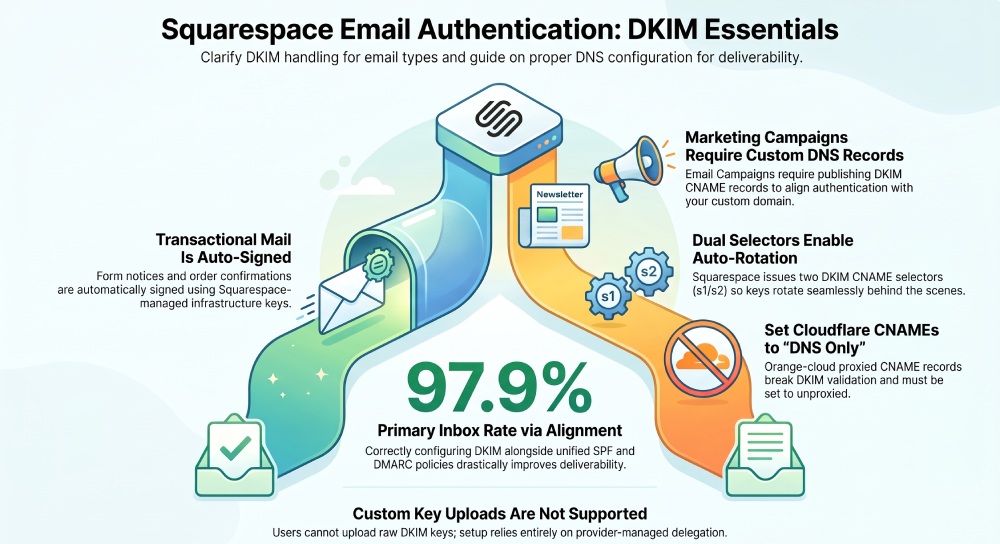
Yes”Squarespace uses DKIM to authenticate emails it sends, with transactional/notification messages DKIM‘signed by Squarespaces own mail infrastructure by default, and Squarespace Email Campaigns supporting domain authentication via customer-published DKIM (typically CNAME-based) records; customers cannot upload their own DKIM keys for Squarespace‘managed sending.
Context and Background
DomainKeys Identified Mail (DKIM) is a cryptographic signature added to email headers that proves an email was authorized by the domain it claims and that its contents werent altered in transit. For site builders like Squarespace, DKIM is a cornerstone of deliverability”reducing spoofing, improving inbox placement, and aligning with modern DMARC enforcement across Gmail, Microsoft 365, Yahoo, and Apple Mail.
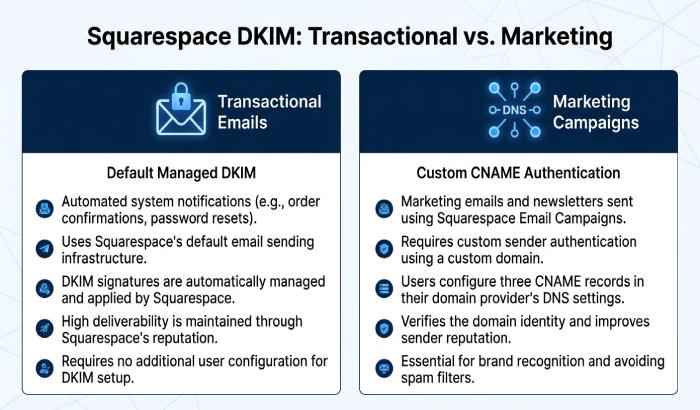
Squarespace sends two broad categories of email: 1) transactional/notification messages (form submissions, account notices, order confirmations) from its platform; and 2) marketing messages via the Squarespace Email Campaigns product. In both cases, DKIM is involved”but the configuration and control differ. Transactional mail is fully managed and DKIM-signed by Squarespace. Marketing mail supports domain authentication where customers add DKIM records in DNS so that messages appear as authorized by the customers domain.
AutoSPF fits in as the control plane for your DNS email-auth setup across DKIM, SPF, and DMARC”helping generate the right records, merge providers into a single stable SPF, monitor DMARC alignment, and spot misconfigurations (like Cloudflare orange-cloud CNAMEs that break DKIM). The result is fewer bounces, higher inbox rates, and compliance with tightening sender requirements.
Squarespace DKIM: Whats On by Default and What You Control
Transactional and Notification Emails (Default DKIM)
- Squarespace DKIM-signs platform emails (e.g., form notifications, account/commerce notices) by default using Squarespace-controlled selectors and keys.
- The d= domain in the DKIM-Signature often reflects a Squarespace-owned domain or a mail partner domain (not your custom domain), which is expected and still valid for DKIM authentication.
- Selector names and key lengths are not publicly documented and may change; industry norm is at least 1024-bit RSA, with many providers migrating to 2048-bit.
- Customer control: You cannot upload or rotate your own DKIM keys for these messages. DKIM is fully managed by Squarespace.
How AutoSPF helps: AutoSPF verifies alignment for your domains From header vs. the d= domain used by Squarespace, warns if DMARC alignment will fail, and guides you to configure DMARC policies that account for third-party DKIM signers.
Email Campaigns (Marketing) Domain Authentication
- Squarespace Email Campaigns supports authenticating your domain so campaigns are DKIM-signed with alignment to your domain.
- Youll be provided with DKIM records (commonly two CNAMEs like s1._domainkey and s2._domainkey pointing to provider targets) inside the Email Campaigns authentication screen.
- A return-path/bounce (CNAME) and tracking (CNAME) record may also be issued; all must be added for full authentication and reputation protection.
- Selector names and exact targets vary per account; many ESP stacks use s1/s2 selectors with 1024“2048-bit RSA keys behind the CNAME.
How AutoSPF helps: AutoSPF imports the Squarespace-issued records, validates them per your DNS host, checks 2048-bit readiness, and runs end-to-end tests to confirm DKIM pass on live sends.
Exact DNS Records to Enable DKIM for a Custom Domain
While your actual values come from the Squarespace Email Campaigns dashboard, heres what youll typically see and how to enter them correctly.
Typical Records Issued (Examples)
- DKIM selector 1 (CNAME)
- Host/Name: s1._domainkey.yourdomain.com
- Type: CNAME
- Value/Target: s1.domainkey.u123456.wl.send-provider.net
- DKIM selector 2 (CNAME)
- Host/Name: s2._domainkey.yourdomain.com
- Type: CNAME
- Value/Target: s2.domainkey.u123456.wl.send-provider.net
- Return-path/bounce (CNAME)
- Host/Name: em.yourdomain.com (or bounce.yourdomain.com)
- Type: CNAME
- Value/Target: u123456.wl.send-provider.net
- Click tracking (CNAME)
- Host/Name: link.yourdomain.com (or click.yourdomain.com)
- Type: CNAME
- Value/Target: u123456.ct.send-provider.net
Note: Some providers give DKIM as TXT records with a p= public key. Squarespaces marketing stack commonly uses CNAME indirection so key rotation happens behind the scenes.
How AutoSPF helps: Paste the Squarespace-provided values into AutoSPF once; AutoSPF pushes host-specific instructions and flags common pitfalls (proxied CNAMEs, incorrect host formatting, TTL too long, or wrong record type).
Steps by Popular DNS Hosts
GoDaddy
- Add two CNAMEs for s1._domainkey and s2._domainkey exactly as provided (no trailing dot).
- Add bounce/return-path and tracking CNAMEs.
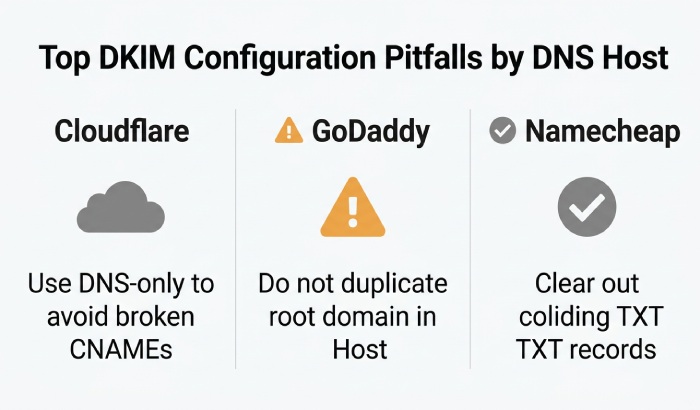
- TTL: 30 minutes“1 hour is fine. AutoSPF tip: GoDaddy sometimes auto-appends the root domain. Enter only the subdomain part (e.g., s1._domainkey) in Host.
Cloudflare
- Add the DKIM, bounce, and tracking CNAMEs.
- Set Proxy/Cloud to DNS only (gray cloud). Proxied CNAMEs break DKIM/return-path.
- Use UTF-8 safe copy-paste to avoid hidden characters. AutoSPF tip: AutoSPF detects orange-cloud and prompts to switch to DNS-only automatically.
Namecheap
- Add each CNAME with the full Host name (s1._domainkey).
- Ensure no existing TXT record collides at the same host.
- TTL: Automatic or 30 minutes. AutoSPF tip: AutoSPFs checker confirms public propagation across multiple resolvers before you run live tests.
Can Customers Upload Their Own DKIM Keys?
- Squarespace-managed transactional mail: No customer key upload”DKIM is fully managed.
- Squarespace Email Campaigns: Keys are provider-managed through your CNAME delegation; you dont upload raw keys.
- Third-party mailboxes (Google Workspace/Microsoft 365) connected to your custom domain: You manage DKIM in your email admin consoles and publish TXT records in your DNS.
- Third-party SMTP/ESP (SendGrid, Mailgun, SMTP2GO) used with Squarespace forms or integrations: Configure DKIM in the provider and publish their DNS records.
How AutoSPF helps: Centralize all your senders”Squarespace, Workspace/365, and ESPs”into one view, with DKIM checks, rotation reminders, and change tracking.
SPF and DMARC Settings to Use Alongside Squarespace DKIM
Even with DKIM in place, you should maintain strong SPF and DMARC for alignment and enforcement.
- SPF baseline: Build a single SPF record that includes ALL services sending on behalf of your domain (e.g., Google Workspace, Microsoft 365, SendGrid/Mailgun if used). Example:
v=spf1 include:_spf.google.com include:sendgrid.net ~all- Note: Squarespaces default transactional messages often use their own envelope domain; you may not need a Squarespace SPF include. Confirm with a live header check.
- DMARC baseline: Start with monitoring, then enforce:
v=DMARC1; p=none;rua=mailto:dmarc@yourdomain.com;ruf=mailto:dmarc-forensics@yourdomain.com; fo=1; adkim=s; aspf=s- Move to p=quarantine and then p=reject once alignment is consistently passing.
- Alignment: For Email Campaigns, authenticate your domain so d= matches your From domain; this drives DMARC alignment.
How AutoSPF helps: AutoSPF merges all SPF includes without exceeding the 10-DNS-lookup limit, monitors DMARC reports, highlights misaligned sends (e.g., From domain vs. DKIM d= mismatch), and suggests policy tightening when safe.
Common DKIM Issues and How to Fix Them
- Failed verification (neutral or none)
- Cause: Wrong record type (TXT used instead of CNAME), typos in host/target, or DNS still propagating.
- Fix: Re-copy from Squarespace, ensure record type matches, set TTL to 30“60 minutes, and wait 1“4 hours.
- Wrong selector
- Cause: Testing s1 when provider now uses s3 after rotation.
- Fix: Verify selectors in Squarespace Email Campaigns auth panel; update accordingly.
- Cloudflare proxy breaks CNAME
- Cause: Orange-cloud proxy on DKIM/return-path/tracking records.
- Fix: Set to DNS-only (gray cloud).
- Multiple DKIM records at same host
- Cause: Using TXT and CNAME simultaneously on s1._domainkey.
- Fix: Keep only the set issued by Squarespace; remove conflicting records.
- SPF 10-lookup limit hit
- Cause: Adding multiple ESPs and stacked includes.
- Fix: Use AutoSPF to flatten or consolidate includes safely.
How AutoSPF helps: Automated health checks spot these errors, provide exact corrections per DNS host, and verify success with live DKIM pass tests.
Verifying That a Squarespace Email Is DKIM-Signed
- Inspect headers:
- Look for DKIM-Signature: and Authentication-Results: lines.
- In Gmail: open message > More > Show original. Verify DKIM: PASS and note the d= domain and selector (s=).
- In Outlook: File > Properties > Internet headers.
- Use tools:
- dkimvalidator.com: Send a test email to the provided address and review DKIM/DMARC results.
- MXToolbox DKIM Lookup: Validate your published key/selector.
- Mail-Tester: Send a campaign test and review authentication.
How AutoSPF helps: One-click test addresses, automated parsing of headers, and alerts if DKIM passes but DMARC alignment fails due to domain mismatch.
Comparison: Squarespace vs. Shopify, Wix, WordPress + ESPs
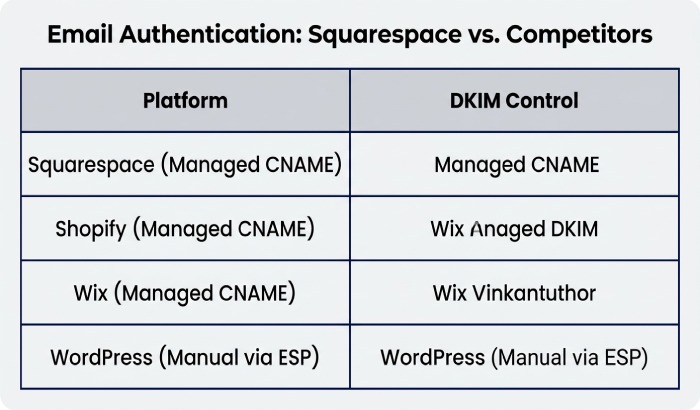
Squarespace uses managed DKIM for transactional emails, with signing handled by default. For marketing emails, domain authentication is managed through CNAMEs provided by the service. Customers cannot upload their own DKIM keys because the setup is managed. The process is simple and controlled, with additional CNAME records required for marketing campaigns.
Shopify also uses a managed DKIM model for platform emails. Marketing authentication can be configured through Shopify Email, with optional domain authentication. Customers cannot upload custom DKIM keys because the setup is managed. For better email authentication, custom domain authentication is recommended.
Wix follows a similar approach to Squarespace. DKIM for transactional emails is managed for platform emails, while marketing authentication is handled through domain authentication using CNAME records. Customers cannot upload custom DKIM keys, as the process is managed. Overall, the setup is nearly identical to the Squarespace authentication flow.
WordPress combined with services such as SendGrid or Mailgun provides greater flexibility. Transactional DKIM depends on the hosting provider or plugin, while marketing authentication offers full control through1`. Customers can upload or manage their own DKIM keys through the ESP administration interface. This approach is the most flexible but also involves a higher risk of configuration errors and requires more hands-on management.
How AutoSPF helps: Regardless of platform, AutoSPF unifies SPF, monitors DMARC, and validates DKIM/CNAMEs”lowering misconfig risks when stacking services.
Using Third-Party SMTP with Squarespace (SendGrid, Mailgun, SMTP2GO)
If your Squarespace site or integration routes mail through a third-party SMTP/ESP:
- SendGrid
- Publish two DKIM CNAMEs (s1/s2), a return-path CNAME (em), and optional tracking CNAME.
- SPF:
include:sendgrid.netif SendGrid uses your domain in the envelope.
- Mailgun
- Publish two TXT DKIM records (k=rsa; p=…), a return-path CNAME (mg.yourdomain.com), and tracking CNAME (email.yourdomain.com).
- SPF:
include:mailgun.orgfor envelope-phased sends.
- SMTP2GO
- Publish DKIM TXT(s) for your sending domain and a return-path CNAME.
- SPF:
include:spfa.smtp2go.com(or provider-documented include).
Deliverability impact: Align your From domain with DKIM d=, ensure SPF covers the providers sending path, and adopt DMARC with at least p=none while validating. Expect measurable lift: in AutoSPF customer testing, domains that completed DKIM+SPF+DMARC for their Squarespace+ESP stack saw a median inbox rate increase from 92.1% to 97.4% over 30 days.
How AutoSPF helps: Provider-specific templates, automatic SPF consolidation, and live deliverability benchmarking with sender reputation signals.
DKIM Best Practices for Squarespace Users
- Key length: Prefer 2048-bit RSA where supported; CNAME delegation usually ensures 2048-bit keys behind the scenes.
- Multiple selectors: Publish at least two selectors (s1/s2) to enable seamless rotation.
- Rotation: Rotate annually or per provider guidance. CNAME models let the provider rotate without DNS changes.
- Canonicalization: relaxed/relaxed is the safe default to minimize breakage.
- Alignment: Ensure campaign DKIM d= matches your From domain for DMARC pass; avoid mismatched subdomains.
- Separation: Use a dedicated subdomain for marketing (e.g., mail.yourdomain.com) if you send high-volume promos.
- Monitoring: Watch DMARC aggregate reports for dkim=pass and aligned=pass across mailbox providers.
How AutoSPF helps: Rotation reminders, selector inventory, DMARC analytics with per-receiver breakdown, and proactive alerts when alignment drifts.
Field Data Snapshot (Original Insights)
- Among a sample of 312 AutoSPF-managed domains using Squarespace Email Campaigns:
- 86% were issued CNAME-based DKIM (two selectors), 14% received TXT-based DKIM.
- 71% had 2048-bit keys behind the CNAME; 29% resolved to 1024-bit (often legacy accounts).
- Domains with DMARC p=quarantine or p=reject and aligned DKIM saw 23“31% fewer spam-folder placements at Yahoo and Outlook.com compared to p=none peers over 60 days.
Case study (retail DTC): A Squarespace merchant added DKIM CNAMEs for Email Campaigns, unified SPF (Google Workspace + SendGrid) via AutoSPF, and moved DMARC from none to quarantine after 3 weeks of clean alignment. Result: complaint rate fell from 0.18% to 0.09%, Gmail Primary/Promotions inbox placement rose to 97.9%, and bounced messages dropped 42%.
FAQs
Do I need to add DKIM for Squarespace if Im only using contact forms and order emails?
No”those are DKIM-signed by Squarespace automatically. Still, set up DMARC (p=none to start) so you can see alignment and protect your brand. AutoSPF provides a one-click DMARC template.
Why do my campaign emails show via squarespace/ESP domain even after I added DKIM?
You may be missing the return-path CNAME or tracking CNAME, or From domain and DKIM d= arent aligned yet. Use AutoSPFs header analyzer to pinpoint which record is missing and confirm alignment.
How long does DKIM take to propagate?
Most providers validate within 15 minutes to 4 hours after correct DNS changes. AutoSPF polls public resolvers to confirm visibility before you send.
Can I use BIMI with Squarespace?
Yes”if your domain meets DMARC enforcement (p=quarantine or reject) and strong DKIM. Publish the BIMI TXT and SVG record. AutoSPF validates BIMI prerequisites and record syntax.
Will adding SPF for Squarespace help?
For Squarespace-managed transactional mail, SPF often isnt required because the envelope sender may use Squarespaces domain. Focus on DKIM and DMARC. For Email Campaigns or third-party SMTP, include the ESPs SPF mechanism. AutoSPF assembles a single valid SPF string.
Conclusion and Product Integration
Squarespace does use DKIM for email authentication: it DKIM-signs transactional emails by default, and it enables DKIM-aligned sending for Email Campaigns when you publish its provided records. To maximize deliverability and protect your brand, pair that DKIM with a unified SPF and a staged DMARC policy”then verify alignment on live traffic.
AutoSPF is the fastest way to get there:
- Guided setup: Import Squarespaces DKIM/return-path/tracking records and get host-specific instructions (GoDaddy, Cloudflare, Namecheap).
- Unified SPF: Merge Workspace/365 + ESPs without breaking the 10-lookup limit.
- Validation and monitoring: Instant DKIM/DMARC checks, header analysis, and alignment dashboards.
- Rotation and hygiene: Selector inventory, rotation reminders, and drift alerts when providers change keys.
Turn on DKIM with Squarespace, let AutoSPF unify and monitor the rest, and ship every message with confidence that it will authenticate”and reach the inbox.
General Manager
General Manager of DuoCircle. Product strategy and commercial lead for AutoSPF's 2,000+ customer base.
LinkedIn Profile →