How To Configure A Barracuda SPF Record For Email Protection

Quick Answer
A Barracuda SPF record helps verify authorized mail servers, reducing spoofing and phishing attempts. Configure it by adding the correct SPF TXT record to your DNS, validating the syntax, and testing the record to improve email authentication and deliverability.
An SPF record is a DNS-based control that tells receiving systems which hosts are allowed to send email for a domain. SPF stands for Sender Policy Framework, and it is one of the core standards used in email authentication alongside DKIM and DMARC. When a receiving mail server performs an SPF check, it compares the apparent sending source against the authorized sources listed in the senders SPF DNS record.
For organizations using Barracuda Networks and Email Gateway Defense, the SPF record helps protect the brand and the mail domain from spoofing, phishing, and unauthorized outbound email. If a malicious actor attempts to send messages that appear to come from your domain, the receiving mail server can use the Sender Policy Framework result to determine whether that sending mail server is legitimate.
In practical terms, the SPF record setup answers a simple question: Which authorized sending mail service can send mail for this domain? That may include Email Gateway Defense, Microsoft 365, an on-premises mail server, or a trusted mail relay. If you’re starting fresh, our guide on how to create an SPF record covers the basics. The correct configuration is especially important when Barracuda handles outbound mail, because the receiving side must recognize Barracudas IP ranges as approved sources.
A typical Barracuda SPF INCLUDE line uses:
include:spf.ess.barracudanetworks.com
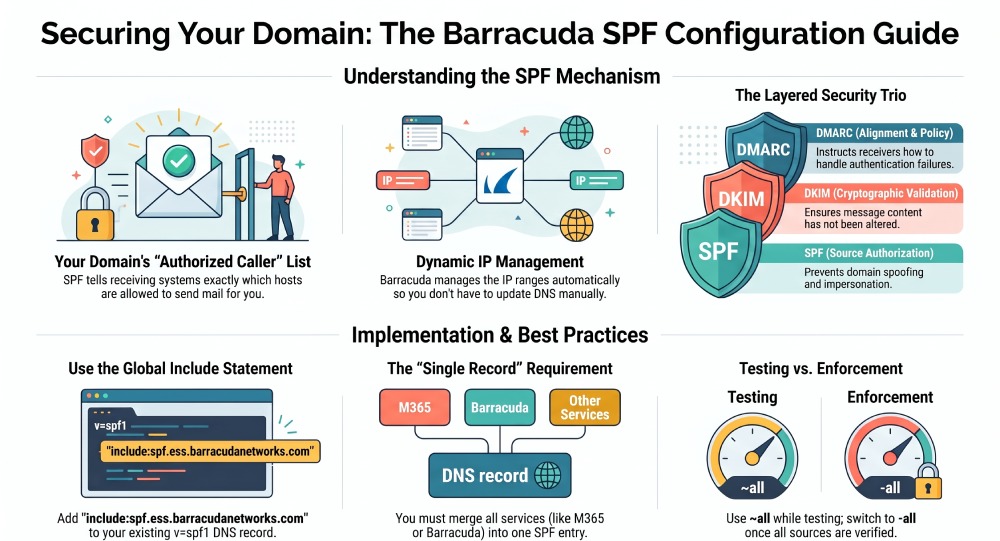
This include statement tells receiving systems to reference Barracudas maintained IP ranges rather than forcing administrators to manually track every sending mail server used by Barracuda Networks. Using include:spf.ess.barracudanetworks.com is cleaner, safer, and easier to maintain than hard-coding static IP ranges into your SPF record.
The Sender Policy Framework does not encrypt mail or inspect attachments; that is handled by other layers of email security, such as spam filtering, malware scanning, email filtering, and policy enforcement. However, SPF provides essential sender verification for authenticating outbound emails, improving email deliverability and reducing impersonation risk.
How Barracuda Uses SPF to Help Prevent Spoofing and Phishing
Barracuda Networks uses SPF as part of a layered email security model in Email Gateway Defense. When your organization routes outbound mail through Barracuda, messages leave through Barracuda-controlled infrastructure. Your SPF record must therefore authorize the correct Barracuda mail service so recipient systems do not reject legitimate outbound email.
For most deployments, the global SPF INCLUDE line is:
include:spf.ess.*barracudanetworks.com*
This line authorizes the appropriate IP ranges behind spf.ess.barracudanetworks.com. Because Barracuda Networks manages those IP ranges, administrators do not need to update the SPF configuration every time Barracuda changes a sending mail server. This is a major advantage for ongoing configuration stability.
SPF also supports broader protection against phishing. If a criminal tries to impersonate your domain from an unauthorized sending mail server, the receivers SPF check should fail. When combined with DKIM signing and a properly enforced DMARC policy, the Sender Policy Framework becomes part of a stronger sender authentication strategy.
Organizations should also understand that SPF only evaluates the envelope sender, not every visible address in a message. This is why DKIM, DMARC, Barracuda logs and reports, and ongoing troubleshooting remain important. A strong email security deployment uses SPF for source authorization, DKIM for cryptographic validation, and DMARC for alignment and policy control.
Prerequisites Before Creating a Barracuda SPF Record
Before editing DNS, confirm how Email Gateway Defense is deployed for your domain. Review your MX records, your inbound filtering policy, and your outbound filtering policy. MX records affect inbound routing, while the SPF record controls which systems are allowed to send outbound mail for the domain.
You should also complete domain verification in the Barracuda portal and check the sender authentication page for the relevant configuration details. If you manage multiple domains, the managing domains workflow is important because each domain may require its own SPF DNS record. Where you send from subdomains, our guide to subdomain SPF records covers the extra configuration.
Common prerequisites include:
- Access to the public DNS zone for the domain
- A list of every authorized sending mail service
- Confirmation that Email Gateway Defense is handling outbound email
- Knowledge of your Barracuda servicing region
- Awareness of other sending platforms such as Microsoft 365, Amazon SES, AppRiver, AuthSMTP, Active Campaign, Act-On Marketing, ADP, Adobe Business Catalyst, Autotask, Actionstep, Affinitiv, Aruba.it, AOL Mail, aluminati.org, Alaska-edu, ACIHQ, or other third-party services
- Access to Barracuda Support, user guides, product documentation, and technical support for validation
Barracuda documentation is commonly found through resources associated with barracudanetworks.com, Campus Product Documentation, and support materials maintained by teams such as the Campus Product Documentation team. Some organizations also track vendor references in systems like Atlassian, or review an API overview, online service terms, and partnership accounts documentation during a larger deployment.
FAQs
What SPF record should I use for Barracuda Email Gateway Defense?
For many United States or global deployments, use v=spf1 include:spf.ess.*barracudanetworks.com* -all. If your Email Gateway Defense account is assigned to a regional instance, use the region-specific SPF INCLUDE line provided by Barracuda Networks.
Can I have more than one SPF record for the same domain?
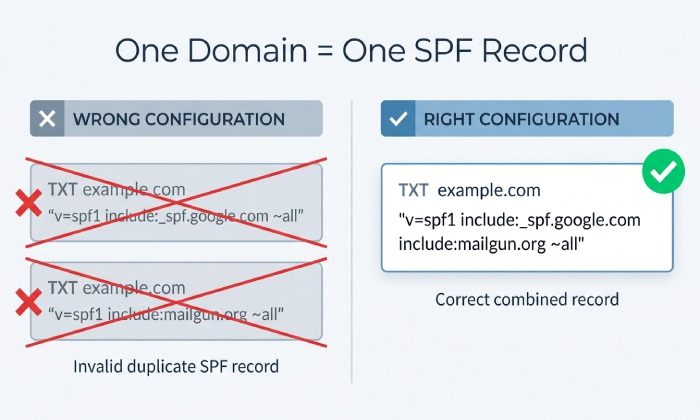
No. A domain should have only one SPF record beginning with v=spf1. If you use multiple services such as Microsoft 365, Barracuda Networks, and Amazon SES, combine all required include mechanisms into a single SPF DNS record. You can build that combined record with our free SPF record generator.
How do I know whether my Barracuda SPF configuration is working?
Run an SPF test with tools such as MXToolbox, then send outbound email and inspect the message headers. A successful result should show SPF pass for the sending mail server authorized by the Barracuda Networks SPF record.
Should I use -all or ~all in my SPF record?
Use ~all during initial testing if you are still confirming all authorized mail sources. Once your configuration is complete and validated, -all provides stronger protection by instructing receivers to reject mail from unauthorized sources.
Does SPF replace DKIM and DMARC?
No. SPF, DKIM, and DMARC work together as complementary email authentication controls. SPF validates the sending mail server, DKIM validates message integrity, and DMARC enforces alignment and policy handling.
Why did SPF fail even though I added the Barracuda include statement?
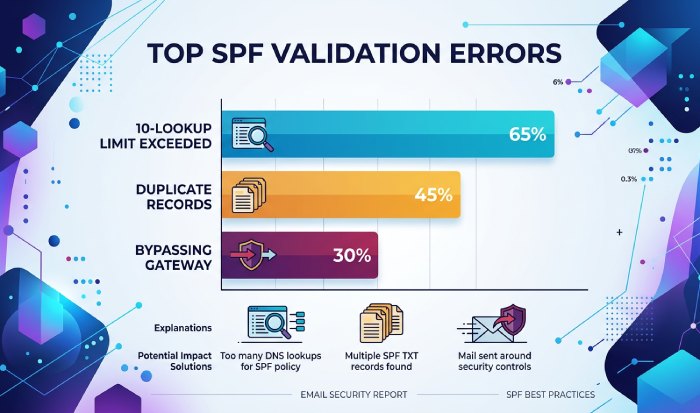
SPF can fail if DNS has duplicate SPF records, the wrong regional instance is used, the 10-DNS-lookup limit is exceeded, or outbound mail is bypassing Email Gateway Defense. Check DNS, Barracuda logs and reports, and the message headers for the exact failure reason.
Key Takeaways
- Use the correct Barracuda Networks SPF INCLUDE line for your Email Gateway Defense region.
- Publish only one SPF record per domain and merge all authorized sending services into it.
- Test with SPF tools such as MXToolbox and verify real outbound email headers.
- Combine SPF with DKIM and DMARC for stronger sender authentication and email security.
- Review SPF configuration regularly as mail services, IP ranges, and business systems change.
General Manager
General Manager of DuoCircle. Product strategy and commercial lead for AutoSPF's 2,000+ customer base.
LinkedIn Profile →