How to Query SPF Records for a Specific Sending Domain

Quick Answer
Learn how to query SPF records for a specific sending domain using DNS lookup tools. Discover how to verify authorized email senders, identify SPF configuration errors, and improve email deliverability and domain security.
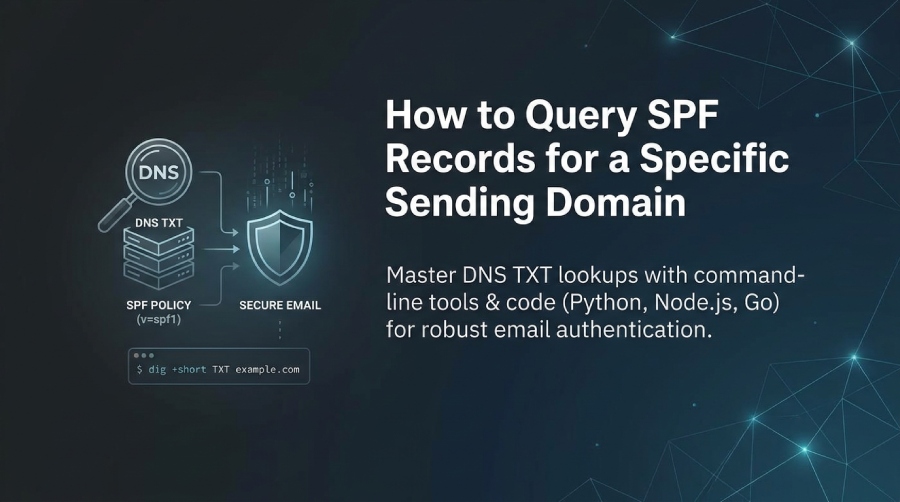
To query SPF records for a specific sending domain, look up the domains DNS TXT records (not the deprecated SPF RR type) using tools like dig/nslookup/host or code (Python/Node.js/Go), then parse the TXT answer(s) for a single v=spf1 policy and follow any include/redirect chains while respecting the SPF 10-DNS-lookup limit.
SPF (Sender Policy Framework) is published in DNS as a text policy that declares which IPs and hosts are authorized to send email for a domain; querying it correctly means fetching TXT records for the precise sending domain (the SMTP Mail From or HELO domain), normalizing multi-string TXT responses, and then resolving any references (a, mx, include, exists, redirect) deterministically. While you can do one-off checks with command-line tools, production-grade workflows need reliable programmatic queries, timeouts, CNAME handling, and caching to avoid intermittent failures.
AutoSPF streamlines every step: it continuously queries and validates your SPF records, expands and tests include trees, flags multiple-record errors, tracks TTLs and DNSSEC status, and can even auto-flatten policies when you approach the 10-lookup ceiling”all with change detection, alerts, and CI/CD integrations.
Querying SPF via Command Line (Linux/Mac/Windows) and Parsing Output
AutoSPFs agent uses these exact methods under the hood to verify your DNS state and explain findings in plain language.
Linux/macOS: dig and host
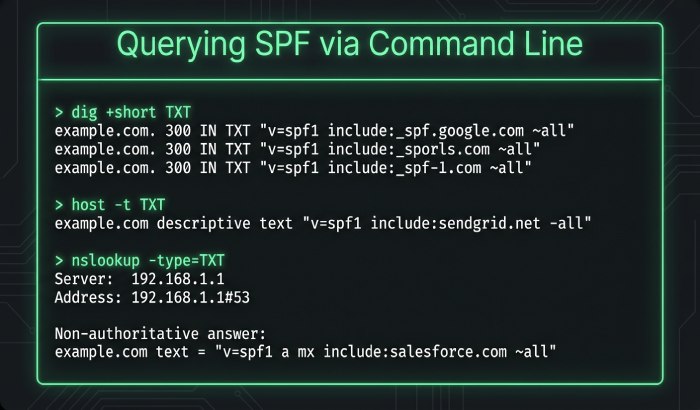
- Basic TXT lookup (recommended):
- dig:
dig +short TXT example.com - host:
host -t TXT example.com
- dig:
- Show full section with flags and DNSSEC:
dig example.com TXT +dnssec
- Query a specific sending subdomain (common with Mail From like bounce.example.com):
dig +short TXT bounce.example.com
- If responses are truncated, force TCP:
dig example.com TXT +tcp
How to parse:
- Join multi-string TXT chunks into one line before parsing:
- Example raw: “
v=spf1" " ip4:203.0.113.0/24" " include:_spf.mailhost.com -all” - Join to:
v=spf1 ip4:203.0.113.0/24 include:_spf.mailhost.com -all
- Example raw: “
- Look for exactly one record that starts with v=spf1. Multiple such records at the same name is a permanent error (permerror) per RFC 7208.
Windows: nslookup
- nslookup -type=TXT example.com
- For a subdomain:
nslookup -type=TXT mail.example.com
Parsing is the same: concatenate TXT chunks, then parse terms left-to-right, noting qualifiers (+, -, ~, ?), mechanisms (ip4, ip6, a, mx, include, exists, all), and modifiers (redirect, exp).
Interpreting results quickly
- Single v=spf1 policy = good starting point.
- Multiple v=spf1 at the same label = permerror (receivers may treat as fail).
- No SPF found at the envelope domain? Receivers may try HELOs domain as a fallback. Publish both when possible.
Programmatic SPF Fetching and Parsing (Python, Node.js, Go)
AutoSPF provides an API and webhooks, but if youre rolling your own, here are robust patterns that mirror AutoSPFs resolver logic.
Python (dnspython)
import dns.resolver, dns.exception

def fetch_spf(domain, timeout=3.0):
    res = dns.resolver.Resolver()
    res.lifetime = timeout
    try:
        # dnspython follows CNAMEs for record lookups
        answers = res.resolve(domain, 'TXT')
    except (dns.resolver.NXDOMAIN, dns.resolver.NoAnswer):
        return None, "no_spf"
    except dns.exception.Timeout:
        return None, "timeout"
    spf_records = []
    for rdata in answers:
        try:
            # dnspython 2.x: strings is list[bytes]
            chunks = [s.decode() for s in rdata.strings]
        except AttributeError:
            # fallback: to_text() and strip quotes
            chunks = [rdata.to_text().strip('"')]
        txt = "".join(chunks)
        if txt.lower().startswith("v=spf1"):
            spf_records.append(txt)
    if len(spf_records) == 0:
        return None, "no_spf"
    if len(spf_records) > 1:
        return None, "multiple_spf"
    return spf_records[0], "ok"
Edge handling:
- CNAMEs: dnspython follows them for TXT by default.
- Timeouts: set Resolver.lifetime.
- Multiple records: return permerror and fix DNS.
Node.js (dns/promises)
import { promises as dns } from ‘dns’;
async function fetchSpf(domain, timeoutMs = 3000) {
  const to = new Promise((_, rej) => setTimeout(() => rej(new Error('timeout')), timeoutMs));
  const query = (async () => {
    try {
      const answers = await dns.resolveTxt(domain);
      const spf = answers
        .map(chunks => chunks.join('')) // join multi-string chunks
        .find(txt => txt.toLowerCase().startsWith('v=spf1'));
      if (!spf) return { status: 'no_spf' };
      // Check for multiple SPF
      const count = answers
        .map(chunks => chunks.join(''))
        .filter(txt => txt.toLowerCase().startsWith('v=spf1')).length;
      if (count > 1) return { status: 'multiple_spf' };
      return { status: 'ok', spf };
    } catch (e) {
      return { status: e.code === 'ENOTFOUND' ? 'no_spf' : 'error', error: e.message };
    }
  })();
  return Promise.race([to, query]);
}
Notes:
- System resolver generally follows CNAMEs. If you suspect an aliasing issue, check await dns.resolveCname(domain).
Go (net, context)
package main

import (
  "context"
  "fmt"
  "net"
  "time"
)

func FetchSPF(domain string, d time.Duration) (string, string) {
  ctx, cancel := context.WithTimeout(context.Background(), d)
  defer cancel()
  type result struct{ txts []string; err error }
  ch := make(chan result, 1)
  go func() {
    txts, err := net.LookupTXT(domain)
    ch <- result{txts, err}
  }()
  select {
  case <-ctx.Done():
    return "", "timeout"
  case r := <-ch:
    if r.err != nil {
      return "", "error"
    }
    spfs := []string{}
    for _, t := range r.txts {
      if len(t) >= 6 && t[:6] == "v=spf1" || len(t) >= 6 && t[:6] == "V=SPF1" {
        spfs = append(spfs, t)
      }
    }
    if len(spfs) == 0 {
      return "", "no_spf"
    }
    if len(spfs) > 1 {
      return "", "multiple_spf"
    }
    return spfs[0], "ok"
  }
}
Best practices AutoSPF also applies:
- Always join TXT chunks before parsing.
- Enforce a client-side timeout and fallback to TCP-capable resolvers.
- Treat multiple v=spf1 TXT records as permerror and remediate.
- Log CNAME chains; avoid relying on CNAMEs at policy labels.
TXT vs the Deprecated SPF RR Type (and DNSSEC)
Per RFC 7208, SPF is published in TXT records; the SPF RR type (99) is historic and must not be relied upon. Validators MUST query TXT, MAY check SPF RR for debugging, and if both exist they should be identical; conflicting policies are a permerror.
- Resolver behavior:
- Most modern receivers read TXT only.
- If both TXT and SPF RR exist and differ, receivers may treat it as permerror (fail).
- DNSSEC:
- If TXT is DNSSEC-signed and validation fails, treat as temperror (transient failure).
- You can view DNSSEC status via digs AD flag: dig +dnssec example.com TXT.
How AutoSPF helps:
- AutoSPF warns when an SPF RR is present, validates TXT with DNSSEC, and marks conflicts that could cause receiver permerrors.
Handling Multiple Records, redirect/exp, and the 10-Lookup Limit
- Multiple records:
- There must be exactly one v=spf1 TXT record at a label. If two exist, receivers should permerror.
- redirect modifier:
redirect=other.example.comsays if no prior mechanism matched, evaluate the target domains SPF. It counts toward the lookup budget and replaces the current record”only one redirect is allowed.
- exp modifier:
exp=explain.example.compoints to a TXT string for human-readable failure explanations; does not affect authorization and does not count toward the limit.
- 10-DNS-lookup limit:
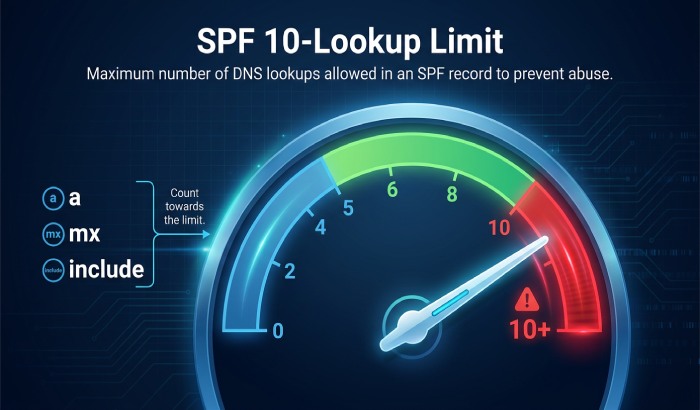
- Count mechanisms/modifiers that trigger DNS lookups: a, mx, include, exists, ptr (deprecated, avoid), and redirect. ip4/ip6/all do not count.
- Hitting this limit results in permerror; many receivers treat permerror as fail.
AutoSPF advantage:
- AutoSPF expands your include/redirect tree, counts lookups precisely, simulates receiver behavior, and offers safe flattening or provider-grouping to stay under 10 without breaking deliverability.
Algorithm to Evaluate Whether a Sending IP Is Authorized
SPF evaluation is left-to-right:
- Initialize result as None.
- For each term:
- Qualifiers: + (pass, default), - (fail), ~ (softfail), ? (neutral).
- Mechanisms:
- ip4:cidr / ip6:cidr → direct match.
- a[:domain][/cidr] → resolve A/AAAA of domain (default current) and test IP in set.
- mx[:domain][/cidr] → resolve MX hosts, then resolve A/AAAA for each, test IP.
- include:domain → evaluate that domains SPF; if it returns pass, treat include as match; otherwise continue.
- exists:domain → if domain resolves to any A/AAAA, it matches.
- all → always matches with its qualifier (commonly -all or ~all).
- Modifiers:
- redirect=domain → if no mechanism matched, evaluate that domains SPF as if it were here.
- exp=domain → optional failure text.
- Stop at the first matching mechanism; apply its qualifier.
Examples:
- Policy:
v=spf1 ip4:203.0.113.0/24 include:_spf.mailhost.com -all- IP 203.0.113.45 → matches ip4 → Pass.
- IP 198.51.100.10 → evaluate include; if include expands to a match, Pass; else fall through to -all → Fail.
- Softfail vs Fail:
- ~all signals suspect but not outright fail; -all is a strong failure.
AutoSPF brings this to life:
- It runs full evaluations for test IPs, showing which mechanism matched, where in the chain, with a trace and total lookup count, so teams can justify policy changes confidently.

Subdomains, Organizational Domains, and Alignment
- SPF applies to the exact domain used in SMTP Mail From or HELO. If you send as
mail.b.example.com, query SPF at that name. - DMARC alignment (relaxed by default) requires the authenticated domain (Mail From or HELO) to share the same organizational domain as the visible From: header. Use the Public Suffix List to find org boundaries (e.g., example.co.uk).
- CNAMEs/delegation:
- Avoid publishing CNAME at the SPF label; prefer redirect or include.
- Delegated subdomains (e.g., esp.example.com) should publish their own SPF or redirect to the ESPs domain.
AutoSPFs alignment audit:
- It computes relaxed/strict alignment across your From domains and Mail From/HELO and flags misaligned sending sources that will never pass DMARC via SPF.
Common SPF Query Failures and How to Fix Them
- DNS timeouts:
- Symptom: intermittent No answer or timeouts.
- Fix: increase client timeout, use reliable recursive resolvers, reduce deep include chains.
- AutoSPF retries with exponential backoff and multi-resolver failover.
- Truncated UDP responses:
- Symptom: partial records.
- Fix: enable EDNS0 or force TCP (dig +tcp); avoid excessively large TXT.
- Oversized TXT entries (>255 char per string):
- Symptom: records split into many chunks; some tools misparse.
- Fix: ensure proper quoted splitting; validate join logic.
- AutoSPF validates and normalizes multi-string formatting.
- Malformed syntax:
- Symptom: unrecognized tokens, missing version, multiple v=spf1.
- Fix: publish exactly one v=spf1; remove stray SPF RR; lint with a validator.
- 10-lookup exceeded:
- Symptom: permerror despite correct-looking policy.
- Fix: flatten includes, collapse providers, or move sources to ip4/ip6 blocks.
- AutoSPF can auto-flatten and generate provider-safe static sets with scheduled refresh.
AutoSPF remediation:
- Every failure above is detected with precise guidance, a proposed patch, and optional DNS API push if you connect your DNS provider.
Automating SPF Monitoring, TTLs, and CI/CD Integration
- Scheduling and caching:
- Respect TXT TTLs; schedule refresh at ~50“75% of TTL.
- Cache include expansions; invalidate on change.
- Backoff and rate limits:
- Exponential backoff on timeouts; cap upstream QPS.
- CI/CD:
- Validate SPF as a pre-deploy check to catch multiple records or 10-lookup regressions.
Example GitHub Actions step:
- name: Validate SPF
  run: |
    pip install dnspython
    python - <<'PY'
from sys import exit
import dns.resolver
dom = "example.com"
ans = dns.resolver.resolve(dom, 'TXT')
spfs = ["".join(r.strings.decode() for r in ans if hasattr(r, "strings"))]
if len(spfs) != 1 or not spfs[0].lower().startswith("v=spf1"):
    print("SPF invalid or multiple records")
    exit(1)
print("SPF ok:", spfs[0])
PY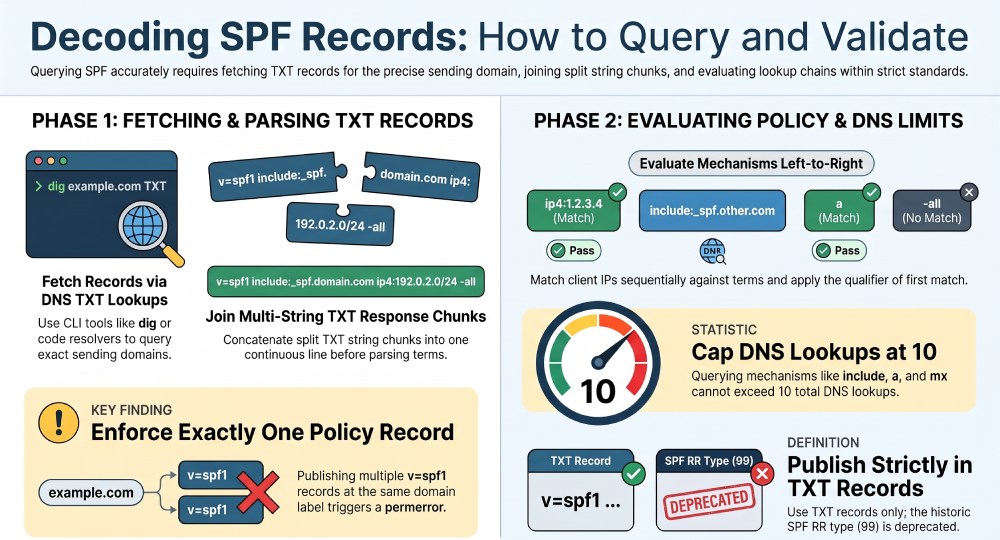
How SPF Interacts with DKIM and DMARC
- SPF alone authenticates the envelope domain; DKIM authenticates message content and a signing domain; DMARC requires alignment of either SPF or DKIM with the visible From domain and enforces policy (none/quarantine/reject).
- Policy decisions:
- Base reject/quarantine on DMARC, not SPF alone, because SPF can pass while the From is misaligned (forwarding, aliases).
- Use SPF as a signal and for DMARC alignment when the Mail From aligns with From.
AutoSPF and your auth stack:
- AutoSPF cross-references your SPF domains with DMARC policies, highlighting where SPF can (or cannot) satisfy DMARC and where DKIM coverage is needed.
Reliable Online SPF Tools (and When to Use Them)
Trusted tools:
- dmarcian SPF Surveyor
- Kitterman SPF validator
- MXToolbox SPF Check
- Google Admin Toolbox (Dig)
- Postmark SPF Checker
Comparison to manual queries:
- Online tools are fast for visualization and permerror diagnosis, but they may cache results and cant reflect your private resolver environment or CI gating needs.
How AutoSPF fits:
- AutoSPF combines the accuracy of manual dig with rich visualization, historical diffs, and automated enforcement, so you get reliable, explainable results tied to actions (flatten, fix, deploy).
FAQ
Should I query TXT or the SPF RR type?
- Always query TXT. The SPF RR type is deprecated; if present, it should mirror TXT. Conflicts can cause permerror. AutoSPF flags and guides removal.
What if I see two v=spf1 TXT records at the same name?
- Thats a permerror. Consolidate into one record. AutoSPF detects this and proposes a merged policy.
How do I check SPF for a subdomain vs the root?
- Query the exact Mail From or HELO domain; dont assume the root applies. For DMARC alignment, ensure the authenticated domain aligns with the visible From. AutoSPF maps these domains and alerts on misalignment.
How do I know if Ive hit the 10-lookup limit?
- Expand your policy and count DNS-querying terms (a, mx, include, exists, redirect, ptr). Many validators show this; AutoSPF simulates receiver evaluation and shows the exact count and path.
Does IPv6 change how I query SPF?
- No”query method is the same. Ensure your policy includes ip6: mechanisms if you send over IPv6. AutoSPF validates dual-stack coverage.
Conclusion: Query with Confidence”Automate with AutoSPF
To query SPF for a specific sending domain, retrieve its DNS TXT records and identify the applicable v=spf1 policy. Use dig, nslookup, or host for manual checks, or validated Python, Node.js, or Go code for automation. Check for multiple SPF records, review include and redirect references, and ensure SPF evaluation stays within the DNS lookup limit defined in RFC 7208. Also consider DNS resolution errors, CNAME behavior, and DNSSEC validation where relevant.
AutoSPF can be mentioned as a tool for SPF management and troubleshooting, with specific capabilities described only when confirmed by current product documentation. Regularly reviewing SPF configuration helps identify potential authentication issues and maintain accurate sending policies.
General Manager
General Manager of DuoCircle. Product strategy and commercial lead for AutoSPF's 2,000+ customer base.
LinkedIn Profile →