How to Set Up a SiteGround SPF Record: A Step-by-Step Guide

Quick Answer
Learn how to set up a SiteGround SPF record step by step. This guide explains how to create, add, and verify your SPF record to improve email authentication, prevent spoofing, and enhance email deliverability.

A SiteGround SPF record is a DNS-based email authentication rule that tells receiving mail systems which mail server is allowed to send outgoing mail for your domain. If you use SiteGround for business email, website notifications, or email marketing, you should configure SPF correctly so mailbox providers can verify SPF during mail delivery.
What an SPF Record Is and Why It Matters for SiteGround Email
What an SPF Record Is and Why It Matters for SiteGround Email
SPF stands for Sender Policy Framework, often written as sender policy framework in technical documentation. It is an authentication protocol published as a TXT record in your domain name system. The SPF record lists each authorized mail server, mail relay, or email provider that can send messages using your email domain.
A basic SPF value starts with the SPF syntax v=spf1, followed by one or more SPF mechanism entries, such as an include mechanism or an IP address, and ends with a policy such as ~all or -all. For example, a simplified SPF entry might look like:
v=spf1 include:_spf.mailspamprotection.com ~all
In many SiteGround environments, the recommended configuration for SiteGround-hosted mail uses a SiteGround-related include value, though you should always confirm the current SPF configuration in SiteGround Site Tools rather than copying an outdated example. You may also see people search for phrases like spf include siteground.com or spf1 include, but the correct SPF value depends on your active email service and DNS settings.
The purpose of an SPF record is server identification. When an email sender sends a message from your domain, the recipients mail server checks your DNS records to see whether the sending system is an authorized server. If the SPF check passes, the message is more likely to be trusted. If SPF validation fails, the recipient system may flag the message as suspicious, route it to spam, or reject unauthorized email.
For SiteGround users, this matters because email authentication directly affects email deliverability, email security, and brand trust. Whether you send invoices, contact form notifications, password resets, newsletters, or email marketing campaigns, a correct SPF record helps protect email from abuse and supports reliable mail delivery.
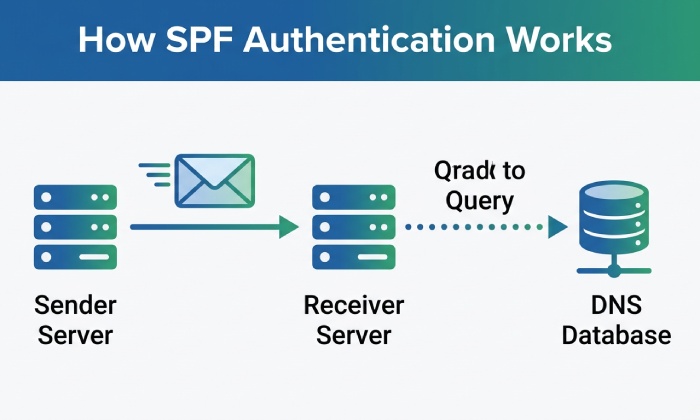
How SPF Helps Improve Email Deliverability and Prevent Spoofing
SPF helps improve email deliverability by giving receiving systems a clear way to confirm that your mail server is authorized to send for your domain. Mailbox providers such as Google and enterprise filters commonly evaluate SPF, DKIM, DMARC, and other email authentication signals before deciding where a message should land.
Without a valid SPF record, legitimate SiteGround email may look unauthenticated. That can damage email deliverability, especially for email marketing, transactional notifications, and setup email messages from your website. If your domain sends through multiple systems”such as SiteGround, Google Workspace, Stripe, Typeform, or a dedicated email provider”you need one SPF record that includes all authorized mail server sources.
SPF also helps prevent spoofing. Email spoofing occurs when a malicious email pretends to come from your domain even though it was sent from an unauthorized mail server. Sender Policy Framework does not stop every phishing attempt on its own, but it is an essential email security layer. Combined with DKIM and DMARC, SPF enforcement can help prevent spam, reduce forged sender abuse, and protect email reputation.
For example, if your email marketing tool sends campaigns on behalf of you@yourdomain.com, that email provider may instruct you to add SPF record authorization using an include mechanism. If you use SiteGround for normal mailbox hosting and another platform for email marketing, you must configure SPF so both services are covered in a single TXT record. Creating multiple SPF records is a common mistake; multiple SPF records can cause SPF validation failures because receiving systems expect only one SPF policy for a domain.
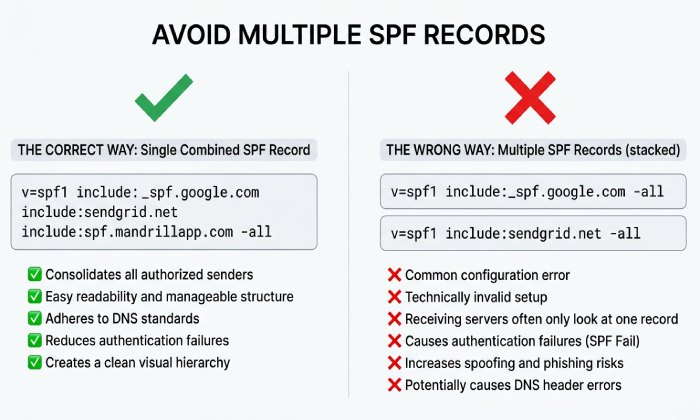
When You Need to Set Up or Update a SiteGround SPF Record
You should create SPF record settings when you first setup email for a domain in SiteGround, when you add domain mailboxes, or when you begin sending outgoing mail from a new email service. Our general guide to set up an SPF record covers the fundamentals. You should update DNS if you move your domain to SiteGround, change your domain registrar, switch DNS hosting to Cloudflare, migrate from another email provider, or add email marketing software.
You should also check SPF record details when:
- You see failed mail authentication warnings.
- Your email deliverability drops suddenly.
- Messages from your SiteGround mail server are landing in spam.
- You start using Google Workspace, Microsoft 365, or another email provider.
- You add a transactional mail relay for forms, receipts, or password resets.
- Your DNS manager shows old TXT record values from a previous host.
- You receive reports of email spoofing or malicious email using your domain.
If your DNS is hosted at SiteGround, you can usually manage the TXT record from the SiteGround control panel. If your nameservers point to Cloudflare, cloudflare.com becomes the active DNS manager, even if your website hosting is still with SiteGround. Likewise, if your domain registrar manages DNS, the SPF setup must be made there. The key rule is simple: configure SPF wherever the authoritative DNS settings for the domain are controlled.
Prerequisites: Domain Access, DNS Management, and Email Service Details Before you add SPF record values or update DNS, gather the right information. You need access to the domain, the active DNS manager, and the exact email service details for every system that sends on your behalf.
Start by confirming your domain and nameservers. The domain name system determines which DNS settings are authoritative. If the domain uses SiteGround nameservers, manage DNS in SiteGround. If it uses Cloudflare, edit the TXT record in Cloudflare. If a third-party domain registrar controls DNS, log in there. This prevents editing the wrong control panel and waiting through DNS propagation only to find that nothing changed publicly.
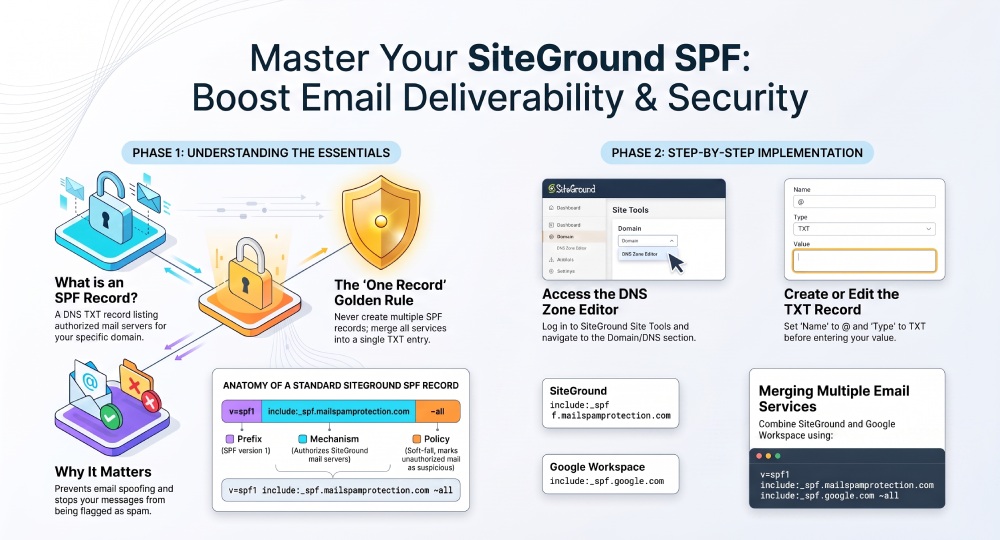
Step-by-Step: Adding or Editing an SPF TXT Record in SiteGround
To add SPF record support in SiteGround, first confirm where your DNS is hosted. If your domain uses SiteGround nameservers, update DNS inside SiteGround. If your domain registrar, Cloudflare, or another DNS manager controls the zone, you must update DNS there instead. Editing DNS settings in the wrong location will not affect authentication.
Follow this SPF setup guide:
- Log in to the SiteGround control panel and open the relevant website.
- Go to Site Tools.
- Navigate to Domain or DNS Zone Editor, depending on your interface.
- Choose the TXT record option as the record type.
- In the Name, Host, or Domain field, enter @ for the root domain, unless you are configuring SPF for a subdomain.
- In the Value field, paste your SPF value, such as:
v=spf1 include:_spf.mailspamprotection.com ~all - Save the TXT record.
- Allow DNS propagation to complete before testing.
If you already have an SPF record, do not create another one. Multiple SPF records for the same domain break SPF validation. Instead, edit the existing TXT record and merge all authorized mail server references into one SPF record. You can generate an SPF record that merges every sender for you.
For example, if you use SiteGround for standard mailbox delivery and Google Workspace for part of your email provider setup, a combined SPF record may look like this:
v=spf1 include:_spf.mailspamprotection.com include:_spf.*google*.com ~all
This single SPF record authorizes both SiteGround and Google as approved senders for the domain. The same logic applies if you later add domain-based email marketing platforms, a transactional mail server, or a mail relay.
General Manager
General Manager of DuoCircle. Product strategy and commercial lead for AutoSPF's 2,000+ customer base.
LinkedIn Profile →