How to Set Up SPF for a QQ Domain with QQ Mail: A Step-by-Step Guide

Quick Answer
Learn how to set up SPF for a QQ domain with QQ Mail using this step-by-step guide. Discover how to create, publish, and verify your SPF record to improve email authentication, reduce spoofing, and enhance email deliverability.
Understanding SPF and Why It Matters for a QQ Domain
Sender Policy Framework (SPF) is an email authentication standard that allows a domain owner to specify which mail servers are authorised to send messages on behalf of the domain. When a recipient receives an email, the receiving mail server can check the domain’s SPF record in DNS and compare the sending server against the authorised sources. New to the terminology? Our glossary of SPF terms defines the key mechanisms.
If you use QQ Mail to send email from your domain, configuring SPF correctly can help receiving mail systems identify legitimate messages and reduce the risk of unauthorised sources sending mail that appears to come from your domain.
SPF is particularly important when QQ Mail is used alongside other email services. For example, if your domain also sends messages through a marketing platform, CRM, help desk, or transactional email provider, those services may also need to be included in the same SPF record.
How SPF protects QQ Mail delivery
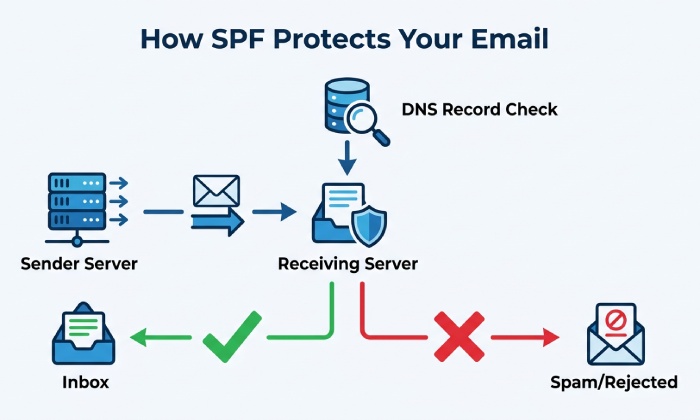
When you send email through QQ Mail using your domain, the recipient’s mail server can check your domain’s SPF record in DNS. The server then evaluates whether the sending source is authorised by the published SPF policy.
A correctly configured SPF record helps receiving mail systems distinguish authorised email sources from unauthorised servers attempting to send messages using your domain. This can reduce the risk of domain spoofing and help prevent legitimate messages from failing SPF authentication.
If your domain uses QQ Mail together with other email platforms, those authorised senders should be included in the same SPF record. Maintaining a single, accurate SPF policy is important for reliable email authentication.
Prerequisites: Accessing QQ Mail and Your Domains DNS Settings
Before creating an SPF record, make sure you have access to both QQ Mail and your DNS hosting provider. This may be your domain registrar, cloud DNS platform, website host, or enterprise DNS administrator.
You will need:
- Administrator access to your QQ domain DNS zone
- Access to your QQ Mail or Tencent enterprise mail settings
- The ability to create or edit TXT records
- Knowledge of any other mail providers sending email for the same domain
- A way to test DNS propagation after publishing the record
Before creating an SPF record for a domain using QQ Mail, make sure you have:
- Access to your domain’s DNS management panel
- Access to your QQ Mail or Tencent enterprise mail settings
- Permission to create or edit TXT records
- A list of all services authorised to send email for your domain
- An SPF checker for validating the published record
Confirm whether QQ Mail is your only sender
If QQ Mail is the only service sending email for your domain, your SPF record can be relatively simple. If your domain also sends email through a CRM, marketing platform, help desk, ecommerce system, or transactional email provider, all authorised sending sources should be included in the same SPF record.
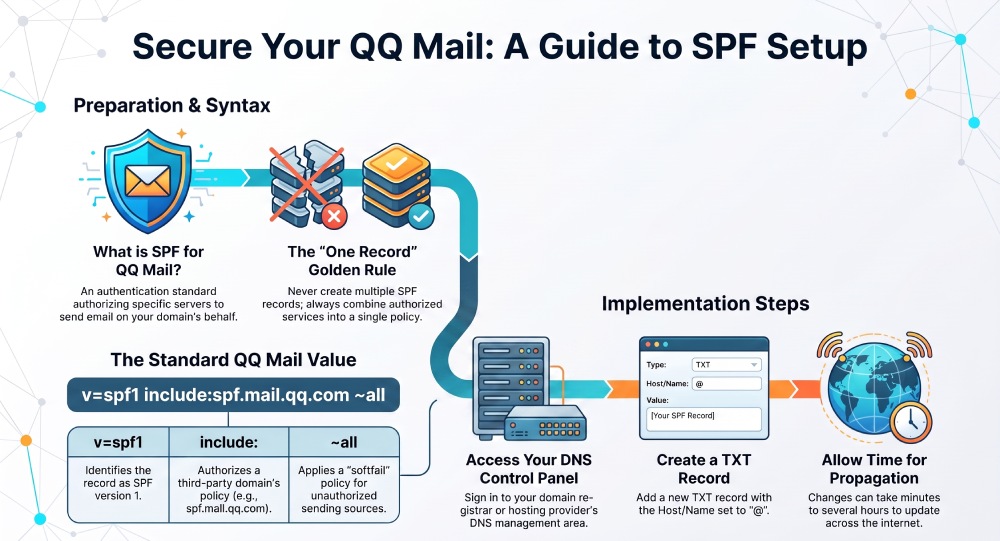
Avoid creating multiple SPF records for the same domain. A domain should publish one SPF policy containing all authorised sending sources. Multiple SPF records can cause SPF validation errors and prevent receiving servers from correctly evaluating your email authentication policy. Strong email security helps protect sensitive information from phishing, malware, and unauthorized access.
Creating the Correct SPF Record for QQ Mail
For domains that use Tencent enterprise mail/QQ Mail, Tencent documentation provides the following SPF record as an example:
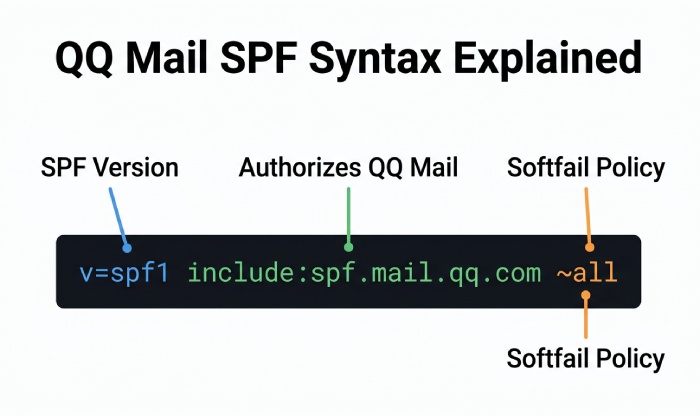
v=spf1 include:spf.mail.qq.com ~all
The include:spf.mail.qq.com mechanism authorizes the mail servers covered by Tencent’s SPF policy to send email on behalf of your domain. The ~all mechanism applies a softfail to other sending sources.
If your domain already uses other email services, do not create a second SPF record. Instead, combine the authorized sending services into the existing SPF policy. If combining includes risks exceeding the lookup limit, SPF flattening can keep the record compact. For example:
v=spf1 include:spf.mail.qq.com include:example-mailer.com ~all
Your domain should have one SPF policy, containing all legitimate sending sources. Tencent documentation also recommends keeping multiple email-service authorizations within a single SPF record.
SPF syntax to use with Tencent QQ
A correct SPF record starts with v=spf1, includes authorized senders, and ends with a policy such as ~all or -all.
Common mechanisms include:
- include: ” authorizes another domains SPF policy, such as Tencents QQ Mail SPF domain
- ip4: or ip6: ” authorizes specific IP addresses
- mx ” authorizes mail exchangers listed in MX records
- ~all ” softfail for unauthorized senders
- -all ” hardfail for unauthorized senders
For a QQ domain, the most important part is including the Tencent QQ mail sender reference correctly. For advanced setups, learn how SPF macros work. Because Tencent may update its infrastructure, use the SPF value shown in your QQ Mail or Tencent enterprise mail admin documentation when available.
Adding the SPF TXT Record to Your QQ Domain DNS
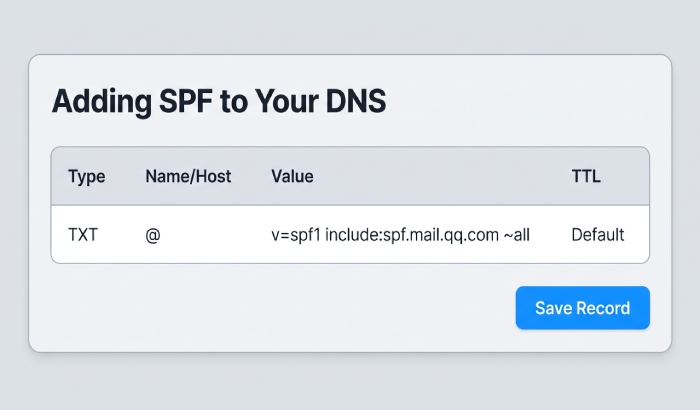
Once you have the correct SPF value, add it to your DNS zone.
- Sign in to your DNS hosting provider.
- Open the DNS management area for your QQ domain.
- Choose to add or edit a TXT record.
- Set the host/name field to @ if the record applies to the root domain.
- Paste the SPF value, such as
v=spf1 include:spf.mail.*qq*.com ~all. - Save the record.
- Wait for DNS propagation, which can take minutes or several hours depending on TTL.
If you are configuring a subdomain, such as mail.example.com, place the TXT record on that specific hostname rather than the root domain.
General Manager
General Manager of DuoCircle. Product strategy and commercial lead for AutoSPF's 2,000+ customer base.
LinkedIn Profile →