How to Troubleshoot Invalid DKIM Signatures and Body Hash Failures

Quick Answer
DKIM signature failures are commonly caused by incorrect DNS records, selector or key mismatches, or changes to email content during transit. Check authentication headers, validate DKIM DNS records, verify key pairs, and inspect gateways or relays for message modifications.
What “DKIM Fail: Signature Did Not Verify” Means
A DKIM fail means the receiving mail server could not confirm that the DKIM signature attached to a message matches the message content and the sender’s published public key. In DomainKeys Identified Mail, the sending MTA signs selected parts of the email with a private key, and the recipient performs DKIM validation by retrieving the matching public key from DNS.
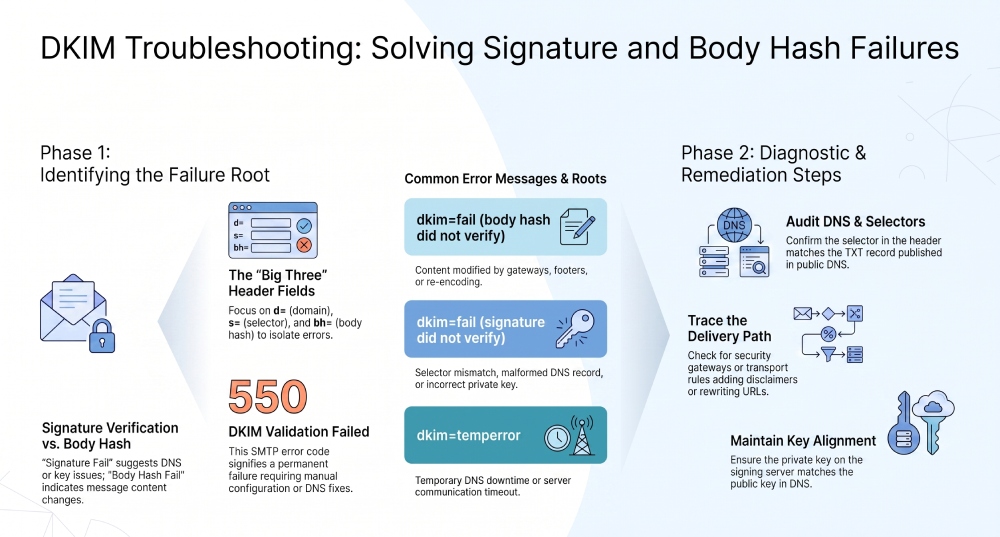
When the result says the signature did not verify, it usually means one of two things: the receiving server could not retrieve or use the correct key, or the message changed after it was signed. In logs, you may see errors such as invalid DKIM signature, “DKIM signature did not verify,” or even SMTP rejection text like 550 DKIM validation failed.
How DKIM Validation Works
During DKIM validation, the receiving server reads the DKIM-Signature header, identifies the selector and domain, performs key retrieval from the relevant DNS TXT record, and compares the computed hash with the values in the signature.
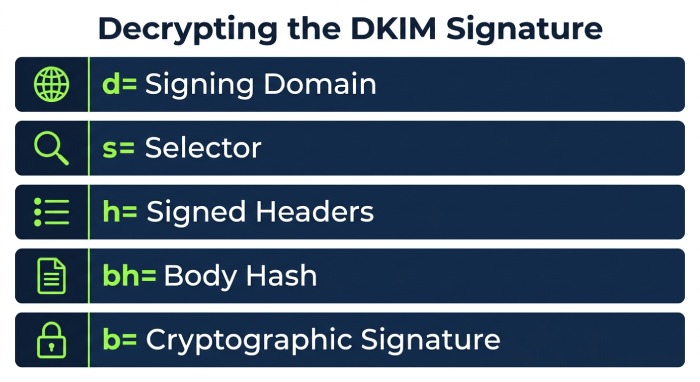
The process depends on several fields:
d=identifies the signing domain.s=identifies the selector.h=lists the signed headers.bh=contains the body hash.b=contains the cryptographic signature.
If the body hash calculated by the receiver does not match the bh= value, the message likely suffered message modification after signing. If the signature itself did not verify, the issue may involve a key mismatch, selector mismatch, altered headers, or DNS errors.
DKIM Fail vs. DMARC Failure
A DKIM fail does not always mean a DMARC failure. DMARC evaluates both DKIM and SPF, plus alignment with the From domain. However, if DKIM fails and SPF also fails or does not align, the message may violate the organization’s dmarc policy. This is where alignment failure becomes important: even a technically valid DKIM signature may not satisfy DMARC if it does not align with the visible sender identity.
Common Causes of Invalid DKIM Signatures and Body Hash Mismatches
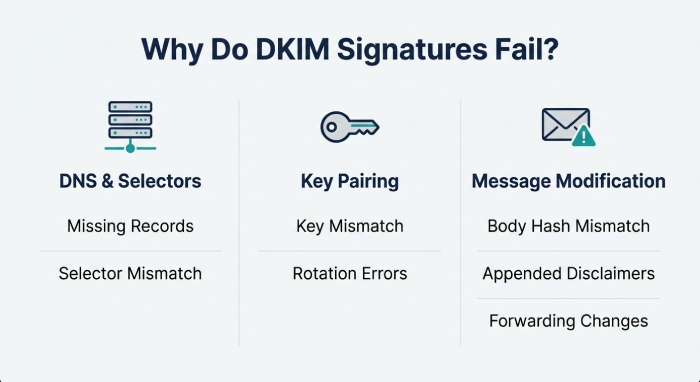
An invalid DKIM signature is usually caused by DNS problems, signing configuration errors, or changes introduced during the mail flow. Understanding the failure category helps you avoid chasing the wrong fix.
DNS, Selector, and Key Problems
The most common issue is a selector mismatch. The selector in the DKIM-Signature header must match the selector published in DNS. If the sender signs with s=mail2024, but DNS only contains s=default, the receiver cannot locate the correct public key.
Other DNS-related causes include:
- Missing DKIM record
- Malformed DKIM record
- Incorrect TXT record formatting
- Expired or incomplete DNS propagation
- Temporary DNS downtime
- Provider-side DNS errors
A key mismatch can occur when the private key used by the sender does not correspond to the public key in DNS.
Public Key and Private Key Pairing
The private key must remain on the signing server or platform, while the public key must be published in DNS. If the private key changes but the public key is not updated, the DKIM signature did not verify because the cryptographic pair no longer matches.
- Key File References in OpenDKIM: In OpenDKIM, check
KeyTable,SigningTable, and key file references. A stale path, wrong permissions, or incorrect selector can cause a DKIM fail even when the DNS record appears correct. - Key Expiration and Rotation: DKIM keys do not inherently expire, but organizations often enforce key expiration policies. During key rotation, keep the old public key available until all signed messages using the old private key have cleared the delivery path.
Message Modification and Header Changes
A body hash failure usually indicates message modification. DKIM signs the canonicalized message body, so even small changes to email content can break the hash.
Common examples include:
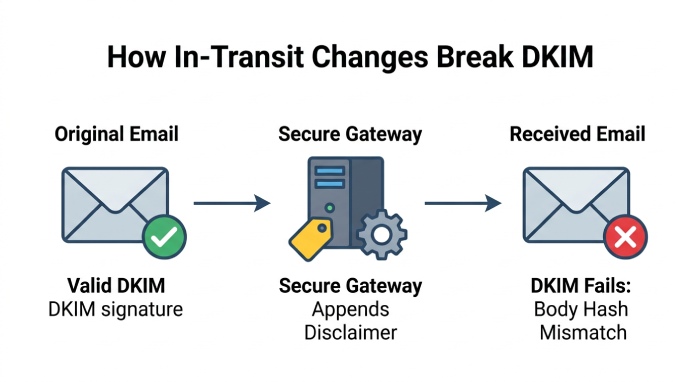
- Disclaimers appended by email gateways
- Tracking links added by marketing tools
- Footer changes by forwarding services
- MIME boundary rewrites
- Encoding changes
- Antivirus or DLP alterations
- Header changes affecting signed headers
If the body hash fails, the receiver’s calculated hash does not match the bh= value in the DKIM signature. This usually means the message body was modified after it was signed, which is why email forwarding, mailing lists, and relays can sometimes cause DKIM verification failures.
Step-by-Step Checks: DNS Records, Selectors, and Public Keys
Troubleshooting should begin with the message itself. Do not rely only on a dashboard summary from Microsoft Outlook, Microsoft 365, DMARC Analyzer, or another secure email tool. Review the raw message headers and authentication results.
Inspect the Authentication Results Header
Look for a header similar to:
Authentication-Results: mx.example.net;
dkim=fail reason="signature did not verify";
spf=pass;
dmarc=fail
This tells you whether the issue is a DKIM fail, SPF issue, or DMARC policy issue. If the reason says the signature did not verify, focus on the DKIM signature, selector, DNS lookup, and body hash.
Check whether the receiver reports:
dkim=fail body hash did not verifydkim=fail signature did not verifydkim=temperrordkim=permerror550 DKIM validation failed
A temporary error often points to DNS errors, DNS downtime, or server communication problems. A permanent error suggests a bad selector, malformed record, or configuration issue.
Confirm Selector and Domain
From the DKIM-Signature header, identify the selector and signing domain:
DKIM-Signature: v=1; a=rsa-sha256; d=example.com; s=selector1;Query DNS for:
selector1._domainkey.example.comIf the selector does not exist, you likely have a selector mismatch. If the selector exists but contains the wrong key, it may be a key mismatch. If the query fails intermittently, investigate DNS errors, authoritative nameserver health, and DNS propagation.
Validate the TXT Record Format
The DKIM TXT record should include a valid p= value containing the public key. A malformed DKIM record may include broken quotes, missing semicolons, extra spaces, truncated values, or copied line breaks from a provider portal.
Investigating Message Changes in Transit That Break DKIM
If DNS and keys are correct but the body hash still fails, investigate the delivery path. DKIM is sensitive to message modification, especially after the message leaves the original signing MTA.
Trace the Delivery Path
Review each hop in the Received headers. Look for a relaying server, filtering appliance, archive service, or security layer that modifies outbound mail. Common sources include:
- Mimecast or other secure gateways
- Microsoft 365 transport rules
- Marketing automation platforms
- Ticketing systems
- Forwarding services
- Legacy gateways configured through Internet Explorer-era admin portals
- Email clients such as Microsoft Outlook, or workflow systems connected to Microsoft Teams
A gateway may add banners, rewrite URLs, or append legal disclaimers. That message modification can invalidate the body hash, causing the DKIM signature to fail even if the public key and private key are correct.
Email Forwarding and Mailing Lists
Email forwarding is a frequent DKIM-breaking scenario. Forwarding services may alter MIME structure, change encoding, or add headers*.* Mailing lists may modify subject lines or footers. If these changes affect signed headers or body content, the result may be DKIM fail.
Canonicalization Matters
Relaxed canonicalization tolerates minor whitespace and header folding changes, but it does not allow meaningful email content changes. If the original body changes, the body hash will not match, and the message did not verify.
Fixing DKIM Failures and Preventing Future Authentication Issues
Resolving a DKIM fail requires matching the fix to the root cause. Avoid simply regenerating keys unless you know whether the problem is DNS, signing, or message modification.
Practical Remediation Checklist
Use this sequence when troubleshooting production outbound mail:
- Review authentication results and raw message headers.
- Confirm whether the error is body hash, key retrieval, or signature verification.
- Validate the selector and domain in the
DKIM-Signature. - Query the DKIM TXT record directly from public DNS.
- Check for DNS errors, DNS propagation delays, or DNS downtime.
- Compare the public key with the signing system’s private key.
- Trace mail flow through gateways, relays, and forwarding services.
- Disable or move disclaimers, link rewriting, and content filters before signing.
- Re-test DKIM validation with fresh messages.
If using OpenDKIM, restart the service after correcting key file references. If using Microsoft 365, confirm DKIM is enabled for the domain and that the CNAME or TXT configuration matches current Microsoft guidance. The Microsoft Q&A forum and other Q&A forum resources can help interpret edge cases, but raw headers remain the most reliable source.
Preventive Best Practices
Strong DKIM operations depend on clear ownership and ongoing monitoring. Establish documented best practices for key rotation, third-party sender onboarding, DNS change control, and dmarc reporting.
Operational Controls
Maintain an inventory of selectors, DKIM records, vendors, and signing systems. Test changes in a controlled environment, preferably using TLS-secured submission paths and authenticated server communication. For broader email security, monitor DKIM, DMARC, and SPF together rather than treating them as isolated controls.
General Manager
Founder and General Manager of DuoCircle. Product strategy and commercial lead for AutoSPF's 2,000+ customer base.
LinkedIn Profile →