DKIM Record Lookup Explained: Find and Fix Missing or Misconfigured Keys

Quick Answer
A DKIM record lookup finds and verifies the public key published in DNS for an email domain and selector. It helps detect missing, invalid, or mismatched DKIM records and confirms whether DKIM authentication is properly configured.

What DKIM Is and Why DKIM Record Lookup Matters
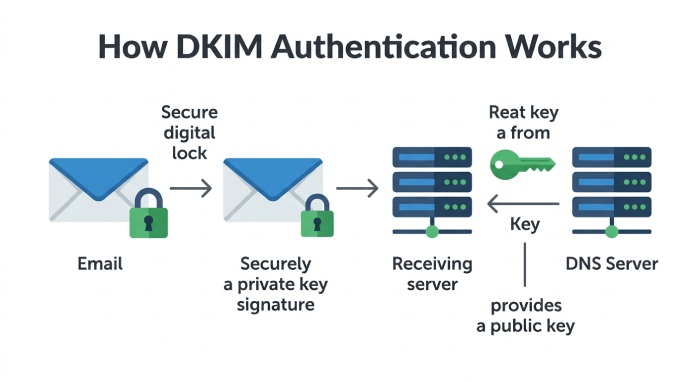
DomainKeys Identified Mail, commonly known as DKIM, is an email authentication method that helps receiving systems confirm that a message was authorized by the domain owner and was not altered in transit. It works by adding a digital signature to the email header of outgoing messages. The receiving mail server then performs signature verification by using a public key published in DNS.
A DKIM record lookup is the process of finding the DKIM public key published in DNS for a specific domain and selector. If the dkim record is missing, malformed, or mismatched with the private key used by the sending platform, email authentication can fail. That failure may hurt email deliverability, weaken sender reputation, and increase the chance that legitimate messages land in spam, quarantine, or become a rejected email.
DKIM is especially important when organizations use third-party services such as Google Workspace, Microsoft 365, SendGrid, or other email service providers. Each provider may generate its own dkim key and require a specific dkim selector. A DKIM lookup can confirm that the expected public key is published for the correct domain and selector before production email relies on it.
Why a DKIM lookup matters for email security
A dkim record lookup supports email security by helping receiving systems distinguish authorized mail from phishing and spoofing attempts. DKIM does not stop attackers by itself, but it provides message integrity through a cryptographic digital signature. When combined with SPF, an spf record, DMARC, a DMARC record, and aggregate reports from a DMARC report, DKIM becomes part of a stronger authentication framework.
A failed dkim validation can indicate that the email signature was broken, the wrong private key signed the message, or the DNS TXT record is not accessible. A dkim record checker or dkim validator can quickly show whether the dns record exists and whether the syntax check passes.
How DKIM Records Work: Selectors, Public Keys, and DNS TXT Records
A dkim record is usually stored as a txt record in DNS. It contains several tags that identify the DKIM version, key type, and public key. The sending email server uses a private key to create a digital signature, while the receiving mail server retrieves the public key through a dns query and verifies the message.
The basic relationship is simple: the private key stays secure inside the sending platform, and the public key is published in DNS for incoming emails to validate. If the public key and private key do not match, signature verification fails.
Selector format and DKIM record location
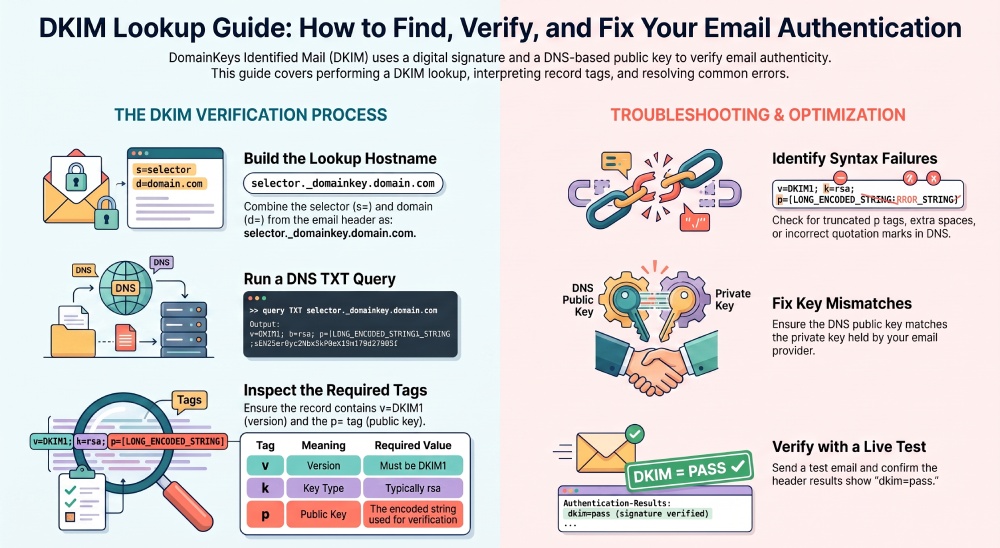
A dkim selector is a label that tells receivers where to find the correct dkim record. The lookup hostname typically follows this pattern:
selector._domainkey.domain.comFor example, if the selector is google and the domain name is example.com, the receiving server queries:
google._domainkey.example.comThe DKIM selector allows a domain to use multiple DKIM keys simultaneously. This is useful when different email services send messages on behalf of the same domain, such as Google Workspace, Microsoft 365, SendGrid, or marketing platforms. Each service can use a different selector to identify its corresponding DKIM public key in DNS.
Public key and private key pairing
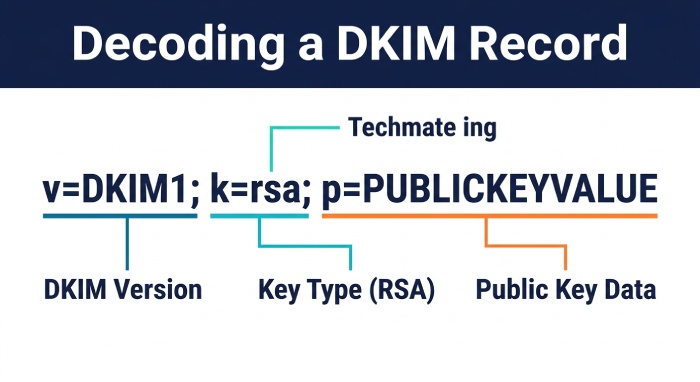
DKIM relies on a matched public key and private key pair. The private key signs outgoing messages; the public key validates the email signature. Many providers use RSA, often shown as k=rsa in the dkim record, and this depends on rsa encryption principles.
A typical dkim record includes values such as:
v=DKIM1; k=rsa; p=PUBLICKEYVALUEYou may also see the lowercase form v=dkim1 in documentation or diagnostic tools. The p tag contains the public key. If the p tag is empty, truncated, wrapped incorrectly, or copied with extra spaces, the dkim check can fail even if the record appears to exist.
Key tags to inspect during a DKIM record test
During a dkim record test, inspect the version tag, key type, and p tag. Confirm that v=DKIM1 appears correctly, that k=rsa matches the expected key type, and that the public key has not been split incorrectly by your DNS interface. Also confirm the domain name and dkim selector match the email header exactly.
How to Perform a DKIM Record Lookup Step by Step
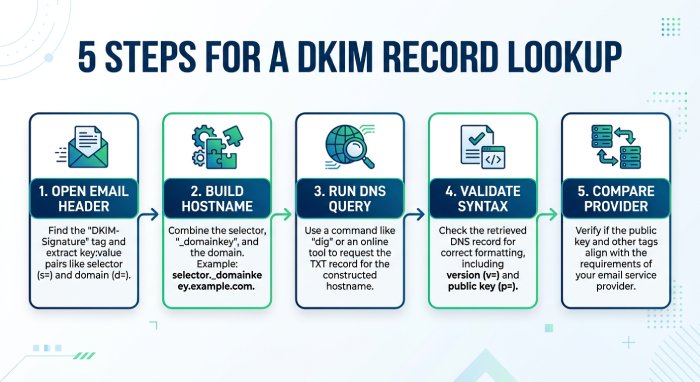
A successful dkim record lookup starts with the message itself. DKIM is not checked only by guessing the domain name; you need the signing domain and dkim selector from the email header.
Step-by-step DKIM check
-
Open the email header Find the
DKIM-Signaturefield. Look for thed=value, which is the signing domain name, and thes=value, which is the dkim selector. -
Build the lookup hostname Combine the selector and domain name in this format:
dkimselector._domainkey.domain.com -
Run a DNS query Query the txt record for that hostname. This dns query should return the dkim record containing the public key.
-
Validate the syntax Use a dkim validator, dkim record checker, or command-line DNS tool to confirm that the dkim record is formatted correctly.
-
Compare with the sending platform Check the email provider’s admin console to confirm that the active DKIM configuration corresponds to the published public key.
Using online validators and security platforms
Online DKIM lookup tools can simplify the process of checking whether a DKIM record exists and whether its DNS syntax is valid. However, a DNS lookup alone cannot confirm that the published public key matches the private key used to sign an email. To verify DKIM authentication, check the DKIM-Signature in a received message and confirm that the result shows dkim=pass.
For broader email authentication management, SPF, DKIM, and DMARC work together to strengthen domain protection and email deliverability. AutoSPF helps organizations manage complex SPF configurations and maintain accurate SPF records alongside their DKIM and DMARC setup.
Common DKIM Lookup Errors: Missing, Invalid, or Misconfigured Keys
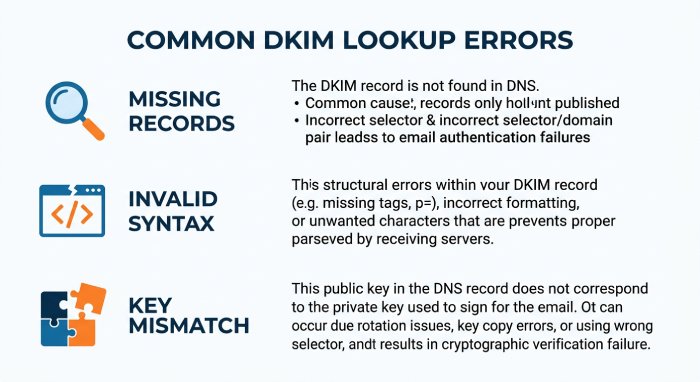
DKIM failures usually fall into a few predictable categories: missing records, invalid syntax, wrong selector, stale public key, or a mismatch between the public key and private key.
Missing selector or missing DKIM record
A missing dkim record often means the dkim selector is incorrect or the TXT record was never published. For example, an administrator may configure SendGrid with one selector but publish another in DNS. In other cases, the DNS Providers panel may save the record under the wrong hostname, such as including the domain name twice.
A dkim record lookup returning “not found” does not always mean DKIM is disabled. It may mean the email header references a different selector or signing domain name. Always use the exact s= and d= values from the email header before assuming authentication is broken.
Invalid syntax, p tag problems, and broken TXT records
Invalid syntax is another common cause of dkim validation failure. The TXT record may include quotation marks incorrectly, contain line breaks that DNS does not handle well, or have a truncated p tag. Some DNS systems automatically split long strings, which is acceptable only if the final combined value remains correct.
A dkim check may also fail when the dkim record includes unsupported characters, missing semicolons, or an incorrect version tag. For example, v=DKIM1 should be clear and properly placed. A syntax check from a dkim validator can detect many of these mistakes quickly.
Key mismatch or stale records
A key mismatch occurs when the private key used by the sending email server does not match the public key published in DNS. This can happen after key rotation, migration from Microsoft to Google, or switching between email service provider platforms. If the old dkim key remains in DNS while the platform signs with a new private key, the digital signature will not validate.
Stale dkim record entries are also risky because they may create confusion during incident response or email authentication audits. The domain owner should document each active dkim selector, the platform using it, and whether the record is still required.
How to Fix DKIM Record Problems and Verify Successful Authentication
To fix DKIM problems, begin by identifying the exact failure. If the dkim record lookup returns no result, confirm the selector, domain name, and DNS hostname. If the dkim check finds a malformed TXT record, correct the syntax and wait for DNS propagation. If the public key does not match the private key, regenerate or republish the correct dkim key from the sending platform.
For Google Workspace, Microsoft 365, SendGrid, and similar services, the safest approach is to copy the DKIM value directly from the provider’s admin console. Publish it as a DNS TXT record at the exact hostname provided. Then run a dkim record test with a trusted dkim record checker and send a fresh message to inspect the email header.
After the fix, verify authentication in three places:
- The dkim record lookup returns the expected public key.
- The email header shows
dkim=pass. - DMARC alignment passes when DKIM or SPF aligns with the visible From domain.
If DMARC is configured with a policy of quarantine or reject, a DKIM authentication failure can contribute to legitimate messages being filtered or rejected when neither DKIM nor SPF passes DMARC alignment. Monitoring DMARC aggregate reports can help identify authentication failures and confirm whether DKIM and SPF configuration changes improve email deliverability.
General Manager
Founder and General Manager of DuoCircle. Product strategy and commercial lead for AutoSPF's 2,000+ customer base.
LinkedIn Profile →