DMARC Best Guess Pass Explained: Causes, Risks, and How to Fix It

Quick Answer
DMARC Best Guess Pass means a receiver assumes an email likely passes authentication despite incomplete or unclear DMARC configuration. Fix it by publishing a valid DMARC record and ensuring SPF and DKIM are properly configured and aligned.
Try Our Free DMARC Checker
Validate your DMARC policy, check alignment settings, and verify reporting configuration.
Check DMARC Record →
What “DMARC Best Guess Pass” Means
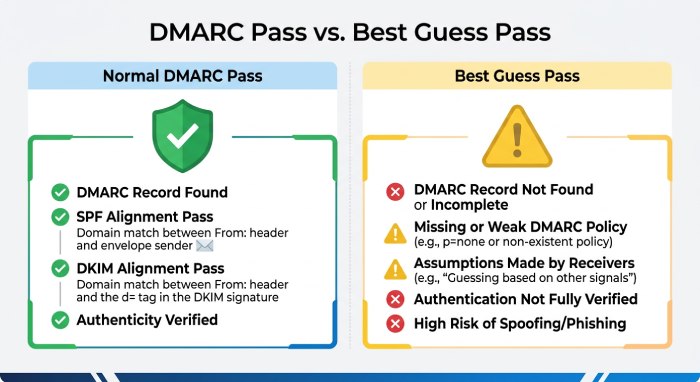
A best guess pass is a receiver-specific authentication result that appears when a mailbox provider or filtering gateway infers that a message probably satisfies DMARC, even when the published authentication setup is incomplete, ambiguous, or not fully enforceable. It is not the same as a standards-based DMARC pass based on a valid DMARC record, aligned SPF, or aligned DKIM.
In practical terms, a mail server may show dmarc=bestguesspass in the email header when it believes the message is legitimate based on signals such as an SPF pass, a successful SPF check, a recognizable sending source, or a partial authentication pattern. However, a best guess pass should not be treated as a true DMARC pass.
Best Guess Pass vs. DMARC Pass
A normal DMARC pass occurs when either:
- SPF passes and the authenticated Return-Path domain aligns with the visible From domain.
- DKIM passes and the signing domain aligns with the visible From domain.
A best guess pass, by contrast, means the receiver made an assumption. The message may have an SPF pass, but the domain may lack a proper DMARC record, have an incomplete DMARC policy, or fail strict alignment checks. That is why organizations should distinguish between DMARC pass, DMARC fail, and best guess pass in authentication results.
Example Header Signal
An email header analyzer may reveal something like:
Authentication-Results: mx.example.com;
spf=pass smtp.mailfrom=sender.example;
dmarc=bestguesspass header.from=example.com
This shows the SPF check succeeded, but the receiver did not evaluate a clean, policy-backed DMARC pass.
Why DMARC Best Guess Pass Happens
A best guess pass usually happens because the receiver sees enough evidence to trust the message temporarily, but not enough to confirm a complete DMARC authentication outcome.
Missing or Invalid DMARC Record
The most common cause is the absence of a valid DMARC record. If the domain has no _dmarc.example.com TXT record, the receiving system cannot apply a defined DMARC policy such as p=none, p=quarantine, or p=reject.
A proper DMARC record looks like this:
v=DMARC1; p=none; rua=mailto:dmarc-reports@example.comWithout this DMARC record, a receiver may infer a best guess pass from SPF or DKIM signals instead of producing an official DMARC pass or DMARC fail.
SPF Pass Without Proper Alignment
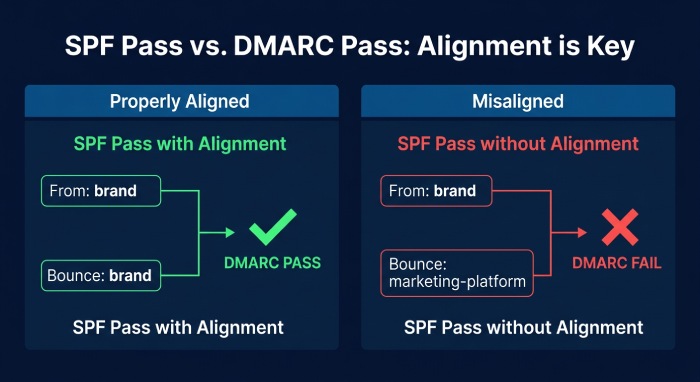
Another frequent cause is an SPF pass that does not align with the From domain. For example, a marketing platform may pass the SPF check using its own bounce domain, while the visible From address uses your brand domain. In that case, the message may show an SPF pass, but still not qualify for a real DMARC pass.
This often happens when multiple senders use the same domain: Google Workspace, Microsoft 365, WordPress, PHP mail scripts, Freshdesk, CRM tools, YouTube notification systems, or SMTP relay services. If the SPF record does not include all legitimate senders, a later SPF check may return neutral, softfail, or fail. If any of these terms are unfamiliar, the SPF terms glossary defines them.
SPF Record Complexity
A bloated SPF record can exceed the 10-DNS-lookup limit and cause a DMARC fail even if the sender is legitimate. Our SPF PermError guide explains how to fix the resulting errors. Tools such as an SPF checker, SPF generator, Hosted SPF, or AutoSPF can help simplify and manage the SPF record.
DKIM Not Configured or Not Aligned
If the domain lacks a proper DKIM record, or if the DKIM check fails because the selector is missing, the message cannot rely on a DKIM pass for DMARC alignment. Hosted DKIM or a DKIM generator can help create the correct key pair, while a DKIM checker confirms that the public key is published correctly.
Risks and Limitations of Relying on Best Guess Results
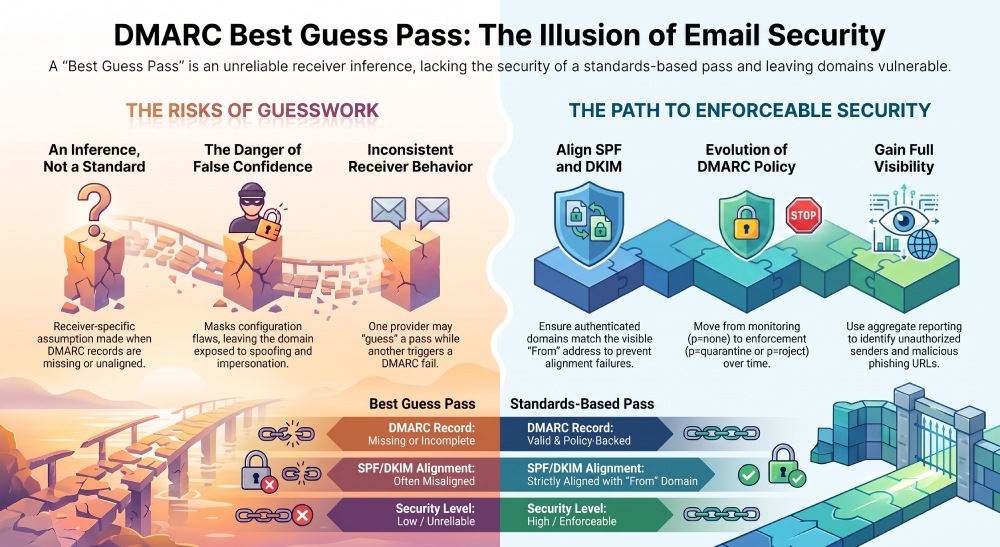
A best guess pass may look reassuring, but it is not a strong authentication result. It can mask configuration problems and leave the domain exposed to spoofing, impersonation, and inconsistent filtering.
False Confidence in Authentication
Security teams may assume that a best guess pass equals a DMARC pass, but this is risky. If the domain has no enforceable DMARC policy, attackers may still send spoofed mail that resembles trusted communication. A real DMARC fail should trigger policy-based handling, but a guessed result depends on the receiver’s internal logic.
Inconsistent Receiver Behavior
One provider may show best guess pass, another may show DMARC fail, and another may accept the same message with no visible warning. This inconsistency harms email deliverability, especially for transactional email, newsletters, password resets, and support messages.
Reduced Visibility and Reporting
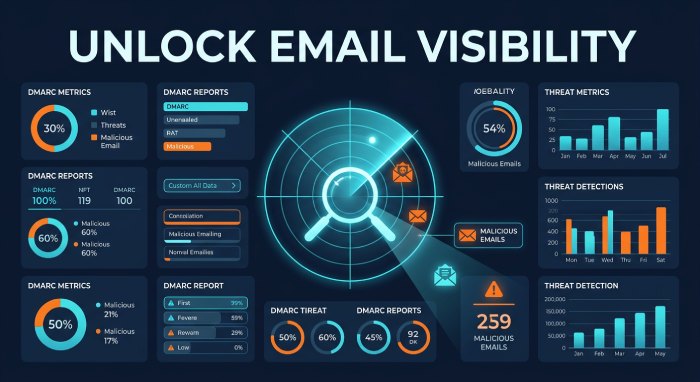
Without a valid DMARC record, you lose reliable aggregate reporting about how your domain is being used for email. Publishing a correct DMARC record with a reporting address allows you to monitor sending sources, identify unauthorized activity, and investigate potential authentication problems.
This visibility is especially useful for detecting domain spoofing, suspicious sending sources, abuse patterns, and unauthorized email infrastructure. Reviewing DMARC reports alongside SPF and DKIM authentication results can help organizations identify configuration issues and strengthen overall email security.
Brand and Reputation Impact
A weak DMARC policy can damage sender trust. Reputation Monitoring, threat intelligence, and a blacklist checker help identify when spoofing, spam campaigns, or compromised SMTP sources affect domain reputation.
How to Diagnose DMARC Best Guess Pass in Email Headers and Reports
Diagnosing best guess pass starts with comparing email headers, DNS records, and authentication reports.
Check Authentication-Results Headers
Open the raw message headers and look for:
spf=pass,spf=fail, orspf=softfaildmarc=bestguesspassdmarc=passdmarc=faildkim=passordkim=failsmtp.mailfromheader.from
If the SPF pass domain does not match or align with the visible From domain, DMARC may not truly pass. If the DMARC record is missing, the receiver may produce a best guess pass rather than a standards-based DMARC pass.
Validate DNS Records
Use a DMARC checker to inspect the DMARC record and confirm that the syntax is valid. A DMARC generator can create a baseline record, while a DMARC analyzer can interpret aggregate data over time.
You should also validate the SPF record with an SPF checker, verify DKIM with a DKIM checker, and confirm any supporting security records such as MTA-STS, TLS-RPT, and a DANE record. Related tools include an MTA-STS checker, TLS-RPT checker, BIMI checker, and BIMI generator.
Review Platform Integrations
 Modern web and marketing stacks often include CookieYes, Google Analytics, Google Tag Manager, Mouseflow, Google reCAPTCHA, crisp-client chat, NitroPack, Freshdesk, WordPress, PHP applications, and API Developer Tools. These services may not all send email, but their forms, notifications, or integrations can trigger mail flows. Track each integration to ensure SPF, DKIM, and DMARC alignment.
Cookie platforms may also manage a session cookie, cookie consent, cookie preferences, analytics settings, and ad campaign effectiveness measurement. While these are separate from email authentication, they often coexist in the same compliance and security ecosystem.
How to Fix It with Proper SPF, DKIM, and DMARC Configuration
The fix is to replace best guess pass behavior with predictable, standards-based authentication: valid SPF, aligned DKIM, and an enforceable DMARC policy.
Publish a Valid DMARC Record
Start with monitoring:
v=DMARC1; p=none; rua=mailto:dmarc-reports@example.com; adkim=s; aspf=sThen analyze legitimate sources. Once you understand the mail flow, move the DMARC policy from p=none to p=quarantine, and eventually to p=reject. This turns uncertain best guess pass outcomes into clear DMARC pass or DMARC fail decisions.
DMARC management tools can simplify policy configuration, aggregate report monitoring, and authentication analysis, making it easier to identify legitimate and unauthorized email sources. Organizations can use these insights to gradually strengthen their DMARC policy from p=none to p=quarantine and eventually p=reject.
Correct SPF Configuration
Create a clean SPF record that includes all authorized senders:
v=spf1 include:_spf.google.com include:spf.protection.outlook.com -allThen run an SPF check after every change. The goal is consistent SPF pass results from approved systems and predictable failures for unauthorized senders. Hosted SPF can help prevent lookup-limit errors and keep the SPF record maintainable. Advanced setups may also use SPF macros for dynamic policies.
Configure DKIM for Every Sender
Enable DKIM signing for every major sender. Publish the correct DKIM record, confirm a DKIM pass, and ensure the signing domain aligns with the From domain. Hosted DKIM can make key rotation and selector management easier.
Strengthen the Wider Email Security Stack
After DMARC, SPF, and DKIM are stable, add complementary controls such as BIMI for brand indicators, MTA-STS and TLS-RPT for transport-layer security reporting, and DANE where supported. Regularly monitor SPF, DKIM, and DMARC configurations to maintain reliable email authentication, improve deliverability, and strengthen protection against spoofing and phishing.
General Manager
General Manager of DuoCircle. Product strategy and commercial lead for AutoSPF's 2,000+ customer base.
LinkedIn Profile →