421 Error SMTP Survival Guide: Fix the 4.4.2 Connection Dropped Issue

Quick Answer
A 421 Error SMTP is a temporary email delivery error that occurs when the mail server drops the connection or cannot process the request. Common causes include server overload, network issues, incorrect SMTP settings, or authentication problems.
What a 421 SMTP Error Means: Understanding Temporary Delivery Failures and the 4.4.2 Connection Dropped Code
An SMTP error 421 is a temporary mail transfer failure returned by an smtp server when it cannot accept or complete a message at that moment. In the context of a 4.4.2 connection dropped, the receiving or relay email server is telling the sending system that the SMTP connection was interrupted before the transaction could finish. Because SMTP—Simple Mail Transfer Protocol—is designed to retry transient failures, a 421 error usually means deferred email, not permanent rejection.
In practical terms, the sending mail client or outgoing server attempted email delivery, but the session ended due to a connection timeout, server downtime, too many connections, throttling, or broader network issues. Users may see messages such as “cannot connect to smtp server,” “server temporarily unavailable,” or “421 4.4.2 connection dropped.” In Microsoft Outlook, Office Outlook, or MS Outlook, this can appear during send/receive operations, especially when the smtp settings, smtp port, port number, encryption, or smtp authentication do not match the requirements of the email provider.
The key point: SMTP error 421 is often a temporary problem, but recurring 421 error events indicate something deeper—unstable network connectivity, incorrect server configuration, reputation limits, aggressive security filtering, or overload on a high traffic server. If users repeatedly cannot connect to smtp server, administrators should treat it as a signal to inspect both the client-side email account configuration and the server-side mail flow.
Strong email security practices also matter because poor authentication, spoofing risk, or compromised sending behavior can contribute to throttling, server blocking, and reduced email deliverability.
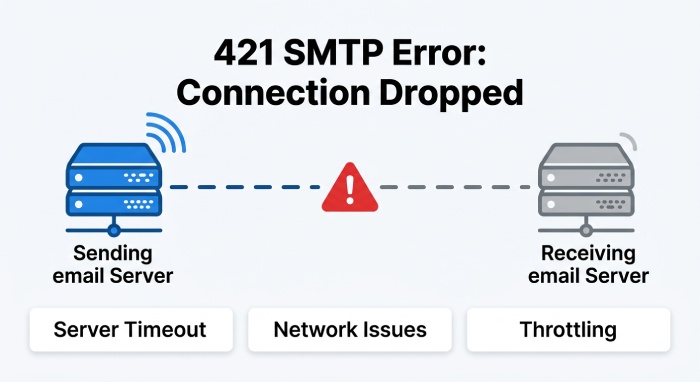
Common Causes of 421 4.4.2 Errors: Server Timeouts, Rate Limits, Network Problems, DNS Issues, and Authentication Failures
Server timeouts, rate limits, and too many connections
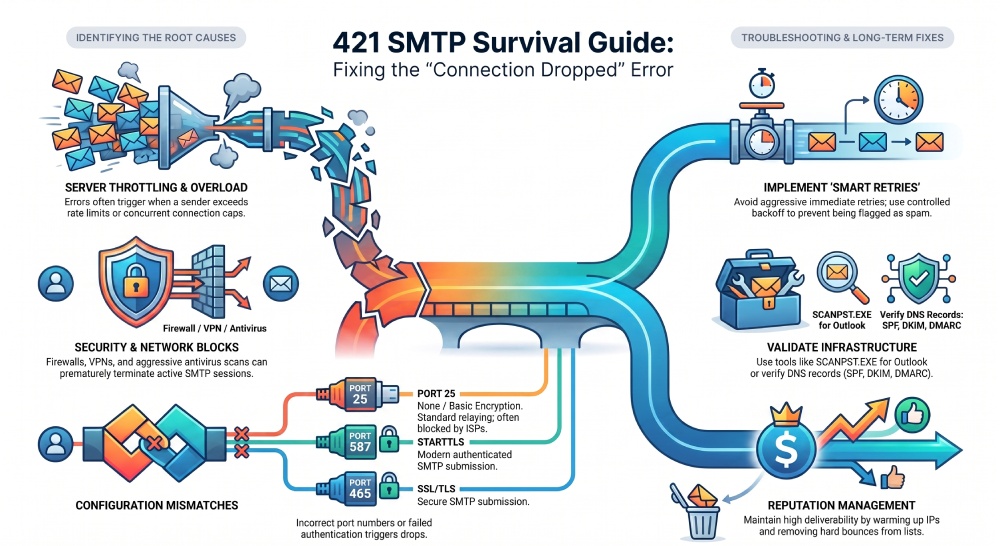
One of the most common reasons for SMTP error 421 is a connection timeout between the sending smtp server and the recipient Mail Server. A timeout may occur when the recipient system is overloaded, the outgoing server is slow to respond, or a gateway drops idle sessions. If a sender is pushing a high volume of messages, such as during email marketing or large email campaigns, the recipient may enforce server restrictions or rate limits.
A high traffic server may reject or defer outgoing emails with a 421 error when it detects too many connections from the same IP address, domain, or smtp relay. Platforms like Ongage and other email marketing systems often expose these deferrals in delivery logs. The right response is not to immediately retry at full speed. Instead, use controlled backoff, queue management, and reputation-aware throttling to improve email delivery and avoid repeated SMTP error 421 responses.
The port number can also matter. If your smtp settings specify the wrong smtp port, such as using 25 when the email provider requires 587 with STARTTLS or 465 with SSL/TLS, the smtp server may reject or drop the session. Always confirm the correct port number, encryption, and smtp authentication method before assuming the recipient is at fault.
Network problems, DNS issues, and security filtering
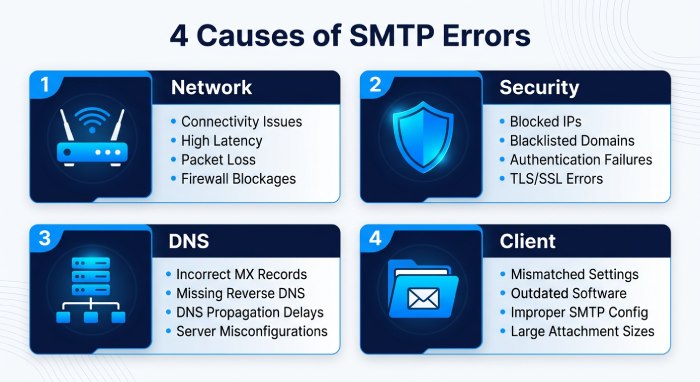 Broader network issues are another major cause. If the sending host has an unstable internet connection, packet loss, routing delays, or intermittent network connectivity problems, users may see “cannot connect to smtp server” even when the smtp server itself is healthy. A vpn connection can also introduce routing problems, geolocation mismatches, or blocked ports. Temporarily disabling the VPN for testing can reveal whether the SMTP connection improves.
Security tools may interrupt smtp traffic as well. A local firewall, enterprise Firewall, Windows Firewall,or gateway filter can block the required port number. Some antivirus software and Antivirus suites scan outbound mail and inadvertently cause a connection timeout. In Windows environments, verify Windows Firewall rules, endpoint security policies, and mail client exceptions.
Incorrect dns settings can also trigger a 421 error. If DNS resolution is slow, broken, or returning stale MX records, the outgoing server may fail to reach the recipient email server. Review your DNS records, including MX, SPF, DKIM, DMARC, and reverse DNS. Misconfigured SPF records or exceeding the SPF 10-DNS-lookup limit can contribute to authentication problems that affect email deliverability. Tools like AutoSPF help validate and optimize SPF records before they impact mail flow. Run a free SPF checker to confirm your record still resolves cleanly. If it flags an error, our guide to fix SPF PermError walks through the resolution.
Client-side corruption can contribute too. In Microsoft Outlook, send/receive failures may be linked to corrupt pst files in the Personal Storage Table. Microsoft provides SCANPST.EXE, also known as the Inbox Repair Tool, to repair a damaged personal storage table file. While corrupt pst files do not usually cause a remote SMTP error 421 by themselves, they can disrupt outgoing emails, create stuck messages, and complicate email troubleshooting. Microsoft Q&A discussions often recommend checking the Outlook profile, PST health, and email account configuration alongside server logs.
Quick Troubleshooting and Long-Term Prevention
Quick Troubleshooting Checklist: Retry Timing, Log Review, Connectivity Tests, Queue Inspection, and Mail Server Health Checks
Start with a structured checklist before making permanent changes:
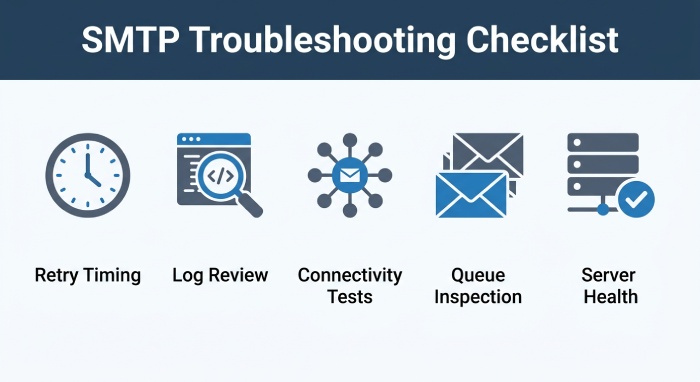
- Retry intelligently. Since SMTP error 421 is usually temporary, wait before you retry sending email. Avoid immediate aggressive retries, which may look like abusive traffic and worsen server blocking.
- Review logs. Check the sending smtp server, outgoing server, application logs, and recipient response codes. Look for repeated 421 error entries, connection timeout messages, failed smtp authentication, or “cannot connect to smtp server.”
- Test connectivity. Use tools like
telnet,openssl s_client,swaks, or platform diagnostics to verify the smtp connection, port number, and TLS handshake. Send a test email from Outlook, webmail, and the application to compare behavior. - Inspect queues. A growing queue with deferred email suggests the email server is retrying but cannot complete email delivery. Check whether failures affect all domains or only specific recipients.
- Check mail server health. Confirm CPU, memory, disk, queue depth, service status, server downtime, and connection limits. If the smtp server is overloaded, tune concurrency and retry intervals.
- Validate client settings. In Outlook or Microsoft Outlook, confirm smtp settings, smtp port, port number, username, password, encryption, and smtp authentication. The same applies to WordPress sites using WP Mail SMTP, the WP Mail SMTP Plugin, or another application-based smtp relay.
- Compare inbound and outbound flow. If inbound emails work but outgoing emails fail, focus on the outgoing server, smtp settings, firewall rules, and provider limits.
If users report “cannot connect to smtp server” from multiple locations, suspect network issues, ISP filtering, DNS problems, or server configuration. If only one workstation is affected, inspect antivirus software, Windows Firewall, cached credentials, Outlook profile corruption, and local internet connection stability.
How to Fix and Prevent Recurring 421 SMTP Errors: Configuration Changes, Throttling, Reputation Management, and Monitoring
Long-term prevention begins with correct server configuration. Verify that the smtp server advertises and accepts the right authentication methods, supports modern encryption, and listens on the correct port number. Align the smtp settings in clients, applications, and automation platforms with your Email Provider documentation. For example, Microsoft 365 commonly uses authenticated SMTP submission on port 587 with STARTTLS, while other providers may require different settings.
For bulk senders, throttle responsibly. If email campaigns generate a high volume of messages, reduce concurrency, spread delivery over time, and respect recipient domain limits. A recurring 421 error may indicate that the recipient sees your smtp traffic as excessive. Improve email deliverability by maintaining clean lists, removing hard bounces, authenticating domains, monitoring complaint rates, and warming up new IPs gradually.
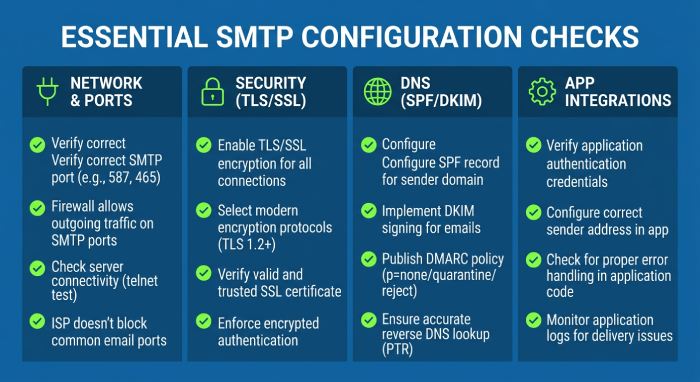
Key configuration checks that reduce repeat failures
Confirm these items during remediation (our SPF glossary explains any unfamiliar terms):
- Correct smtp port and port number for the provider.
- Valid smtp authentication credentials.
- Proper TLS/SSL encryption mode.
- Accurate dns settings, MX records, SPF, DKIM, DMARC, and reverse DNS.
- No local firewall, Windows Firewall, or antivirus software blocking the SMTP connection.
- No restrictive vpn connection path interfering with the outgoing server.
- Queue retry intervals that avoid hammering a busy smtp server.
- Monitoring for connection timeout, network issues, and delivery deferrals.In application environments, confirm that WordPress, CRM, and marketing tools are not using outdated credentials or unsupported ports. WP Mail SMTP can help route WordPress mail through a verified smtp relay, but the WP Mail SMTP Plugin must still use accurate smtp settings. In Microsoft ecosystems, check service health for Microsoft 365, Azure mail-related dependencies, and any connector policies used by applications or line-of-business platforms.
Browser choice rarely causes a server-side SMTP error 421, but administrative portals may behave differently in Microsoft Edge versus legacy Internet Explorer. Use supported browsers when reviewing provider dashboards, OAuth settings, and connector policies.
When to Escalate: Working with Hosting Providers, ISPs, Email Service Providers, and Recipient Mail Admins
Escalate when the same SMTP error 421 persists after retry windows, configuration validation, and connectivity testing. Contact your hosting provider if your email server shows overload, queue growth, service crashes, or signs of server downtime. Contact your email provider or ESP if logs show throttling, reputation limits, or unexplained server restrictions.
ISPs should be involved when users consistently cannot connect to smtp server from a specific network, especially if port 25 or another port number is blocked. Some ISPs restrict outbound SMTP to reduce spam, forcing customers to use authenticated submission through the provider’s outgoing server.
If only one recipient domain returns the 421 error, ask the recipient mail admins to review their gateway logs. Provide timestamps, sending IPs, sender and recipient addresses, message IDs, and the exact SMTP error 421 text. For enterprise Microsoft environments, reference Microsoft Q&A or Microsoft support when Microsoft Outlook, Microsoft 365, connectors, or tenant-level mail flow rules appear involved. Escalation is most effective when you can show whether the issue is caused by network issues, a connection timeout, incorrect smtp settings, recipient throttling, or sender reputation.
General Manager
General Manager of DuoCircle. Product strategy and commercial lead for AutoSPF's 2,000+ customer base.
LinkedIn Profile →