What does the ‘null’ value mean in an SPF record?
Quick Answer
If you check your SPF record using tools like MXToolbox, SPF Record Checker, or your ESP’s built-in SPF validator, you might see errors such as: All these error prompts indicate that your SPF record is not specifying any authorized senders or including invalid characters, which is what having a ‘null’ value in your SPF record essentially means.
What does the ‘null’ value mean in an SPF record?
Related: Free DMARC Checker ·How to Create an SPF Record ·SPF Record Format

Imagine setting up an SPF record to protect your domain, only to realize it’s as good as not having one! Well, this is precisely what the situation is when your SPF record has the ‘null’ value.
Per RFC 7208, SPF evaluation is capped at 10 DNS mechanism lookups and 2 void lookups per check — exceeding either limit produces a PermError that fails authentication for every message from the domain.
What does it mean?
If you check your SPF record using tools like MXToolbox, SPF Record Checker, or your ESP’s built-in SPF validator, you might see errors such as:
-
No mechanisms found in SPF record
-
Empty SPF record
-
SPF record has no valid mechanisms
-
Null SPF record value detected
-
Invalid SPF syntax: no mechanisms defined
All these error prompts indicate that your SPF record is not specifying any authorized senders or including invalid characters, which is what having a ‘null’ value in your SPF record essentially means.
If you regularly review your DMARC reports, even they can show SPF ‘fail’ results for all emails if your SPF record is null, with no passing IPs listed.

Why does an SPF record become ‘null’?
A ‘null’ value in your SPF record isn’t the result of a random technical glitch; it occurs because you have overlooked something crucial, and now your SPF record is not in accordance with the guidelines laid down by RFC. Here are the common issues triggering it-
1. Misconfiguration during setup
This is one of the most common reasons, especially if you have DIYed the setup. Domain owners often miss adding all the senders, especially third-party senders who send emails on their behalf. Another misconfiguration issue arises due to the incorrect or incomplete use of a certain mechanism.

For example, domain owners often forget to use mechanisms like ‘ip4’ or ‘include.’ This situation is like sending out a wedding invitation with no venue details; the guests don’t know where to show up. Similarly, your emails are left wandering in spam folders or getting rejected again and again.
2. Syntax errors
Even a small typo can make your SPF record invalid or interpreted as ‘null’ by mail servers. For example:
v=spf1 null -all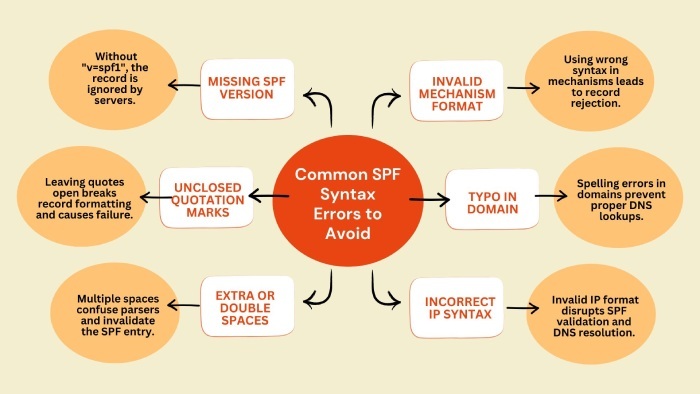
Here, ‘null’ is not a valid SPF mechanism. Maybe you intended to add an include or IP4 entry, but wrote ‘null’ by mistake, leaving your record syntactically incorrect.
Other syntax slip-ups include:
-
Missing spaces between mechanisms
-
Incorrect mechanism names (e.g., ip:192.0.2.0 instead of ip4:192.0.2.0)
-
Using unsupported or outdated mechanisms

These syntax errors confuse recipient servers, leading them to treat your SPF record as if it’s empty.
3. DNS entry errors when updating SPF records
At times, SPF records get corrupted or become invalid because of some technical glitch at your DNS host. The possible situations are-
-
The record accidentally gets partially deleted while editing.
-
The DNS provider’s interface truncates long records, leaving only the version tag.
-
Changes are saved incorrectly, causing an empty TXT record to be published.

These DNS-level errors often go unnoticed until you start seeing delivery failures or authentication errors.
How to fix a ‘null’ value in your SPF record?
Step 1: Identify where your SPF record is hosted
Here is how you can easily sort the ‘null’ value issue and save your emails from getting marked as spam or rejected.
First, you need to know where your SPF record lives. Usually, it’s managed by your domain registrar (like GoDaddy), DNS hosting provider (like Cloudflare), or your website hosting provider (like Bluehost).
Step 2: Validate your current SPF record
After fetching your current SPF record, check the current set of issues using free tools. If the tool shows errors like-

-
No mechanism found in SPF record
-
Empty record
-
SPF record has a null value
It means your record isn’t authorizing any senders.
Step 3: Update your SPF record with valid mechanisms
This is the step where you fix the problem. So, see if your SPF record includes the following; if it misses any of these, please add-
-
It should begin with the version tag, which is v=spf1.
-
Include at least one mechanism (ip4 or include) to specify authorized senders.
-
‘ip4’ mechanism specifies the IP address.
-
The ‘include’ mechanism is used to authorize third-party services like Mailchimp and Google Workspace.

Step 4: End with an enforcement policy
Every valid SPF record ends with either -all or ~all.
-
‘-all (fail) tells recipient servers to reject emails not matching your authorised senders.
-
‘~all’ (soft fail) marks them as suspicious but may still deliver them to spam.
We understand how you may find it difficult to wrap your head around these technical things. So, if you are feeling overwhelmed and need a helping hand, reach out to us. Trust us, we are good at what we do; we have helped thousands of domain owners get their SPF right using our SPF Flattening tool.
Operations Lead
Operations Lead at DuoCircle. Runs project management, developer coordination, and technical support execution for AutoSPF.
LinkedIn Profile →Fix your SPF record in 60 seconds
Try AutoSPF free for 30 days. No credit card required.
Start Free Trial