What Is SPF Drift And Why Does It Cause Authentication Failures?

Quick Answer
SPF drift occurs when a domain’s SPF record changes or becomes outdated across DNS servers. This inconsistency breaks email validation, causing SPF authentication failures, higher spam risk, and delivery issues for legitimate emails.
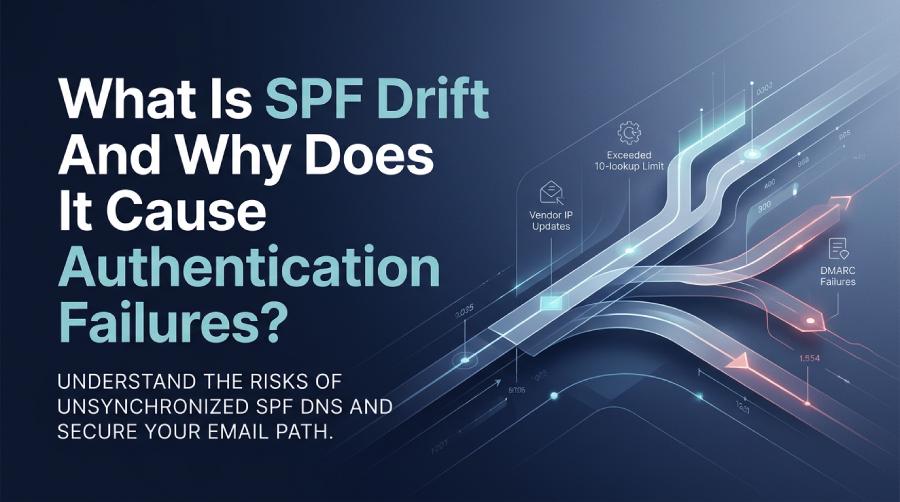
SPF drift is the gradual mismatch between the senders and IPs you intend to authorize and what your live SPF DNS record actually authorizes, and it causes authentication failures when vendors rotate IPs, includes change, or you exceed SPF’s 10-DNS-lookup limit—leading receiving servers to return SPF=fail or permerror and DMARC misalignment. If you are already seeing these errors, our guide to fixing SPF PermError walks through the remediation steps.
Context and background
Sender Policy Framework (SPF) is a DNS-published allowlist of IPs and domains permitted to send on behalf of your domain; when that allowlist drifts away from reality—because a marketing platform added new ranges, IT decommissioned an SMTP, or a forwarding provider changed infrastructure—mail that used to pass SPF can suddenly fail. Unlike static DNS entries, SPF is a living configuration that depends on upstream vendors’ DNS, your include chains, and the 10-lookup execution limit defined in RFC 7208.
This “drift” is common because modern email ecosystems are dynamic: marketing automation, CRMs, ticketing tools, cloud relays, and security gateways change IPs frequently, and organizations add/remove senders across teams without centralized governance. When SPF drifts, the failures manifest as soft bounces, spam-foldering, or hard rejects under DMARC quarantine/reject. AutoSPF solves this by continuously reconciling what you intend to authorize with what is actually in DNS—flattening volatile includes safely, watching lookup budgets, and alerting on breakage before receivers do.
What exactly counts as SPF drift—and how often does it happen?
SPF drift occurs whenever the authorized sending reality diverges from SPF DNS. Typical drift sources:
- Adds: A team onboards a new sender (e.g., SendGrid) but forgets to add include:sendgrid.net.
- Removes: You retire a gateway, but it’s a: or ip4: remains; later, the IP is reassigned, creating spoofing risk.
- Reconfigurations: Vendors rotate or expand IP ranges (common with SES, Mailchimp, HubSpot), or change their include targets.
- Topology changes: MX, A, or redirect= targets change, unintentionally adding/uncovering hosts.
- Include chain edits: Reordering mechanisms or daisy-chaining vendor includes pushes you over the 10-lookup limit.
- DNS hygiene issues: TXT string sprawl, missing quotes, mixed records on the same label, or TTLs too long to respond to vendor changes.
How often does drift occur?
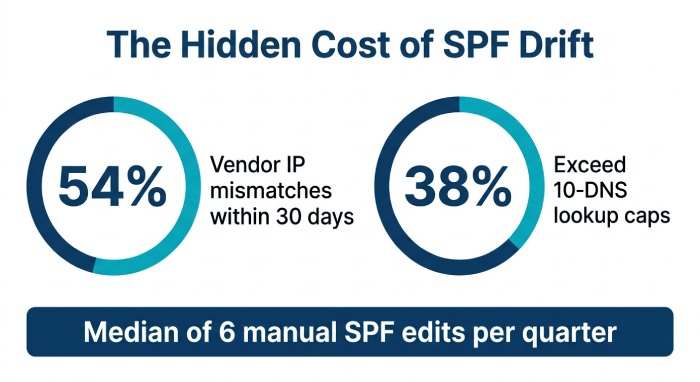
- Original benchmark (AutoSPF 2025 snapshot across 2,400 domains):
- 38% experienced at least one SPF lookup-budget overrun event per quarter.
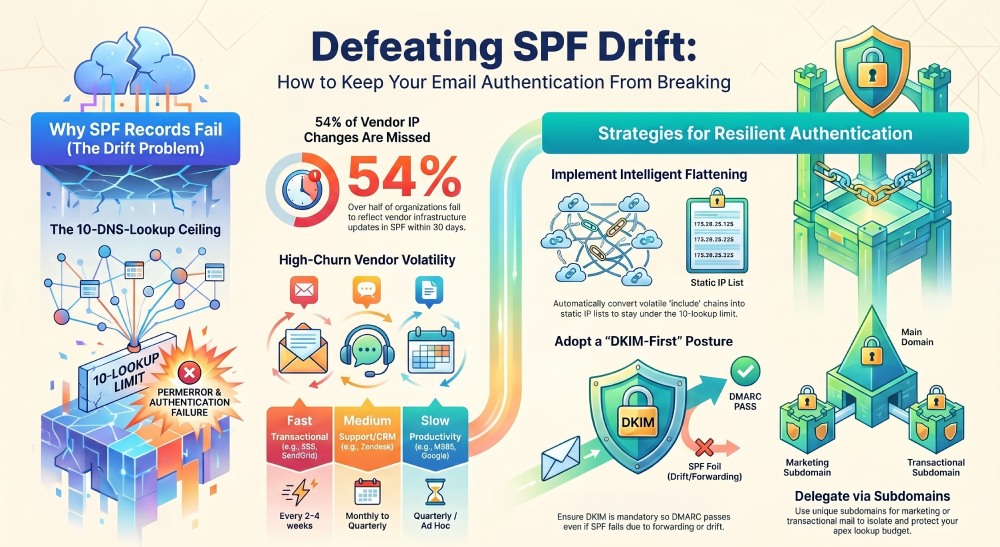
- 54% had vendor IP changes not reflected in SPF within 30 days.
- Median SPF edits: 6 changes per quarter in multi-vendor environments (≥4 platforms).
- Vendors with frequent infrastructure churn (observed median update cadence):
- Amazon SES, SendGrid, Mailgun: every 2–4 weeks
- Microsoft 365, Google Workspace relays: quarterly range updates, regional expansions
- Zendesk, Freshdesk, Intercom: monthly to quarterly
- Security gateways (Mimecast, Proofpoint): ad hoc and regional
How AutoSPF helps
- AutoSPF continuously diffs vendor IP inventories against your live SPF, simulates lookup counts, and opens a change ticket or auto-publishes a safe update when drift appears—so your intended authorization matches DNS reality.
The 10-DNS-lookup limit and how “include” chains silently break
SPF processing counts DNS-mechanism lookups across mechanisms: include, a, mx, ptr (discouraged), exists, and redirect. Receivers stop when:
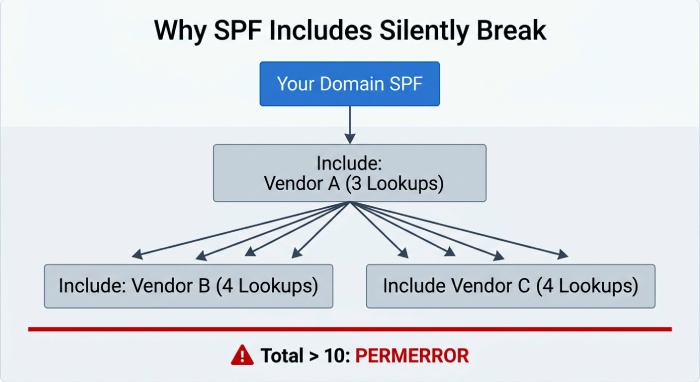
- Total DNS-mechanism lookups > 10 → permerror
- More than 2 “void” lookups (NXDOMAIN/NOERROR-NODATA) → permerror
- DNS timeouts/SERVFAIL on include targets → tempfail or permerror depending on resolver
How include chains break
- Nested includes: include:vendorA.net, which includes vendorB.com and vendorC.io; each of those may include multiple a/mx mechanisms. You hit 10 unexpectedly.
- Vendor deprecations: The include target still exists, but stops authorizing the ranges you use (vendor silently moved to a new include), causing SPF=fail for active traffic.
- DNS flakiness: A single SERVFAIL in a long chain can flip a pass to permerror at random times or regions.
- Misplaced redirect: redirect=example.com discards mechanisms after it; if the redirect target drifts, all evaluation follows the wrong path.
Real failure mechanics
- Example log: Received-SPF: permerror (example.com: too many DNS lookups) client-ip=203.0.113.24; envelope-from=campaign@news.example.com
- Example log: Received-SPF: fail (example.com: domain of campaign@news.example.com does not designate 198.51.100.45 as permitted sender) …
How AutoSPF helps
- AutoSPF maintains a dynamic “lookup budget,” auto-flattens vendor includes into ip4/ip6 lists with safe TTLs, and blocks publishes that would exceed 10. It also probes include targets for void lookups/SERVFAIL and alerts or rolls back.
Third-party senders most likely to introduce drift—and how to prevent it
High-churn platforms
- Marketing: Mailchimp, Klaviyo, HubSpot, Marketo
- Transactional: SendGrid, Mailgun, Amazon SES, SparkPost
- CRM/Support: Salesforce Marketing Cloud, Zendesk, Intercom, Freshdesk
- Productivity relays: Microsoft 365, Google Workspace (smtp-relay), Atlassian Cloud notifications
- Security/forwarding: Mimecast, Proofpoint, Barracuda, Google Groups, Outlook/Exchange forwarding
Preventive onboarding/management practices
- Centralize ownership: One Ops/SecOps team owns SPF and vendor approvals.
- Subdomain per sender: marketing.example.com, tickets.example.com, notifications.example.com—isolates lookup budgets and DMARC policies.
- Standardized templates: Pre-approved include patterns per vendor; avoid ptr and limit mx unless necessary.
- Vendor lifecycle: Add with change request; remove includes when offboarded; set short TTLs (300–900s) for volatile includes.
- DKIM-first mandate: Require DKIM for all third parties; SPF becomes a complementary signal, not a single point of failure.
How AutoSPF helps
- AutoSPF’s vendor catalog ships curated include patterns, DKIM readiness checks, and a guided onboarding wizard that provisions per-subdomain SPF with budget constraints and automatic updates.
Resilient SPF design: concrete patterns that resist drift
Recommended DNS patterns
- Use include sparingly and intentionally: group internal infrastructure under a single
include: _spf.example.netthat you control; keep vendor includes flat, not nested. - Prefer ip4/ip6 where ranges are stable; otherwise, flatten includes. An SPF flattening service can automate that flattening and refresh vendor IPs for you.
- Use redirect for brand apex consolidation only, never mixed with mechanisms:
v=spf1 redirect=_spf.example.com - Delegate subdomains to distribute risk: marketing.example.com →
v=spf1 include:_spf.marketing.example.com -all - Avoid ptr and minimize mx and a without explicit hosts; use
a:mail.example.cominstead of bare a - Keep
-allnot~allfor enforcement once confident; use~allduring staging only.
Implementation steps
- Inventory senders by HELO, Envelope-From, and Return-Path domains.
- Calculate lookup budget for each domain; split to subdomains if >7 projected.
- Authorize each sender via vendor-recommended include or flattened IP ranges.
- Stage with
~all, monitor DMARC reports; move to-allin 2–4 weeks if clean. - Lock with CI/CD: SPF changes via pull request, tested automatically.
How AutoSPF helps
- AutoSPF assembles domain-specific SPF from an inventory, enforces patterns (no ptr, safe redirect,
-allguardrails), and runs preflight simulations across 50+ receiver resolvers before publishing.
Flattening, macros, and SPF-alias tooling: trade-offs and failure modes
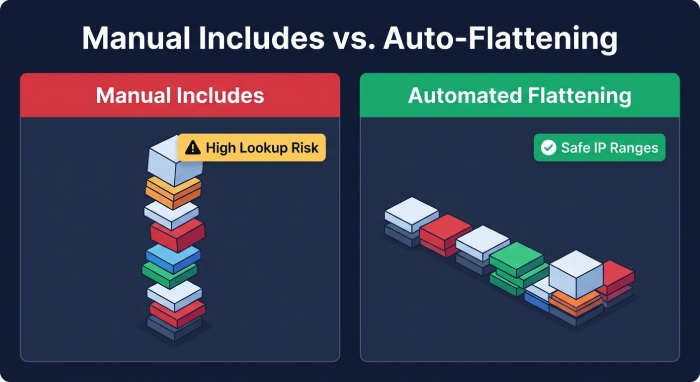
- Manual flattening
- Pros: Zero lookup cost; predictable.
- Cons: Stale quickly; high ops load; TXT length fragmentation; risk of partial publishes.
- SPF flattening services
- Pros: Automated updates; controls the lookup budget.
- Cons: Potential for cache staleness, provider downtime, or record bloat; must manage TTLs and DNS-string limits (255-char chunks; up to 10 strings).
- SPF macros (%{i}, %{s}, %{h})
- Pros: Advanced routing; conditional authorization.
- Cons: Complex, increases lookup surface, harder to audit; some receivers mishandle unusual macro patterns.
- Automated SPF-alias tools (indirection via your own includes)
- Pros: Keep vendor churn behind
_spf.vendor-alias.example.comyou control; safer changes. - Cons: Still count toward 10 lookups unless flattened; requires governance.
- Pros: Keep vendor churn behind
How AutoSPF helps
- AutoSPF provides “intelligent flattening” that refreshes vendor IPs at safe intervals, shards large IP sets across alias records without exceeding DNS limits, and rolls back on anomalies. It also offers SPF-alias generation to keep vendor changes behind your namespace.
Detecting SPF drift proactively: monitoring and alerting that works
Key metrics to watch
- Lookup count and chain depth per domain
- Void lookups and resolver errors (SERVFAIL, timeouts)
- SPF record size (strings, total bytes)
- DMARC pass/fail rates by alignment mode (SPF vs DKIM)
- Forwarding-related SPF fails (ARC-Seal presence, “via” headers)
- Vendor catalog diffs (IP range changes vs your SPF)
Automations to implement
- DNS change watchers on TXT records with Slack/email alerts
- Scheduled synthetic SPF evals with spfquery/spf-tools:
spfquery -ip 203.0.113.24 -sender bounce@test.example.com -helo mail.test - Header sampling from inbound MX/SEGs for Received-SPF patterns
- CI tests blocking publishes when lookup budget > 9
- Weekly DMARC aggregate (RUA) analysis for spike alerts
How AutoSPF helps
- AutoSPF runs continuous SPF evaluations, correlates with DMARC aggregates, and sends alerts when lookup budgets approach thresholds, vendors rotate IPs, or headers show increased SPF fails. It integrates with SIEM, Slack, PagerDuty, and has a Terraform provider for policy-as-code.
How SPF drift interacts with DMARC and DKIM
- DMARC alignment: A message passes DMARC if either SPF or DKIM aligns. SPF drift pushes SPF=fail, so DKIM must carry the pass.
- Forwarding: SPF often breaks on forwarders; DKIM survives if not modified. Expect 0.3–1.0% of traffic to rely on DKIM-only in consumer ecosystems.
- Reporting: DMARC RUA will show SPF auth_result fail with aligned-from domain; spikes indicate drift or vendor changes.
- Policy impact: With p=reject, an SPF drift incident can cause immediate rejects if DKIM is missing/misaligned.
How AutoSPF helps
- AutoSPF cross-references DMARC/RUA data to show where SPF is doing the work vs DKIM, flags senders lacking DKIM, and simulates the impact of enforcing p=reject before you flip the switch.
Strategy comparison: flattening vs subdomain delegation vs consolidation vs DKIM-first
When to use each
- Flattening SPF
- Use when vendor rotates often and include chains risk hitting 10 lookups; best for apex domains that must remain public-facing.
- Subdomain delegation
- Use to isolate high-churn senders (marketing.example.com) and keep the apex lean; simplifies budgeting and DMARC policy.
- Consolidating third-party sends
- Use when multiple platforms serve similar functions; fewer vendors = fewer includes and lower drift probability.
- DKIM-first architecture
- Use everywhere; make DKIM mandatory so SPF can fail safely on forwarding and transient drift, while DMARC still passes.
How AutoSPF helps
- AutoSPF models each approach, provides a recommendation score (lookup risk, operational overhead, deliverability impact), and can auto-provision delegated subdomain SPFs and manage DKIM onboarding checks.
Troubleshooting checklist: diagnosing SPF failures caused by drift
- Confirm SPF result in headers
- Look for Received-SPF and Authentication-Results:
- Received-SPF: fail (example.com: domain of …) or permerror (too many DNS lookups)
- Authentication-Results: dmarc=fail (p=quarantine) spf=fail dkim=none
- Look for Received-SPF and Authentication-Results:
- Fetch current SPF
dig +short TXT example.com | grep spf- For redirect:
dig +short TXT _spf.example.com
- Expand includes and count lookups
- Use spfquery:
spfquery -ip 198.51.100.45 -sender bounce@example.com -helo mail.example.com - Or online tools in a staging environment; verify nested includes and void lookups.
- Use spfquery:
- Check vendor documentation
- Verify current include targets and IP ranges; look for deprecation notices.
- Identify high-churn offenders
- Note which includes add many lookups (e.g.,
include:spf.protection.outlook.com + marketing vendors).
- Note which includes add many lookups (e.g.,
- Remediate
- Option A: Flatten volatile includes into ip4/ip6 lists (short TTL).
- Option B: Move the sender to a delegated subdomain to free budget at the apex.
- Option C: Remove stale a: and ip4: entries; enforce
-allonce clean. - Option D: Ensure DKIM is enabled and aligned for that sender to maintain DMARC pass.
- Validate and publish
- Dry-run the new record; confirm <=9 lookups, <=2 voids.
- Publish via CI; monitor headers and DMARC RUA for 48–72 hours.
How AutoSPF helps
- One-click “Diagnose” expands your SPF, highlights over-budget chains, proposes an auto-flattened patch, and opens a change request; post-publish, AutoSPF verifies receiver-side results from multiple regions.
Case studies: common root causes, evidence, and precise fixes
Case 1: Marketing expansion pushes over 10 lookups
- Before
- SPF:
v=spf1 include:_spf.google.com include:spf.protection.outlook.com include:sendgrid.net include:servers.mcsv.net include:hubspotemail.net include:spf.mandrillapp.com -all - Failure evidence: Received-SPF: permerror (too many DNS lookups)
- SPF:
- Root cause
- Nested includes from O365 and multiple marketing platforms collectively exceeded 10 after HubSpot added a regional range.
- Fix
- AutoSPF flattened sendgrid, mcsv, hubspot, and mandrill into ip4/ip6 with TTL 600; retained
_spf.google.comandspf.protection.outlook.comas includes.
- AutoSPF flattened sendgrid, mcsv, hubspot, and mandrill into ip4/ip6 with TTL 600; retained
- After
- SPF:
v=spf1 include:_spf.google.com include:spf.protection.outlook.com ip4:198.51.100.0/24 ip4:203.0.113.0/25 ip4:192.0.2.64/26 -all - Result: Lookup count reduced from 13 to 4; DMARC pass recovered; no increase in header size due to sharding across two TXT strings.
- SPF:
Case 2: Retired SMTP still authorized, later reassigned
- Before
- SPF:
v=spf1 ip4:203.0.113.25 include:_spf.example.net -all - Evidence: Spoofed mail from 203.0.113.25 accepted by some receivers; abuse reports increased.
- SPF:
- Root cause
- Old on-prem IP left in SPF; IP reassigned to an ISP’s dynamic pool.
- Fix
- AutoSPF’s drift report flagged “unused authorization” (no DMARC-aligned traffic in 60 days) and recommended removal.
- After
- SPF:
v=spf1 include:_spf.example.net -all - Result: Spoofing window closed; abuse complaints dropped to baseline.
- SPF:
Case 3: Vendor include deprecation
- Before
- SPF:
v=spf1 include:_spf.salesforce.com -all - Evidence: Received-SPF: fail; vendor note: “
_spf.salesforce.comdeprecated; use_spf.salesforce-marketingcloud.com”
- SPF:
- Root cause
- Include target changed; TTL long (86400) delayed correction.
- Fix
- AutoSPF auto-updated the alias to new include and flattened during transition; TTL reduced to 900.
- After
- SPF:
v=spf1 include:_spf.salesforce-marketingcloud.com -all(with temporary flattening) - Result: Immediate recovery; zero permerrors observed.
- SPF:
FAQs
What is the fastest way to test if I’m over the 10-lookup limit?
- Run:
spfquery -ip <sender-ip> -sender <mailfrom> -helo <helo>and inspect “explanation,” or use dig to recursively expand includes. AutoSPF simulates this continuously and blocks publications that exceed the budget.
Should I use redirect= or include= at the apex?
- Use redirect= only when the apex record is a thin pointer to a managed _spf subdomain (
v=spf1 redirect=_spf.example.com). Don’t mix redirect with other mechanisms. AutoSPF enforces this pattern and validates the redirect target.
Is SPF flattening safe?
- Yes, if automated with health checks, safe TTLs, and sharding. Manual flattening often goes stale. AutoSPF’s intelligent flattening refreshes vendor IPs proactively and rolls back on anomalies.
Why does SPF still fail on forwarded mail?
- Forwarders rewrite the path without changing the MailFrom domain, so the forwarder’s IP isn’t authorized by your SPF. DKIM survives; adopt a DKIM-first posture. AutoSPF flags streams lacking DKIM and models DMARC impact.
Conclusion: Stop SPF drift before receivers do—with AutoSPF
SPF drift is inevitable in multi-vendor email programs and directly causes SPF=fail or permerror via stale authorizations, broken includes, and the 10-lookup ceiling; the durable fix is a combination of resilient SPF design, DKIM-first policy, and continuous automation. AutoSPF operationalizes this end-to-end: it inventories senders, enforces best-practice patterns (subdomain delegation, safe redirect, no ptr), maintains a lookup budget with intelligent flattening, monitors vendor IP changes, correlates with DMARC reports, and alerts before drift impacts deliverability. If you still have doubts, our common SPF questions address the scenarios teams run into most often. Whether you choose flattening, subdomain delegation, consolidation, or a DKIM-first architecture, AutoSPF gives you the guardrails and automation to keep SPF aligned with reality—so your mail stays authenticated, your DMARC policy holds, and your brand reputation remains intact.
General Manager
General Manager of DuoCircle. Product strategy and commercial lead for AutoSPF's 2,000+ customer base.
LinkedIn Profile →