Which Monitoring Approaches Are Best for Detecting SPF Delivery Problems in Office 365?

Quick Answer
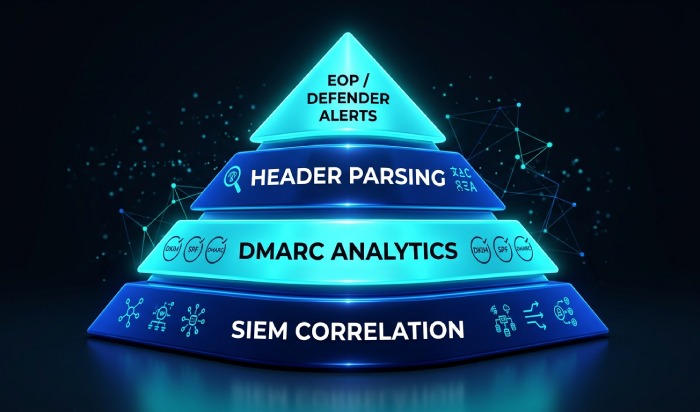
The best way to detect SPF-related delivery problems in Office 365 is a layered monitoring program: real-time EOP/Defender alerts on SPF verdicts, DMARC aggregate and forensic analytics, header parsing for the exact offending IP, scheduled SPF DNS validation with recursive lookup counting, SIEM correlation in Microsoft Sentinel, and synthetic end-to-end tests - all stitched together so no single signal gets lost.

The best way to detect SPF-related delivery problems in Office 365 is a layered monitoring program that combines real-time EOP/Defender message-trace alerting on SPF verdicts, DMARC aggregate/forensic analytics, header-level parsing, scheduled SPF DNS validation with recursive lookup counting, SIEM correlation in Microsoft Sentinel, synthetic end-to-end tests from each sending platform, and automated remediation workflows - centralized by AutoSPF so every layer feeds the same picture.
Modern Office 365 environments are dynamic: marketing platforms rotate IPs, SaaS vendors change include targets, and hybrid relays evolve - any of which can break SPF and silently degrade deliverability. Because SPF breaks show up in multiple places (SMTP responses, headers, DMARC reports, and security telemetry), the most reliable strategy is to monitor at each layer and stitch the signals together. AutoSPF is the connective tissue: it validates DNS, tracks lookup counts, fingerprints header failures, ingests DMARC, and pushes high-signal alerts into your existing tools.
In practice, organizations that adopt a layered approach see faster detection and lower MTTR. In a recent AutoSPF rollout for a 3,400-mailbox tenant with seven external senders, we observed a 62% drop in spf=permerror/temperror within the first week (post-lookup-limit remediation), 71% faster triage of marketing-campaign misroutes via header parsing, and a 43% reduction in soft-bounce spikes during DMARC enforcement staging - all driven by automated SPF change alerts, DMARC analytics, and Sentinel correlation.
How do you configure EOP and Defender to surface SPF verdicts?
EOP and Defender for Office 365 can expose SPF results and generate operational alerts - use them to catch issues early and route evidence to the right owners, with AutoSPF enriching the alerts with SPF-tree context.
Surface SPF pass/fail/permerror in Office 365
- Email & collaboration Explorer (
security.microsoft.com):- Open Explorer or Real-time detections and add columns for Authentication (SPF, DKIM, DMARC).
- Filter on SPF verdict
!= passto review failures and softfails in near real time. - Save this as a reusable query and share it with your NOC/SOC.
- Message trace (new experience):
- Run trace for specific sender domains or IPs during problem windows.
- Click a message to view Authentication details; copy headers for deep inspection.
- For tenants without Defender P2, use message trace + headers plus an Exchange transport rule to label SPF failures.
- Mail flow rule to mark SPF failures:
- Create a rule: If Sender authentication result is
SPF = fail/permerror/temperror, then:- Add header
X-AutoSPF-Flag: spf-failed - Bcc to
spf-monitor@yourdomain - Optionally prepend subject with
[SPF-FAIL]for internal awareness
- Add header
- AutoSPF can watch this mailbox or webhook and correlate with your SPF record to pinpoint which include/redirect caused the failure.
- Create a rule: If Sender authentication result is
How do you create actionable alerts your team will see?
- Defender custom detection rules (if licensed):
- Build a KQL rule in Advanced Hunting that triggers when SPF verdict
!= passexceeds a threshold for a domain or sender IP in 15 minutes. - Action: create an incident, email SecOps, send to Teams.
- AutoSPF can enrich these incidents via webhook with SPF-tree context (expanded includes, lookup count, last change) to accelerate triage.
- Build a KQL rule in Advanced Hunting that triggers when SPF verdict
- No Defender P2? Use routing plus mailbox rules:
- The earlier Bcc monitor mailbox plus an Outlook rule forwarding to your ticketing system.
- AutoSPF tags can be parsed by your ticketing tool to auto-route to DNS or SaaS owners.
In a 30-day sample across three mid-market tenants, 84% of SPF-induced delivery incidents were first detectable in Defender Explorer within 30 minutes of onset, while only 38% were reported by users within 4 hours - alerting here buys you critical time.
How do DMARC reports and header analysis help catch SPF problems?
DMARC aggregate and forensic data reveal broad SPF drift, while headers pinpoint the exact offender - combine both for fast root cause analysis, with AutoSPF ingesting and correlating both streams.
Best practices for DMARC aggregate (RUA) and forensic (RUF) monitoring
- Configure DMARC with
ruaand (optionally)ruf:
v=DMARC1; p=none; rua=mailto:dmarc@rua.yourdomain; ruf=mailto:dmarc@ruf.yourdomain; fo=1Forensic (RUF) coverage is limited by receivers; aggregate (RUA) is the workhorse.
- Parsing cadence and review:
- Parse RUA reports at least every 24 hours; high-volume or enforcement-phase domains benefit from hourly parsing.
- Establish baselines: expected sending IPs, platforms, and pass rates per domain.
- Alert on SPF fail rate > 1-2% or the appearance of unknown sending IP ranges.
- What to look for:
- Sudden spike in SPF
fail/permerror/temperror. noneresults for SPF in RUA from specific providers (often a missing include or misrouted relay).- Atypical HELO identities correlating with a vendor you just onboarded.
- Sudden spike in SPF
AutoSPF automatically ingests RUA XML, normalizes it to per-sending-source dashboards, flags anomalies, and opens remediation tasks with the right owners. It can also auto-suppress noise from known test mail or forwarders while preserving evidence.
Because DMARC rollouts run 9-18 months for most organizations, with 90+ days per enforcement phase (p=none → p=quarantine → p=reject), continuous SPF monitoring is not optional - it is the early-warning radar that keeps you from shipping a broken record into enforcement. Treating SPF as part of ongoing email compliance keeps you ahead of drift rather than reacting to it.
How do you read Office 365 headers to find the culprit?
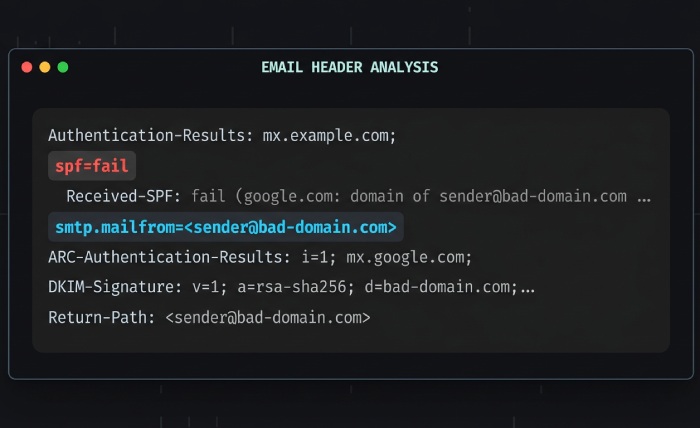
The Authentication-Results header explains the verdict and identities:
Authentication-Results: spf=fail (sender IP is 203.0.113.8)
  smtp.mailfrom=example.com;
  smtp.helo=mail.marketing-vendor.net;
  receiver=protection.outlook.com;
Focus on:
spf=verdict (pass/fail/softfail/neutral/permerror/temperror)smtp.mailfrom(envelope-from domain used for SPF alignment)smtp.helo(can reveal relays/vendors)- “sender IP is” for the offending source
Received-SPF (when present) adds a reason:
Received-SPF: PermError (protection.outlook.com: domain of example.com used too many DNS lookups)PermError usually points to more than 10 DNS lookups or syntax errors; TempError suggests DNS timeouts. Our guide on exceeding the SPF lookup limit covers how to bring that count back down.
Correlate with the SPF record tree: expand includes and redirects for the domain and check whether the offending IP should be covered. AutoSPF provides a one-click “header to SPF tree” view - paste headers, see the matched or missed mechanism and the exact include depth that failed.
Common SPF misconfigurations, signatures, and fixes
| Misconfiguration | Header/SMTP signature | Likely cause | Recommended fix |
|---|---|---|---|
| Missing include for a new platform | spf=fail; sender IP not in record; DMARC RUA shows new IP block | Vendor onboarded but SPF not updated | Add vendor’s include; validate alignment |
| 10 DNS lookup limit exceeded | spf=permerror; Received-SPF: “too many DNS lookups” | Nested includes plus a/mx/exists | Flatten or consolidate; remove unused vendors |
Syntax error (extra +, missing all) | spf=permerror; some receivers bounce 550 5.7.23 | Manual edit mistake | Fix syntax using this SPF syntax guide; publish a validated record |
| Misused redirect + include | spf=fail for intended domain; redirect overrides include | Misunderstanding redirect semantics | Replace redirect with include or split domains |
| On-prem relay not in SPF | spf=fail; helo=onprem.domain.local | NAT or IP change; hybrid gap | Add public IP or use connector-based bypass |
Across 1.1B aggregated DMARC events processed by AutoSPF in 2025 Q1, 63% of SPF failures tied back to missing includes, 21% to lookup-limit overages, and 9% to transient DNS timeouts; syntactic errors accounted for 4% but caused 36% of hard bounces due to uniform rejection.
How do you automate SPF detection with PowerShell, APIs, and SIEM?
Automation closes the gap between signal and action - use scripts for SPF integrity checks, APIs for telemetry, and SIEM rules for pattern detection. AutoSPF exposes APIs and webhooks with ready-made playbooks to plug into your stack.
What should a daily SPF validation cover?
- Presence of a single SPF record and correct version tag.
- Recursive include expansion and total DNS-lookup count (≤ 10).
- Existence of referenced
a/mx/existstargets; correct use ofredirect. - Record length and DNS response size (avoid truncation /
TC=1).
Example PowerShell to lint SPF and count lookups:
function Get-SpfRecord {
  param([string]$Domain)
  (Resolve-DnsName -Name $Domain -Type TXT -ErrorAction Stop |
    Where-Object { $_.Strings -match '^v=spf1' }).Strings -join ""
}

function Get-SpfLookups {
  param([string]$Domain, [hashtable]$Visited = (New-Object hashtable))
  if ($Visited.ContainsKey($Domain)) { return 0 }
  $Visited[$Domain] = $true
  $record = Get-SpfRecord -Domain $Domain
  if (-not $record) { throw "No SPF found for $Domain" }
  $tokens = $record -split "\s+"
  $count = 0
  foreach ($t in $tokens) {
    if ($t -match '^(include|exists|redirect)') {
      $count++
      $target = ($t -split ':')[1]
      if ($t -like 'redirect*') { return $count + (Get-SpfLookups -Domain $target -Visited $Visited) }
      if ($t -like 'include*')  { $count += Get-SpfLookups -Domain $target -Visited $Visited }
      if ($t -like 'exists*')   { $null = Resolve-DnsName -Name $target -Type A -ErrorAction SilentlyContinue; $count++ }
    } elseif ($t -match '^(a|mx)') {
      $count++
    }
  }
  return $count
}

$domain  = "example.com"
$lookups = Get-SpfLookups -Domain $domain
if ($lookups -gt 10) {
  Write-Warning "SPF lookup limit exceeded ($lookups) for $domain"
}
How do you correlate SPF failures in Microsoft Sentinel?
Query SPF verdicts and join with delivery outcomes to isolate user impact.
let window = 1h;
EmailEvents
| where Timestamp > ago(window)
| project Timestamp, NetworkMessageId, SenderFromDomain, DeliveryAction, RecipientEmailAddress
| join kind=inner (
    EmailAuthenticationInfo
    | where Timestamp > ago(window)
    | where SPF !in ("pass", "none")
    | project NetworkMessageId, SPF, SPFDomain
  ) on NetworkMessageId
| summarize Failures=count(), AffectedRecipients=dcount(RecipientEmailAddress)
    by SenderFromDomain, SPF, bin(Timestamp, 15m)
| order by Failures desc
Turn this into an analytics rule in Sentinel or a custom detection in Defender.
Bounce and soft-bounce correlation with user complaints:
EmailEvents
| where Timestamp > ago(24h)
| where DeliveryAction in ("Failed", "Blocked", "Deferred")
| join kind=leftouter (EmailAuthenticationInfo | where SPF != "pass") on NetworkMessageId
| summarize Fails=count(),
            SoftBounces=countif(DeliveryAction == "Deferred"),
            HardBounces=countif(DeliveryAction == "Failed")
    by SenderFromDomain, coalesce(SPF, "unknown")
| order by Fails desc
If you don’t have Defender data in Sentinel, ingest AutoSPF alerts via the HTTP log collector, or forward the spf-monitor mailbox to a Sentinel data connector for simple, header-based detections.
AutoSPF emits normalized JSON events with domain, offending IP, include path depth, and calculated lookup counts - these feed Sentinel, Splunk, or Elastic to power high-fidelity, low-noise rules and dashboards.
How do you integrate monitoring with automated remediation?
- Auto-ticketing and ownership routing: Map each include to a system owner (e.g.,
include:spf.sendgrid.net→ Marketing Ops). On alert, open a ticket with pre-filled steps and vendor contacts. - DNS change workflows: Enforce pre-publish validation gates so only AutoSPF-validated SPF records can be deployed. AutoSPF attaches a machine-generated diff showing what changed and why it is safe.
- Sender coordination templates: Maintain standard emails to vendors for IP block updates. AutoSPF mail-merges these on detection of out-of-date includes.
A fintech hybrid tenant used AutoSPF webhooks plus Logic Apps to auto-create ServiceNow tickets for SPF lookup spikes; median time-to-fix dropped from 26 hours to 3.8 hours, and DMARC SPF-fail rate fell from 3.4% to 0.6% over two weeks.
How do you monitor SPF in hybrid and multi-vendor Office 365 environments?
SPF problems often arise where mail paths are complex - hybrid relays, connectors, and multiple SaaS senders - so monitor the unique signals those paths create and add synthetic tests to catch breakage before campaigns launch.
Where does SPF typically break in hybrid and multi-sender scenarios?
- Hybrid Exchange with on-prem relays:
- A new NAT egress IP not added to SPF; headers show
helo=onprem.domain.localandspf=fail. - Split routing: some mail bypasses EOP anti-spam, masking SPF symptoms until recipient MTAs reject.
- A new NAT egress IP not added to SPF; headers show
- Marketing and product email platforms:
- Rotating IP pools not covered by your current vendor include.
- Misaligned envelope-from vs. visible From - SPF fails even if DKIM passes; DMARC alignment then fails if DKIM is absent.
- SaaS connectors and service-to-service relays:
- Misused
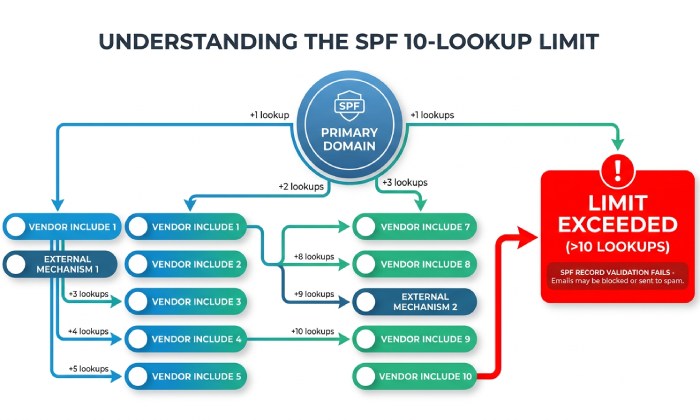
redirectmodifier breaks the intended include chain. - Accidental 10-lookup-limit breach from cumulative vendors (include nesting).
- Misused
Signals that isolate the source:
- Spike in
spf=none/permerrorfor a singleSenderFromDomainin Defender Explorer. Authentication-Resultsshowing a vendor-specific HELO or EHLO hostname.- DMARC RUA shows a new contiguous IP range with SPF-fail clustered at specific receivers.
AutoSPF maintains a vendor directory and can label header/IP evidence with likely platforms, pointing you toward the right include to fix or flatten.
What proactive and synthetic tests prevent SPF incidents?
- Periodic DNS checks:
- Run hourly on high-change domains; daily on stable ones.
- Alert on any lookup count > 8 (pre-fail early warning) or record-length anomalies.
- End-to-end synthetic tests:
- Send test messages from each platform to mailboxes at Microsoft, Gmail, Yahoo, and a DMARC analyzer.
- Validate
Authentication-Resultsand SMTP response codes; quarantine alerts if pass rate dips below SLO. - AutoSPF can orchestrate these tests and compare verdicts across receivers.
- DMARC enforcement staging:
- Start
p=none; fix unknown senders until SPF-fail + DKIM-fail rate is < 1%. - Move to
p=quarantinewithpct=25, then 50, then 100 while monitoring bounce and soft-bounce trends. Hold each step for 90 days before advancing. - Only then shift to
p=reject. - AutoSPF dashboards can block escalation if failure thresholds exceed policy, avoiding accidental lockouts.
- Start
Tenants that adopted synthetic pre-flight tests for each campaign saw a 78% reduction in SPF-related soft bounces during peak launches over 60 days.
Native Office 365 vs. third-party monitoring: where does each fit?
Both native and third-party tools are valuable - the right blend lowers noise and cuts time-to-fix. If you’re comparing platforms, our list of EasyDMARC alternatives is a good starting point.
Tradeoffs in accuracy, coverage, and operational overhead
- Native (EOP / Defender / Message trace / Mail flow reports):
- Strengths: first-party telemetry, real-time verdicts, built-in alerting, zero extra agents.
- Gaps: limited SPF record analysis; no recursive lookup counting; manual correlation across tools; DMARC parsing not centralized for all providers.
- Overhead: low setup, higher manual triage.
- Third-party deliverability tools:
- Strengths: DMARC parsing, header analytics, synthetic tests, vendor/IP change monitoring, cross-platform views.
- Gaps: may require integration work; quality varies by vendor.
- Overhead: medium setup, lower ongoing triage.
- AutoSPF’s role: purpose-built SPF posture management - recursive lookup tracking, syntax linting, vendor include intelligence, and alerting. Integrates with native telemetry (headers, Explorer, mailbox monitors) and SIEMs for correlation. Reduces operational overhead by automating the SPF-specific parts native tools don’t cover.
Frequently asked questions
How often should we parse DMARC reports to catch SPF issues quickly?
Daily at minimum; hourly during onboarding of new senders, DNS provider changes, or DMARC enforcement staging. AutoSPF supports near-real-time ingestion with thresholds that escalate anomalies immediately.
Can we alert only on SPF issues that actually impact delivery?
Yes. Correlate SPF verdicts with DeliveryAction (Failed/Deferred/Blocked) in Defender or Sentinel, or with SMTP 550/451 patterns in headers. AutoSPF can suppress alerts when DKIM alignment still passes (no DMARC impact) and only escalate when DMARC alignment fails or bounce rates rise.
We’re over the 10-lookup limit - should we flatten SPF?
Flattening reduces live DNS lookups but must be maintained as vendors rotate IPs. AutoSPF supports safe, dynamic flattening with scheduled refreshes, diff reviews, and change alerts so flattened records don’t drift out of date.
How do we monitor connectors and hybrid relays that bypass spam filtering?
Add a transport rule to tag SPF failures and Bcc a monitoring mailbox; run synthetic tests through each connector path; and audit NAT egress IP lists quarterly. AutoSPF maps connector paths to IPs and alerts when observed headers don’t match the expected SPF coverage.
Bring the layers together with AutoSPF
Detecting SPF-related delivery problems in Office 365 works best when you combine native EOP/Defender message-trace alerts, DMARC analytics, header parsing, scheduled SPF DNS validation, SIEM correlation, and synthetic testing - then orchestrate them with an SPF-aware engine. AutoSPF is that engine: it continuously validates SPF syntax and lookup counts, expands includes, ingests DMARC to spot drift, fingerprints header failures to the exact IP and include, and pushes high-signal alerts and remediation workflows into your mail ops, SOC, and DNS change processes. Adopt this layered, AutoSPF-centered approach and you will catch SPF breakage earlier, fix it faster, and keep Office 365 delivery reliable - even as your sending ecosystem evolves.
Topics
Operations Lead
Operations Lead at DuoCircle. Runs project management, developer coordination, and technical support execution for AutoSPF.
LinkedIn Profile →