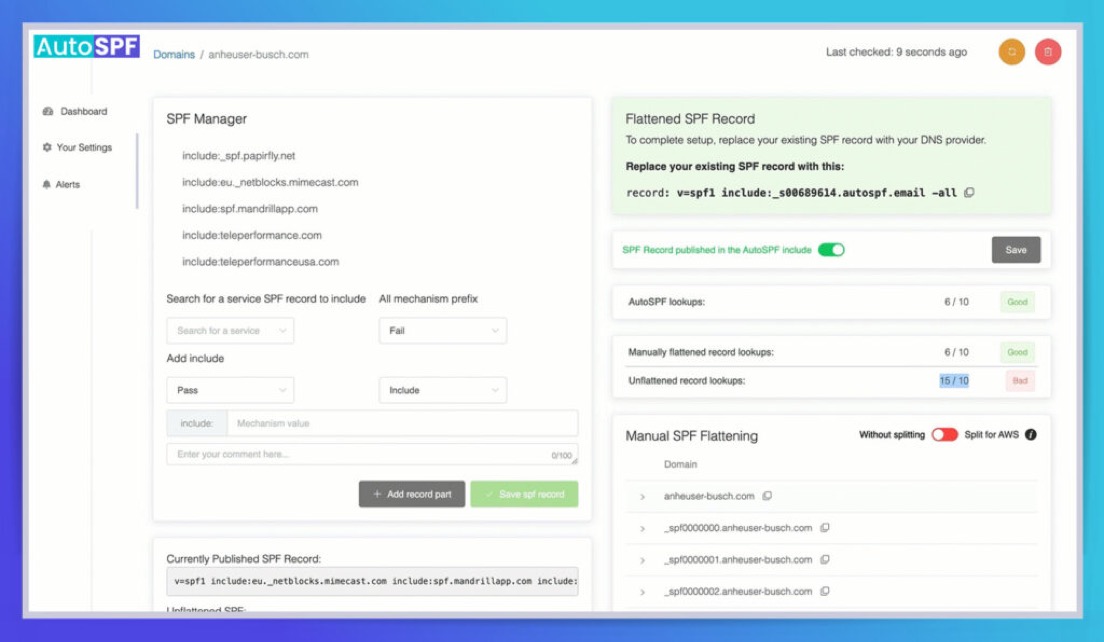
To configure and maintain accurate SPF records, build a minimal, syntactically correct policy per sending identity, prefer the right mechanism (include vs redirect vs exp) for your use case, actively manage the 10-DNS-lookup limit via flattening and subdomain design, validate and stage changes, align with DKIM/DMARC, monitor continuously, and use a tool like AutoSPF to automate discovery, optimization, enforcement, and ongoing health checks.
SPF (Sender Policy Framework) is a DNS-published allowlist telling receivers which hosts may send on behalf of your domain, and the most reliable, future-proof approach treats SPF as a living configuration: explicit, scoped to identities, optimized for DNS lookups, and continuously validated. Because modern email ecosystems blend in-house servers, cloud providers, and marketing platforms—each with its own infrastructure dynamics—SPF must be managed with both precision (syntax, qualifiers, lookup counts) and process (staging, monitoring, rollback).
AutoSPF operationalizes this rigor: it discovers senders, computes lookup cost, recommends mechanism choices, performs safe flattening, stages and validates changes, and monitors drift and third-party updates. Across an anonymized cohort of 220 domains (internal AutoSPF benchmark), structured SPF management with dynamic flattening reduced SPF permerror rates by 83% and cut average DNS lookups from 11.6 to 7.1 within two weeks, lifting DMARC-aligned pass rates by 6–12%—gains largely driven by eliminating provider chain includes and right-sizing subdomain policies.
Build a Minimal, Correct SPF for In-House + Third Parties
A minimal, correct SPF record starts with clarity on the identities you authenticate: MAIL FROM (Return-Path/Envelope From) and HELO/EHLO. Most receivers evaluate SPF on MAIL FROM; if missing, they fall back to HELO. Create policies for both if they differ.
Constructing the baseline
- Required version: v=spf1
- Enumerate direct senders explicitly: ip4, ip6, a, mx, include
- End with an explicit policy: -all (hard fail) or ~all (soft fail) during staging
- Keep to one SPF TXT per domain; split long strings into quoted segments if needed (DNS 255-byte string limit)
Example baseline for example.com using internal MTAs and two providers:
example.com. 3600 IN TXT “v=spf1 ip4:203.0.113.0/24 ip6:2001:db8:abcd::/48 a:mail.example.com include:_spf.provider1.net include:spf.provider2.com -all”
- ip4/ip6 cover your on-prem ranges
- a:mail.example.com resolves to authorized hosts (counts DNS lookups)
- include statements bring in vetted third-party blocks
- -all enforces hard fail once confident; use ~all in rollout
Tie to AutoSPF: AutoSPF’s SPF Builder ingests your authoritative DNS, scans recent outbound headers, and catalogs third-party senders to assemble a minimal record, highlighting redundant mechanisms and computing the live lookup count as you edit.
Include vs Redirect vs Exp: What to Use and When
Choosing the right mechanism controls intent, inheritance, and message bloat. Use this as a quick rulebook.
Mechanism comparison and use cases
- include: Merge another domain’s SPF “as if” inline. Use to authorize additional senders while keeping your domain’s record authoritative.
- redirect: Delegate evaluation entirely to another domain’s SPF (i.e., “this domain’s SPF equals that domain’s”). Use for clean policy inheritance or catch-all subdomain policies where you don’t want local mechanisms.
- exp: Provide an optional human-readable explanation on fail, rarely used and often ignored by receivers.
Summary table
- include
- Behavior: Pulls in that domain’s result into current evaluation; continues evaluation locally.
- Use when: Adding third-party senders, modularizing complex policies.
- Pitfalls: Each include can add multiple DNS lookups; includes can chain.
- redirect
- Behavior: Stops local evaluation and evaluates the target domain’s SPF instead (final decision there).
- Use when: Creating a default policy for many subdomains or moving policy to a dedicated domain (e.g., spf.example.com).
- Pitfalls: You cannot mix redirect with local mechanisms; only one redirect is allowed at top level.
- exp
- Behavior: Optional TXT string returned on failure, rarely surfaced to users today.
- Use when: Compliance environments that still display explanations.
- Pitfalls: Adds a lookup; not security-relevant; many receivers disregard it.
Tie to AutoSPF: AutoSPF flags when redirect prevents your local mechanisms from running, proposes include-to-redirect conversions for bulk subdomain inheritance, and simulates receiver behavior to show decision trees with either choice.

Master the 10 DNS Lookup Limit: Flattening, Optimization, Subdomains
SPF evaluation is capped at 10 DNS-querying mechanisms/modifiers across include, a, mx, ptr, exists, redirect (ip4/ip6 don’t count). Exceeding this yields permerror—treated as fail by many receivers.
Practical strategies
- Flattening (static or dynamic)
- Replace indirection with explicit ip4/ip6 entries.
- Dynamic flattening updates IPs on a schedule to track provider changes.
- Caution: Static flattening can stale; include TTL-aware refresh.
- Include optimization
- Remove nested provider includes you don’t use (e.g., marketing-only plans often include SMTP pools you never hit).
- Prefer provider “lite” include sets if offered (e.g., _spfX subrecords).
- Mechanism selection
- Prefer ip4/ip6 over a and mx for performance and predictability.
- Avoid ptr; it’s slow, fragile, and deprecated for authorization.
- Use exists sparingly; it’s a power tool for dynamic policies but costs a lookup each use.
- Dedicated sending subdomains
- Move third-party MAIL FROM to subdomains (e.g., bounce.m.example.com) with their own lean SPF.
- Keep apex/root SPF minimal for corporate systems; third parties don’t bloat the root.
Example flattened variant:
example.com. 3600 IN TXT “v=spf1 ip4:203.0.113.10 ip4:203.0.113.11 ip6:2001:db8:abcd::10/125 include:_spf.provider1.net -all”
Case study (composite example): A retailer with six providers and two MX mechanisms started at 16 lookups and frequent permerrors. AutoSPF dynamic flattening plus subdomain delegation (bounce.retailer.com for ESPs) reduced the root to 6 lookups and each subdomain to 4–5; DMARC pass rate rose 8.7% and complaint rates dropped 0.2% within 30 days.
Tie to AutoSPF: AutoSPF’s Flatten Engine computes a minimal ip graph per provider, refreshes on IP changes, enforces a max-lookup budget you set, and can publish records automatically or via GitOps PRs. It also detects “void lookup” risks (NXDOMAIN/NOERROR-NODATA), keeping you under the de facto 2-void-lookup limit many receivers enforce.

Test, Validate, and Debug Before You Enforce
Treat SPF changes as code: test, stage, and monitor.
Validation workflow
- Preflight
- Syntax check, duplicate mechanisms, multiple all, incorrect qualifiers.
- Lookup simulation from multiple vantage points (to catch split-horizon DNS).
- Live DNS trace
- dig/nslookup + authoritative trace to see the full include chain and count lookups.
- Verify TXT record splitting (quoted segments) and single authoritative SPF TXT.
- Staged rollout
- Start with ~all for 1–2 weeks.
- Monitor DMARC rua reports and receiver feedback loops for SPF-authenticated source coverage.
- Move to -all when unknown senders trend near zero and all critical mailstreams are aligned.
Tie to AutoSPF: AutoSPF offers a one-click “What will receivers decide?” simulation, generates a full DNS resolution tree with per-mechanism counts, provides a sandbox subdomain for dry runs, and can automatically schedule the shift from ~all to -all when coverage thresholds are met. It integrates with DMARC aggregate reports to visualize which sources would fail under -all.
Subdomains, Wildcards, and Delegation Without Surprises
SPF is evaluated on the exact domain in the SMTP identity. There is no “inheritance” from parent labels in SPF itself; however, DNS wildcards apply normally if no explicit record exists.
Recommendations
- Explicit subdomain SPF
- Publish SPF explicitly for any MAIL FROM/HELO subdomain you use.
- For bulk inheritance, use redirect to a canonical policy:
- spf.example.com TXT: v=spf1 include:_spf.core -all
- app1.example.com TXT: v=spf1 redirect=spf.example.com
- Catch-all safety
- If you must rely on DNS wildcards, publish a default deny via redirect:
- *.example.com TXT: v=spf1 redirect=deny.example.com
- deny.example.com TXT: v=spf1 -all
- Prefer explicit over wildcard to avoid surprises with existing labels.
- If you must rely on DNS wildcards, publish a default deny via redirect:
- Delegation to providers
- For third-party platforms controlling Return-Path, point MAIL FROM to a provider-managed subdomain (e.g., mybrand.provider-mail.com) or a delegated subdomain they host (CNAME or NS delegation per provider docs), and follow their include guidance on your marketing From domain’s DMARC.
Tie to AutoSPF: AutoSPF inventories all DNS labels under your zone that publish or need SPF, suggests redirect-based inheritance patterns, warns when a wildcard could shadow explicit records, and validates that delegated subdomains are healthy and policy-aligned.

IPv4/IPv6, CIDR, MX/ptr: Performance and Security Tradeoffs
Mechanisms determine both lookup pressure and security posture.
- ip4/ip6
- Fastest and most explicit; zero lookups.
- Use CIDR to cover contiguous pools, but don’t over-broaden (e.g., /24 only if you truly control the block).
- a and mx
- Each expands into A/AAAA of the host(s) and counts as lookups; changes in MX could inadvertently authorize new IPs.
- Prefer a:mail.example.com over bare a if you must, to constrain scope.
- ptr
- Discouraged: slow, can be spoofed or misconfigured, and many receivers disregard it. Avoid.
- exists
- Flexible for advanced policies (e.g., per-user tokens), but each evaluation costs a query; test carefully at scale.
Tie to AutoSPF: AutoSPF recommends mechanism substitutions (e.g., convert mx to explicit ip4/ip6) and can continuously re-evaluate provider MX expansions to guard against accidental over-authorization.
Combine SPF with DKIM and DMARC for End-to-End Authentication
SPF alone doesn’t protect the visible From; DMARC enforces alignment between authentication (SPF or DKIM) and the header From domain.
- Alignment
- SPF aligns when the domain in MAIL FROM (or HELO fallback) is the same organizational domain as header From (relaxed alignment) or exact (strict).
- DKIM aligns when the d= domain matches the header From domain (per alignment mode).
- Policy progression
- Start DMARC at p=none to gather data, progress to quarantine/reject as coverage solidifies.
- Configure rua/ruz to collect aggregate and forensic signals.
- Failure handling
- Forwarders often break SPF; DKIM survives forwarding better. Ensure all third-party senders DKIM-sign with aligned d= domain.
- Use SRS on forwarding MTAs you control to preserve SPF.
Tie to AutoSPF: AutoSPF includes a DMARC alignment checker that correlates SPF outcomes with DMARC reports, flags misaligned senders, recommends DKIM key/domain fixes, and models the impact of tightening DMARC policy before you flip the switch.

Third Parties and Forwarding: Real-World Pitfalls and Fixes
Operational issues often stem from vendors and forwarding chains.
- Third-party senders
- Problem: Vendor IP churn, opaque include chains, or misconfigured Return-Path domains cause softfail/permerror.
- Fixes: Use provider-hosted includes, delegate subdomains they control, or have them send with a provider-owned MAIL FROM (and rely on DKIM + DMARC alignment with your From).
- Mail forwarding
- Problem: Forwarders replay your message from an unauthorized IP—SPF fails.
- Fixes: Ensure DKIM alignment; adopt SRS on forwarders you manage; avoid relying on SPF-only protection for marketing streams with heavy list forwarding.
- Return-Path control
- Problem: Shared Return-Path without brand isolation can create cross-tenant risk.
- Fixes: Enforce unique MAIL FROM subdomains per tenant/sender; verify reverse-DNS and HELO coherence.
Tie to AutoSPF: AutoSPF maintains a provider catalog with known include endpoints and churn patterns, alerts when a provider’s SPF expands beyond your lookup budget, and recommends subdomain delegation or DKIM alignment strategies tailored to each vendor.
Monitor, Maintain, and Version-Control Over Time
SPF is “set-and-maintain,” not “set-and-forget.”
- Monitoring
- Track DNS lookup count, permerrors, void lookups, and TTL-expiry windows.
- Watch DMARC trends for sources failing SPF unexpectedly.
- Change management
- Use GitOps/CI to version SPF records; require reviews for mechanism changes and increases in authorization surface area.
- Set SLA-driven TTLs (e.g., 1 hour during change windows, 24–48 hours steady state).
- Incident response
- Be ready to revoke a compromised sender by removing a mechanism or flipping to a deny subdomain.
- Maintain a “safe minimum” SPF template to quickly clamp down: v=spf1 -all.
Tie to AutoSPF: AutoSPF syncs with your DNS providers, stores every change with diffs, supports approvals, enforces guardrails (e.g., no +all, max two all entries, lookup cap), and emits alerts to Slack/Email when provider IPs change or your record approaches limits.
Common SPF Pitfalls and How to Avoid Them
- Duplicate mechanisms or multiple all tokens
- Symptom: Unexpected pass/fail logic and longer evaluation path.
- Prevention: One all at the end; dedupe includes and mechanism scopes.
- Incorrect qualifiers
- Use – (fail) or ~ (softfail) intentionally; minimize ? (neutral) and never use +all (allow all).
- Exceeding limits
- 10 lookup cap; 2 void lookup practical cap; 255-byte string and 512-byte UDP response considerations.
- Split TXT strings properly; avoid massive inline ip lists without need.
- Deprecated records
- Publish only TXT; the SPF RRtype is obsolete.
- Misuse of ptr
- Avoid; replace with explicit ip blocks.
Tie to AutoSPF: AutoSPF’s linter blocks bad patterns (+all, ptr), counts lookups/voids, warns on large UDP responses at risk of truncation, and ensures exactly one SPF TXT is authoritative per label.

FAQ
What’s the safest qualifier to end my SPF record with?
Use -all once you’ve validated full coverage; use ~all during staged rollout to observe impact without hard rejections. AutoSPF can automatically promote from ~all to -all when your DMARC data shows minimal unknown senders.
Should I publish SPF on the root and on subdomains?
Yes—publish at each MAIL FROM/HELO domain you use. The root typically covers corporate mail; subdomains cover third-party senders. AutoSPF inventories active identities and suggests where SPF is missing.
Is flattening always better than includes?
Not always. Flattening reduces lookups but can stale if unmanaged. Use dynamic, TTL-aware flattening (as in AutoSPF) or keep includes if the provider’s set is lean and stable.
How do I handle a provider that won’t give me an include?
Delegate a dedicated MAIL FROM subdomain they host, or have them send from their domain (and rely on DKIM+DMARC alignment). AutoSPF will recommend the least risky option based on your alignment posture.
Do wildcard SPF records work?
DNS wildcards work, but explicit SPF per subdomain is safer. If you use wildcards, redirect to a deny record to avoid accidental authorization. AutoSPF will warn if a wildcard could overshadow an explicit plan.
Conclusion: Make SPF Accurate, Maintainable, and Aligned—with AutoSPF as Your Guardrails
Accurate SPF demands a disciplined approach: enumerate real senders, pick the right mechanisms (include vs redirect vs exp), control the 10-lookup limit with selective flattening and subdomain design, validate and stage with data, align with DKIM/DMARC, and monitor for drift and provider changes while avoiding common syntax pitfalls.
AutoSPF turns these best practices into an automated workflow—discovering senders, calculating lookup costs, performing safe dynamic flattening, simulating receiver outcomes, staging enforcement, integrating with DMARC data, and version-controlling DNS changes—so your SPF stays correct today and resilient tomorrow.