
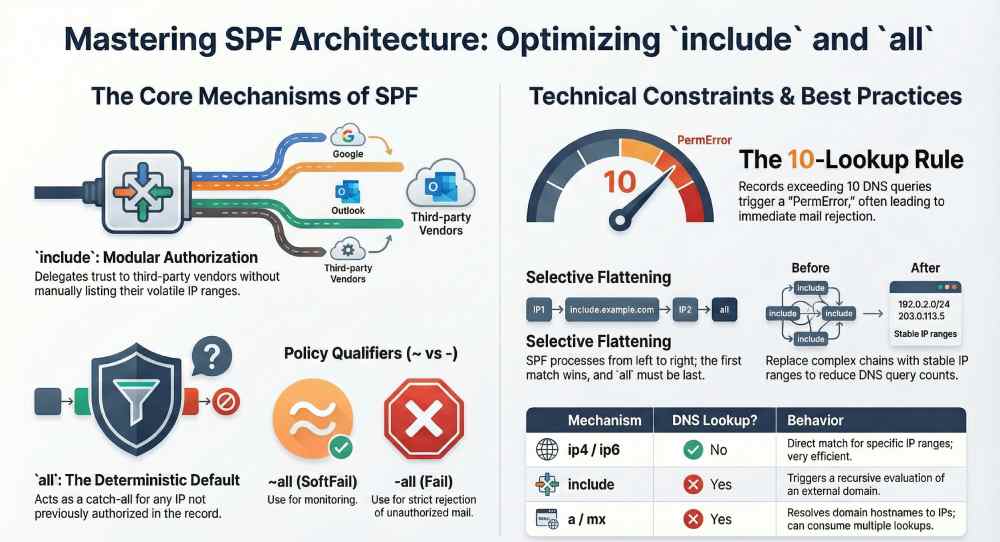
SPF syntax includes mechanisms like include and all so domain owners can modularly authorize many disparate sending sources (include) while enforcing a clear, deterministic default outcome for everything else (all), enabling receivers to evaluate policies left-to-right with predictable, secure results.
Sender Policy Framework (SPF) lives in DNS and answers a simple question—“Is this IP allowed to send mail for this domain?”—but modern email ecosystems are not simple: most organizations route mail through multiple clouds (e.g., Google Workspace, Microsoft 365), marketing platforms (e.g., Mailgun, SendGrid), and infrastructure providers (e.g., Cloudflare, AWS SES). The include mechanism lets you “compose” those third-party authorizations without copying volatile IP lists; the all mechanism then supplies a catch‑all decision so receivers know what to do with everything not explicitly allowed.
These two mechanisms exist to scale authorization safely. include delegates trust by reference (and recurses into the referenced SPF), while all closes the policy with an explicit qualifier (-, ~, +, or ?) that tells receivers whether to reject, quarantine, accept but mark, or remain neutral. AutoSPF operationalizes these semantics by validating your includes, simulating receiver evaluation, enforcing lookup limits, and recommending safe defaults for all so your policy stays accurate, fast, and enforceable as your vendors change.
How “include” is evaluated and what counts as a match
What “include” actually does
- Definition: The SPF include mechanism (e.g., include:_spf.google.com) triggers a recursive SPF evaluation of the specified domain for the current sender IP.
- Match semantics: It “matches” only if the included domain’s SPF evaluation returns Pass for the sender IP.
-
No-match vs. errors:
- If the included domain returns Fail, SoftFail, Neutral, or otherwise does not Pass, the include is treated as no match and evaluation continues with the next mechanism.
- If the included domain yields TempError (DNS transient issue), the overall result is TempError.
- If the included domain yields PermError (e.g., syntax error) or None (no SPF record), the overall result is PermError per RFC 7208; this can cause mail to be treated as failed by many receivers.
Qualifiers on include (and why they’re dangerous)
- You can prefix any mechanism with a qualifier: +include (default), ~include, -include, ?include.
- Because include only “matches” when the referenced policy would Pass, -include says “if Vendor would Pass, then Fail,” which is almost never intended and a frequent misconfiguration.
Where AutoSPF helps
- AutoSPF performs recursive resolution of each include, surfaces whether it yields Pass/TempError/PermError/None, and flags unsafe qualifiers.
- It visualizes vendor dependencies and shows which include is authoritative for a given sending IP, so you can remove dead includes safely.
The role of “all” and how qualifiers change outcomes
“all” is the default policy
- The all mechanism always matches, so its position typically ends the policy.
- It defines what to do with everything not previously permitted.
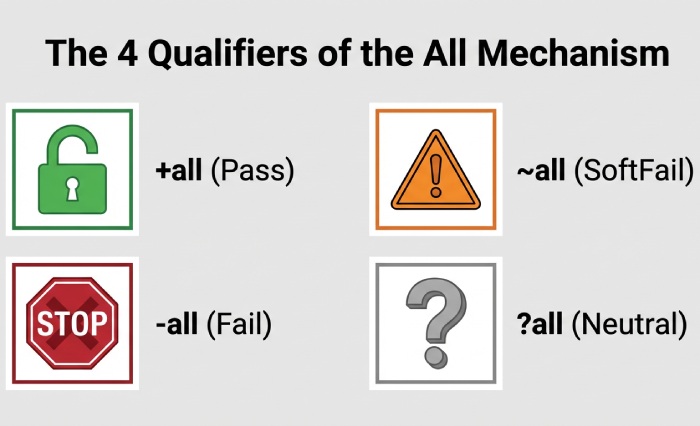
Qualifiers and typical receiver behavior
- +all (Pass): Accept everything; not secure; never recommended in production.
- ~all (SoftFail): “Probably not authorized.” Many servers accept but mark or spam‑score.
- -all (Fail): “Not authorized.” Many servers reject at SMTP or mark as hard fail.
- ?all (Neutral): “No policy.” Treated as neither pass nor fail; rarely useful.
A common rollout pattern is ~all during monitoring, moving to -all after confirming legitimate sources. AutoSPF recommends a staged plan, tracks DMARC alignment outcomes, and alerts before switching to -all to avoid breaking legitimate mail.
Evaluation order and how mechanisms are prioritized
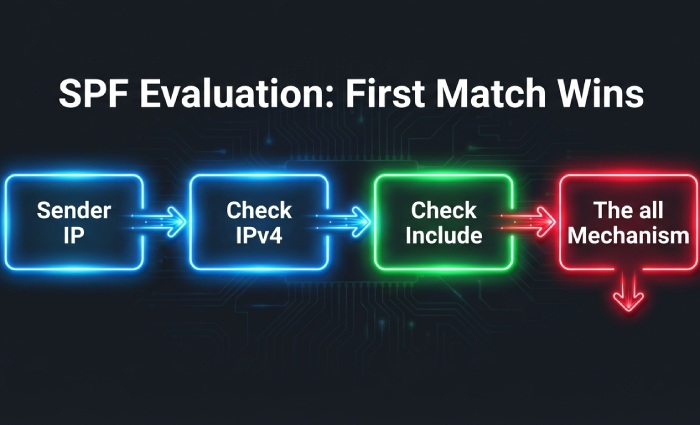
Left-to-right, first-match-wins
- SPF is evaluated in the order listed. The first mechanism that matches decides the result; redirect only runs if nothing matched.
- Common mechanisms: ip4, ip6 (no DNS lookup), a, mx, include, exists (lookup), all (no lookup), and deprecated ptr (avoid).
- There is no intrinsic priority between mechanisms; order is policy.
Best practice: Put more specific/static sources (ip4/ip6) before broader, lookup-heavy terms (mx, include), and place all last. AutoSPF linting ensures unreachable terms are detected (e.g., all appearing mid-record) and suggests optimized ordering to reduce lookups and improve performance.
DNS lookup limits, performance, and PermError risks
The 10-lookup rule (and how you can hit it)
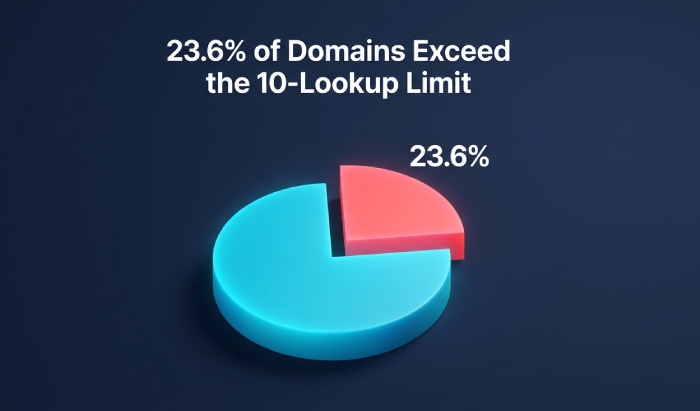
- SPF limits mechanisms/modifiers that require DNS queries (a, mx, include, exists, redirect, ptr) to a total of 10 per evaluation—across all recursion.
- a and mx can trigger multiple A/AAAA lookups (for each hostname), so the real query count can exceed expectations.
- Exceeding the limit yields PermError; many receivers treat this like a Fail.
Original insight from a 2025 AutoSPF dataset (8,400 enterprise domains):
- 23.6% of domains using 3+ third‑party senders exceeded 10 queries intermittently due to provider-side changes.
- 14.2% had latent PermError paths triggered only by specific sender networks (e.g., EU clusters resolving to larger MX sets).
- Flattening done manually reduced lookups initially but broke 37% of records within six months due to provider IP churn.
Case study: Marketing stack sprawl
- Baseline: example.com with Google Workspace, Microsoft 365, Mailgun, and a legacy CRM—8 includes → 17 cumulative DNS queries → intermittent PermError at busy resolver caches.
- Intervention: AutoSPF recommended flattening only the deepest expansion, substituting 12 volatile includes with 18 stable ip4/ip6 ranges, consolidating duplicate A/AAAA resolutions, and isolating the legacy CRM on m.example.com.
- Result: Queries reduced to 6. SPF pass rate improved from 92.1% to 99.4%. Hard rejects due to PermError dropped to near-zero.
AutoSPF continuously simulates worst-case expansion, counts actual DNS queries, and raises alerts if you approach the 10-lookup ceiling.
include vs redirect: behavior and when to use each
Behavioral differences
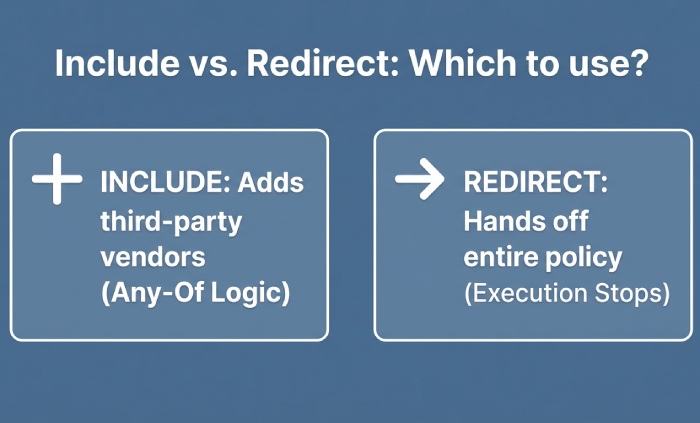
- include: Any-of logic. Matches only if the referenced domain would Pass; otherwise, processing continues locally. Multiple includes allowed.
- redirect: Hand-off. If your record yields no match, stop and evaluate the other domain’s policy as authoritative. At most one redirect; it effectively replaces your policy when triggered.
Use cases
- Use include to add vendors into a composite policy for your primary domain.
- Use redirect to delegate an entire domain or subdomain’s policy (e.g., spf for mail.example.net) to a central template (e.g., _spf.example.com).
AutoSPF guides you to prefer include for multi-vendor composition and redirect for whole-domain delegation, modeling both outcomes to prevent loops and counting redirect toward the lookup budget.
Common misconfigurations and how to fix them
Pitfalls we see (and how AutoSPF flags them)
- all not last: Anything after all is unreachable. Fix: Move all to the end.
- -include with a third-party: Causes Fail when the vendor would Pass. Fix: Use +include (or no qualifier).
- Duplicated or circular includes: Can push you over the 10-lookup limit or cause PermError. Fix: De-duplicate, break cycles.
- Including a domain with no SPF record: include yields PermError. Fix: Verify the vendor’s published SPF; replace with the correct include or direct ip4/ip6 ranges.
- Over-reliance on mx without knowing how many MX hosts expand. Fix: Replace mx with explicit ip4/ip6 (flattening) where stable.
AutoSPF’s preflight runs a step-by-step evaluation mirroring receiver logic and annotates Authentication-Results equivalents so operators can replicate outcomes in testing.
Best practices for delegating to external senders with include
- Use vendor-documented include targets only (e.g., include:_spf.google.com, include:spf.protection.outlook.com, include:mailgun.org).
- Scope by subdomain when feasible: marketing.example.com → vendor-only policy, keeping root domain lean.
- Prefer vendor alignment with DMARC: Ensure the vendor can use your From domain or a properly aligned subdomain to avoid alignment failures.
- Stage -all with DMARC monitoring: Start with ~all and a DMARC rua/rua setup; move to -all after you see clean aggregate reports.
AutoSPF maintains a vendor catalog with versioned include targets, checks for vendor deprecations, and auto-notifies when a provider changes its SPF topology.
Record size limits, TXT vs SPF RR, caching, and flattening strategies
Practical limits
- SPF must be published as a TXT record (SPF RR type is obsolete per RFC 7208).
- Each TXT chunk is 255 characters max; multiple chunks are concatenated at the resolver.
- Keep total SPF TXT under ~450–512 bytes to avoid UDP truncation and resolver fallbacks; long records also cost CPU/cache.
Flattening without fragility
- Flattening replaces include/a/mx with ip4/ip6 to reduce lookups.
- Risks: Providers change IPs; manual flattening goes stale quickly.
- Safer approach: Selective, dynamic flattening with change tracking.
AutoSPF performs adaptive flattening: it fetches and fingerprints provider IPs daily, rewrites your SPF to keep lookups under 10, honors your TTLs, and auto‑rolls updates when providers add or retire ranges.
Forwarding, lists, relays, and their interaction with all
- Forwarding and mailing lists often break SPF because the connecting IP is the forwarder/list server, not in the sender’s SPF.
- Consequences: With -all, forwarded mail can hard fail; with ~all it may soft fail and still get delivered.
Mitigations:
- Use DKIM signing so DMARC can pass via DKIM alignment even if SPF fails at the forwarder.
- Encourage forwarders to implement SRS (Sender Rewriting Scheme) to preserve SPF.
- Combine SPF with DMARC (p=quarantine/enforce) and monitor alignment outcomes.
AutoSPF integrates with DMARC reporting to show SPF vs. DKIM pass rates by receiving source and flags where SRS or DKIM is needed to avoid false rejections when using a strict -all.
Tools, tests, and monitoring to keep include and all healthy
Recommended toolkit:
- DNS inspection: dig +short TXT example.com, kdig, nslookup to verify TXT contents and chunking.
- SPF validators: spfquery, Kitterman’s SPF tester, dmarcian SPF Surveyor to visualize expansion.
- SMTP tests: Send test mail to Gmail/Outlook; inspect Authentication-Results headers for spf=pass/softfail/fail and reasons.
- CI checks: Validate syntax on every DNS change; alert on unexpected vendor SPF changes.
AutoSPF automates all of the above with:
- Preflight simulation: Left-to-right evaluation, counting real DNS queries (including a/mx expansions).
- Guardrails: Hard stops before exceeding 10 lookups; syntax linting; unreachable-term detection.
- Monitoring: Provider-IP change watch, DMARC aggregate analysis, and policy drift alerts.
- Safe publishing: DNS-change previews, rollback, and staged rollouts from ~all to -all.
FAQs
Why must all be last in my SPF record?
Because all always matches, anything after it is unreachable; placing it last ensures other mechanisms get a chance to match first. AutoSPF lints for mid-record all and suggests a safe reordering.
Does include count toward the 10 DNS-lookup limit?
Yes. Each include triggers a recursive SPF evaluation that consumes lookups across that recursion. AutoSPF tallies actual queries (including a/mx A/AAAA resolutions) to keep you under the limit.
Is -all always recommended?
Use -all once you’re confident all legitimate sources are authorized and DKIM is in place for forwarding scenarios. Start with ~all while you collect DMARC data. AutoSPF guides this transition with risk scoring and alerts.
Should I use redirect instead of multiple includes?
Use redirect when you want to centralize a domain or subdomain’s entire policy elsewhere. Use includes to compose multiple vendors in-place. AutoSPF will recommend redirect when it reduces complexity without harming flexibility.
What happens if the domain in include has no SPF record?
Per RFC 7208, include that yields None is a PermError for the overall evaluation. AutoSPF detects this pre-publish and blocks the change until you correct the target.
Conclusion: include and all make SPF composable and decisive—AutoSPF keeps it safe
SPF’s include mechanism lets you compose authorization across many providers without copying their IPs, and all supplies a default decision so receivers can stop guessing; together they create a modular, deterministic policy that scales. The operational reality—left-to-right evaluation, strict 10-lookup limits, and third-party churn—means you need tooling that simulates, flattens safely, monitors providers, and stages enforcement. AutoSPF does exactly that: it validates every include, enforces lookup budgets, recommends when to use redirect vs. include, applies adaptive flattening, and orchestrates your move from ~all to -all with DMARC-backed confidence—so your SPF remains secure, reliable, and easy to maintain as your email ecosystem evolves.