A Complete Guide to Configuring Cloudflare DMARC, SPF & DKIM

Quick Answer
To configure Cloudflare DMARC, SPF, and DKIM, add the correct DNS records in your Cloudflare dashboard. These email authentication protocols help prevent spoofing, improve deliverability, and protect your domain from phishing and unauthorized email use.
Try Our Free DMARC Checker
Validate your DMARC policy, check alignment settings, and verify reporting configuration.
Check DMARC Record →
Domains managed in Cloudflare are often protected at the network and application layers, but email security requires its own set of security records. DMARC, SPF, and DKIM are the core email authentication methods that help receiving mail systems decide whether a message claiming to come from your domain is legitimate. Together, they reduce spoofing, brand impersonation, and the likelihood that attackers can use your domain in a phishing attack.
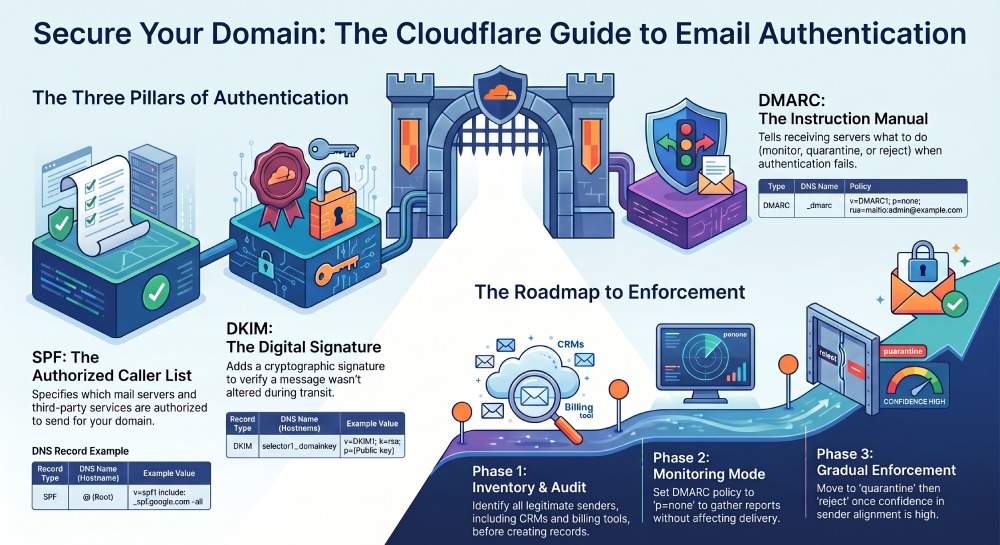
SPF, or Sender Policy Framework, tells receiving mail systems which email server or third-party service is allowed to send mail for your domain. DKIM, or DomainKeys Identified Mail, adds a cryptographic signature to messages so the receiver can verify that the message was not altered and that it was authorized by the sending domain. DMARC, short for Domain-based Message Authentication Reporting and Conformance, builds on SPF checks and DKIM checks by defining what should happen when message authentication fails. If any of these terms are new, our SPF terms glossary offers quick definitions.
For a domain administrator using Cloudflare DNS, these controls are published as DNS TXT record entries. A properly configured SPF record, DKIM record, and DMARC record improve email delivery while giving mailbox providers a clear machine-readable command about how to handle unauthorized sender activity. A DMARC policy can start in monitoring mode with a none policy, then move toward quarantine or reject as confidence improves.
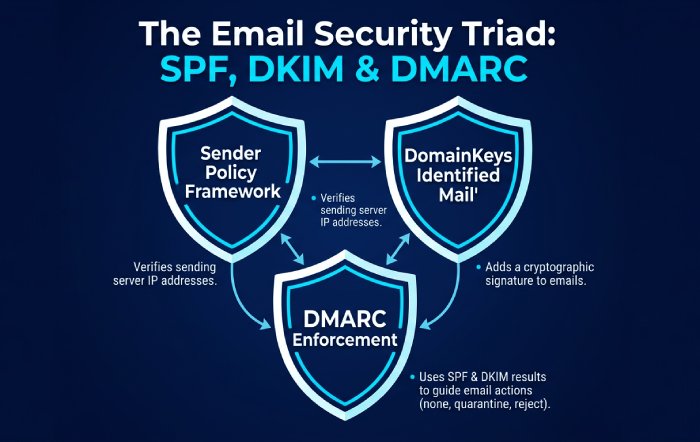
Cloudflare DMARC Management and the Email Security DNS Wizard can simplify record setup by helping identify missing or misconfigured email authentication records. The Cloudflare DMARC Management docs in Cloudflare Docs are especially useful for understanding policy enforcement, reporting, and domain-specific policies across larger environments.
Preparing Your Cloudflare DNS Zone for Email Authentication Setup
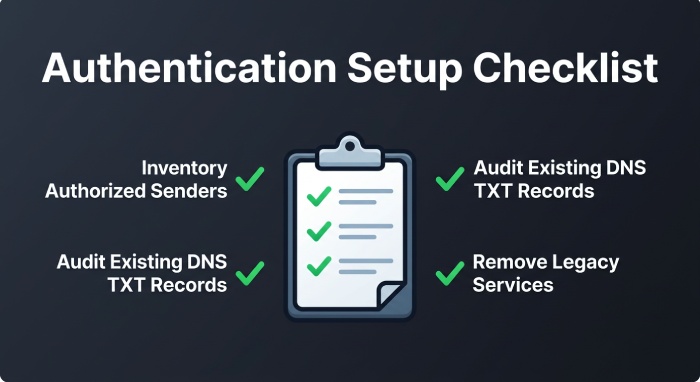
Before publishing any DNS TXT record in Cloudflare DNS, inventory every authorized sender that sends mail on behalf of your domain. This includes your primary email server, marketing platform, CRM, billing system, support desk, and any third-party service that sends messages such as password resets, invoices, or newsletters. If you miss a legitimate provider, SPF checks or DKIM checks may fail and affect email delivery.
For example, if example.com uses Google Workspace, a transactional email platform and a help desk tool, each service must be accounted for in the Sender Policy Framework configuration and DKIM setup. The domain administrator should confirm the exact DNS record values supplied by each provider, because DKIM selectors and SPF include mechanisms that vary by vendor.
In Cloudflare DNS, email authentication records are usually added as TXT records. SPF is normally published at the root domain, while DKIM is commonly published at a selector-based hostname such as selector1._domainkey.example.com. A DMARC record is published at _dmarc.example.com.
Audit Existing DNS and Security Records
Start by reviewing existing DNS entries in Cloudflare DNS. Look for duplicate SPF records, outdated DKIM selectors, or a previous DMARC record that no longer reflects your current email security strategy. A domain should have only one SPF DNS TXT record at the same hostname; multiple SPF records can cause SPF validation errors.
Also, check whether old services are still listed as authorized sender sources. If a provider is no longer used, remove it from the Sender Policy Framework record to reduce exposure. This minimizes the chance that an unauthorized sender or compromised third-party service can exploit legacy permissions.
Cloudflare resources such as the Help Center, Community forum, Cloudflare blog, Cloudflare API, System Status page, and Cloudflare Docs can help teams manage DNS at scale. Broader Cloudflare ecosystem references—including Cloudflare One, Cloudflare Radar, Cloudflare Labs, Certificate Transparency, Cloudflare Research, GitHub, Sponsorships, Open Source, Privacy Policy, GDPR, and Compliance materials—may also support internal governance and compliance workflows.
How to Configure SPF and DKIM Records in Cloudflare
SPF configuration begins with identifying all legitimate sending sources. In Cloudflare DNS, create or edit a DNS TXT record at the root of the domain. A basic SPF record might look like this:
v=spf1 include:_spf.google.com include:sendgrid.net -allThis Sender Policy Framework example authorizes Google and SendGrid to send mail for the domain. The -all mechanism indicates a stricter failure posture than ~all, but you should only use it once you are confident all authorized sender sources are included. During early deployment, some teams use a softer mechanism while monitoring SPF checks and email delivery. You can generate an SPF record with the correct syntax to avoid manual mistakes.
DKIM configuration depends on your email provider. DomainKeys Identified Mail uses public-private key cryptography: the sending platform signs outbound messages with a private key, and the public key is published in Cloudflare DNS as a DNS TXT record. Generate a signing key with our DKIM generator. A DKIM DNS TXT record may resemble:
Name: _dmarc
Type: TXT
Value: v=DMARC1; p=none; rua=mailto:third-party-example@example.com; adkim=r; aspf=r
When a recipient receives the message, DKIM checks verify the signature using the public key. If DomainKeys Identified Mail passes, the receiver has stronger confidence that the message was authorized and not modified in transit.
Use the Email Security DNS Wizard
Cloudflare’s Email Security DNS Wizard can help identify whether SPF, DKIM, and DMARC are present for a domain in Cloudflare DNS. It is especially helpful for teams that are new to email authentication or managing many zones. The wizard can surface missing security records, malformed DNS TXT record values, or gaps in message authentication.
Cloudflare DMARC Management can then provide visibility into how your DMARC policy is performing. While the Email Security DNS Wizard helps with record setup, DMARC Management is useful for ongoing monitoring, policy failure analysis, and reporting.
How to Create and Publish a DMARC Record in Cloudflare
A DMARC record is a DNS TXT record published at the _dmarc hostname. DMARC aligns SPF and DKIM results with the visible From domain, then applies a domain-based policy. Under RFC 7489, the receiving mail system evaluates whether SPF or DKIM passes and whether the authenticated identifier aligns with the From domain.
A starter DMARC record for example.com might look like this:
Name: _dmarc
Type: TXT
Value: v=DMARC1; p=none; rua=mailto:third-party-example@example.com; adkim=r; aspf=r
In this example, the DMARC policy is a none policy, meaning receivers should not quarantine or reject messages solely because of DMARC failure. The rua tag specifies the aggregate report destination for DMARC reporting. This lets the domain administrator review which services are passing or failing SPF, DKIM, and DMARC.
The adkim and aspf policy attributes define alignment mode. Relaxed alignment allows subdomains to align with the organizational domain, while strict alignment requires an exact domain match. For many organizations, relaxed alignment is easier during early deployment; strict alignment may be preferable for high-security domains with tightly controlled senders.
Move from Monitoring to Enforcement
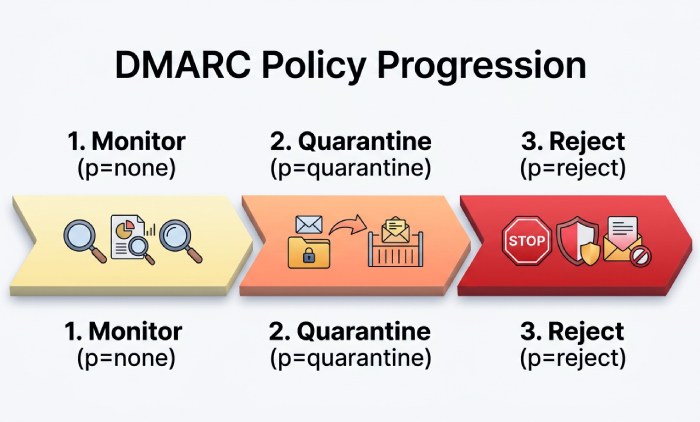
After reviewing DMARC Management reports, you can strengthen the DMARC policy. A typical progression is:
p=none
p=quarantine
p=reject
A quarantine policy tells receivers to place failing mail into spam or another suspicious-mail area. A reject policy instructs receivers to reject failing mail during SMTP evaluation when supported. This policy enforcement process is central to reducing phishing, spoofing, and brand impersonation.
For example:
v=DMARC1; p=quarantine; rua=mailto:third-party-example@example.com; adkim=s; aspf=sThis DMARC record uses quarantine and strict alignment for both DomainKeys Identified Mail and Sender Policy Framework alignment. Before moving to reject, verify that every authorized sender passes SPF checks or DKIM checks and aligns with the visible From domain.
Cloudflare DMARC Management, Cloudflare DMARC Management docs, and Cloudflare Docs can help interpret report data and fine-tune domain-specific policies. For larger organizations, DMARC Management also supports a more structured approach to policy enforcement and email inbox protection.
Testing, Monitoring, and Troubleshooting Cloudflare DMARC, SPF, and DKIM
Once records are published in Cloudflare DNS, allow time for DNS propagation. Then test SPF, DKIM, and the DMARC record by sending mail to major mailbox providers and inspecting message headers. Look for SPF pass, DKIM pass, and DMARC pass results. If message authentication fails, determine whether the problem is authorization, alignment, or record syntax.
Common issues include:
- Multiple SPF DNS TXT record entries at the same hostname
- Missing third-party service includes in the Sender Policy Framework record
- Incorrect DKIM selector names for DomainKeys Identified Mail
- Broken public keys caused by copied line breaks or extra quotation marks
- DMARC record syntax errors, especially malformed rua tag values
- A DMARC policy that is too strict before all senders are authenticated
Cloudflare DMARC Management is valuable because aggregate reporting reveals which email server or platform is sending on behalf of your domain. If a source appears legitimate but fails SPF or DKIM, update the DNS TXT record or enable DKIM in the vendor’s admin console. If a source is unknown, treat it as a potential unauthorized sender and investigate before allowing it.
When troubleshooting email delivery, remember that DMARC requires either SPF or DKIM to pass and align. SPF can fail when messages are forwarded, while DKIM often survives forwarding if the message body and signed headers are not changed. This is why enabling both SPF and DKIM provides stronger email authentication than relying on one method alone. For complex sending setups, Sender Policy Framework macros can add flexibility without inflating your lookup count.
For operational monitoring, review DMARC Management data regularly, especially after adding a new third-party service, changing email infrastructure, or migrating providers. Keep Cloudflare DNS records current, document every authorized sender, and adjust the DMARC policy gradually from none policy to a quarantine policy and eventually reject when reporting confirms stable compliance.
General Manager
General Manager of DuoCircle. Product strategy and commercial lead for AutoSPF's 2,000+ customer base.
LinkedIn Profile →