Best Email Authentication Tools For Enterprise in 2026 The Complete Guide

Quick Answer
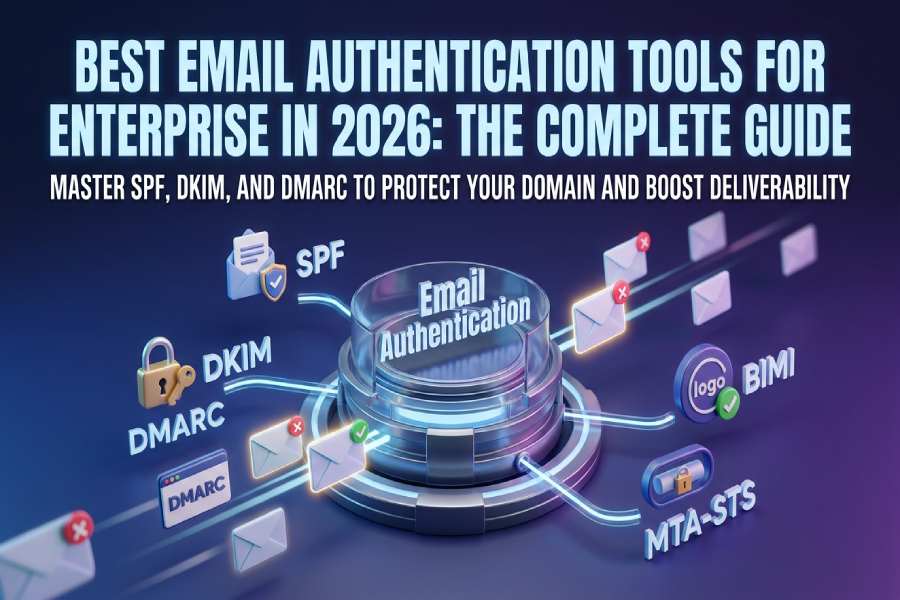
Email authentication is the process of verifying that an email message was actually sent by the domain it claims to come from. It works by publishing machine-readable policies in a domain’s DNS records, which receiving mail servers check before deciding whether to deliver, quarantine, or reject an incoming message.
What Is Email Authentication?
Email authentication is the process of verifying that an email message was actually sent by the domain it claims to come from. It works by publishing machine-readable policies in a domain’s DNS records, which receiving mail servers check before deciding whether to deliver, quarantine, or reject an incoming message.
In practical terms, email authentication answers a simple question for every email your organization sends: “Is this message legitimate, or is someone pretending to be you?” Without authentication, any attacker can forge your domain in the “From” field of an email, a technique called spoofing, to trick your customers, partners, and employees into trusting fraudulent messages.
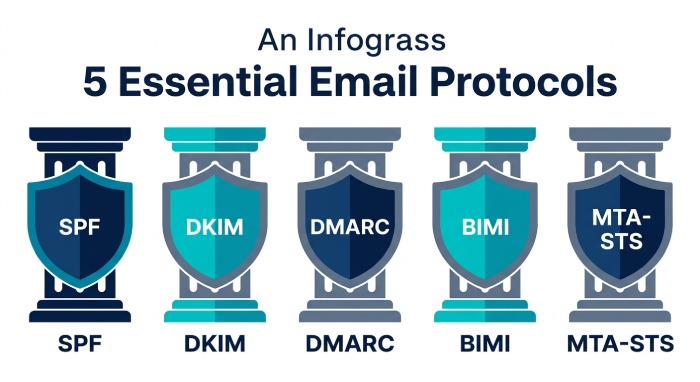
Modern email authentication relies on three core protocols that work together: SPF (Sender Policy Framework), which verifies that a message was sent from an IP address authorized by the domain owner; DKIM (DomainKeys Identified Mail), which attaches a cryptographic signature to each message to prove it hasn’t been tampered with in transit; and DMARC (Domain-based Message Authentication, Reporting, and Conformance), which ties SPF and DKIM together and tells receiving servers what to do when authentication fails.
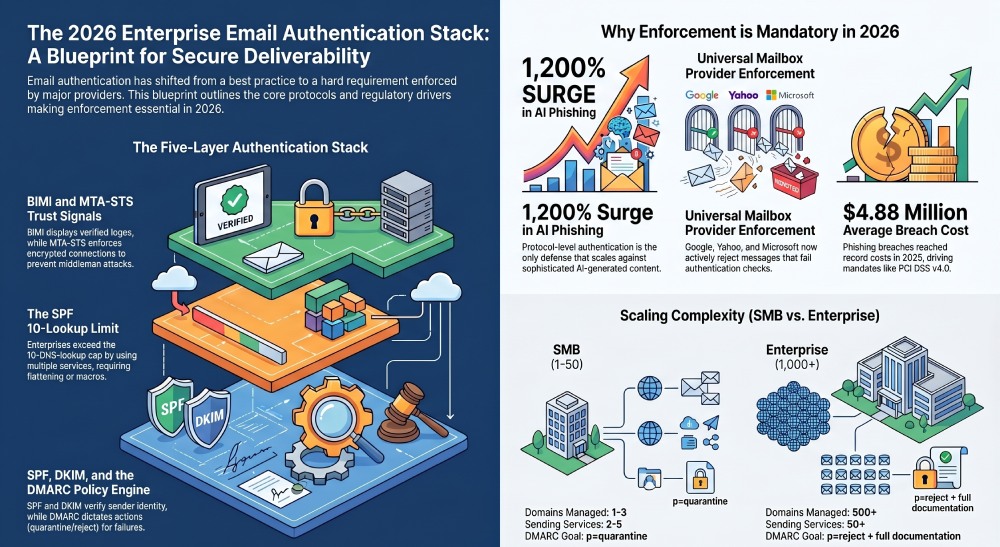
Two additional protocols round out a mature enterprise authentication stack: BIMI (Brand Indicators for Message Identification), which displays your verified brand logo next to authenticated emails in supporting inboxes; and MTA-STS (Mail Transfer Agent Strict Transport Security), which enforces encrypted connections between mail servers to prevent man-in-the-middle attacks during transit.
Why Email Authentication Matters for Enterprises in 2026
Email authentication shifted from a best practice to a hard requirement between 2024 and 2025, and the consequences for non-compliance are now immediate and measurable.
Mailbox provider enforcement is now universal. Gmail and Yahoo began enforcing SPF, DKIM, and DMARC requirements for bulk senders (5,000+ messages/day) in February 2024. Microsoft followed in May 2025, extending requirements to Outlook.com and Microsoft 365 environments. Messages that fail authentication checks are now actively rejected, not just filtered to spam, across all three major providers.
Regulatory mandates are multiplying. CISA BOD 18-01 requires p=reject for all U.S. federal domains. PCI DSS v4.0 mandated DMARC for organizations processing payment card data as of March 2025. T_he UK NCSC, Australia’s ASD, and Canada’s CCCS all require DMARC for government domains. For enterprises in regulated industries, finance, healthcare, government, authentication is a compliance checkbox, not an optional security layer._
The threat landscape is accelerating. The average cost of a phishing-related breach reached approximately $4.88 million in 2025. AI-generated phishing content surged over 1,200% in 2025, making it virtually impossible for traditional spam filters to distinguish forged messages from legitimate ones based on content alone. Protocol-level authentication, verifying who sent the message, not what it says, is the only defense that scales against AI-generated phishing.
Adoption is growing, but enforcement lags dangerously behind. According to EasyDMARC’s 2026 DMARC Adoption Report, DMARC adoption among the top 1.8 million domains globally reached 52.1% in 2026, up from 47.7% in 2025. But only about 9% of domains combine enforcement policies with reporting, the configuration required to actually block spoofed emails. Fortune 500 companies lead with 95% adoption and over 80% enforcement, but the gap for mid-market organizations remains significant.
Deliverability depends on it. According to data aggregated by Unspam.email, SPF adoption hit 93% and DKIM reached 90% in 2026, yet the global inbox placement rate is only 65%. Authentication alone doesn’t guarantee deliverability, but without it, your emails are increasingly likely to be filtered or rejected outright.
The Five Protocols Every Enterprise Needs
Understanding how the five email authentication protocols work together is essential before evaluating any tool. Each protocol addresses a different attack vector, and gaps in any one of them leave your domain exposed.
SPF (Sender Policy Framework)
SPF allows domain owners to specify which IP addresses and mail servers are authorized to send email on behalf of their domain. Published as a DNS TXT record, SPF is evaluated by receiving servers during the SMTP transaction. If the sending IP matches the authorized list, SPF passes. If not, the message can be flagged or rejected.
The critical limitation of SPF is the 10-DNS-lookup cap defined by RFC 7208. Every include, a, mx, and redirect mechanism in your SPF record counts as a lookup. Modern enterprises using five or more email-sending services, Google Workspace, Microsoft 365, Salesforce, SendGrid, HubSpot, Mailchimp, Zendesk, routinely exceed this limit, causing SPF to return a PermError and authentication to fail for every message. This is the specific problem that SPF flattening and SPF macro tools solve. Understanding the different types of SPF records also helps you keep the record lean from the start.
DKIM (DomainKeys Identified Mail)
DKIM adds a cryptographic signature to the header of every outgoing email. The receiving server retrieves the corresponding public key from the sender’s DNS and uses it to verify that the message hasn’t been altered in transit and that it originated from an authorized source. Unlike SPF, DKIM survives email forwarding, a critical advantage for organizations whose messages pass through mailing lists, distribution groups, or mail gateways. Generate a signing key with our free DKIM generator.
DMARC (Domain-based Message Authentication, Reporting, and Conformance)
DMARC ties SPF and DKIM together by adding a policy layer. It tells receiving servers what to do when a message fails both SPF and DKIM alignment: monitor only (p=none), send to spam (p=quarantine), or reject outright (p=reject). DMARC also enables reporting, allowing domain owners to receive aggregate and forensic data about authentication results across their entire sending ecosystem.
The path to DMARC enforcement, moving from p=none to p=reject, is where most organizations stall. The transition requires mapping every legitimate sending source, ensuring SPF and DKIM alignment for each one, and then monitoring reports to confirm no legitimate mail is being blocked before tightening the policy.
BIMI (Brand Indicators for Message Identification)
BIMI displays your verified brand logo next to authenticated emails in Gmail, Apple Mail, and other supporting inboxes. It requires a fully enforced DMARC policy (p=quarantine or p=reject) and a Verified Mark Certificate (VMC) linked to a registered trademark. BIMI doesn’t strengthen authentication itself, it’s a visual trust signal that rewards organizations that have already achieved full enforcement.
MTA-STS (Mail Transfer Agent Strict Transport Security)
MTA-STS enforces TLS encryption for email in transit between mail servers. Without MTA-STS, even properly authenticated emails can be intercepted by downgrade attacks during transport. TLS-RPT (TLS Reporting) works alongside MTA-STS to provide visibility into encryption failures across your sending infrastructure.
Benefits of a Complete Email Authentication Stack
Reduced phishing and spoofing risk. Organizations with fully enforced DMARC policies see measurably fewer successful spoofing attempts against their domains. Authentication verifies sender identity at the protocol level, a defense that scales regardless of how sophisticated phishing content becomes.
Improved email deliverability. Authenticated emails are treated more favorably by ISP algorithms. Gmail delivers 73% of tested emails to the inbox, but domains with properly configured SPF, DKIM, and enforced DMARC consistently achieve higher inbox placement rates than the 65% global average.
Compliance with regulatory requirements. PCI DSS v4.0, CISA BOD 18-01, and sender requirements from Gmail, Yahoo, and Microsoft all mandate email authentication. A complete authentication stack satisfies these requirements simultaneously.
Brand protection and customer trust. Spoofing erodes trust. When customers receive phishing emails that impersonate your domain, the reputational damage is real and difficult to reverse. DMARC enforcement stops spoofed emails from reaching recipients. BIMI adds a visible trust signal by displaying your verified brand logo in the inbox.
Operational visibility into your sending ecosystem. DMARC reporting reveals every IP address and service sending email on behalf of your domain, including unauthorized ones. This visibility is essential for organizations using dozens of third-party services, where shadow IT email sending is common.
Key Features to Look for in an Email Authentication Tool
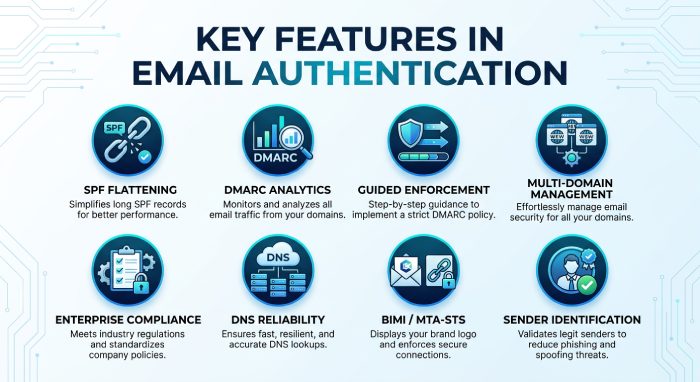
When evaluating email authentication tools, these are the capabilities that separate effective platforms from checkbox solutions.
SPF management and flattening. Any tool you evaluate should solve the SPF 10-DNS-lookup limit, either through automatic flattening (resolving include mechanisms into IP addresses) or SPF macros (delegating per-query resolution to a dynamic DNS service). Look for automatic re-scanning, vendor IPs change regularly, and a manually flattened record goes stale fast. The best tools re-scan every 15 minutes or less.
DMARC reporting and analytics. Raw DMARC aggregate reports arrive as XML files and are unreadable without tooling. A good platform transforms XML into visual dashboards that identify sending sources, flag authentication failures, and help you diagnose misconfigured services.
Guided enforcement workflow. The path from p=none to p=reject is where most organizations need the most help. Look for platforms that provide a structured journey: identify sources, configure authentication, move to quarantine, monitor for false positives, then enforce.
Multi-domain management. Enterprises manage dozens or hundreds of domains and subdomains. The tool must support bulk onboarding, centralized dashboards, and per-domain policy management.
Enterprise compliance documentation. For regulated industries, look for SOC-2 Type II certification, signed SLAs with specific uptime guarantees, Data Processing Agreements (DPAs), SSO/SAML integration, RBAC, and audit logs.
DNS infrastructure reliability. SPF records must resolve in milliseconds for every inbound email. If the tool serves your SPF record through its own infrastructure, the DNS uptime SLA is critical. Look for 99.99%+ uptime backed by Cloudflare or AWS Route 53.
BIMI and MTA-STS support. A complete platform should support the full protocol stack. BIMI requires a managed workflow for VMC certificates and logo hosting. MTA-STS and TLS-RPT require DNS policy publishing and monitoring.
Sender identification. The ability to identify sending services by name, rather than just by IP address, dramatically reduces the time required to map your sending ecosystem.
Dedicated Tool vs. All-in-One Platform
One of the most important architectural decisions is whether to use a dedicated tool for each protocol or an all-in-one platform that manages everything from a single dashboard. Both approaches have legitimate trade-offs.
| Factor | Dedicated Tools | All-in-One Platforms |
|---|---|---|
| SPF Uptime SLA | Separate SLA ensures SPF availability isn’t compromised by reporting workloads | SPF is one feature among many; SLA may cover the platform, not SPF specifically |
| Vendor Flexibility | Choose best-of-breed for each protocol; swap without migration | Single vendor, single contract, single dashboard; simpler procurement |
| SPF Depth | Purpose-built for flattening, macros, re-scan frequency, DNS rollback | SPF is an add-on; may lack advanced features like true macros |
| DMARC Reporting | Need a separate tool; adds complexity | Integrated reporting with enforcement workflow in one place |
| Total Cost | May be lower if you only need SPF management | May be lower if you need DMARC + SPF + DKIM + BIMI together |
When a dedicated approach makes sense: You already have DMARC reporting handled and need enterprise-grade SPF management with its own uptime SLA. You don’t want to rip out your existing stack.
When an all-in-one approach makes sense: You’re starting from scratch with email authentication, want a single vendor relationship, and value the simplicity of managing everything in one dashboard.
Enterprise vs. Mid-Market vs. SMB: How Requirements Differ
Email authentication requirements scale with organizational complexity. What works for a 10-person startup is inadequate for a Fortune 500.
| Requirement | SMB (1-50) | Mid-Market (50-1K) | Enterprise (1K+) |
|---|---|---|---|
| Domains | 1-3 | 5-20 | 20-500+ |
| Sending Services | 2-5 | 5-15 | 15-50+ |
| SPF Pressure | Often within limit | Frequently exceeds | Almost always exceeds |
| DMARC Goal | p=quarantine | p=reject | p=reject + full docs |
| Compliance | Gmail/Yahoo rules | PCI DSS, SOC-2 | CISA, PCI, GDPR |
| Budget Range | $0-50/mo | $50-400/mo | $400-5,000+/mo |
Common Email Authentication Mistakes Enterprises Make
Publishing multiple SPF records. RFC 7208 allows exactly one SPF TXT record per domain. Publishing two or more causes a PermError for every message, surprisingly common when different teams each add their own SPF record without coordinating. Following one clear process for building an SPF record avoids these overlaps.
Staying on p=none indefinitely. A DMARC policy of p=none provides visibility but zero protection. Organizations that deploy monitoring but never progress to enforcement are compliant on paper but unprotected in practice.
Ignoring subdomains. DMARC policies only apply to the exact domain they’re published on unless you explicitly set a subdomain policy (sp=reject). Attackers frequently spoof subdomains that lack their own DMARC records.
Not monitoring SPF record freshness. Email service providers regularly change their sending IP ranges. A manually configured SPF record goes stale when this happens, silently de-authorizing legitimate senders. This is why automatic re-scanning matters.
Treating authentication as “set and forget.” Your sending ecosystem evolves constantly. New marketing tools, new CRM platforms, new support systems, each adds mechanisms to your SPF record and may require DKIM key provisioning.
Confusing SPF compliance with DMARC alignment. SPF can pass based on the Return-Path domain, but DMARC requires alignment with the From header domain. An email can pass SPF but still fail DMARC if the aligned domain doesn’t match.
How to Choose the Right Email Authentication Tool
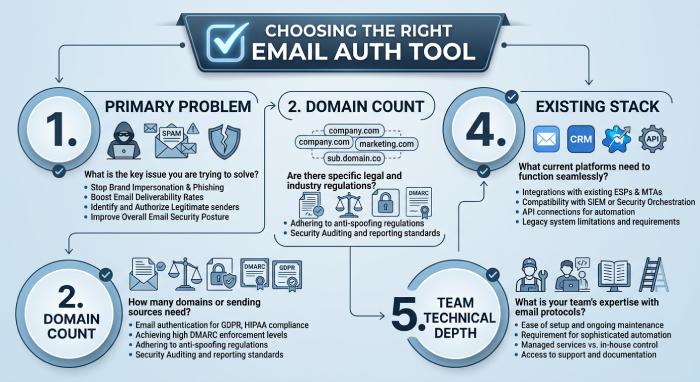
Before evaluating specific products, clarify your requirements across these dimensions:
1. What’s your primary problem? If your immediate pain point is the SPF 10-lookup limit, a dedicated SPF management tool solves that fastest. If you need DMARC enforcement from scratch, an all-in-one platform provides a more complete starting point.
2. How many domains do you manage? Organizations with 50+ domains need bulk onboarding, multi-tenant management, and scalable pricing.
3. What compliance requirements apply? If you need SOC-2 Type II, signed SLAs, DPAs, SSO/SAML, and audit logs, narrow your shortlist to vendors that offer these as standard.
4. What’s already in your stack? If you have existing DMARC reporting, a dedicated SPF solution that sits alongside it is the path of least resistance.
5. What’s your team’s technical depth? Some platforms assume DNS expertise. Others prioritize guided workflows. Match the tool to your team.
Summary Comparison Table
The following table provides an at-a-glance comparison of all tools reviewed in this guide. Pricing is sourced from published vendor pages, G2, Capterra, and TrustRadius as of April 2026.
| Tool | Type | SPF Flat. | Macros | DMARC | BIMI | From | Not Ideal For |
|---|---|---|---|---|---|---|---|
| AutoSPF | Dedicated SPF | ✓ (15-min) | ✓ | Via DMARC Report | , | $37/mo | Solopreneurs, all-in-one seekers |
| PowerDMARC | All-in-one | ✓ | ✓ | ✓ (AI) | ✓ | $8/mo | Dedicated SPF SLA needs |
| EasyDMARC | All-in-one | ✓ | , | ✓ (AI) | ✓ | $35.99/mo | Budget teams at scale |
| Valimail | Enterprise | ✓ | ✓ | ✓ (auto) | ✓ | ~$5K/yr | SMBs, mid-market |
| MxToolbox | DNS suite | ✓ | , | ✓ (basic) | , | $399/mo | SPF-only needs |
| Redsift | MSP-focused | ✓ | , | ✓ | ✓ | Contact | Solo domain owners |
| dmarcian | DMARC reporting | , | , | ✓ | , | Contact | SPF mgmt needs |
| Mimecast | Bundled security | , | , | ✓ | , | Contact | Non-Mimecast orgs |
Tool Reviews
AutoSPF
AutoSPF is a dedicated, enterprise-grade SPF management platform built exclusively for solving the SPF 10-DNS-lookup limit through automatic flattening and macro-based SPF optimization.
Unlike all-in-one DMARC platforms that include SPF management as one feature among many, AutoSPF focuses entirely on SPF record management. The product is built by DuoCircle LLC, the same company behind DMARC Report (a separate DMARC reporting product) and Phish Protection (an inbound email security product). This architectural separation is deliberate: AutoSPF’s DNS infrastructure carries its own 99.99% uptime SLA, which isn’t diluted by DMARC reporting or analytics workloads running on the same platform.
The product supports two approaches to solving the lookup limit. The standard flattening approach resolves all include mechanisms into their underlying IP addresses, compressing them into a single managed include that typically uses only 2-3 lookups. AutoSPF re-scans upstream vendor IPs every 15 minutes, so when Google, Microsoft, or SendGrid rotate their sending infrastructure, the flattened record updates automatically.
The second approach, available on Premium ($97/mo) and Enterprise ($387/mo) plans, uses SPF macros, which are defined in RFC 7208 §7 and bypass the 10-lookup limit entirely. Instead of pre-resolving IPs, macros delegate per-query resolution to AutoSPF’s DNS infrastructure at the moment each email is received. This allows truly unlimited include mechanisms using just 1-2 DNS lookups, and adds IP obfuscation as a side benefit.
Setup follows a “copy, paste, replace” model. You replace your existing SPF TXT record with a single include:_spf.autospf.com record, and AutoSPF manages everything from there. The company guarantees setup in 60 seconds or less, or the first year is free.
AutoSPF has been in operation since 2018 and serves over 2,000 businesses. The company holds SOC-2 Type II certification and offers enterprise compliance documentation including signed SLAs, DPAs, NDAs, SSO/SAML, RBAC, team management, audit logs, and DNS rollback. DNS availability is served through Cloudflare infrastructure.
According to G2, AutoSPF holds High Performer, Easiest to Use, Best Support, Easiest Setup, and Most Likely to Recommend badges in the DMARC category. Reviewers consistently highlight the simplicity of setup and quality of support. One G2 reviewer noted that when they encountered a capacity issue, AutoSPF’s team provided a personalized support video using the customer’s own configuration.
Top Features
- Automatic SPF flattening with 15-minute re-scan cycles across all included domains
- True SPF macro support (RFC 7208 §7) for unlimited includes with 1-2 DNS lookups
- IP obfuscation via macros, competitors cannot enumerate your authorized senders
- 99.99% DNS uptime SLA, served through Cloudflare infrastructure
- SOC-2 Type II certification with enterprise compliance documentation
- SSO/SAML, RBAC, team management, and audit logs on Enterprise plans
- DNS rollback capability for reverting changes if needed
- Unlimited emails on all plans, no monthly cap, no per-user pricing
Pricing: Plus: $37/mo (1 domain). Premium: $97/mo (5 domains, macros). Enterprise: $387/mo (10 domains, macros, SSO/SAML, audit logs). Additional domains: $10-20/mo. 30-day free trial, no credit card required.
Best For: Enterprise organizations that need SPF solved with dedicated uptime SLAs and compliance documentation, without migrating their existing DMARC stack.
How Does It Compare: AutoSPF is the most focused tool on this list. It does one thing, SPF management, with enterprise-grade infrastructure. The trade-off: it does not include DMARC reporting, DKIM management, or BIMI support. If you need everything in one dashboard, an all-in-one platform is a better fit.
PowerDMARC
PowerDMARC is a full-stack, SaaS-based email authentication platform that manages DMARC, SPF, DKIM, BIMI, MTA-STS, and TLS-RPT from a single dashboard with AI-powered threat intelligence, built for organizations wanting a single-vendor solution.
PowerDMARC’s SPF feature, PowerSPF, uses hosted macros. The platform is used by over 10,000 organizations across 100+ countries. On G2, it holds a 4.9/5 rating across 238 reviews, with users praising responsive support and the comprehensive single-dashboard approach. According to G2 reviewer feedback, pricing can be a concern for organizations managing many domains.
Top Features
- PowerSPF: hosted SPF macros for unlimited includes
- AI-powered DMARC reporting and threat intelligence
- Full protocol coverage: DMARC, SPF, DKIM, BIMI, MTA-STS, TLS-RPT
- MSP/MSSP multi-tenancy with white-label support
Pricing: Pay-as-you-go from $8/mo. 15-day free trial. Enterprise and MSP pricing is quote-based.
Best For: Organizations wanting DMARC + SPF + DKIM + BIMI from a single vendor dashboard, and MSPs managing multiple client domains.
How Does It Compare: The most feature-complete all-in-one platform on this list. According to G2 reviewer feedback, users managing many domains note that pricing can scale upward.
EasyDMARC
EasyDMARC is a user-friendly, guided DMARC platform designed to make email authentication accessible to teams without deep DNS expertise, covering DMARC, SPF, DKIM, and BIMI through an intuitive onboarding workflow designed for mid-market and enterprise teams.
EasyDMARC’s differentiator is the guided enforcement journey. EasySPF uses dynamic flattening for the 10-lookup limit. On G2, the platform carries strong ratings with users praising the clean interface. According to independent reviewers, pricing escalates as domain count and email volume increase, and the free tier is limited to 14-day data retention.
Top Features
- Guided DMARC enforcement workflow (monitor → quarantine → reject)
- AI-powered DMARC report analyzer with sender identification by name
- EasySPF dynamic flattening
Pricing: Free plan (1 domain, 14-day retention). Plus: $35.99/mo. Premium: $71.99/mo. Enterprise: custom pricing.
Best For: Teams new to DMARC wanting guided setup and mid-market companies prioritizing support quality.
How Does It Compare: The most approachable platform for beginners. According to independent review analysis, pricing can become expensive at scale.
Valimail (DigiCert)
Valimail is an enterprise-grade DMARC automation platform with patented macro-based SPF management, designed for large organizations wanting automated enforcement with minimal manual DNS work after an initial one-time setup.
On G2, Valimail holds a 4.6/5 rating across 441 reviews, the largest review count in the DMARC category, and has been ranked #1 for 15 consecutive quarters. Valimail was acquired by DigiCert in 2025. According to G2 feedback, pricing is a concern for smaller organizations.
Top Features
- Patented Instant SPF with macro-based approach
- Automated DMARC enforcement (monitor → enforce → align)
- Free tier for Microsoft 365 customers (Valimail Monitor)
Pricing: Monitor: free. Align: from $19/mo. Enforce: ~$5,000/year. Enterprise: quote-based.
Best For: Large enterprises and Fortune 500 wanting automated, zero-maintenance enforcement.
How Does It Compare: Most enterprise-focused, largest G2 review base. DigiCert acquisition has prompted some customers to re-evaluate. According to G2 feedback, the push toward automation isn’t ideal for teams wanting a hands-on approach.
MxToolbox
MxToolbox is the industry-standard DNS diagnostic platform with SPF flattening available as part of its Delivery Center Plus subscription, alongside blacklist monitoring, email delivery testing, and comprehensive DNS tooling used by IT administrators for nearly two decades.
Top Features
- Comprehensive DNS diagnostic suite (SuperTool, MX Lookup, Blacklist Monitoring)
- SPF flattening integrated with Delivery Center Plus
- Google/Yahoo bulk sender compliance checks
Pricing: Delivery Center Plus: $399/mo. Free diagnostic tools available.
Best For: IT administrators who already rely on MxToolbox for DNS diagnostics.
How Does It Compare: Strongest for DNS diagnostics first, SPF management second. The $399/mo reflects the full suite, not just SPF flattening. Does not offer macros or enterprise compliance documentation.
Redsift OnDMARC
Redsift OnDMARC is a purpose-built, MSP-focused email security platform with Dynamic SPF technology, multi-tenant management, and an API-first architecture designed for managed service providers managing client domains at scale.
Top Features
- Dynamic SPF for the 10-lookup limit
- Purpose-built MSP/MSSP multi-tenant platform
- Free Investigate assessment tool (no signup required)
Pricing: Contact Redsift for MSP and enterprise pricing.
Best For: MSPs and MSSPs managing multiple client domains with API-driven automation.
How Does It Compare: Strongest MSP-focused option. Solo domain owners may find the platform more complex than necessary.
dmarcian (Fortra)
dmarcian is a DMARC visibility and reporting pioneer, founded by one of DMARC’s original creators, focused on helping organizations understand their authentication data through clear, visual reporting and strong educational content before moving to enforcement.
Top Features
- Visual DMARC reporting with graphical SPF Surveyor
- Extensive educational content and documentation
- Fortra cybersecurity ecosystem integration
Pricing: Free plan for personal/non-commercial use. Paid plans are quote-based.
Best For: Organizations early in their DMARC journey wanting reporting clarity first.
How Does It Compare: Best for education and clarity. Does not offer SPF flattening, macros, or advanced SPF management.
Mimecast DMARC Analyzer
Mimecast DMARC Analyzer provides DMARC management as part of Mimecast’s broader email security ecosystem, offering integrated protection across inbound filtering and outbound authentication from a single vendor for organizations already invested in the Mimecast stack.
Top Features
- DMARC management integrated with Mimecast email security
- Unified view across inbound and outbound email security
Pricing: Contact Mimecast. Typically bundled with broader email security subscriptions.
Best For: Existing Mimecast customers wanting DMARC bundled into their platform.
How Does It Compare: Makes sense only for existing Mimecast customers. Not a standalone DMARC offering.
How to Choose: Decision Framework
| If This Describes You… | …Consider This Tool |
|---|---|
| Primary problem is SPF 10-lookup limit; DMARC already handled | AutoSPF |
| Want DMARC + SPF + DKIM + BIMI from one vendor | PowerDMARC or EasyDMARC |
| Fortune 500 / large enterprise wanting zero-maintenance enforcement | Valimail (DigiCert) |
| MSP managing 50+ client domains | Redsift OnDMARC or PowerDMARC |
| Need DNS diagnostics alongside SPF management | MxToolbox Delivery Center |
| Brand new to DMARC; need guided onboarding | EasyDMARC or dmarcian |
| Already a Mimecast customer | Mimecast DMARC Analyzer |
| Need SOC-2, SLAs, DPAs, SSO as standard | AutoSPF Enterprise, Valimail, or Redsift |
| Budget is the primary constraint | PowerDMARC (from $8/mo) |
Role-Based Buyer Guidance
For CISOs and Security Leaders: Prioritize DMARC enforcement and brand protection. Key metrics: time-to-enforcement, visibility into unauthorized senders, and compliance documentation. Platforms with automated enforcement workflows (Valimail, EasyDMARC) or dedicated SPF SLAs (AutoSPF) align best.
For IT Directors and System Administrators: Prioritize operational reliability and DNS infrastructure. The SPF uptime SLA matters, if the tool serving your SPF record goes down, every outbound email fails authentication. Look for 99.99%+ uptime guarantees and fast re-scan intervals.
For Email Marketing and Deliverability Managers: Prioritize inbox placement and sender reputation. Email authentication is foundational to deliverability, but not the whole picture. Look for tools providing deliverability analytics alongside authentication management.
For MSPs and Managed Service Providers: Prioritize multi-tenant management, white-label capabilities, and scalable pricing. Redsift OnDMARC and PowerDMARC both offer purpose-built MSP programs.
For Compliance Officers: Prioritize audit trails, certifications, and documentation. Ensure the vendor provides SOC-2 Type II, GDPR compliance, DPAs, and the ability to export evidence for auditors.
Implementation Considerations
Dedicated SPF first, or full platform first? If your emails are currently failing SPF checks (PermError from exceeding 10 lookups), fixing SPF is the most urgent priority. A dedicated SPF tool can be deployed in minutes while a full DMARC platform implementation typically takes weeks.
Migration risk. Switching SPF management tools requires a DNS change. During the transition, there’s a brief propagation window. Plan migrations during low-volume windows and monitor results for the first 24-48 hours.
Cost vs. features vs. risk. An SPF tool that saves $200/year but carries a lower uptime SLA may cost far more in failed email delivery during downtime. Evaluate total cost of ownership.
Vendor lock-in. Some platforms create deeper dependency on vendor infrastructure than traditional flattening. Understand what migration looks like before you commit.
Training and adoption. Match the tool’s complexity to your team’s capacity. Guided platforms (EasyDMARC, dmarcian) reduce the learning curve. Expert platforms (PowerDMARC, MxToolbox) offer more control but require more DNS knowledge.
Frequently Asked Questions
What is the difference between SPF flattening and SPF macros?
SPF flattening resolves all include mechanisms into a flat list of IP addresses, which consume zero DNS lookups. The limitation is that vendor IPs change, so flattened records need automatic re-scanning. SPF macros (RFC 7208 §7) delegate per-query resolution to a managed DNS service at the moment each email is evaluated, bypassing the 10-lookup limit entirely with just 1-2 DNS lookups.
Do I need separate tools for SPF and DMARC?
Either approach works. All-in-one platforms manage both from a single dashboard. Dedicated tools let you choose best-of-breed for each function. The trade-off is simplicity (one vendor) vs. specialization (dedicated SLAs and deeper feature sets).
How long does it take to reach DMARC enforcement (p=reject)?
It depends on your sending ecosystem complexity. Small organizations can reach enforcement in 4-8 weeks. Large enterprises with dozens of sending sources typically take 3-6 months.
What happens if my SPF management tool goes down?
If the tool that serves your flattened or macro-based SPF record experiences downtime, receiving servers cannot resolve your SPF record, and SPF authentication fails for every outbound email. This is why the DNS uptime SLA matters more for SPF management tools than for DMARC reporting tools.
Is email authentication enough to stop phishing?
No. Authentication prevents domain spoofing but does not prevent look-alike domain attacks, spear phishing from compromised accounts, or social engineering that doesn’t involve domain forgery. Authentication is a critical layer in defense-in-depth, not a complete solution.
We hope this guide has been helpful in navigating the email authentication landscape. If you’d like to see how AutoSPF handles SPF management for your specific domain, you can try it free for 30 days at autospf.com/pricing, no credit card required. Full pricing plans are available if you want to compare tiers first.
This guide is maintained and updated regularly. Last updated: April 2026. If you believe any characterization in this guide is inaccurate, please contact us at autospf.com/contact-us and we’ll investigate and correct it promptly.
Topics
General Manager
General Manager of DuoCircle. Product strategy and commercial lead for AutoSPF's 2,000+ customer base.
LinkedIn Profile →