Gmail SPF Record Setup: A Practical Guide for Google Workspace
Quick Answer
To set up SPF for Google Workspace, publish a DNS TXT record at your root domain containing v=spf1 include:_spf.google.com ~all. The include:_spf.google.com mechanism authorizes all Google mail servers to send on your behalf. Add additional include or ip4/ip6 mechanisms for any third-party services that also send email from your domain, while staying within the 10-DNS-lookup limit defined by RFC 7208.
Related: Free DKIM Lookup ·Free DMARC Checker ·How to Create an SPF Record

To set up SPF for Google Workspace, publish a DNS TXT record at your root domain containing v=spf1 include:_spf.google.com ~all. The include:_spf.google.com mechanism authorizes all Google mail servers to send on your behalf. Add additional include or ip4/ip6 mechanisms for any third-party services that also send email from your domain, while staying within the 10-DNS-lookup limit defined by RFC 7208.
According to Google’s February 2024 bulk sender requirements, any domain sending 5,000+ messages per day to Gmail users must have SPF or DKIM authentication and a published DMARC policy of at least p=none — making correct SPF configuration a compliance requirement, not just a best practice.
“Google Workspace administrators often inherit SPF records with 8-9 includes already in place. Adding _spf.google.com pushes them over the 10-lookup limit, and suddenly legitimate mail starts bouncing,” says Brad Slavin, CEO of AutoSPF. “The fix isn’t to remove senders — it’s to flatten the record so every service stays authorized within the RFC 7208 limit.”
Sender Policy Framework (SPF) is a foundational email authentication control that helps Gmail and other providers verify which servers may send mail on behalf of your domain. For Google Workspace organizations, a correctly published SPF record improves email deliverability, strengthens security, and supports data protection by signaling trust to receiving systems and deterring spoofing and phishing.
Business and Compliance Impact
-
Email authentication reduces impersonation risk, supporting legal and compliance obligations around identity confirmation and access control. It complements DMARC and DKIM as part of a layered security strategy.
-
Strong domain management practices — such as ensuring the SPF record is accurate in DNS — protect brand reputation and reduce help desk load tied to support and troubleshooting.
-
Administrators can use the Google Workspace Admin console to set up and manage services, verify configuration, and leverage reports and monitoring to track authentication alignment, aiding audit readiness.
Operational Benefits for Administrators
-
Fewer false positives and better inbox placement with Gmail due to clear authorization signals.
-
Easier user management, especially during data migration or when you deploy apps that send mail, because policies are centralized in DNS rather than distributed on endpoints.
-
Aligns with security settings for device management and internal apps, minimizing shadow IT risks from unvetted apps & integrations.
How SPF Works: Mechanisms, Qualifiers, and DNS TXT Essentials
SPF is defined via a DNS TXT record at the root domain. Receivers evaluate the SPF record of the MAIL FROM domain to determine pass/fail outcomes.
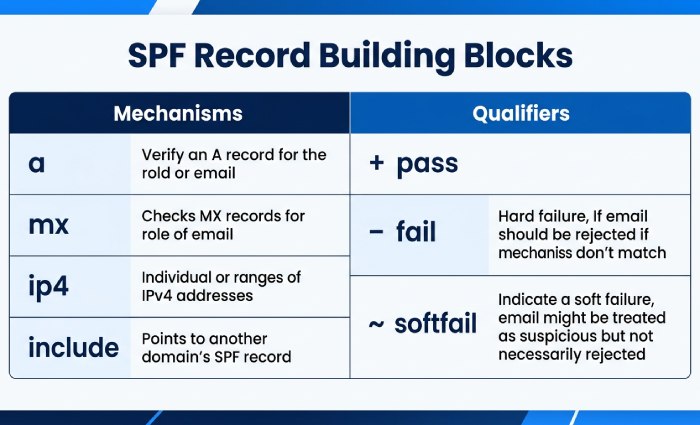
SPF Mechanisms: The Building Blocks
Common mechanisms include:
- a and mx: Authorize the domain’s A or MX hosts to send.
- ip4 and ip6: Allow explicit IP ranges.
- include: Delegate to another domain’s SPF record (for example, Google’s).
- exists and ptr: Advanced/legacy options; use sparingly.
- all: A catch-all that should appear last.
Qualifiers and Policy Semantics
-
- (pass) is implied when omitted.
- ~ (softfail) signals “not authorized, but accept and flag.”
-
- (fail) rejects unauthorized sources outright.
- ? (neutral) makes no assertion.
Most organizations start with ~all to reduce disruption, then tighten to -all once sender mapping is complete.
DNS TXT Essentials for Administrators
- Place the SPF record in DNS as a single TXT string beginning with v=spf1.
- Respect the 10-DNS-lookup limit across include, a, mx, ptr, and exists.
- Keep the record under 255 characters per string (use quoted splits if necessary).
- Coordinate changes in the admin console change calendar so administrators know when mail paths are being adjusted.
- Use reports and monitoring tools to validate changes and troubleshoot errors proactively.
Map Your Senders: Google, Third-Party Platforms, and Network Sources
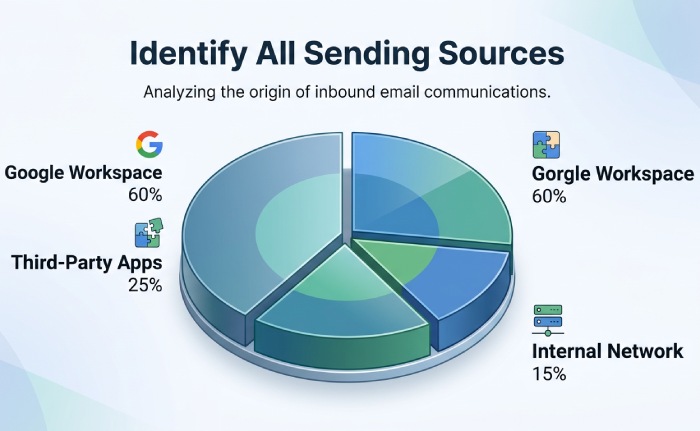
Before you set up SPF, inventory all systems that send using your domain. This is core domain management and reduces drift when apps & integrations evolve.
First-Party: Google and Your Network
- Gmail and Google Workspace services: Authorize with include:_spf.google.com.
Google services that send via Apps Script or a cloud application workflow also authenticate through Google’s SPF infrastructure when routed correctly.
- Your network egress: If devices or relays send directly, add ip4/ip6 mechanisms. Document device management ownership so user management and IT know who maintains those IPs.
Third-Party Apps & Integrations
Many third-party apps send system emails, alerts, or notifications on your behalf. Examples include 15Five, 4me, Adaptive Insights, Adobe Acrobat Sign, Aha!, Amazon Business, services on Amazon Web Services, AppDynamics, Asana, Atlassian Cloud, Automox, BambooHR, Betterworks, and many more. For each:
- Confirm whether they provide an SPF include (preferred) or require dedicated IPs.
- In Marketplace administration, manage Marketplace apps and track admin-installed apps, app access requests, and verified third-party app status.
- Use OAuth 2.0 and SSO practices — SAML, SAML-based SSO, integrated SAML apps, or a custom SAML app via a third-party IdP — to authorize access and control app access. Maintain SAML certificates, align SSO settings, and monitor the SSO sign-in flow.
- Configure third-party apps with an app allowlist, review app access regularly, and enable automatic token revocation where supported to manage data access responsibly.
According to a 2025 Egress report, 94% of organizations experienced email security incidents in the past 12 months — many traced to misconfigured or missing SPF records for third-party senders that were added without updating DNS.
Integration Governance Checklist
- Map custom attributes and user schema to ensure correct sender identity in notifications.
- Confirm private web apps or internal apps do not send external mail unless explicitly authorized.
- Document policies in training guides for consistent administration and faster support and troubleshooting.
Locate and Access Your DNS Host: Prerequisites and Permissions
Your SPF record lives in DNS. Ensure you know where your domain’s zone is hosted and who has rights to change it.
Identify the DNS Provider and Zone of Authority
- Check your registrar or hosting provider dashboard, or query NS records to find where DNS is managed. Many organizations use cloud DNS services such as those offered on Amazon Web Services.
- Validate subdomain needs separately (marketing.example.com vs example.com) and ensure consistent domain management across business units.
- If vendors provision subdomains or CNAMEs, coordinate to avoid SPF fragmentation.
Confirm Roles, Access, and Change Control
- Ensure a super administrator and designated administrators have access control to both the DNS portal and the Admin console.
- Align billing and subscriptions ownership so changes don’t stall during renewals.
- Use an implementation overview and change ticket, schedule a maintenance window, and plan propagation monitoring.
Process Hygiene and Observability
- Log every DNS change; capture before/after SPF record values.
- Use reports and monitoring to check authentication results in Gmail post-change.
- Where appropriate, validate data synchronization impacts if integrations rewrite MAIL FROM or route through different gateways.
Build the Baseline Record for Google Workspace
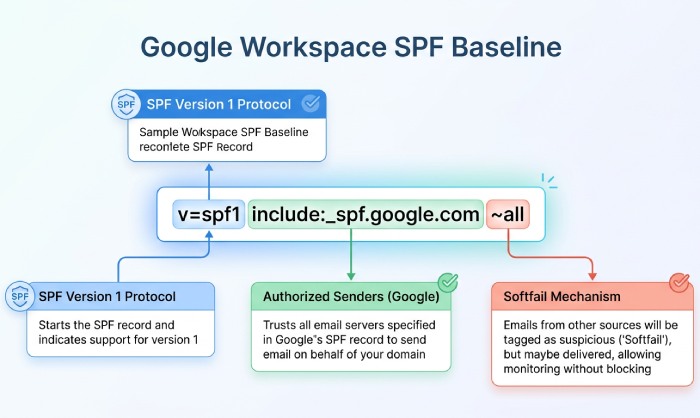
The safest starting point for most Google Workspace tenants is to publish Google’s include and softfail. This authorizes Gmail and core Google senders while letting you identify stragglers:
v=spf1 include:_spf.google.com ~allOnce you’ve mapped all third-party senders and confirmed their SPF includes, add them to the record. If you exceed the 10-lookup limit, consider SPF flattening to resolve nested includes into IP addresses — or use AutoSPF to automate flattening and keep your record compliant without manual DNS management.
Topics
CEO
Founder and CEO of DuoCircle. Product strategy and commercial lead for AutoSPF's 2,000+ customer base.
LinkedIn Profile →Fix your SPF record in 60 seconds
Try AutoSPF free for 30 days. No credit card required.
Start Free Trial