Google Updates SPF Records: What Domain Owners Need to Fix in 2026

Quick Answer
Google's bulk sender requirements (announced October 2023, enforced from February 2024) require any domain sending 5,000+ messages per day to Gmail addresses to authenticate with both SPF and DKIM, publish a DMARC record of at least p=none, keep spam complaints below 0.3%, and use one-click unsubscribe on marketing mail. Non-compliant senders are routed to spam or rejected outright.
Google Updates SPF Records: What Domain Owners Need to Fix in 2026

Google’s bulk sender requirements - announced October 2023 and enforced from February 2024 - require any domain sending 5,000 or more messages per day to Gmail addresses to authenticate with both SPF and DKIM, publish a DMARC record of at least p=none, keep spam complaint rates below 0.3%, and include a one-click unsubscribe header on marketing mail. These rules apply to every domain in the From header, not just the sending infrastructure’s domain, and Google now rejects or routes to spam any message from a non-compliant bulk sender.
Per RFC 7208, SPF evaluation is capped at 10 DNS mechanism lookups and 2 void lookups per check - exceeding either limit produces a PermError that fails authentication for every message from the domain.
According to Google’s official bulk sender announcement, the change was driven by the fact that ML-based spam filters already block nearly 15 billion unwanted messages per day, but unauthenticated bulk mail was still slipping through. The authentication requirement closes that gap by making SPF, DKIM, and DMARC hard prerequisites rather than recommendations. Yahoo adopted the same requirements on the same timeline.
This guide covers exactly what SPF changes Google Workspace customers need to make for 2026, how to audit whether your domain is currently compliant, how to fix a PermError from exceeding the 10-DNS-lookup limit (the single most common blocker), and how to stage DMARC from p=none to p=quarantine to p=reject without breaking legitimate mail. Our SPF PermError and TempError guide breaks down that failure in detail.
What Is SPF and Google Workspace Email Authentication?
SPF is short for Sender Policy Framework, which is a DNS-based email authentication protocol that tells the receiving server if a sender is officially authorized to send emails from your domain. It works by listing trusted sending services inside a TXT record in your DNS. When someone receives an email from your domain, their mail server checks this record to verify whether the sending server is allowed to act on your behalf.
Google Workspace makes things easier by publishing its own managed SPF record under ‘_spf.google.com.’ So, instead of manually adding all of Google’s mail server addresses, you just point to this ‘include’ value_. Google takes care of updating the addresses behind it, so you don’t have to worry about keeping it current._
If your domain sends email only through Google Workspace, Google suggests using this straightforward SPF record:
v=spf1 include:_spf.google.com ~allThis basically tells receiving mail servers, “Google is the only authorized sender for this domain. Anything else should be questioned or blocked.” Please note that if you also use other services to send email, you need to add them to your SPF record too.
What’s the new change for the Google SPF record

When you look inside Google’s _spf.google.com SPF reference, you’ll see that it isn’t just one line; it actually points to other internal SPF records managed by Google. Earlier, this included three sub-records:
-
_netblocks.google.com
-
_netblocks2.google.com
-
_netblocks3.google.com
These contained Google’s IP ranges for sending email. Recently, Google silently removed _netblocks3.google.com from the chain. This simply means that the removed sub-record no longer holds active sending addresses.
In simple terms, Google cleaned up its SPF structure. Here’s how it looked earlier:
v=spf1 include:_netblocks.google.com include:_netblocks2.google.com include:_netblocks3.google.com ~allHere’s what it looks like now-
v=spf1 include:_netblocks.google.com include:_netblocks2.google.com ~allWho is affected by the new change for the Google SPF record
Most Google Workspace users don’t need to worry about this change. They simply use the recommended ‘include:_spf.google.com’ entry, and Google keeps everything updated behind the scenes. If your SPF record follows this format, it will continue to work as expected. That is why Google hasn’t made any loud announcements about it.

But if you manually copied Google’s internal structure, your SPF record might be invalid or include an unnecessary reference. It might not break email right away, but it makes the SPF setup messy and harder to maintain. Removing outdated references keeps your SPF cleaner, accurate, and ready for any future updates Google makes.
How to check if your domain is affected
Run your current SPF record through AutoSPF’s SPF lookup tool. The tool will show your SPF record and everything in it, including whether _netblocks3.google.com or other outdated Google entries are still there.
If you notice separate Google netblocks listed along with _spf.google.com, it’s a sign your record needs cleaning. Our tool also highlights issues like extra lookups or broken includes, so you can quickly see what needs fixing. This simple check helps you understand whether your SPF setup matches Google’s latest structure.

How to fix it
Fixing this issue is straightforward once you know what to look for.
-
Check your SPF record and identify how Google is referenced.
-
If your record only has ‘include:_spf.google.com,’ you don’t need to make any changes. Google manages updates for you.
-
If you see individual netblocks entries such as _netblocks.google.com, _netblocks2.google.com, or _netblocks3.google.com, remove them.
-
Replace all of them with a single include pointing to ‘_spf.google.com,’ which keeps your configuration clean and automatically updated by Google. If you run several providers, see our guide to combining SPF records correctly.
-
If you believe you need detailed control, then at least remove _netblocks3.google.com, because it is no longer used. However, ideally, avoid splitting them at all.
Keeping your SPF record simple reduces errors, improves maintenance, and ensures future Google updates are applied without manual intervention.
What Are Best Practices for SPF records?

To keep your email authentication setup clean and reliable, it helps to follow a few simple habits:
- Use only vendor-issued ‘include’ entries
Always rely on official SPF ‘include’ values published by providers like Google or Microsoft. They update these automatically, so you don’t have to track changing IP ranges or maintain the record manually.
- Avoid manually expanding SPF entries
Don’t copy or rewrite internal SPF references. Hard-coding details makes your record messy and increases the risk of errors when the provider updates their configuration.
- Audit your SPF record regularly
Check your SPF setup every few months to spot outdated entries, duplicated references, or broken includes. A quick review helps prevent alignment issues or deliverability problems. If something is failing, our SPF validation troubleshooting guide can help.
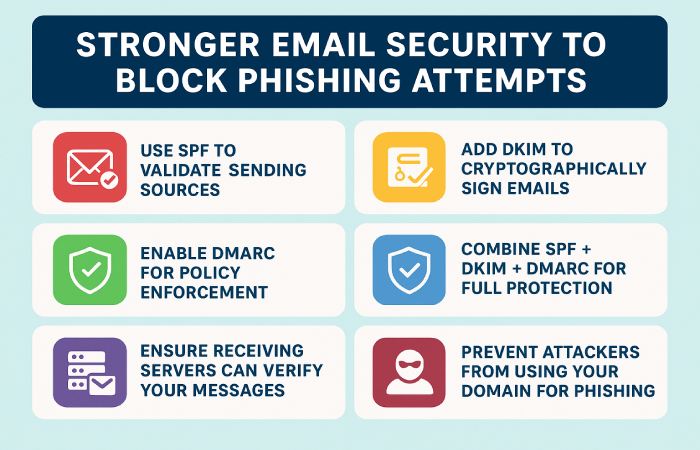
- Pair SPF with DKIM and DMARC
SPF alone isn’t enough. Combine it with DKIM and DMARC so receiving servers can verify messages correctly and block phishing attempts using your domain.
- Use Monitoring or Reporting Tools
Tools like SPF lookup, DMARC analyzers, or email security dashboards help you monitor changes and detect configuration issues early, making maintenance easier.

Final words
Google’s SPF update may look small, but it points to a bigger problem. Outdated or heavily customized records can weaken your email protection without you noticing. Most domains that follow Google’s guidance are safe, but those with old netblocks or copied entries may face alignment issues.
This is a good reminder to check your DNS setup from time to time. A clean SPF record is easier to manage and stays accurate when your email provider makes changes.
If you have not reviewed your SPF record recently, now is a great time to do it. Use the AutoSPF SPF checker tool to see if your record has old or extra entries. If something is incorrect, update it or reach out to your email provider for help. A little cleanup today can prevent delivery problems and security risks later.
Topics
Operations Lead
Operations Lead at DuoCircle. Runs project management, developer coordination, and technical support execution for AutoSPF.
LinkedIn Profile →