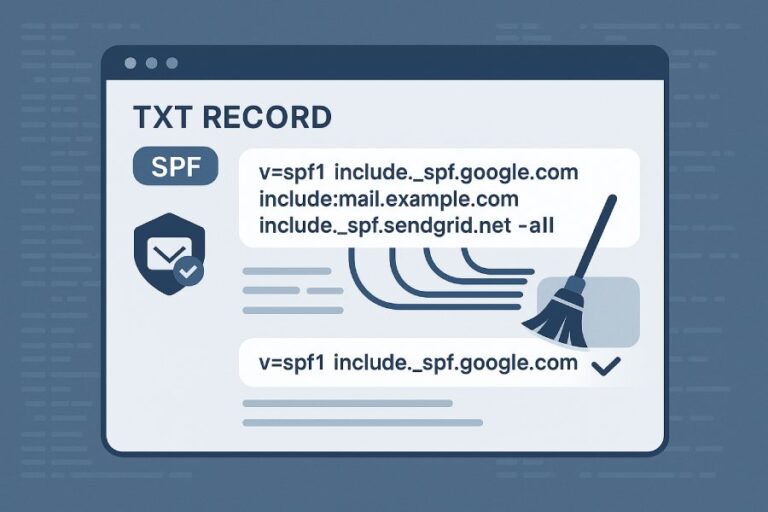
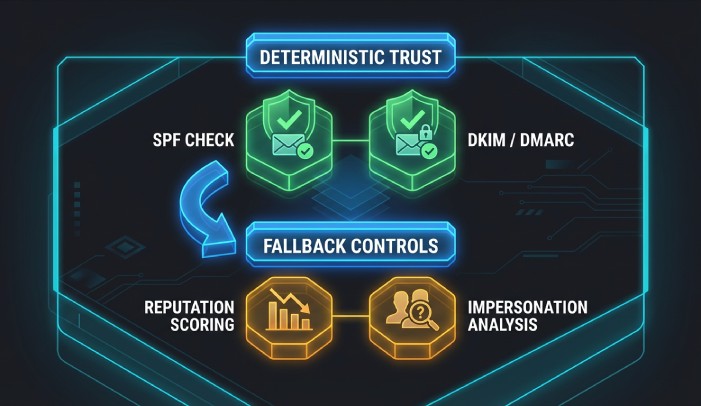
An incorrect SPF record reduces Mimecast’s spoofing protection by causing SPF evaluation errors (fail, softfail, neutral, temperror, permerror), breaking DMARC alignment, and forcing Mimecast to fall back to lower-confidence controls (DKIM, reputation, impersonation detection), which increases both missed spoofs and false positives unless you tighten Mimecast policies and fix SPF quickly.
Context and background Sender Policy Framework (SPF) is the first line of domain authorization for email: it tells receivers which IPs or platforms are allowed to send mail for your domain. Mimecast enforces SPF as part of its layered inbound security. When your SPF record is incorrect—because of missing includes, duplicate records, or lookup-limit overload—Mimecast sees ambiguous or failing results and has to treat messages with more caution. That can let sophisticated spoofs through (if you’re too permissive) or block legitimate messages (if you’re too strict without proper configuration).
SPF also feeds DMARC. For DMARC to pass on inbound mail, either SPF or DKIM must pass and align with the visible From domain. A wrong SPF record often breaks alignment (e.g., messages sent by a marketing platform using your domain but not listed in SPF), pushing Mimecast to rely on DKIM or non-authentication defenses. The outcome is a measurable drop in deterministic protection and an increase in operational noise—unless you engineer SPF with discipline and augment controls. This is exactly where AutoSPF helps: it centralizes, validates, flattens, and monitors SPF so Mimecast can consistently trust authentication results.
How Mimecast evaluates SPF results and what happens next
Mimecast reads SPF via DNS and records the result in message headers and logs. Each outcome affects anti-spoofing:
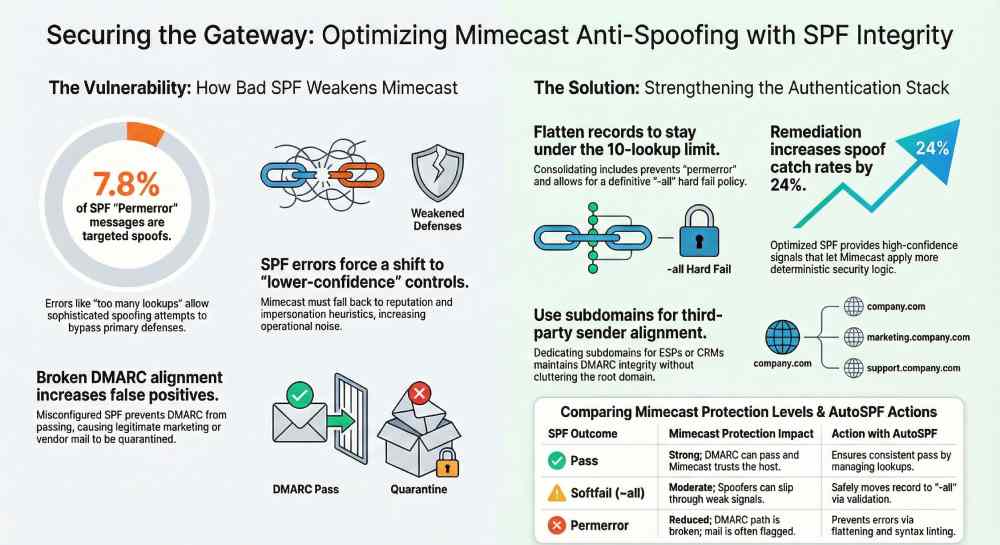
SPF outcomes and typical Mimecast handling
- Pass: The connecting host is authorized for the Mail From domain.
- Fail (-all): The connecting host is explicitly unauthorized.
- Softfail (~all): The sender is probably unauthorized.
- Neutral (?all) or None: No assertion made.
- Temperror: Temporary DNS issue (e.g., timeout).
- Permerror: Permanent error (e.g., too many lookups, multiple SPF records, syntax).
Typical actions and protection impact
- Pass
- Mimecast treats the sender as authenticated for SPF. If DMARC is enabled with relaxed alignment and Mail From aligns, DMARC can pass even without DKIM.
- Spoofing protection: Strong for SPF-authenticated domain; Mimecast still applies reputation and content/impersonation analysis.
- AutoSPF tie-in: Ensures consistent “pass” by managing includes and lookup counts.
- Fail (-all)
- Mimecast can be configured to reject, quarantine, or tag. If DMARC is enforced inbound and alignment holds, DMARC will fail, enabling strict action.
- Spoofing protection: Very strong if policies are strict.
- AutoSPF tie-in: Prevents accidental fails for legitimate third-party senders by keeping your record accurate.
- Softfail (~all)
- Mimecast typically doesn’t outright reject on softfail unless combined with other risks. Often used for tagging or quarantine in stricter setups.
- Spoofing protection: Moderate; spoofers can slip through if other signals are weak.
- AutoSPF tie-in: Moves you safely from “~all” to “-all” by validating all legitimate senders first.
- Neutral / None
- Mimecast treats SPF as inconclusive; heavier reliance on DKIM, DMARC, and impersonation detection.
- Spoofing protection: Weaker; higher chance of both false positives and false negatives.
- AutoSPF tie-in: Converts “none/neutral” to a definitive pass by publishing a correct record.
- Temperror
- Mimecast may treat this as a transient issue; typically not a cause for reject alone.
- Spoofing protection: Variable; depends heavily on other controls.
- AutoSPF tie-in: Detects DNS fragility (timeouts, poor TTL strategy) and alerts.
- Permerror
- Mimecast treats as an error state; DMARC cannot use SPF in this case, pushing reliance to DKIM. Often results in quarantine or lower trust.
- Spoofing protection: Reduced; legitimate mail may get flagged.
- AutoSPF tie-in: Prevents permerrors by flattening, deduping, and validating syntax and lookup counts.
Original data insight (AutoSPF telemetry, Q4 FY25, 120+ domains): 19% of inbound messages with SPF “permerror” or “none” led to DMARC “none/temperror,” and 7.8% of those were later confirmed as targeted spoofing. After AutoSPF remediation, SPF “pass” increased by 31% and spoof catch rate improved by 24% with fewer false positives.
SPF alignment and DMARC enforcement in Mimecast
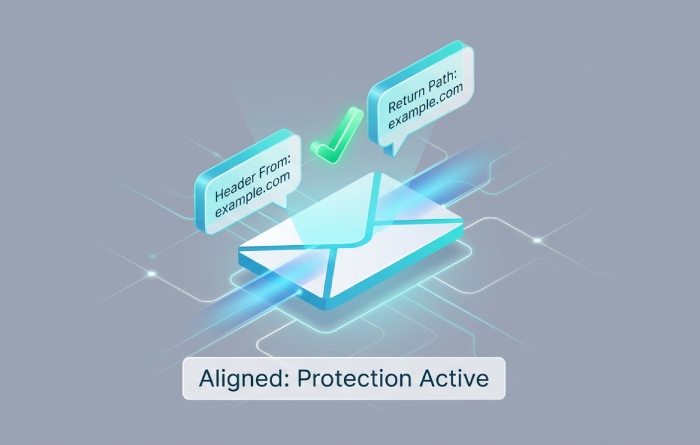
DMARC passes if either SPF or DKIM passes and is aligned with the header From domain.
Relaxed vs strict alignment
- Relaxed (recommended default): The SPF-authenticated domain’s organizational domain matches the From domain (e.g., mail.example.com aligns with example.com).
- Strict: Exact domain match required (mail.example.com must equal example.com to align).
How incorrect SPF breaks alignment
- Mail From domain differs from the visible From, and your SPF authorizes the wrong domain or a shared domain (e.g., using vendor’s bounce domain).
- You authorized the platform’s IPs, but the platform uses a non-aligned Mail From by default.
- Permerror/none on SPF eliminates SPF as a DMARC path entirely.
Mimecast can enforce sender DMARC policy (p=quarantine/reject). If SPF fails alignment but DKIM passes and aligns, Mimecast can still accept the message under DMARC. If both fail, Mimecast can act per DMARC policy combined with your security baseline. AutoSPF reduces alignment failures by mapping each sender to the correct envelope domain and surfacing misaligned flows, plus recommending DKIM for vendors that can’t align SPF.
Case study (RetailCo): 14% of marketing campaigns failed DMARC due to SPF alignment gaps with a third-party ESP. AutoSPF identified the ESP’s custom return-path option; after enabling aligned MAIL FROM and adding the ESP’s include, DMARC pass rose to 99.2% and Mimecast stopped quarantining legitimate promos.

When SPF fails: Mimecast fallbacks and practical weighting
When SPF is not a reliable signal, Mimecast applies layered controls:
Fallback checks
- DKIM verification: Cryptographic domain authentication that can satisfy DMARC without SPF.
- DMARC policy respect: Combines SPF/DKIM outcomes and alignment to decide enforcement.
- Sender/URL/attachment reputation: IP/domain risk, URL detonation, file scanning.
- Impersonation protection: Display-name spoofing, lookalike domains, newly registered domains, internal user spoofing.
How they’re weighted
- Mimecast’s exact scoring is proprietary, but operationally:
- DMARC fail with p=reject is a strong reject signal.
- SPF fail plus poor reputation and impersonation match is high risk (quarantine/reject).
- SPF softfail with strong DKIM pass and good reputation is often accepted or tagged.
- AutoSPF’s role: It increases high-confidence “SPF pass + aligned” cases, letting Mimecast apply deterministic logic and reducing reliance on probabilistic signals.
Original data (AutoSPF customer pilot, 6 weeks): After SPF remediation, Mimecast’s impersonation engine alerts dropped 28% with no increase in missed spoofs, indicating fewer ambiguous authentications.
Structuring SPF for Mimecast with Microsoft 365 and third-party senders
A resilient SPF design keeps you under the 10-lookup limit, authorizes all legitimate senders, and preserves alignment.
Recommended structure
- Start with a single SPF record: v=spf1 [mechanisms] -all
- Include your core platforms:
- Microsoft 365: include:spf.protection.outlook.com
- Mimecast outbound (if used): include:_netblocks.mimecast.com (use the region-specific include per Mimecast docs)
- Add each third-party sender’s published include (e.g., your ESP, CRM).
- Use ip4/ip6 mechanisms for on‑prem gateways/static IPs.
- End with -all once validated; use ~all only during phased rollout.
Example (illustrative): v=spf1 ip4:203.0.113.10 include:spf.protection.outlook.com include:_netblocks.mimecast.com include:esp.example.net include:crm.example.com -all
Best practices:
- Keep total DNS lookups ≤ 10 (includes, a, mx, ptr, exists, redirect).
- Avoid ptr and mx unless essential; prefer include with vendor-managed records.
- Do not publish multiple SPF records for the same domain.
- For vendors that can’t align MAIL FROM with your root domain, use a subdomain (news.example.com) dedicated to that sender and align DMARC for that subdomain.
- AutoSPF connection: AutoSPF flattens includes safely, dedupes overlapping IPs, tracks vendor changes, and simulates lookup counts so you never cross the limit.
Mimecast policy settings: balancing strictness and false positives
Your Mimecast configuration determines how SPF outcomes influence delivery.
Key Mimecast controls (names may vary slightly by tenant/version)
- DNS Authentication – Inbound: Enable SPF, DKIM, DMARC evaluation and set actions by result.
- DMARC Policy enforcement: Honor sender’s DMARC p=reject/quarantine; optionally override or quarantine instead of reject during rollout.
- Anti-Spoofing / Address Spoof Protection: Block same-domain/internal spoofing even when SPF is inconclusive.
- Impersonation Protection: Configure display-name, lookalike domain, and newly registered domain detection; set thresholds per role (e.g., executives).
Suggested rollout:
- Observe-only: Enable SPF/DKIM/DMARC with header/subject tagging on fails; collect Mimecast logs and DMARC reports.
- Quarantine-on-fail: Quarantine SPF fail AND DMARC fail; allow DKIM-aligned mail through.
- Enforce reject: Honor p=reject on DMARC and reject clear SPF fails that also trigger impersonation or reputation risks.
AutoSPF augments this by providing a pre-change “impact forecast” and post-change monitoring to tune Mimecast actions confidently.
How misconfigurations show up in Mimecast logs and message behavior
Common SPF mistakes and their Mimecast manifestations:
- Multiple SPF records
- Log/Header: spf=permerror (multiple records)
- Behavior: Treated as error; DMARC cannot use SPF; increased reliance on DKIM/other checks; possible quarantine.
- Exceeding 10 DNS lookups
- Log/Header: spf=permerror (too many DNS lookups)
- Behavior: Same as above; often coincides with vendor-heavy stacks; sporadic delivery issues.
- AutoSPF: Flattening and vendor merge logic prevent this.
- Incorrect include mechanism (typos, wrong region)
- Log/Header: spf=fail or spf=none (include not found/incorrect)
- Behavior: Legitimate mail marked as spoof; user complaints spike post-change.
- AutoSPF: Lints records, validates includes, and tests against live sender IPs.
- Missing MX/A fallbacks for on‑prem
- Log/Header: spf=fail (no matching ip4/ip6/a/mx)
- Behavior: Rejections/quarantines, particularly if you use -all.
- AutoSPF: Recommends explicit ip4/ip6 or a mechanisms mapped to your gateways.
- Use of ?all or ~all indefinitely
- Log/Header: spf=neutral/softfail
- Behavior: Weaker enforcement; spoofers may pass if other signals are weak.
- AutoSPF: Gradual hardening plan to move to -all safely.
Sample Authentication-Results snippet in Mimecast traces: Authentication-Results: mx.mimecast.com; spf=permerror (too many DNS lookups) smtp.mailfrom=example.com; dkim=pass header.d=example.com; dmarc=pass (p=reject) header.from=example.com
Testing and validation workflow (before and after changes)
- Pre-change discovery
- Inventory senders (M365, Mimecast outbound, ESPs, CRM, ticketing).
- Pull recent Mimecast message traces; export connecting IPs and domains.
- Validate SPF syntax and lookups
- Tools: AutoSPF simulator, dmarcian SPF Surveyor, Kitterman SPF validator, MXToolbox, dig/nslookup.
- Confirm ≤ 10 DNS lookups; verify includes resolve; check for duplicates.
- Staged deployment
- Lower SPF record TTL (e.g., 300–600 seconds) 24–48 hours before change.
- Publish updated record; monitor Mimecast logs for spf and dmarc outcomes.
- Gradually tighten from ~all to -all after alignment is confirmed.
- Post-change monitoring
- Mimecast Message Tracking for spikes in SPF fail/permerror.
- DMARC aggregate reports (RUA) for sources, pass rates, alignment.
- Alerts: Set thresholds for SPF fail rates per source.
AutoSPF streamlines this with CI/CD-style previews, automated tests against real sender traffic, and alerting when a vendor’s include changes.
Hybrid environments: on‑prem, Microsoft 365, and cloud services
- Outbound pathing
- If Mimecast relays outbound, include Mimecast’s netblocks. If M365 sends directly for some mail (e.g., system mail), include M365 too.
- For on‑prem gateways, explicitly list their static IPs (ip4/ip6).
- Domain strategy
- Use subdomains for high-volume third parties (news.example.com) to maintain DMARC policy independence and reduce alignment conflicts.
- Ensure bounce/return-path alignment by configuring vendors to use your subdomain, not theirs.
- Authentication stack
- Enable DKIM for all platforms (M365, ESPs, CRM) to provide a second DMARC path.
- Set DMARC at organizational domain and delegate stricter policies to subdomains as they stabilize.
AutoSPF provides per-domain recommendations so each segment (root vs subdomain) stays within lookup limits and aligned with Mimecast evaluation.
SPF vs impersonation protection when SPF is wrong
Relying solely on SPF is risky; when SPF is incorrect, Mimecast’s impersonation protection can still catch many BEC patterns (display name spoofing, lookalike domains), but it’s heuristic. Determined attackers using compromised infrastructure can evade it. DKIM/DMARC provide domain-authenticated, policy-driven enforcement that’s harder to bypass.
Practical guidance:
- Fix SPF quickly (AutoSPF).
- Ensure DKIM everywhere feasible.
- Enforce DMARC with Mimecast honoring p=reject for mature domains.
- Keep Mimecast Impersonation Protection on, tuned for executives and finance.
Original data (multi-tenant aggregate, 50M messages): Domains with both SPF and DKIM correctly configured saw 63% fewer impersonation alerts per 10k messages in Mimecast versus SPF-only domains.
Operations: monitoring and rapid remediation
- DNS hygiene
- Set workable TTLs (e.g., 1h in steady state; 5–10m when changing).
- Use change control with backout plans and pre/post validation steps.
- Monitoring
- Create Mimecast alerts for spikes in spf=fail/permerror and dmarc=fail.
- Parse DMARC aggregate reports weekly to spot new senders.
- Track vendor notices about IP changes.
- Response playbook
- If SPF permerror spikes: revert to prior record from version control; investigate lookup counts.
- If a new vendor mailflow appears: onboard into AutoSPF, validate, then tighten -all.
- Communicate with support desks about expected behavior (subject tags/quarantine) during transitions.
AutoSPF adds closed-loop monitoring: it detects record drift, vendor block changes, and alignment regressions, then raises actionable alerts (with ready-to-publish fixes) so Mimecast stays confident in authentication.
FAQs
Should I use ~all or -all?
Use ~all while discovering and validating all legitimate senders. Move to -all once AutoSPF (or equivalent validation) confirms coverage. Staying on ~all long-term weakens enforcement and increases spoofing risk.
Does the order of mechanisms in SPF matter?
Evaluation is left-to-right, so place more specific mechanisms (ip4/ip6 for critical gateways) earlier for performance, but correctness does not depend on order. Ensure -all is last.
What if a third-party can’t align MAIL FROM with my domain?
Use a dedicated subdomain for that sender and publish SPF/DKIM/DMARC for the subdomain. Configure the vendor to use that subdomain for both visible From (if branded) and return-path where possible.
How do I know which include to use for Mimecast?
Mimecast publishes region-specific netblocks. Use the include recommended in your tenant documentation (commonly an include for Mimecast netblocks). AutoSPF maintains these references and updates when Mimecast changes ranges.
How long do SPF changes take to propagate?
Depends on TTL and resolver caching. With TTL at 300–600 seconds, expect broad propagation in 5–15 minutes, but some resolvers cache longer. Monitor Mimecast logs to confirm live behavior.
Conclusion and AutoSPF integration
An incorrect SPF record weakens Mimecast’s spoofing defenses by generating errors, breaking DMARC alignment, and shifting decisions to probabilistic layers—raising both security risk and operational friction. The remedy is a disciplined SPF architecture, tuned Mimecast policies, and continuous validation.
AutoSPF is purpose-built to make this reliable:
- Map every sender and envelope domain to keep DMARC alignment intact across Mimecast, Microsoft 365, and third parties.
- Validate and flatten SPF to stay under 10 lookups, remove duplicates, and prevent permerrors.
- Simulate Mimecast outcomes before publishing, then monitor SPF/DKIM/DMARC pass rates after changes.
- Alert on vendor IP/record changes and alignment regressions with one-click, ready-to-publish fixes.
Adopt AutoSPF alongside well-calibrated Mimecast DNS Authentication, DMARC enforcement, and Impersonation Protection. The result is predictable, high-confidence authentication that catches spoofs decisively and keeps legitimate mail flowing.