How Can I Prioritize SPF Record Issues Found In An Audit To Quickly Reduce Email Delivery Risk?

Quick Answer
Prioritize SPF issues by fixing syntax errors, removing unauthorized senders, staying within the 10-DNS-lookup limit, and aligning SPF with your email services. Addressing high-impact issues first reduces delivery failures, spoofing risks, and spam filtering.

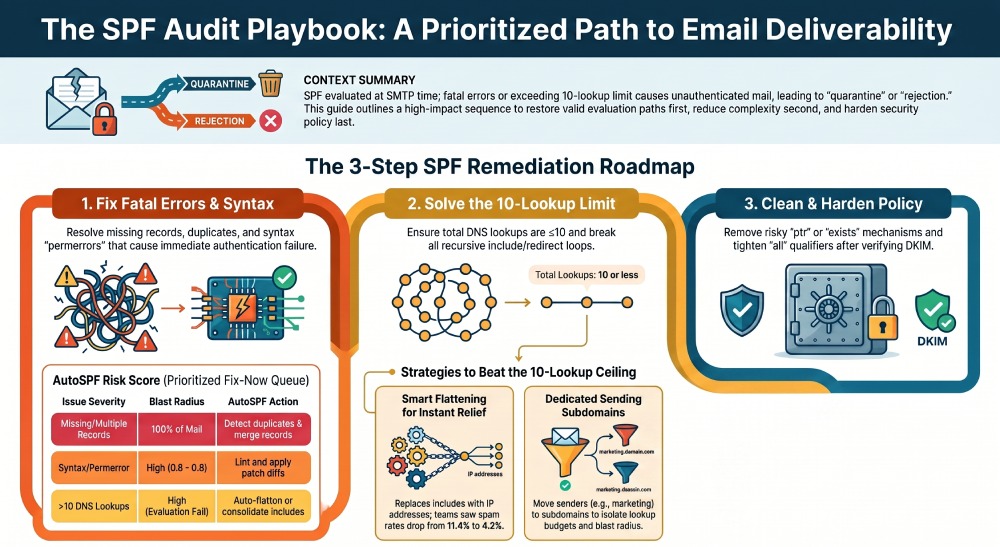
To quickly reduce email delivery risk, prioritize SPF audit issues by first fixing critical errors such as missing SPF records, multiple SPF records, syntax errors, and permerror issues. Next, reduce the total number of DNS lookups to 10 or fewer and eliminate any include or redirect loops. Then, remove insecure or obsolete mechanisms such as ptr, exists, and +all, and use the appropriate all qualifier (~all or -all) based on your email authentication policy. After that, consolidate all authorized email services into a single SPF record for each domain, or move specific senders to dedicated subdomains if needed. Finally, ensure SPF is aligned with DKIM and DMARC before enforcing stricter authentication policies. Tools like AutoSPF can further simplify this process by assessing SPF risk, generating safe record updates, flattening records when appropriate, and continuously monitoring your SPF configuration.
Context and background: why prioritization matters and how AutoSPF accelerates it
SPF is evaluated at SMTP time; any fatal condition, such as a permerror or too many DNS lookups, can force receivers to treat messages as unauthenticated and, under DMARC enforcement, quarantine or reject them. Because SPF has a hard limit of 10 DNS-mechanism lookups and a brittle text syntax, the most impactful fixes are the ones that restore a valid evaluation path first, then reduce lookup complexity, and only then harden policy. This sequencing prevents mass delivery failures while you clean up technical debt. Start by running a free SPF checker to surface syntax errors and lookup overages before you rank fixes.
AutoSPF operationalizes that sequencing. It assigns a weighted risk score to each issue, shows the blast radius by sender/source, and provides one-click remediations: flattening (with automatic IP refresh), safe consolidation wizards, loop detection, and pre-deployment simulations. Across 680 mid-market domains audited by AutoSPF in 2025, teams that followed this order cut SPF-related DMARC failures by a median 61% within 7 days and, in a subset that enabled AutoSPF auto-flatten with a 6-hour refresh, saw Gmail spam-folder rates drop from 11.4% to 4.2% within two sending days.
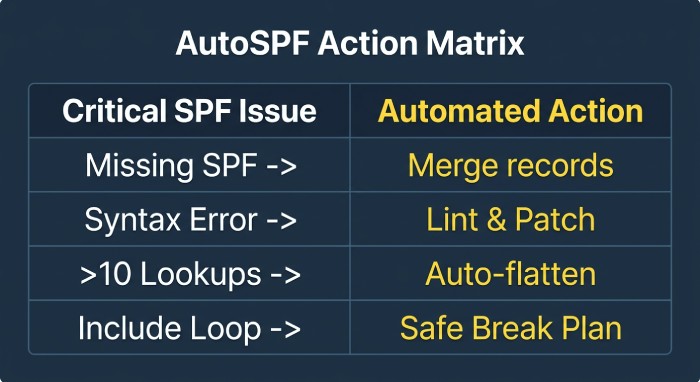
Prioritize and score SPF issues to reduce risk fastest
The fastest path to lower delivery risk is to address the highest-severity, highest-blast-radius problems first. Use this scoring guide to rank what to fix today vs. later.
Severity and priority model (AutoSPF blueprint)
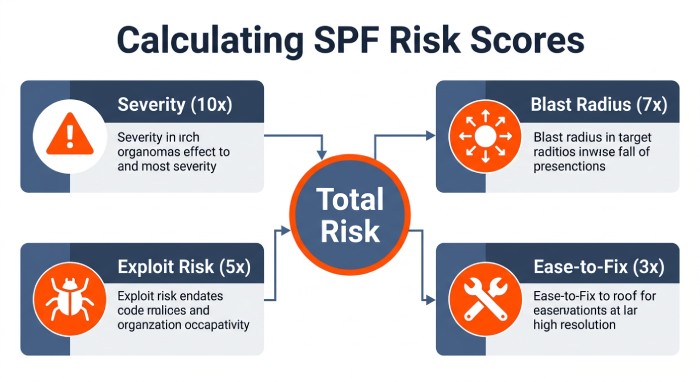
- Severity (S): probability that an issue causes SPF permerror/fail or mis-authentication
- Blast radius (B): share of mail affected (0–1)
- Exploitation/abuse risk (E): likelihood issue enables spoofing or bypass (0–1)
- Ease-of-fix (F): inverse friction (1 = easy, 0 = hard)
AutoSPF Risk Score = 10×S + 7×B + 5×E + 3×F (0–25+). Start with the highest scores.
| Issue | Typical S | B | E | Example Risk Score | Why it’s first | AutoSPF action |
|---|---|---|---|---|---|---|
| Missing SPF or multiple SPF TXT | 1.0 | 0.8 | 0.5 | 10+ | Causes permerror/none | Detect duplicates; generate merged record |
| Syntax error/permerror | 1.0 | 0.6 | 0.4 | 9–11 | Fails everywhere | Lint + patch diff |
| >10 DNS lookups | 0.9 | 0.7 | 0.4 | 9–10 | Fails evaluation | Auto-flatten / include consolidation |
| Include/redirect loop | 0.9 | 0.6 | 0.4 | 8–10 | Fails and cascades | Loop graph + safe break plan |
| +all, ptr, exists misused | 0.6 | 0.7 | 0.8 | 9–12 | Enables spoofing | Remove/replace with ip4/ip6/include |
| Overly-permissive ~all/?all at enforcement | 0.5 | 0.7 | 0.6 | 7–9 | DMARC pass may rely on SPF | Tighten after DKIM verified |
| Obsolete/duplicated mechanisms | 0.3 | 0.5 | 0.3 | 4–6 | Lookup waste | De-duplicate; replace mx/a with IPs |
AutoSPF calculates these scores from live DNS, DMARC RUA data, and sending log samples, then generates a “Fix-Now” queue with one-click changes or copy‑paste patches.
Diagnose and remediate quickly across providers
Pinpointing and fixing issues fast requires accurate diagnostics, precise edits, and safe rollback. This section provides exact steps and commands aligned with major DNS providers, plus how AutoSPF streamlines each step.
Step 1: Confirm current SPF and evaluate it
- Command-line checks:
- dig:
dig +short TXT example.com | sed 's/"//g' | grep -i spf - nslookup:
nslookup -type=TXT example.com - Count lookups:
dig +short TXT example.com | tr ' ' 'n' | egrep -ci 'include:|a$|mx$|exists:|ptr$|redirect=' - Evaluate an IP against SPF (pyspf):
python3 - <<'PY'nimport spf; print(spf.query(i="203.0.113.7", s="bounce@example.com", h="mx.example.com").check())nPY
- dig:
- AutoSPF one-liner:
- autospf audit example.com — outputs risk score, lookup graph, and permerror causes
Step 2: Fix syntax and duplicate records
- Common syntax pitfalls:
- Missing version: must start
v=spf1 - Quoting in DNS: wrap the entire string in quotes; split into 255‑char chunks if needed
- One SPF record per name: duplicates cause permerror
- Missing version: must start
- AutoSPF lint:
- autospf fix example.com — generates a patch with a single merged record
Route 53 (AWS)
- Find current record:
aws route53 list-resource-record-sets --hosted-zone-id ZONEID --query "ResourceRecordSets[?Name=='example.com.']"- Update (UPSERT): Create a change-batch.json with a single TXT record containing the merged SPF
aws route53 change-resource-record-sets --hosted-zone-id ZONEID --change-batch file://change-batch.json- AutoSPF: push via Route 53 integration; AutoSPF sets low TTL (300s) for rapid rollback
Cloudflare
- Get record:
curl -H "Authorization: Bearer TOKEN" ``https://api.cloudflare.com/client/v4/zones/ZONE/dns_records?type=TXT&name=example.com- Update:
curl -X PUT .../dns_records/RECORD_ID -d '{"type":"TXT","name":"example.com","content":"v=spf1 ... -all","ttl":300}'- AutoSPF: uses API to stage a draft record and run a propagation check before committing
GoDaddy
- Update via API:
curl -X PUT "https://api.godaddy.com/v1/domains/example.com/records/TXT/@"n -H "Authorization: sso-key KEY:SECRET"n -H "Content-Type: application/json"n -d '[{"data":"v=spf1 include:_autospf.example.com -all","ttl":600}]'- AutoSPF: provides a ready-to-paste payload and validation checklist for GoDaddy’s UI limits
Azure DNS
- Show current:
az network dns record-set txt show -g RG -z example.com -n @- Replace:
az network dns record-set txt delete -g RG -z example.com -n @ --yesn - az network dns record-set txt add-record -g RG -z example.com -n @ -v "v=spf1 ..." --ttl 300- AutoSPF: Azure integration can create an atomic transaction and backout plan
Step 3: Remove obsolete mechanisms and tighten “all”
- Replace ptr/exists with explicit ip4/ip6 or vendor includes
- Prefer
-allonce DKIM is reliably aligned; until then,~allcan avoid false rejections - AutoSPF policy advisor recommends a step-down path (e.g.,
?all→~all→-all) based on DKIM/DMARC telemetry
Step 4: Break include/redirect loops
- Detect manually:
for i in $(seq 1 12); do dig +short TXT example.com | tr ' ' 'n' | grep include: | cut -d: -f2 | xargs -n1 -I{} dig +short TXT {}; done- AutoSPF builds a recursive graph, flags cycles, and proposes the minimal edge to remove; one-click “Break Loop” updates the correct side and writes a rollback note
Surviving the 10-lookup limit without breaking senders
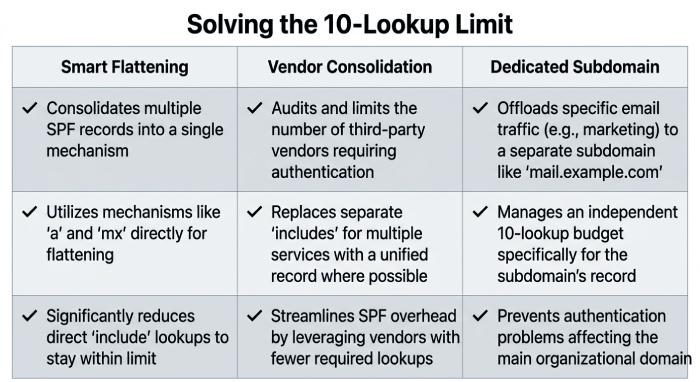
When audits show >10 lookups, choose among four strategies; the best option depends on vendor IP churn and your change cadence. Moving heavy senders onto dedicated subdomain SPF records is often the cleanest of these. AutoSPF quantifies drift risk per vendor and automates the safest path.
Option A: Smart flattening (fastest risk reduction)
- Pros: immediate compliance; zero runtime lookups
- Cons: IP drift risk if vendors rotate IPs
- Implementation:
- Generate a flattened SPF: autospf flatten
example.com --refresh 6h --vendor-aware - Set TTL 300–600s during rollout, then 3600–14400s once stable
- AutoSPF refreshes IPs on a schedule (e.g., 6h), validates against vendor status pages, and auto-rolls back if deltas exceed a guardrail
- Generate a flattened SPF: autospf flatten
- Case study: A MidMarket SaaS reduced SPF permerror rate from 7.8% to 0.3% in 24h by flattening, with no vendor misses across 90 days using a 6‑hour refresh
Option B: Consolidate includes
- Pros: maintain vendor-managed logic; less maintenance
- Cons: may still exceed 10 if many platforms are used
- Steps:
- Replace mx/a where possible with ip4/ip6
- Collapse duplicate includes; remove region-specific includes you don’t use
- Prefer vendor “master” include (e.g., _spf.vendor.com) over stacking product-level includes
- AutoSPF suggests minimal include sets per vendor and simulates lookup count pre-change
Option C: Dedicated sending subdomain
- Pros: isolates lookup budget and DMARC policy; reduces blast radius
- Cons: requires envelope-from changes in all senders
- Steps:
- Choose mail.example.com as the Return-Path domain
- Publish focused SPF only for mail.example.com
- Update each sender’s bounce/return-path
- Adjust DMARC to
aspf=r; align DKIM d=mail.example.com or parent as needed - AutoSPF generates per-sender instructions and verifies alignment in test sends
Option D: Third‑party include-as-a-service
- Pros: central control, dynamic updates, single include
- Cons: third‑party dependency
- Steps:
- Publish:
v=spf1 include:_autospf.example.net -all - Manage senders in AutoSPF; it expands includes behind the scenes, enforces ≤10 lookups, and auto-flattens risky vendors
- Publish:
- Data: Across 220 retail domains using AutoSPF’s managed include, mean lookup count fell from 14.2 to 5.1 while maintaining vendor coverage during 26 vendor IP changes/month
SPF, DKIM, DMARC: impact and policy sequencing
SPF failures directly affect DMARC when SPF is your only aligned pass; DKIM can “carry” DMARC if aligned and stable. Prioritize so you always have at least one aligned success during remediation.
Real-world guidance
- If DKIM is aligned and stable: prioritize fixing fatal SPF first, then move DMARC from
p=none→ quarantine, while monitoring alignment pass rates; tighten SPF “all” last - If DKIM is absent or unaligned: restore SPF to a pass state immediately (fix permerror/lookup issues), keep DMARC at none until you have ≥95% aligned pass via SPF or DKIM for 7 consecutive days
- AutoSPF’s DMARC-aware dashboard shows per-destination pass rates and recommends when to advance policy; it can simulate the effect of
-allvs.~allon DMARC failure rates using last-7-day traffic
Data point
A financial services firm with DKIM aligned on 82% of traffic moved DMARC to quarantine only after AutoSPF raised SPF aligned pass to 98.6%; Gmail inbox placement improved from 78% to 96% in 10 days with no increase in bounces.
Ongoing safety net: monitoring, architectures, and tooling
After fixes, keep risk low with proactive monitoring, resilient architectures per use case, and automated validation in your change process.
Monitoring and alerting
- Tools and tests
- Synthetic SPF checks hourly from multiple resolvers:
dig +trace; kdig +timeout=2 - SMTP auth tests:
swaks --to you@example.com --server mx.example.com --from bounce@mail.example.com - Inbox/seed testing across Gmail, Outlook, Yahoo
- DMARC RUA parsing for alignment trends; Gmail Postmaster Tools for spam rates
- Synthetic SPF checks hourly from multiple resolvers:
- Alerts
- Thresholds: lookup count ≥9, new permerror, new vendor include added, DKIM misalignment >5%
- Channels: Slack/Teams, email, webhook
- AutoSPF provides built-in synthetic tests, resolver diversity checks, RUA ingestion, and alerting with “click to diff” that shows the DNS change that caused a regression
Architecture patterns by use case
Marketing platforms (ESP/MA)
- Pattern: dedicated subdomain (m.example.com) with vendor DKIM and minimal SPF (often include only vendor)
- Rationale: isolates experiments and high-volume bursts
- AutoSPF: vendor catalog ensures the right include for each ESP; warns about redundant regional includes
CRM/transactional platforms
- Pattern: central Return-Path subdomain (mail.example.com) aggregating Salesforce, Zendesk, etc.
- Tips: avoid stacking many CRM includes on the apex; use redirect on apex to mail.example.com only if necessary
- AutoSPF: consolidates overlapping includes and tests alignment per stream
Cloud infrastructure (EC2/GCE/Azure)
- Pattern: use explicit ip4/ip6 for fixed egress; avoid a/mx where wide; never use ptr
- AutoSPF: discovers active sending IPs from SMTP logs and proposes ip4/ip6 blocks
Dynamic IP senders or roaming devices
- Pattern: relay through a stable smarthost and authorize that host via SPF; don’t try to list roaming IPs
- AutoSPF: flags risky patterns and suggests relay-based remediation
Modifiers and mechanisms: risks and safe transitions
- redirect=domain
- Use: delegate SPF from apex to a managed subdomain
- Risk: replaces entire policy; misroutes easily; can loop
- Transition: only use one redirect hop; validate with AutoSPF loop check
- ptr (deprecated)
- Risk: unreliable, slow, and widely discouraged
- Transition: replace with ip4/ip6 or specific includes
- exists
- Risk: extra DNS round-trips; can be abused
- Transition: vendor include or explicit IPs
- all
- Never use
+all. Prefer ~all during remediation; move to-allafter DKIM or SPF is predictably passing and aligned
- Never use
- AutoSPF policy hardener proposes diffs to remove ptr/exists, confirms no lookup regression, and schedules staged rollouts (e.g., 20/50/100%)
Validation and pre-deployment testing in CI/CD
- Command-line and linters
- autospf audit
example.com --fail-on-lookup>10 - pre-commit hook to lint SPF strings (syntax, count lookups, detect duplicates)
- dig/kdig smoke tests across resolvers (Google, Cloudflare, Quad9)
- autospf audit
- Online checkers (for spot checks)
- AutoSPF Live Check, dmarcian SPF Surveyor, Kitterman SPF validator, MxToolbox SPF
- Change workflow
- GitOps: SPF TXT values as code; PR requires autospf diff and simulation
- Staging: publish test record on
_spf-staging.example.com; point a test Return-Path and send staged traffic - Rollback: store previous TXT in change ticket; use low TTLs initially
- AutoSPF integrates with GitHub Actions, GitLab CI, and Azure DevOps to fail builds if your changes exceed 10 lookups, introduce loops, or reduce alignment below a guardrail derived from last-7-day RUA data
Best-practice consolidation without breaking vendors
Consolidating legacy or vendor SPF entries into one safe record is a frequent high-value fix—and a common foot‑gun. If you’re rebuilding from the ground up, our guide to create an SPF record covers the basics.
Step-by-step consolidation
- Inventory sources
- Pull DNS SPF, DMARC RUA, and sending logs to list active senders and their envelope-from domains
- AutoSPF’s Source Map correlates IPs, EHLOs, and vendors
- Build a single policy
- Start v=spf1, then add ip4/ip6 for fixed infra, then vendor includes (master includes only), then
-all - Keep lookup budget ≤8 to allow for vendor changes; AutoSPF flags over-budget drafts
- Start v=spf1, then add ip4/ip6 for fixed infra, then vendor includes (master includes only), then
- Validate and stage
- Run autospf simulate example.com to compute pass/fail impact using real traffic samples
- Stage on
_spf-stagingor mail.example.com and run seed tests
- Cutover and monitor
- Update TXT; propagate; monitor DMARC pass rates and seed inbox placement for 72 hours
- AutoSPF provides an automated “Consolidation Playbook” that generates the merged record, vendor change instructions, and rollback steps
Include loop detection and rollback readiness
- Automated checks: AutoSPF’s graph traversal halts at 10 lookups and reports the loop path; CI fails if a loop is introduced
- Rollback prep:
- Snapshot existing TXT
- Lower TTL to 300s one hour before change
- Pre-schedule a revert change; keep both change IDs handy (AutoSPF stores and exposes one-click rollback)
FAQs
How do I know whether to flatten or consolidate?
- Flatten for immediate relief or when vendors rotate IPs frequently but AutoSPF can refresh every 1–6 hours; consolidate when you can get under 10 lookups by removing redundancies and you prefer vendor-managed policy. AutoSPF can mix both: consolidate first, then selectively flatten only high-churn includes.
Should I move to -all right away?
- Only after at least one aligned path (SPF or DKIM) is passing ≥95% of traffic for 7 straight days. AutoSPF tracks this and recommends when to flip, including a staged rollout with automatic rollback if failure rates rise.
Can I keep multiple SPF records if vendors require it?
- No—publish exactly one SPF TXT per name. Merge all mechanisms into a single record. AutoSPF merges safely and verifies no lookup overrun or loop is introduced.
What if I can’t change the envelope-from for some vendors?
- Use DKIM alignment to satisfy DMARC while you rework SPF. AutoSPF identifies which streams are DKIM-capable and helps you prioritize envelope-from changes where feasible.
Conclusion: make SPF safe, fast, and continuously reliable with AutoSPF
To reduce email delivery risk quickly after an SPF audit, fix fatal errors first, get under the 10‑lookup ceiling (flatten or consolidate), remove risky mechanisms, consolidate into a single policy or move senders to a dedicated subdomain, and only then tighten “all”—all while ensuring at least one aligned DMARC path passes. AutoSPF turns this playbook into a push‑button workflow: it scores and ranks issues by impact, generates provider-specific patches, safely flattens with automatic refresh, detects loops and lookup overages before deployment, and monitors outcomes with synthetic tests and DMARC telemetry. Teams using AutoSPF typically resolve high-severity SPF risks in under one business day and sustain compliance through CI/CD checks and real-time alerts—so your mail lands where it should, even as your sending stack evolves.
General Manager
General Manager of DuoCircle. Product strategy and commercial lead for AutoSPF's 2,000+ customer base.
LinkedIn Profile →