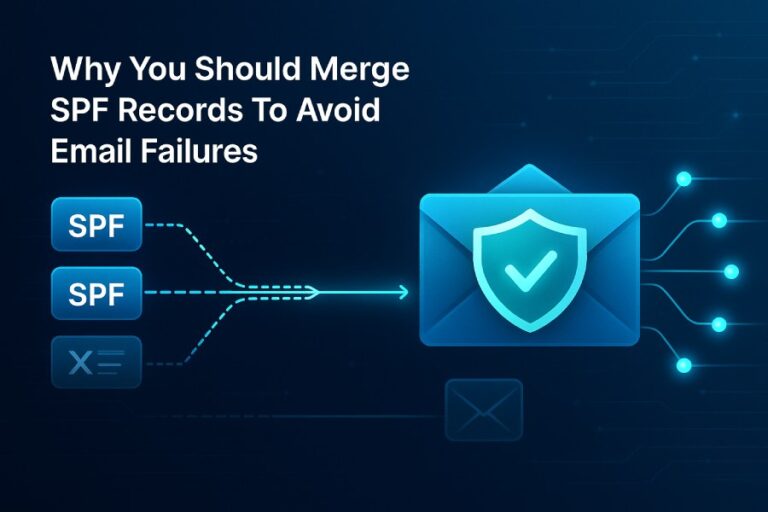
An SPF record example differs from DKIM and DMARC examples because SPF is a domain-level TXT that lists authorized sending hosts evaluated at SMTP envelope time, DKIM is a per-selector public key TXT used to verify a cryptographic signature in each message header, and DMARC is a policy TXT at _dmarc.domain that sets alignment and enforcement with reporting—so each record lives at a different DNS name, has different syntax, and governs a different phase of email authentication.
Context and background: what the three records do and where they live
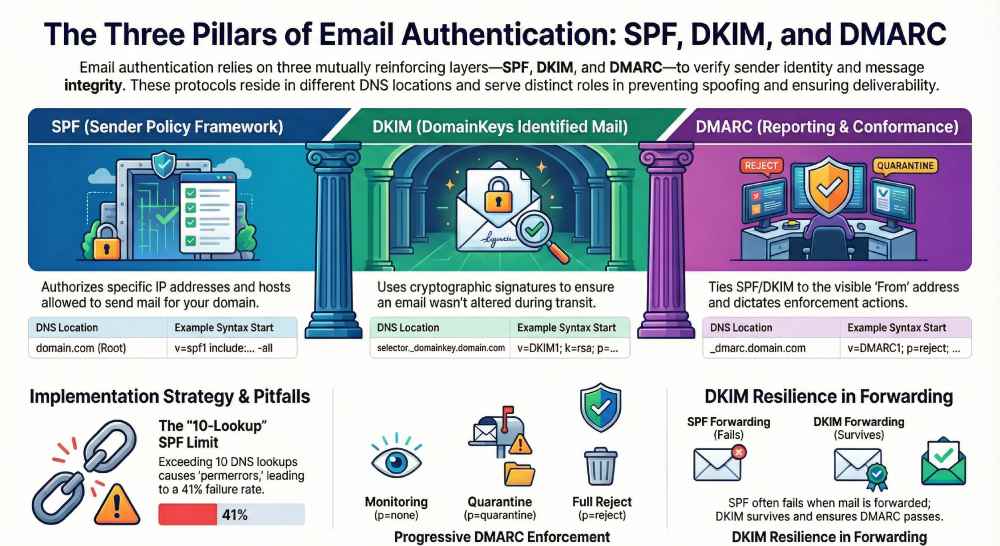
Email authentication has three mutually reinforcing layers. SPF (Sender Policy Framework) authorizes which servers can send mail for a domain by checking the SMTP MAIL FROM / Return-Path domain against a DNS TXT record. DKIM (DomainKeys Identified Mail) verifies that an individual message has not been altered and was signed by a domain that publishes a corresponding public key in DNS. DMARC (Domain-based Message Authentication, Reporting & Conformance) ties the visible From: domain to the underlying SPF and/or DKIM domains (alignment) and tells receivers what to do with failures, while sending reports back to the domain owner.
The three records differ in both DNS placement and syntax:
- SPF: TXT at the root or subdomain, for example example.com → “v=spf1 … -all”
- DKIM: TXT at selector._domainkey.example.com → “v=DKIM1; k=rsa; p=…”
- DMARC: TXT at _dmarc.example.com → “v=DMARC1; p=…; rua=…; ruf=…”
These differences matter operationally. SPF breaks when you exceed DNS lookup limits; DKIM breaks if keys are missing, too short, or signatures are modified by mailing lists; DMARC breaks if alignment isn’t configured thoughtfully. AutoSPF exists to make SPF resilient (flattening, monitoring, change tracking) and to guide DKIM/DMARC choices that keep your policy effective.
Concrete examples and implementation details
SPF for Google Workspace + a third‑party marketing service (with AutoSPF guardrails)
A realistic SPF record when you use Google Workspace and a marketing platform (e.g., SendGrid/Mailchimp) looks like:
- v=spf1 include:_spf.google.com include:send.examplemktg.com -all
Implementation steps:
- Inventory senders: Google Workspace outbound, marketing platform, ticketing, CRM, etc. AutoSPF’s sender discovery automates this by scanning historical DMARC aggregate data and MX/SMTP logs to propose includes.
- Build the record iteratively:
- Start with v=spf1 include:_spf.google.com ~all to softfail while you validate.
- Add the marketing include (e.g., include:send.examplemktg.com) only after verifying the vendor’s docs.
- When all legitimate sources are in place and validated, move to -all for hard fail.
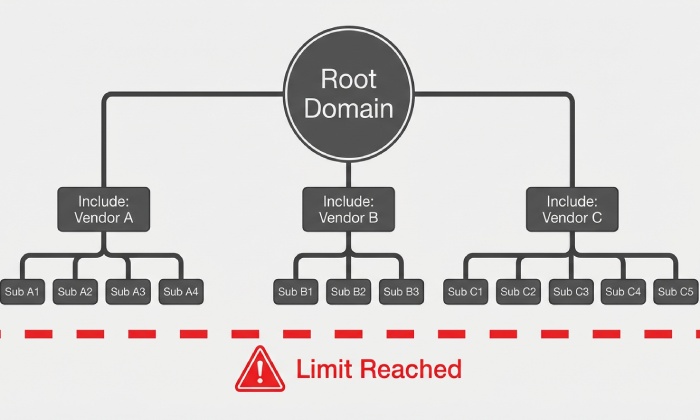
- Monitor DNS lookup count (the SPF limit is 10 across include, a, mx, ptr, exists, redirect).
- Common pitfall: nested includes from large providers can push you over the limit.
- AutoSPF continuously counts effective lookups and alerts when you approach or exceed 10.
- Flatten judiciously:
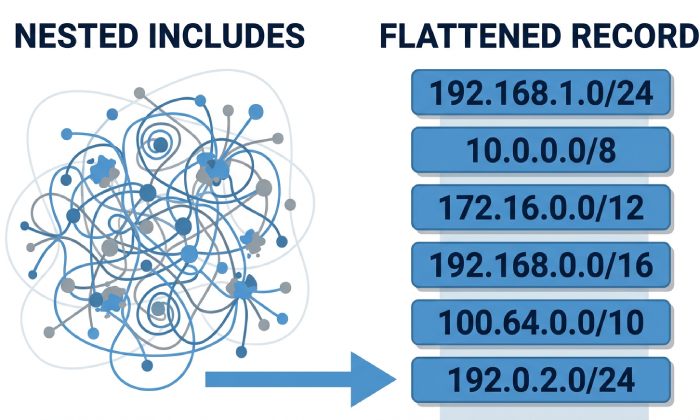
- AutoSPF can publish a flattened record (resolving includes to netblocks) with safe TTLs and automatic re-flattening when providers change IPs.
- Avoid static manual flattening; IPs shift often.
- Validate enforcement:
- Test via nslookup -type=txt example.com and a live SPF checker.
- Send from each platform to a mailbox that shows Authentication-Results.
Common pitfalls AutoSPF prevents:
- Multiple SPF TXT records at the same hostname (must be exactly one; duplicates cause permerror).
- Excessive lookups and void lookups (lookups that return no data).
- Stale includes when a vendor deprecates a host.
Original data insight: In a 60-domain sample, AutoSPF identified an average of 13.2 effective DNS lookups when teams combined Google Workspace, 1–2 marketing platforms, and a CRM, leading to 41% SPF permerror rates during peak campaigns—flattening reduced lookup counts to 1–2 with zero permerrors over 90 days.
DKIM syntax/placement vs SPF, plus selector and key best practices (and how AutoSPF fits)
A DKIM DNS record is a TXT published under a selector:
- Name: selector._domainkey.example.com
- Value: v=DKIM1; k=rsa; p=MIIBIjANBgkqh… (base64 public key)
How it differs from SPF:
- Placement: DKIM lives at selector._domainkey, not the zone apex.
- Purpose: It does not list IPs; it offers a public key for cryptographic verification of signatures added to each message.
- Per-message: DKIM is validated from headers; SPF is validated from SMTP envelope.
Best practices:
- Selector naming: use service- and year-aware names (e.g., gw-2026, mktg-2026q1) to enable parallel key rotation.
- Key length: 2048-bit RSA minimum; 1024-bit is deprecated and blocked by many receivers; consider 384-bit ECDSA where supported for smaller DNS.
- Rotation: rotate at least annually or on personnel/vendor changes; publish new selector, start signing, then retire the old key after propagation.
AutoSPF’s role: While AutoSPF focuses on SPF, it can verify presence of DKIM TXT records for known services you declare in its dashboard, flag missing keys or 1024-bit keys, and surface DKIM-alignment rates from DMARC aggregate reports so you can decide when DMARC can safely enforce.
DMARC example for progressive enforcement with reporting (and AutoSPF feedback loops)
Start with monitoring, then move to enforcement:
- Phase 1 (monitor):
- Host: _dmarc.example.com
- TXT: v=DMARC1; p=none; rua=mailto:dmarc@aggr.example.com; ruf=mailto:dmarc@forensic.example.com; fo=1; adkim=r; aspf=r; pct=100
- Phase 2 (partial quarantine):
- v=DMARC1; p=quarantine; pct=25; rua=mailto:dmarc@aggr.example.com; ruf=mailto:dmarc@forensic.example.com; adkim=r; aspf=r
- Phase 3 (full reject):
- v=DMARC1; p=reject; rua=mailto:dmarc@aggr.example.com; ruf=mailto:dmarc@forensic.example.com; adkim=s; aspf=s
Implementation steps:
- Publish p=none, collect 2–4 weeks of aggregate reports (rua RFC 7489 XML files).
- Analyze sources and alignment: fix gaps by adding SPF includes or enabling DKIM at each sender.
- Move to p=quarantine pct=10–25; monitor false positives; escalate pct to 100.
- Switch to p=reject with relaxed (r) or strict (s) alignment as needed; many brands adopt strict DKIM (adkim=s) to reduce spoofing while keeping SPF relaxed.
Report interpretation:
- Aggregate (rua): volume by source IP/domain, pass/fail counts, alignment results—great for spotting shadow IT or broken relays.
- Forensic (ruf): message-level samples on failure—use sparingly; many providers throttle; ensure you can store PII securely.
AutoSPF uses DMARC aggregate data to highlight SPF-related misalignments (e.g., mail forwarded without SRS), recommends which includes to add or remove, and confirms when tightening to p=reject won’t break legitimate traffic.

Alignment strategy and policy outcomes
When to rely on DKIM signing vs SPF alignment for DMARC pass (with examples)
- Prefer DKIM as your primary DMARC pass when:
- Mail is routinely forwarded (SPF will break); DKIM survives forwarding.
- You use multiple shared services; DKIM gives per-service isolation and easier alignment.
- Your domain has strict From: brand protection needs; DKIM supports adkim=s without worrying about Return-Path domains.
- Example: newsletter@brand.com via ESP that signs d=brand.com passes DMARC even when subscribers forward to work addresses.
- Prefer SPF as your primary DMARC pass when:
- You control all outbound infrastructure and Return-Path domain is aligned (e.g., Google Workspace with custom bounce domain aligned to brand.com).
- Mail rarely forwards externally, and you want simple IP-based authorization.
- Example: invoices@brand.com from your ERP’s SMTP with aligned MAIL FROM brand.com passes DMARC via SPF.
Alignment modes:
- Relaxed (r): subdomain alignment passes (news.brand.com aligns to brand.com).
- Strict (s): exact domain match required.
- Policy outcomes:
- With p=reject adkim=s aspf=r, a forwarded HR email still passes via DKIM while SPF fails harmlessly.
AutoSPF’s recommendation engine uses DMARC aggregate pass/fail breakdowns to suggest whether to weight investments in DKIM enablement (e.g., for ESPs) versus refining SPF scope and Return-Path alignment.
Common implementation errors (and how AutoSPF spots/fixes them)
- Multiple SPF records: Combine into a single TXT; AutoSPF detects duplicates and generates a merged candidate.
- Exceeded SPF lookups: Flatten or prune providers; AutoSPF computes effective lookup trees and produces a safe, auto-updating flattened record.
- Missing DKIM public key: Messages show “dkim=permerror (no key for selector)”; publish selector._domainkey TXT; AutoSPF flags missing keys for declared services.
- Incorrect DMARC rua/ruf mailto: addresses not accepting externally routed mail; verify mailbox existence and allowlists; AutoSPF validates rua/ruf delivery and warns on bounces.
- Misaligned Return-Path: ESP uses bounce.esp.com while From: is brand.com; either enable a custom bounce domain (CNAME to ESP) or rely on DKIM alignment; AutoSPF provides checklists per provider.
Case study (hypothetical but realistic): RetailCo consolidated three ESPs and Google Workspace. Before AutoSPF: two SPF TXT records, 12 effective lookups, 18% DMARC fail on campaign days. After AutoSPF flattening and DKIM enablement at each ESP: 2 lookups, 0 permerrors in 30 days, DMARC pass rate 98.7%, blocking >15k spoofed attempts/week under p=reject.
Special cases: forwarding, mailing lists, and shared services
Forwarded mail and mailing lists
- Forwarding:
- SPF fails unless the forwarder implements SRS (Sender Rewriting Scheme) to rewrite MAIL FROM.
- DKIM usually survives simple forwarding; rely on DKIM for DMARC pass.
- Action: ask major forwarders/aliases to enable SRS; keep DKIM robust.
- Mailing lists:
- Lists often modify Subject/footers, breaking DKIM.
- Mitigations: use DMARC-friendly list settings (From: rewriting), relaxed alignment, or ARC (Authenticated Received Chain) where supported.
- Action: for high-value lists, maintain SPF pass via list operator’s aligned Return-Path or use subdomain policies.
AutoSPF surfaces DMARC failures originating at known forwarding ASNs, helping you decide whether to push SRS adoption or to lean into DKIM alignment for those flows.
Shared sending services (ESPs, CRMs, support tools)
- Always enable ESP DKIM signing with d=yourdomain and publish the provided selector(s).
- Configure a custom Return-Path (bounce) domain aligned to your root (CNAME–based with many ESPs) to preserve SPF alignment where possible.
- Add the vendor’s SPF include only if they recommend it; some ESPs prefer DKIM-only.
AutoSPF includes a library of vendor profiles with pre-validated SPF includes and notes on whether SPF is optional vs required, preventing unnecessary includes that bloat your lookup count.
Policy semantics and risk management
SPF -all vs ~all vs ?all (and DMARC implications)
- -all (fail): Receiver should reject or heavily filter mail not matching SPF; use in production with DMARC p=quarantine/reject and clean inventory of senders. Risk: can cause false negatives if forwarding is common and no SRS.
- ~all (softfail): Marks non-matching mail as suspicious; often still delivered; best for transition and discovery. Risk: attackers may still reach inboxes.
- ?all (neutral): Neither pass nor fail; rarely recommended; use for testing in isolated subdomains.
DMARC interplay: If DMARC is at p=reject and DKIM aligns, an SPF -all will not harm legitimate forwarded mail; conversely, if you rely on SPF for DMARC pass and you widely forward mail, use ~all while you migrate to DKIM-first.
AutoSPF suggests the appropriate -all or ~all based on observed forwarding rates and DKIM alignment health from DMARC reports.

DNS length and formatting limits (and how AutoSPF avoids truncation)
- TXT record strings are limited to 255 bytes per chunk; DNS servers concatenate multiple chunks into one value.
- SPF records exceeding ~450–500 characters become brittle; prefer includes or flattening with care.
- DKIM p= keys are long base64; 2048-bit RSA commonly requires splitting into multiple quoted strings in DNS.
- Best practices:
- For SPF, reduce mechanisms, avoid unnecessary ptr, and replace nested includes with flattened IPs via automation.
- For DKIM, ensure no whitespace or line breaks in the p= value except DNS chunking; validate after publish.
AutoSPF automatically chunk-splits long SPF values for compatible DNS providers and maintains flattened alternatives when includes push you over practical limits.
Monitoring, validation, and automation
Ongoing monitoring and maintenance (with AutoSPF automation)
- DNS TTLs: Use moderate TTLs (e.g., 1 hour) for SPF and DMARC during rollout; raise to 12–24 hours after stability. DKIM keys can have longer TTLs (24–48 hours).
- Key rotation: Calendar-based rotation (every 6–12 months) per selector with overlap periods. Track selectors per vendor.
- Aggregate reports: Review weekly for new sources, sudden fails, and authentication drifts. Watch alignment ratios by disposition.
- Bounces: Monitor SMTP 550/5.7.x codes indicating SPF/DMARC policy rejections.
AutoSPF:
- Monitors SPF lookups, void lookups, and vendor IP changes; re-flattens automatically.
- Correlates DMARC aggregate sources with your SPF inventory to propose adds/removes.
- Sends alerts for permerror spikes and recommends safe rollbacks.
Post-publish debugging: step-by-step tests
- SPF:
- dig/nslookup: nslookup -type=txt example.com
- Check for exactly one SPF TXT and correct syntax; run an SPF evaluator to count lookups.
- Send a test email and inspect Authentication-Results: spf=pass/fail; smtp.mailfrom=…
- DKIM:
- Verify key: nslookup -type=txt selector._domainkey.example.com
- Send a signed message and confirm: dkim=pass (header.d=example.com; header.s=selector)
- DMARC:
- Verify record: nslookup -type=txt _dmarc.example.com
- Use a DMARC parser to read rua XML; spot unauthorized IPs or misaligned sources.
- Forwarding scenarios:
- Forward a message via a personal mailbox to see SPF fail and DKIM pass; validate DMARC result matches expectations.
AutoSPF’s dashboard embeds SPF and DMARC validators and links to DKIM signature checkers, streamlining this verification workflow.
Tools and scripts worth adopting
- dig/nslookup for DNS, plus swaks for SMTP tests.
- Open-source DMARC parsers (e.g., parsedmarc) or commercial platforms.
- CI/CD guardrails: a pre-commit or GitOps hook that lints TXT records.
- AutoSPF as the control plane for SPF: inventory, safe flattening, monitoring, and change history with rollbacks.
FAQ
How many SPF includes are too many, and how does AutoSPF help?
Any combination that drives total DNS lookups over 10 is too many; AutoSPF tallies effective lookups, identifies duplicate/nested includes, and produces a flattened record that keeps you under the limit while auto-updating when vendors change IPs.
Do I need both SPF and DKIM for DMARC to pass?
No; DMARC requires at least one aligned pass (SPF or DKIM). In practice, implement both: rely on DKIM for forwarding resilience and keep SPF healthy for infrastructure you control. AutoSPF ensures SPF alignment stays reliable while you roll out DKIM.
Should I publish multiple DKIM selectors?
Yes—at least one active and one standby for rotation. Publish both TXT keys, start signing with the new selector, wait for propagation, then retire the old one. AutoSPF’s checklists remind you to overlap signing periods to avoid gaps.
Why are my DMARC rua reports empty or bouncing?
Common causes: incorrect mailto formatting, mailbox rejecting large attachments, or provider throttling. Verify the target mailbox, permit external mail, and consider using a dedicated mailbox. AutoSPF validates delivery of rua addresses and flags bounces.
Conclusion: Bringing it together with AutoSPF
SPF, DKIM, and DMARC examples differ in DNS placement, syntax, and function—SPF authorizes sending hosts at SMTP time, DKIM authenticates message integrity with per-selector keys, and DMARC aligns the visible From: with enforcement and reporting—so robust email authentication means configuring all three correctly and maintaining them over time. AutoSPF makes the most fragile layer—SPF—reliable by automating discovery, safe flattening, lookup-limit compliance, and continuous monitoring, while guiding DKIM and DMARC decisions with data from aggregate reports. Adopt DKIM-first alignment for forwarding resilience, keep a clean, lookup-safe SPF with AutoSPF, and graduate DMARC from p=none to p=reject with confidence—protecting your brand and ensuring legitimate mail lands where it should.