How To Add mtasv.net To Your SPF Record

Quick Answer
To add mtasv.net to your SPF record, include the required SPF mechanism provided by your email service, such as include:mtasv.net if instructed. Then publish the updated SPF TXT record in your domain's DNS and verify it to ensure proper email authentication.

mtasv.net is associated with Postmark, the transactional email service operated under Postmarkapp. When your application sends mail through Postmark mail servers, receiving systems such as Google, Gmail, Microsoft, Outlook, Fastmail, and G Suite need a way to confirm that Postmark is authorized to send on behalf of your domain. That is where an SPF record comes in.
An SPF record is a type of DNS record published in your domain’s DNS settings. It lists the services, mail servers, and authorized IP addresses allowed to send mail for your domain. Adding include:mtasv.net tells inbox providers that Postmark’s infrastructure is part of your approved email authentication setup. If you’re new to this, our guide to SPF record setup covers the fundamentals.
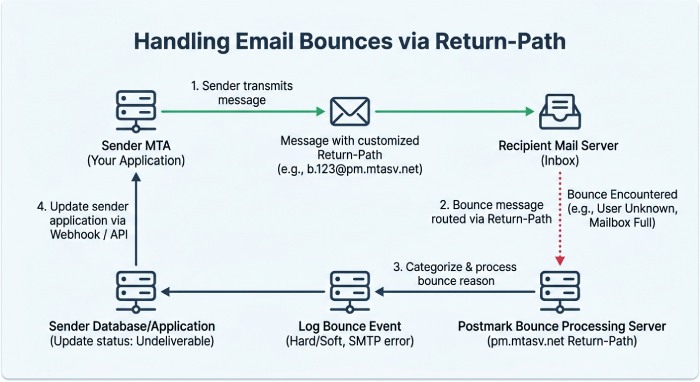
You may also see pm.mtasv.net in Postmark configurations, especially around Return-Path, bounce address handling, and bounce processing. In many Postmark setups, the Return-Path is used to route failed delivery notices, bounces, and error report data back to Postmark for bounce tracking and email delivery reports. A custom Return-Path may use a CNAME such as a subdomain pointing to pm.mtasv.net, while the SPF record authorizes Postmark for sending.
In short:
- mtasv.net is used in SPF authorization for Postmark sending.
- pm.mtasv.net is commonly associated with Postmark Return-Path and bounce processing.
- The SPF record helps receiving email server systems validate the email sender.
- The DNS record supports email authentication, anti-spoofing, deliverability, and domain reputation.
SPF works alongside other email security mechanisms, including DKIM, a DKIM signature, and sometimes legacy checks such as SenderID. While SPF validates the sending source, DKIM validates that the message content and selected email headers were not altered. Together, they form a stronger authentication workflow for recipients and inbox providers.
When You Need to Include mtasv.net for Email Authentication
You need to include mtasv.net in your SPF record when your domain sends email through Postmark, and you want that email to pass SPF checks. This is especially important for transactional messages such as password resets, receipts, notifications, alerts, and user account confirmations.
If Postmark is sending mail using your domain in the From address, your SPF record should authorize Postmark mail servers. Without this authorization, receiving systems may treat the message as suspicious, route it to spam, or reject it, depending on the recipient provider’s acceptance practices and acceptance criteria.
You should consider adding include:mtasv.net when:
- Your application sends transactional email through Postmark.
- Your DNS settings do not already authorize Postmark.
- Postmark’s domain verification screen asks you to update your SPF record.
- You use a custom Return-Path for better domain alignment.
- You want consistent email delivery across Gmail, Outlook, Microsoft, Google Workspace, Fastmail, and other inbox providers.
- You rely on Postmark bounce processing, bounce tracking, and email delivery reports.
The Return-Path is particularly important. The visible From address is what users usually see in their email client, but the Return-Path is used behind the scenes for handling bounces. When Postmark manages the Return-Path through pm.mtasv.net, it can process failed deliveries, classify bounces, and provide cleaner deliverability data in tools such as Postmark’s Activity view or Log Explorer.
However, SPF alone is not the entire email authentication picture. For stronger email security, configure SPF, DKIM, and Return-Path alignment where possible. This reduces anti-spoofing risks, protects your domain reputation, and helps prevent unauthorized services from impersonating your domain.
Also, ensure your sending practices align with Postmark’s Terms of Service, acceptable use policy, and no-spam policy. Postmark is designed for permission-based transactional messaging, not purchased addresses, a third-party list, or bulk promotional spam. If you need help with abuse-related issues, Postmark references contacts such as abuse@postmarkapp.com, while account or setup questions are typically directed to support@postmarkapp.com.
How to Check Your Current SPF Record Before Making Changes
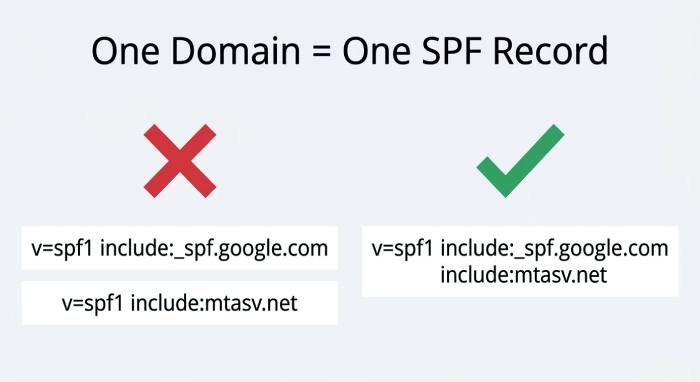
Before adding mtasv.net, check your existing SPF record. A domain should usually have only one SPF TXT record. Multiple SPF records can cause SPF validation failures even if each DNS record looks correct.
You can inspect your current SPF record using command-line tools or online SPF lookup services such as SPF-Record.com, SPF-Record.de, emailsherpa.net, emailsherpa, or other DNS diagnostic platforms. Some administrators also use Cloudflare DNS tools, the Cloudflare Community, Google Admin Toolbox, DNSBL Check utilities, or mail testing platforms to review SPF, MX, CNAME, and email authentication status.
A typical SPF lookup checks for TXT records at your root domain, for example:
example.com TXT "v=spf1 include:mtasv.net include:_spf.google.com ~all"If you use Google Workspace or G Suite, you may already have Google’s SPF include. If you send through Microsoft 365, you may have Microsoft’s SPF include. Your goal is to merge Postmark into the existing SPF record—not create a separate one. If you would rather build the merged record automatically, our free SPF record generator assembles all your includes into one valid record.
For example, do this:
v=spf1 include:mtasv.net include:_spf.google.com include:spf.protection.outlook.com ~allDo not do this:
v=spf1 include:mtasv.net ~all
v=spf1 include:_spf.google.com ~all
The second example creates duplicate SPF records and can break email authentication.
When reviewing your DNS record, also check related DNS settings:
- MX records for inbound mail routing.
- CNAME records for custom Return-Path or tracking domains.
- DKIM records provided by Postmark.
- Any legacy SenderID references.
- Whether pm.mtasv.net appears in your Return-Path configuration.
- Whether your current SPF record exceeds the SPF lookup limit.
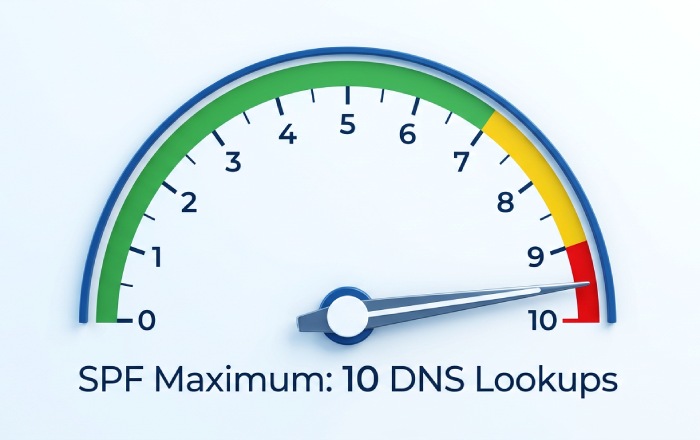
The SPF standard allows a maximum of 10 DNS lookups during evaluation. Each include, a, mx, redirect, or similar mechanism that may trigger an SPF lookup. If your SPF record includes too many third-party services, the SPF check may fail with a “permerror.” This is a common issue in domain management, especially for organizations using many SaaS email platforms.
Step-by-Step Guide to Adding include:mtasv.net to Your DNS SPF Record
Follow these steps to add Postmark authorization safely.
- Log in to your DNS provider Open your DNS hosting provider, such as Cloudflare, your registrar, or your domain management platform. Locate the DNS settings for the domain used in your Postmark sending configuration.
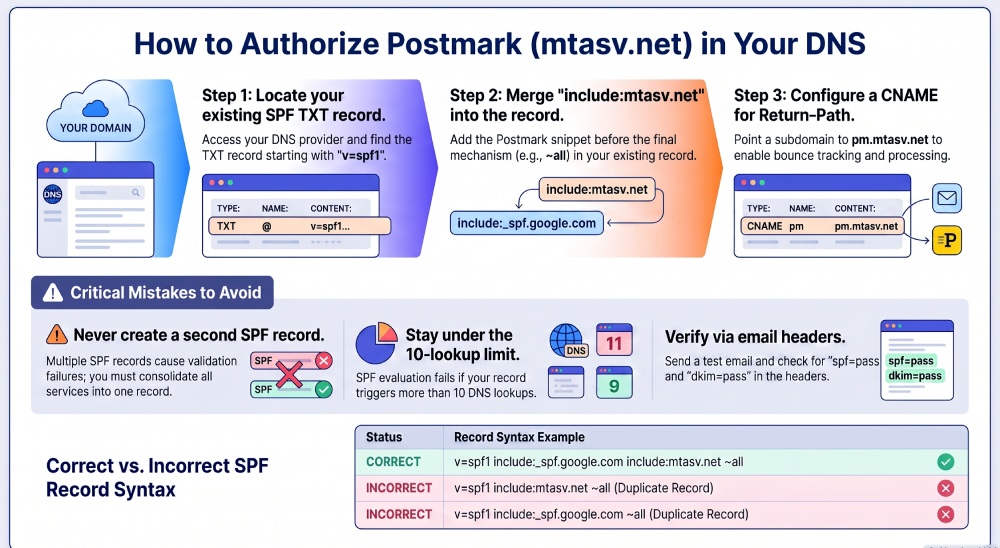
- Find the existing SPF TXT record Look for a TXT record that starts with:
v=spf1This is your current SPF record. It may already include Google, Microsoft, Fastmail, or another email delivery provider.
- Edit the existing SPF record
Add
include:mtasv.netbefore the final mechanism, such as~all,-all, or?all. Example before:
v=spf1 include:_spf.google.com ~allExample after:
v=spf1 include:_spf.google.com include:mtasv.net ~all- Do not create a second SPF record SPF requires one consolidated DNS record. If you create another TXT record for Postmark, email authentication can fail.
- Check your Return-Path configuration If Postmark asks you to configure a custom Return-Path, you may need a CNAME record pointing a subdomain such as pm.example.com to pm.mtasv.net. This helps Postmark handle bounce processing, bounces, and the bounce address while improving domain alignment.
- Save the DNS record DNS propagation can take minutes or hours depending on TTL and provider behavior. Cloudflare updates are often fast, but some registrars take longer.
- Review Postmark verification In Postmarkapp, recheck the sender signature or the domain authentication screen. Postmark should detect the SPF record, Return-Path, DKIM signature, and related DNS record changes once propagation completes.
How to Verify the Update and Avoid Common SPF Configuration Mistakes
After saving your DNS record, run another SPF lookup. Confirm that include:mtasv.net appears in the active SPF record and that the result passes a syntax check. You can use SPF-Record.com, SPF-Record.de, emailsherpa.net, DNSBL Check tools, or your DNS provider’s built-in lookup. You can also send a test message to Gmail or Outlook and inspect the email headers to confirm SPF, DKIM, and Return-Path results.
Look for authentication results similar to:
spf=pass
dkim=pass
You may also see the Return-Path referencing a Postmark-managed domain or a custom Return-Path that ultimately routes through pm.mtasv.net.
Avoid duplicate SPF records and excessive SPF lookups
The most common mistake is publishing more than one SPF record. Learning how to merge SPF records into one avoids this. Another common problem is exceeding the 10-query SPF lookup limit. If your SPF record includes Postmark, Google, Microsoft, and several marketing or support systems, verify the full lookup chain.
A clean SPF record supports reliable email delivery, but an overloaded record can create security risks and deliverability failures. If needed, remove obsolete services, especially old email server entries or vendors no longer used by your organization.
Confirm Return-Path, bounce processing, and policy alignment
SPF validates the sending infrastructure, but the Return-Path supports bounce processing. If your Postmark setup uses pm.mtasv.net, make sure the CNAME is correct and that the bounce address is functioning. Good bounce handling protects domain reputation by suppressing invalid recipients and reducing repeated failed delivery attempts.
Also, confirm that your messages comply with Postmark’s no-spam policy, acceptable use policy, and Terms of Service. Include unsubscribe handling where appropriate, avoid purchased third-party list imports, and maintain clear permission records. These practices align with IT baseline protection guidance from organizations such as BSI and reduce long-term email security risk.
If verification still fails, review Postmark’s documentation, check DNS propagation, inspect the Log Explorer, and compare your setup against guidance from experts such as Chris Nagele and the broader Postmarkapp community. For persistent problems, contact support@postmarkapp.com with your domain, current SPF record, SPF check results, and any error report details.
General Manager
General Manager of DuoCircle. Product strategy and commercial lead for AutoSPF's 2,000+ customer base.
LinkedIn Profile →