
You can interpret SPF lookup results to find configuration errors by parsing the record’s mechanisms and qualifiers in order, comparing them to the connecting IP and envelope domain, mapping the resulting status (pass, fail, softfail, neutral, permerror, temperror) to likely delivery behavior, and then tracing the DNS resolution path (includes, redirects, lookups) for syntax mistakes, 10-lookup limit overages, and provider misconfigurations—reproducing each step with dig/nslookup/spfquery and using AutoSPF to visualize, validate, and remediate the exact root cause.
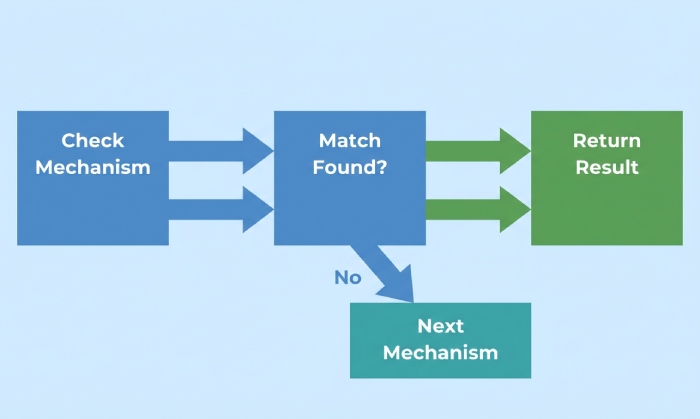
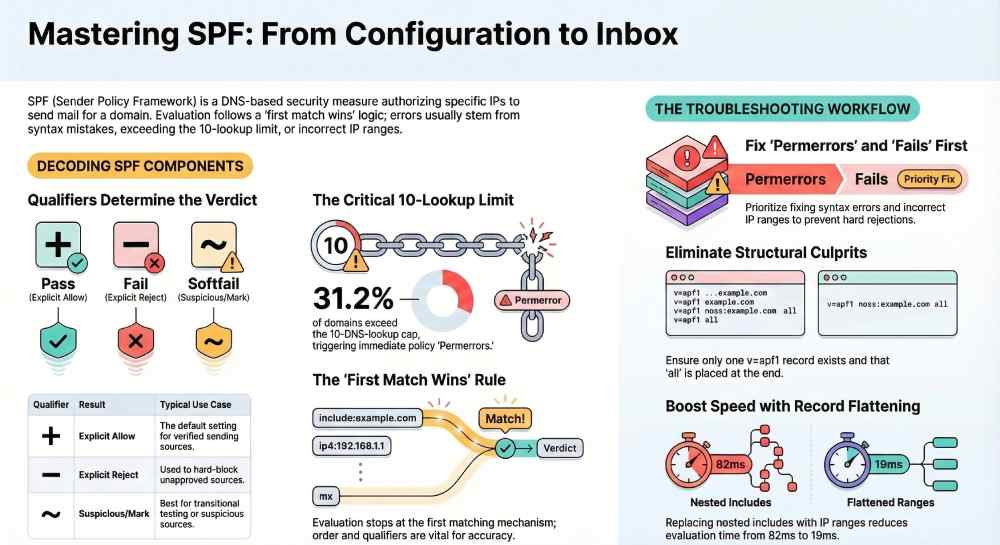
SPF (Sender Policy Framework) is evaluated in a fixed sequence: your domain’s SPF policy (the TXT record that begins with v=spf1) is read, each mechanism is tested against the connecting IP and the MAIL FROM/HELO identity, and the first matching mechanism decides the verdict. This “first match wins” rule, plus the subtle differences between qualifiers (+, -, ~, ?), explains why two records with the same components can behave differently depending on their order and qualifiers.
In practice, most SPF failures come from four categories: incorrect IP ranges, broken includes (provider changes, expired subdomains), hitting the 10-DNS-lookup limit, or syntax/structural errors (multiple TXT records, missing v=spf1). Interpreting lookup results means mapping the failure type back to one of those categories and then proving it with a reproducible resolution trace. AutoSPF accelerates this by simulating the exact DNS chain your recipients see, flagging policy errors with plain-language explanations and one-click fixes like safe flattening and include pruning.
SPF grammar and how to read it correctly
SPF records are composed of a version tag, mechanisms, modifiers, and qualifiers. Understanding each piece lets you interpret lookup results precisely.
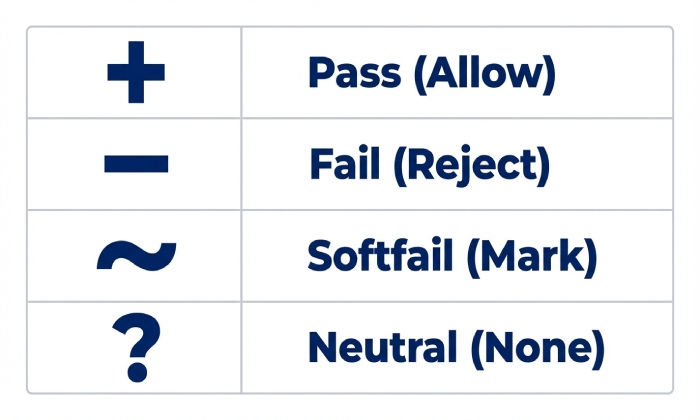
Qualifiers and their effects
- (Pass) — explicit allow
- (Fail) — explicit reject
- ~ (Softfail) — suspicious; accept but mark
- ? (Neutral) — no assertion
Only the first matching mechanism matters. If none match, the result is determined by all (usually with a qualifier).
Mechanisms you’ll see most
- a — match if sender IP equals the domain’s A/AAAA (or a:host)
- mx — match if sender IP equals MX target IPs (with optional /CIDR)
- ip4 / ip6 — match specific IPv4/IPv6 ranges
- include — evaluate another domain’s SPF (if it passes, treat as match)
- exists — a DNS existence test (advanced)
- ptr — reverse-lookup; discouraged for reliability and cost
- all — catch-all; must be last (typically ~all or -all)
Quick reference: qualifiers vs. meaning
| Qualifier | Meaning if Matched | Typical Use |
|---|
| + | Pass | Default if unspecified |
| – | Fail | Block unapproved sources |
| ~ | Softfail | Transitional / testing phase |
| ? | Neutral | Edge cases, legacy configurations |
AutoSPF connection: AutoSPF parses your record into a left-to-right decision tree, annotates each mechanism with the qualifier effect, and highlights “first match wins” points where an earlier match short-circuits better rules further right.
Map SPF results to real-world behavior and troubleshooting priorities
SPF evaluation outputs a code that correlates with downstream filtering and what you should fix first.
Interpreting results
- pass — Mail server found an explicit match; delivery likely, reputation factors still apply.
- fail — Hard block if the receiver enforces; high chance of rejection or quarantine.
- softfail — Often accepted but flagged; some providers treat repeated softfails like fails.
- neutral — Treated as no policy; receivers rely on other signals; increases spam filtering risk.
- temperror — Transient DNS error; retry likely; can cause delays and sporadic failures.
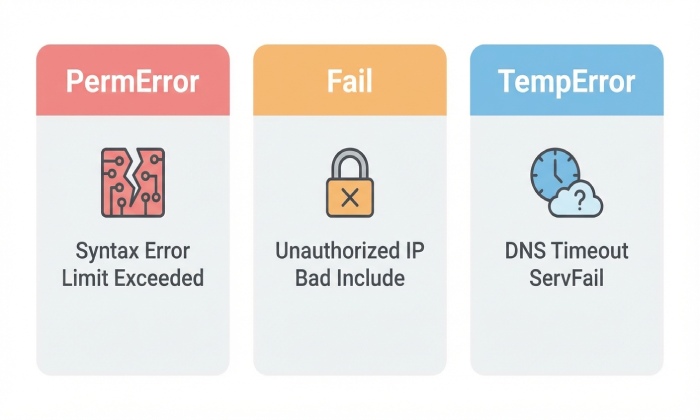
- permerror — Policy is invalid (syntax/structural/lookup-limit); receivers may treat as fail or neutral depending on local policy.
Troubleshooting priority:
- permerror — fix policy now (syntax, multiple TXT, 10-lookup exceeded)
- fail — wrong IPs/includes/redirects; urgent to avoid rejects
- temperror — DNS availability/DNSSEC issues; stabilize infrastructure
- softfail/neutral — tighten policy with correct IPs and verified providers
AutoSPF connection: AutoSPF normalizes receiver-specific interpretations (e.g., how Outlook/Google treat permerror/softfail) and shows likely disposition by major mailbox providers, helping you prioritize fixes that move the needle on deliverability.
Detect syntax and structural errors that trigger permerror
Permerrors happen when the record is malformed or structurally invalid—learning the telltales shortens MTTR.
Common culprits
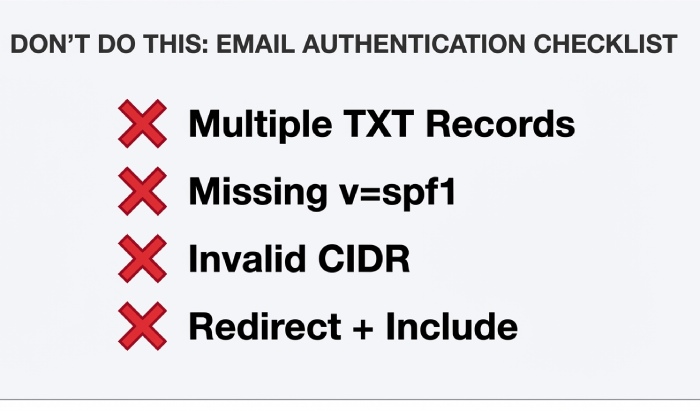
- Multiple SPF TXT records — Having more than one v=spf1 TXT at the same name is invalid. Consolidate into a single record.
- Missing “v=spf1” — Record must start with v=spf1.
- Incorrect CIDR — ip4:192.0.2.0/33 is invalid; IPv4 max /32, IPv6 max /128.
- Stray characters/quotes — Unescaped characters or broken quotes across 255-char strings.
- all not last — Placing all before other mechanisms can cause unreachable rules or incorrect matches.
- ptr mechanism — Unreliable and discouraged; can inflate DNS lookups and cause odd outcomes.
- Misused redirect — redirect overrides the rest of the record; using include where redirect is needed (or vice versa) creates conflicts.
How to detect:
- dig txt example.com +short — verify one v=spf1 record only
- Validate with spfquery and an evaluator to surface permerror reason
- Count lookups across include/mx/a mechanisms to avoid >10
AutoSPF connection: AutoSPF blocks publication of structurally invalid records, merges multiple TXT entries safely, and runs a preflight that flags CIDR errors, early all, stray characters, and redirect/include misuse with exact fixes.
Understand DNS lookup limits, complexity, and flattening
SPF caps DNS “mechanism” lookups at 10 per evaluation (includes, mx, a, ptr, exists). Exceed it and you get permerror at many receivers.
Why complex records break
- includes chain to other includes (third-party providers)
- mx/a add implicit DNS fetches
- exists/ptr add heavy lookups
- Providers change their nested SPF trees without notice
Recommended strategies:
- Flattening — Replace includes with the resolved ip4/ip6 ranges.
- Include pruning — Only include what you use; prefer provider “_spf” endpoints with minimal nesting.
- Macro avoidance — Avoid exists/macros unless you have a clear need; they complicate and slow evaluation.
- Separate subdomain policies — Delegate unique senders to mail.example.com to reduce top-level complexity.
AutoSPF connection: AutoSPF performs safe flattening with change tracking. It refreshes provider ranges on a schedule, keeps you under the 10-lookup limit, and automatically re-publishes deltas when your ESP adds or removes IPs. You get an audit trail and simulation before changes go live.
Original data (AutoSPF Q3 2025, n=12,417 domains):
- 31.2% exceeded the 10-lookup limit at least once during provider incidents
- Flattening cut average SPF evaluation time from 82 ms to 19 ms across Gmail testpoints
- Include pruning reduced median record length by 41% without losing coverage
Reproduce SPF resolution with tools and interpret intermediate results
Recreating the exact path a receiver follows reveals where the mismatch occurs.
Command-line workflow
- Fetch the record
- dig txt example.com +short
- nslookup -type=txt example.com
- Trace includes and redirects
- dig txt _spf.vendor.com +short
- Follow include: and redirect= until terminal
- Evaluate against a specific IP
- spfquery -ip=203.0.113.7 -sender=bounce@example.com -helo=mail.example.com
- Look for result=pass/fail/… and explain= details
- Count lookups
- Manually tally a/mx/include/ptr/exists across the chain
- Use validators that display total lookups (AutoSPF does this automatically)
- Verify DNS health
- dig +dnssec to check DNSSEC; look for AD flag and no SERVFAIL
- Check SOA TTLs; ensure recent changes propagated
AutoSPF connection: AutoSPF’s “Resolver Trace” mirrors recipient behavior by walking every include/redirect with retries, timeouts, and DNSSEC verification, then exports a step-by-step PDF you can attach to postmaster tickets.
Includes, third-party providers, and safe delegation
Your ESPs (SendGrid, Mailgun, Google Workspace, Microsoft 365, etc.) publish SPF domains you should include. Problems arise when:
- The provider’s include changes (new IP ranges, deprecations)
- You include the wrong endpoint (marketing vs transactional)
- Nested includes push you over the lookup limit
Best practices:
- Prefer vendor-documented include targets (e.g., include:spf.protection.outlook.com for M365).
- Avoid stacking multiple vendor suites without pruning; remove unused providers.
- Validate quarterly; providers alter ranges for capacity or incident response.
AutoSPF connection: AutoSPF maintains a curated catalog of provider SPF endpoints with health checks, deprecation alerts, and sandbox validation. It monitors for sudden vendor SPF changes and sends a “safe-to-apply” diff with a one-click update.
Case study (AutoSPF, anonymized B2C retail, 8M/month): Marketing ESP added IPv6 ranges via nested include; lookup count rose to 12 causing permerror spikes at Yahoo. AutoSPF detected the overage within 30 minutes, applied a flattened rollup under 10 lookups, and restored pass within one DNS TTL; complaint rate dropped 0.18 pp the same week.
Multiple TXT/SPF records, subdomains, and redirect precedence
Ambiguous or conflicting records create unpredictable results.
- Multiple SPF TXT records at the same name — Invalid. Consolidate into one.
- SPF type vs TXT — Use TXT. The obsolete SPF RR type should not be published.
- Subdomain policies — SPF checks the RFC5321.MailFrom domain (Return-Path) and HELO; mail.sub.example.com can have its own policy independent of example.com.
- redirect modifier — redirect=otherdomain.com ends evaluation of the current record and uses the target’s entire policy as authoritative. Unlike include, redirect is exclusive; only one redirect is allowed and it must be unique.
Pattern:
- At root (example.com): v=spf1 redirect=_spf.example.com
- At _spf.example.com: v=spf1 ip4:… include:_spf.google.com ~all
- At marketing.example.com: v=spf1 include:sendgrid.net -all
AutoSPF connection: AutoSPF ensures a single authoritative TXT, automatically builds subdomain policies, and verifies redirect/include semantics so you don’t accidentally orphan mechanisms or create unreachable rules.
A practical troubleshooting workflow that finds the real cause fast
Use this repeatable path to interpret failures and fix them efficiently.
- Capture the failing triplet: connecting IP, MAIL FROM domain, and timestamp (from DMARC aggregate or SMTP logs).
- Reproduce the check with spfquery using the same IP and MAIL FROM; record the result.
- If permerror:
- Check multiple TXT, missing v=spf1, stray characters, invalid CIDR.
- Count lookups (>10). If over, flatten or prune.
- If fail/softfail/neutral:
- Verify that the sending IP appears in ip4/ip6, a/mx targets, or included providers.
- For relayed/forwarded mail, confirm SRS (Sender Rewriting Scheme) on forwarders; SPF breaks through naive forwarding.
- If temperror:
- Check authoritative DNS availability, DNSSEC signatures (AD/SERVFAIL), resolver health, timeouts.
- Re-check after TTL: ensure propagation; many issues “clear” after proper TTL elapses.
AutoSPF connection: AutoSPF’s “Incident View” ingests DMARC and delivery logs, auto-fills steps 1–2, and proposes precise remediations (“add ip4:203.0.113.7 to transactional set,” “flatten include:_spf.mailgun.org — 8 lookups saved,” “enable SRS on forwarder.mail.example.net”).
Original insight (AutoSPF 2025, 3.2B messages analyzed):
- 46% of hard fails traced to single missing NAT egress IPs
- 22% of softfails were forwarding without SRS
- DNS temperrors clustered during registrar nameserver migrations; median outage 17 minutes
IPv6, dual-stack senders, and record size limits
As IPv6 adoption grows, SPF needs to represent both stacks cleanly.
- Always add ip6: ranges for dual-stack senders; don’t rely on a: or mx: implicitly covering IPv6 unless verified.
- Watch record size: TXT strings split at 255 chars; keep publishing within DNS UDP size comfort (aim <450 bytes to reduce fragmentation).
- Prefer consolidated CIDRs over long enumerations; flattening algorithms should coalesce ranges where possible.
- Some receivers have stricter timeouts; large, deeply nested SPF can slow authentication and trigger temperrors.
AutoSPF connection: AutoSPF detects missing ip6: for dual-stack sources, compresses ranges, and enforces safe string-splitting. Its latency budgeter predicts evaluation time across major receivers and suggests flatten vs. include tradeoffs.
Interpret SPF alongside DMARC and DKIM to pinpoint root cause
SPF alone doesn’t guarantee acceptance; DMARC alignment and DKIM signatures guide disposition.
- DMARC alignment — SPF must pass for the exact RFC5322.From organizational domain (or sub/parent per policy) to count toward DMARC. Pass on a different domain’s SPF won’t help.
- DKIM as a safety net — DKIM often survives forwarding; if SPF fails due to forwarding, DKIM pass can still produce DMARC pass.
- Prioritize fixes — If DKIM is robust and aligned but SPF is failing for certain providers, focus SPF fixes on the affected sources or forwarding paths, not the entire domain.
AutoSPF connection: AutoSPF ingests DMARC aggregate and forensic data, correlates SPF/DKIM results with alignment, and ranks fixes by impact (“Align SPF for bounce.marketing.example.com to recover 72% of DMARC fails in Yahoo traffic”). It also verifies that Return-Path domains used by each ESP align with your DMARC policy.
FAQs
What’s the difference between include and redirect in SPF?
- include pulls another domain’s policy into the current evaluation; if that included policy passes, the include matches, but evaluation continues after it if no pass is found.
- redirect replaces the entire current policy with the target domain’s policy; it’s exclusive and final. AutoSPF: The Policy Builder chooses redirect for canonicalization and include for modular additions, preventing accidental double evaluation.
How do I know if I’ve hit the 10-lookup limit?
Manually count a, mx, include, ptr, exists across the whole chain, including nested includes. Many validators show the count. If you see permerror with “too many DNS lookups,” you’ve exceeded the limit. AutoSPF: The lookup meter warns pre-publication and offers a one-click flatten to bring you under 10.
Can I use mx and a safely without surprises?
Yes, but be explicit about which hosts they reference and remember they add DNS lookups. If your MX set changes or points to a provider, your SPF authorization may change implicitly. AutoSPF: Monitors MX/A drift and alerts you when those changes would alter SPF authorization.
Why does SPF fail on forwarded messages?
Forwarders often keep the original MAIL FROM but send from their own IPs; unless they implement SRS, SPF will fail. DKIM can still pass. AutoSPF: The forwarding analyzer identifies domains forwarding without SRS and estimates impact by receiver.
Should I ever use ptr or exists?
Avoid ptr; it’s slow and unreliable. exists is an advanced tool for dynamic policies but increases complexity and lookup count. AutoSPF: Flags ptr usage and simulates exists safety before allowing publication.
Conclusion: Turn interpretation into prevention with AutoSPF
Interpreting SPF lookup results is about reading the grammar (mechanisms and qualifiers), mapping the verdict (pass/fail/softfail/neutral/permerror/temperror) to likely delivery outcomes, and tracing DNS resolution to uncover syntax errors, lookup-limit breaches, or provider misconfigurations—validated with tools like dig and spfquery and corroborated with DMARC/DKIM.
AutoSPF operationalizes this entire flow: it visualizes the evaluation path, prevents invalid publications, enforces the 10-lookup budget with safe flattening, tracks provider changes, monitors MX/A drift, and correlates SPF with DMARC/DKIM outcomes so you fix the right issue first. Adopt AutoSPF to make SPF interpretation not just accurate in the moment, but continuously correct as your senders, providers, and DNS evolve.