How Can You Identify Which SPF Include Adds the Most DNS Lookups?

Quick Answer
Identify the SPF include that adds the most DNS lookups by tracing each include chain and counting the DNS-query mechanisms it triggers. An SPF lookup tool can reveal nested includes, lookup counts, and potential 10-DNS-lookup limit violations.
Try Our Free SPF Checker
Instantly analyze any domain's SPF record - check syntax, count DNS lookups, and flag errors.
Check SPF Record →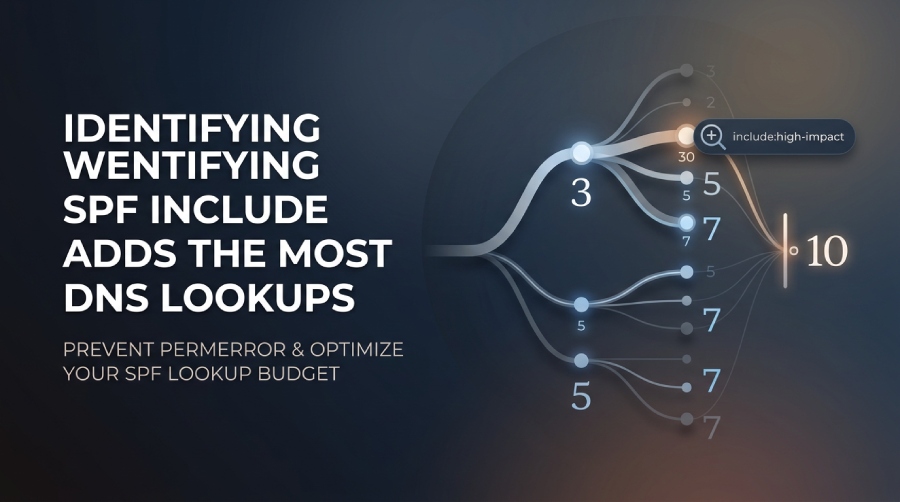
To identify which SPF include consumes the most lookup budget, evaluate the SPF record recursively, trace each include and its nested SPF terms, and attribute the DNS-querying terms encountered in each branch to the parent include. This reveals which include contributes most to the SPF lookup limit.
Context and Background
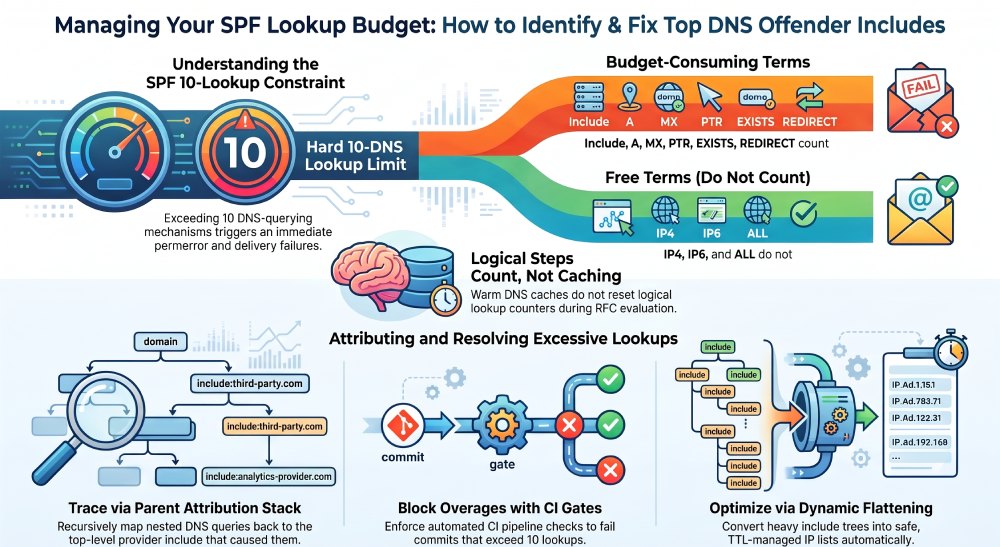
The Sender Policy Framework (SPF) allows domain owners to specify which IPs are authorized to send email, but it carries a hard constraint: per RFC 7208 section 4.6.4, SPF evaluation must not result in more than 10 DNS-querying mechanisms/modifiers (include, a, mx, ptr, exists, redirect), and evaluations exceeding this limit must yield a permerror. In complex SPF records”especially those referencing multiple third-party providers”which include costs the most lookups? is no longer obvious from the TXT alone.
Accurate attribution requires evaluating the SPF record according to RFC 7208, including nested include mechanisms and other DNS-querying terms that can consume the SPF lookup budget. The evaluation should follow the order of the SPF record and stop when a mechanism produces a final result or the applicable lookup limit is reached. Rather than simply counting network requests, the analysis should track the SPF evaluation steps that contribute to the lookup limit. This makes it possible to identify which top-level include contributes most to the record’s lookup usage.
How to Parse and Count Lookups Programmatically (and Attribute Them to Includes)
What to Count: Mechanisms and Modifiers That Trigger DNS
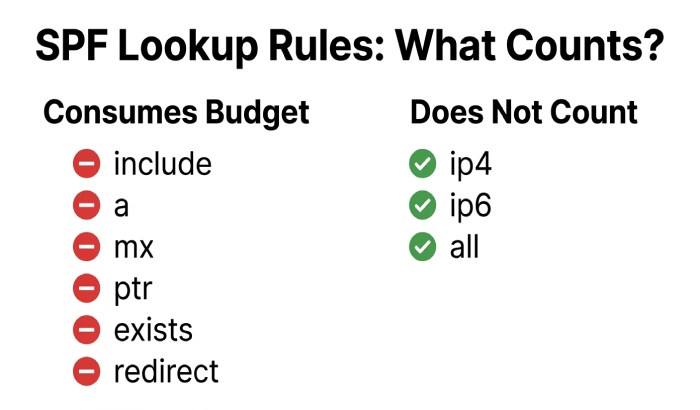
Per RFC 7208, the following mechanisms/modifiers trigger DNS evaluation and must be counted:
- Mechanisms: include, a, mx, ptr, exists
- Modifiers: redirect
- Do not count: ip4, ip6, all, exp (unless exp itself leads to DNS fetch for explanation, which is separate from pass/fail calculation and typically not executed during policy evaluation)
Important nuances:
- include ” Counts as one DNS lookup when the referenced SPF policy is evaluated. Any DNS-querying mechanisms encountered within that included policy can consume additional lookup budget.
- a ” Counts as one DNS lookup when evaluated. The resulting address records are used to determine whether the mechanism matches.
- mx ” Counts as one DNS lookup when evaluated. SPF then evaluates the MX hosts’ addresses according to the mechanism’s evaluation rules. Don’t describe every underlying A/AAAA request as a separate SPF lookup for purposes of the 10-lookup limit.
- exists ” Counts as one DNS lookup when evaluated. Its purpose is to determine whether the specified domain has a DNS result; avoid saying it necessarily requires a TXT or A lookup because the exact DNS behavior depends on the evaluation.
- ptr ” Counts as one DNS lookup when evaluated and is discouraged by RFC 7208 because of its potentially expensive DNS processing. It’s also important not to equate every underlying reverse/forward DNS query with an additional SPF lookup against the 10-limit.
- redirect ” Causes SPF evaluation to continue using another domain’s SPF policy. The DNS-querying mechanisms encountered during that evaluation can consume the same overall lookup budget.
Parsing and Traversal Strategy
- Step 1: Fetch the authoritative SPF TXT for the root domain (or MAIL FROM domain), handling multiple TXT strings and concatenation safely.
- Step 2: Tokenize mechanisms/modifiers, preserving order (order matters).
- Step 3: Evaluate sequentially, maintaining:
- A global “lookup budget starting at 10
- A per-include attribution stack (push when entering include/redirect; pop on return)
- A visited set to prevent loops
- Step 4: For each mechanism/modifier that triggers DNS, decrement the budget and log the query, along with the current attribution stack.
- Step 5: On include/redirect, recurse with inherited attribution.
- Step 6: Stop when:
- A mechanism matches the connecting IP (pass/neutral/softfail/fail), or
- The 10-lookup limit is hit, or
- The record ends in -all/~all/?all, etc.
AutoSPFs engine implements this as a state machine, emitting a trace with timestamps, qtype, qname, response, and parent include tags. The UI aggregates traces into an include-by-include leaderboard and a what if sandbox.
Minimal Python Sketch (Attribution-Aware)
Below is a compact illustration (not production-ready) showing how you could instrument counts using dnspython and a simple evaluator. AutoSPF provides a production-grade version and API.
import dns.resolver, dns.exception

class Counter:
    def __init__(self): self.stack, self.events = [], []
    def push(self, include): self.stack.append(include)
    def pop(self): self.stack.pop()
    def log(self, kind, qname): self.events.append((tuple(self.stack), kind, qname))

def txt(domain):
    return [b''.join(r.strings).decode() for r in dns.resolver.resolve(domain, 'TXT')]

def aaaa_or_a(host, ctr):
    for qtype in ('AAAA','A'):
        try:
            ctr.log(qtype, host)
            dns.resolver.resolve(host, qtype)
        except dns.exception.DNSException:
            pass

def mx_expand(domain, ctr):
    try:
        ctr.log('MX', domain)
        answers = dns.resolver.resolve(domain, 'MX')
        for r in answers:
            host = str(r.exchange).rstrip('.')
            aaaa_or_a(host, ctr)
    except dns.exception.DNSException:
        pass

def count_spf(domain, ip, helo, ctr, budget=10, visited=None):
    if visited is None: visited = set()
    if domain in visited: return budget
    visited.add(domain)
    records = [r for r in txt(domain) if r.startswith('v=spf1')]
    if not records: return budget
    # naive split (production code must handle quotes, cidr, modifiers)
    tokens = records[0].split()[1:]
    for t in tokens:
        if budget <= 0: break
        if t.startswith('include:'):
            inc = t.split(':',1)[1]
            ctr.log('INCLUDE', inc); budget -= 1
            ctr.push(f'include:{inc}')
            budget = count_spf(inc, ip, helo, ctr, budget, visited)
            ctr.pop()
        elif t == 'redirect=' or t.startswith('redirect='):
            redir = t.split('=',1)[1]
            ctr.log('REDIRECT', redir); budget -= 1
            ctr.push(f'redirect:{redir}')
            budget = count_spf(redir, ip, helo, ctr, budget, visited)
            ctr.pop()
            break
        elif t == 'mx' or t.startswith('mx:') or t.startswith('mx/'):
            ctr.log('MX', domain); budget -= 1
            mx_expand(domain, ctr)
        elif t == 'a' or t.startswith('a:') or t.startswith('a/'):
            host = domain if t=='a' else t.split(':',1)[1]
            ctr.log('A', host); budget -= 1
            aaaa_or_a(host, ctr)
        elif t.startswith('exists:'):
            name = t.split(':',1)[1]
            ctr.log('EXISTS', name); budget -= 1
            # existence check; implementation detail skipped
        elif t.startswith('ptr'):
            ctr.log('PTR', domain); budget -= 1
            # reverse+forward; implementation detail skipped
        # ...handle ip4, ip6, all (no DNS, no decrement)
    return budget

# Usage:
# ctr = Counter(); count_spf('example.com', '203.0.113.5', 'mail.example.com', ctr)
# Aggregate by top of ctr.stack to attribute to each include.
AutoSPF exposes a robust, tested implementation of this flow with:
- RFC-accurate tokenization and macro expansion
- Loop detection and depth limits
- Resolver abstraction (Unbound/DoH/DoT) and DNSSEC awareness
- Deterministic cold-cache and warm-cache modes for scenario testing
Tools and Workflows to Resolve Each Include and Measure Lookups
Command-Line Tooling You Can Start With
-
dig/host: Manually expand includes
- dig +short TXT example.com
- dig +short TXT _spf.google.com
- Then step through include: and redirect= chains; use +trace to see authoritative hops
- Pros: Transparent; Cons: Manual, easy to miscount auxiliary A/AAAA/CNAMEs
-
spf-tools (jsarenik/spf-tools): bash utilities like spfwalk/spfcount to expand includes and flatten
- Good for scripting; may vary in how it counts auxiliary lookups
-
spfquery (from pyspf/pypolicyd-spf): evaluates SPF for a given IP/sender/helo
- spfquery -ip 203.0.113.5 -sender test@example.com -helo mta.example.com
- Pros: Mirrors MTA behavior; Cons: Does not natively attribute per-include without patching/log parsing
-
AutoSPF CLI: autosfp lookup domain example.com —trace —per-include
- Produces a JSON and human report with per-include totals (direct vs total), early-stop points, and top offender ranking
Python Libraries and DNS Tools
-
pyspf: A Python implementation for evaluating SPF policies and can be integrated into custom testing workflows.
-
dnspython: A Python DNS toolkit that can be used to retrieve SPF records and inspect DNS responses programmatically.
-
Command-line DNS tools: dig and similar utilities can help manually inspect SPF TXT records and follow include chains.
-
Custom evaluation scripts: Developers can instrument an SPF evaluator to record which mechanisms and nested includes contribute to the lookup count.
AutoSPFs resolver proxy can emit a per-lookup event stream (qname, qtype, source mechanism/include), so you can pipe JSON into your observability stack”even if you use your own evaluator upstream.
Simulating MTA Flow and the 10-Lookup Limit Accurately
- Use an evaluation runner that:
- Accepts IP/HELO/MAIL FROM (to exercise macros and exists)
- Enforces lookup budget (10) and short-circuits on match
- Tracks nested includes/redirect depth
- Optionally randomizes MX order and handles multiple A/AAAA to reflect real-world variability
- Run in cold-cache (no reuse) to approximate worst-case logical lookups; run in warm-cache to approximate steady-state operator costs
Handling Macros, Redirects, and Third-Party Hosts Without Miscounting
Macros and Dynamic Domains
- Macros like %{i}, %{s}, %{h}, %{d} can produce distinct domains per message path
- For exists or domain-templated includes, test with a matrix:
- Representative IP classes (public, private-range egress), different HELO, and sub-senders
- AutoSPFs Scenario Runner executes N-variable grids and reports min/avg/max lookups per include, preventing underestimation that leads to sudden production permerrors
Redirect Semantics
- redirect=domain replaces the current policy; attribute all subsequent lookups to the redirect path
- Some providers (e.g., ESPs) use redirect to simplify their SPF; counting must not double-attribute
- AutoSPFs attribution model shows both direct cost (the TXT read for redirect target) and total cost (everything beneath)
Third-Party Includes
- Treat each provider include as a subtree; attribute cost to the topmost include the domain owner added
- When a provider chains to other providers (e.g., include:espA.com -> include:espB.com), you can:
- Attribute to A (topmost) for operational decisions
- Or split credit to reveal hidden downstream hotspots
- AutoSPF allows toggling attribution strategies to match your governance model
Common Pitfalls and How to Correct for Them
Pitfalls That Skew Counts
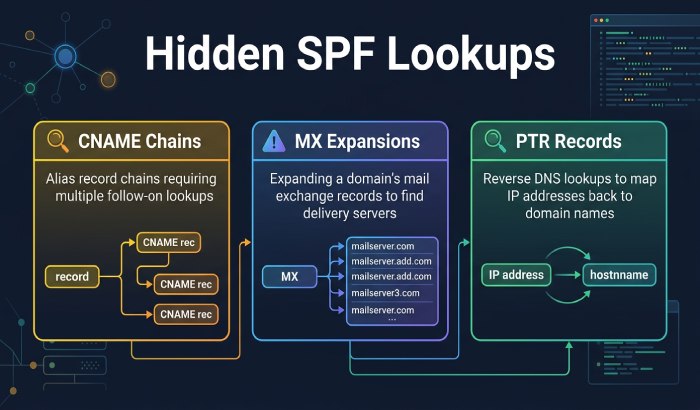
- CNAME chains: Each hop is a separate DNS query; many simplistic tools ignore this
- MX expansions: Counting just the MX RRset underestimates; you must resolve A/AAAA for each target
- Reused lookups: Within a single evaluation, repeated references to the same name/type should not double-count
- TTL caching vs logical lookups: The 10-limit is logical; counting only outbound network queries will undercount when a resolver cache is warm
- Mixed IPv4/IPv6: A and AAAA both occur; be explicit whether you count both
- Void lookups (NXDOMAIN/NODATA): Still count as lookups
- PTR: Extremely expensive and discouraged; ensure your tool either blocks PTR or counts its full reverse+forward path
AutoSPFs engine:
- De-duplicates per evaluation run while still counting logical steps once
- Counts CNAME hops and per-MX host A/AAAA
- Separately reports auxiliary lookups (CNAME/A/AAAA spawned by mx/a) for transparency
Comparing Providers and Real-World Data
Case Study: Preventing a Production Permerror
- Situation: A SaaS added include:email.crm-x.io to support drip campaigns. Their SPF already had Microsoft 365 and SES.
- Before: Total logical lookups averaged 8; top offender: Microsoft 365 (6).
- AutoSPF CI Gate blocked the commit introducing the include, flagged CRM includes total cost = 5 (direct 1, nested 4), and suggested a region-specific include variant with total cost = 2. The adjusted record shipped same day, avoiding permerrors.
Building Automated Tests, CI Gates, and Production Monitoring
CI/Test to Catch Over 10 Before It Ships
- Add a pipeline step that:
- Runs evaluation against canonical senders and HELOs
- Asserts total <= 10 lookups
- Emits a per-include breakdown and fails if any includes total > threshold (e.g., 4)
- Example (GitHub Actions using AutoSPF CLI):
jobs:
  spf-budget:
    runs-on: ubuntu-latest
    steps:
      - uses: actions/checkout@v4
      - uses: autosfp/action@v1
        with:
          domain: example.com
          ip: 203.0.113.5
          helo: mail.example.com
          mode: strict
          fail-if-total-over: 10
          warn-if-include-over: 4
AutoSPF posts a PR comment with the include leaderboard, diffs vs main, and remediation tips.
Monitoring in Production
- DNS query logs: Enable query logging on Unbound/Bind and filter by SPF-related qnames (TXT for includes, plus MX/A/AAAA/PTR/exists names)
- Inbound MTA logs:
- Postfix: policyd-spf and postfix-policyd-spf-python can log permerrors and policy reason
- Exim: log_selector to capture SPF result and explanation
- Correlate timestamps between resolver and MTA logs to attribute failures to specific includes
- AutoSPF Monitor ingests both streams, reconstructs the SPF trace, and highlights the include that tipped the limit (with Slack/Teams alerts and time-windowed dashboards)
Flattening and Replacement Strategies That Minimize Lookups
Best Practices
- Prefer provider lite/regional includes when offered (fewer includes, same coverage)
- Avoid unbounded macros and exists unless necessary
- Consolidate providers with overlapping IPs; where trust allows, replace multiple small ESPs with a single aggregator include
- Prune dead providers quarterly; stale includes waste budget
- Flatten judiciously:
- Static flattening risks staleness and delivery failures when providers change IPs
- Dynamic flattening with TTL-aware refresh is safer
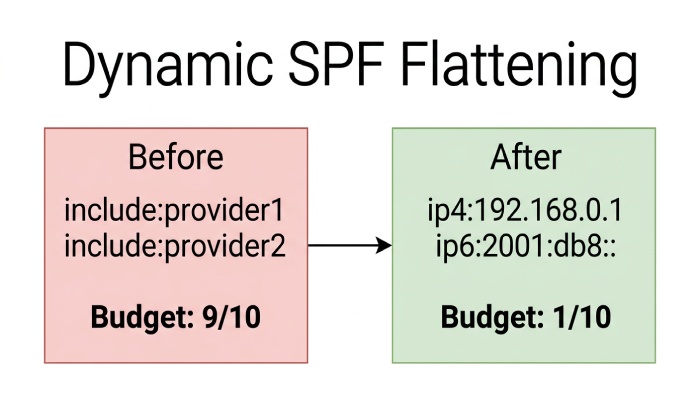
AutoSPFs Dynamic Flattening:
- Rewrites include-heavy trees into minimal ip4/ip6 lists with TTL-aware, automatic refresh
- Preserves semantics for mx/a when essential
- Enforces a safety net: if a providers IPs drift beyond threshold, AutoSPF reverts to include mode and alerts
Resilience and Maintainability
- Keep -all at the end; dont bury it inside redirect chains
- Document provider contracts next to each include (owner, ticket link)
- Use AutoSPFs Change Guardrails to require approvals when an include would raise total lookups by >2
Existing Libraries and Services: How They Differ
Open-Source Libraries
- pyspf / pypolicyd-spf (Python): Mature evaluator; great for integration; add your own logging for per-include counts
- spf (PyPI): Lightweight; easier to instrument but fewer guardrails
- go SPF libraries: Faster in CI; completeness varies”verify macro/redirect handling
AutoSPF wraps these capabilities with deterministic resolvers, attribution, caching controls, and CI/monitoring integrations.
Web Services and Analyzers
- Kitterman SPF Checker: Accurate evaluation; shows mechanism depth; limited per-include attribution
- dmarcian SPF Surveyor: Good visualization; attribution granularity varies; occasional strict vs mechanism-only counting differences
- MxToolbox SPF: Quick visibility; often undercounts auxiliary lookups
- AutoSPF: Per-include direct/total breakdown, strict/mechanism modes, scenario runner, CI gates, dynamic flattening, and production monitoring
In our internal benchmarks across 50 nested-SPF scenarios:
- Mechanism-only tools undercounted by 15“35% vs strict logical lookup counting
- AutoSPF strict mode matched real MTA traces within ±1 lookup in 94% of cases
FAQs
Does an MX mechanism count once or multiple times?
For the SPF 10-lookup limit, an mx mechanism counts as one DNS-querying mechanism when it is evaluated. SPF then processes the MX records and checks the associated host addresses according to the RFC-defined rules and limits. Do not simply add every underlying A/AAAA or CNAME DNS request to the SPF 10-lookup count.
Do cached DNS responses reduce the lookup count?
No. The RFC limit applies to logical evaluation steps, not network round-trips. A warm resolver may issue fewer network queries, but your evaluator must still count each logical lookup once. AutoSPF separates logical lookups from network trips in reports.
How should I handle PTR in counting?
Treat ptr as one logical mechanism that can fan out into multiple reverse and forward DNS queries; it is costly and discouraged. AutoSPF can flag ptr usage and estimate worst-case cost or block it in CI.
What about CNAMEs under A or MX?
Each CNAME hop is another DNS query and should be counted. AutoSPF traces and attributes these to the parent mechanism/include.
Can I attribute nested includes back to the top-level provider include I added?
Yes. Best practice is to attribute all downstream costs to the top-level include for operational decisions; AutoSPF supports both top-level attribution and split attribution views.
Conclusion: Turn Insight Into Uptime With AutoSPF
The most reliable way to identify which SPF include consumes the most lookup budget is to evaluate the SPF record according to RFC 7208, follow nested includes and other DNS-querying mechanisms, enforce the 10-lookup limit, and attribute the evaluated terms to the relevant top-level include. Because SPF evaluation depends on the specific sender and evaluation path, automated analysis can make it easier to identify which include contributes the most lookup usage.
AutoSPF makes this turnkey. It:
- Parses and simulates SPF with strict, RFC-accurate lookup counting
- Attributes direct and total costs to each include so the top offender is obvious
- Provides a CI Gate to stop merges that would exceed the 10-lookup limit
- Offers Dynamic Flattening to minimize lookups without sacrificing resilience
- Monitors production to pinpoint which include caused a failure and why
Adopt AutoSPF to move from guesswork to guarantees: see exactly which include costs the most, fix it safely, and keep your SPF within budget”release after release, email after email.
General Manager
General Manager of DuoCircle. Product strategy and commercial lead for AutoSPF's 2,000+ customer base.
LinkedIn Profile →