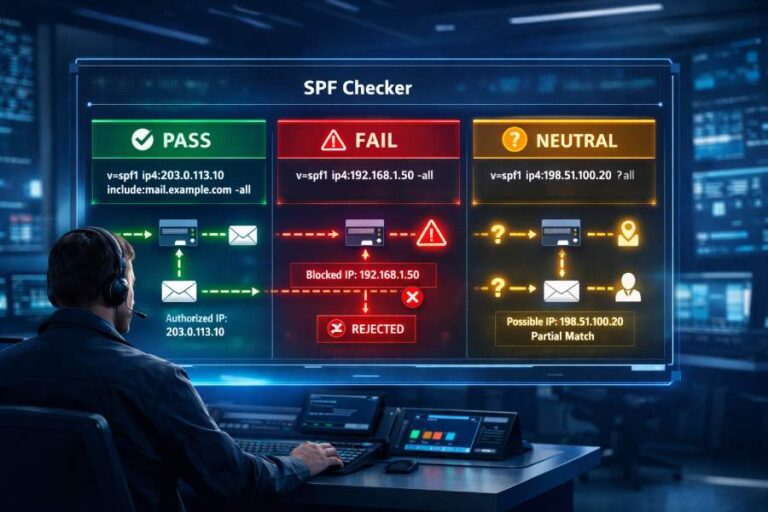
An SPF check result interprets as follows: an SPF “pass” means the sending host is authorized by the domain’s policy, a “fail” means it is explicitly unauthorized, a “softfail” means it is likely unauthorized but not definitively blocked, and a “permerror” means the SPF policy is invalid or couldn’t be evaluated due to a permanent error.
SPF, defined in RFC 7208, is a DNS-published authorization policy that lets receivers verify whether an IP is allowed to send mail for a domain. When you run an SPF check, the receiver evaluates the record’s mechanisms left-to-right and returns one of several results that signal the sender’s legitimacy or a policy error. Understanding what each outcome means—and why it occurred—guides decisions like acceptance, quarantine, or rejection, especially when SPF is used with DMARC and DKIM for layered authentication.
Throughout this guide, we’ll cite RFC 7208 (SPF), RFC 7489 (DMARC), and industry-practice behaviors. We’ll also show how the product AutoSPF helps you interpret, reproduce, and remediate ambiguous results with tooling purpose-built for lookup budgeting, include-chain visualization, permerror diagnostics, and DMARC-aware analysis.
Quick Answer and Framing
An SPF “pass” means the IP matched an allowed mechanism; “fail” means it matched a disallow rule (often -all); “softfail” means it matched a weaker disallow (~all) and is treated as a hint; “permerror” means the SPF record is broken (for example, too many DNS lookups, malformed syntax, or multiple SPF TXT records). These outcomes are defined by RFC 7208 and are widely used by receiving MTAs when scoring or dispositioning mail.
Core Concept
SPF results reflect the policy semantics you publish in DNS via mechanisms like ip4, ip6, a, mx, include, and all—each optionally prefixed by qualifiers (+, -, ~, ?). A receiver evaluates mechanisms left-to-right, short-circuiting on the first match. A “pass” result occurs when an allow mechanism matches; a “fail” when a disallow mechanism matches; a “softfail” when a weak disallow matches; and a “permerror” when the policy is not processable. These signals are essential inputs to spam filters and DMARC enforcement.
Specific Aspect
- The 10-DNS-lookup limit (RFC 7208) is one of the most important guardrails, and exceeding it yields a permerror.
- Absent records produce “none,” while multiple SPF TXT records produce permerror.
- Tools like AutoSPF reconstruct the evaluation path, track lookup budgets, and surface the exact step that led to pass/fail/softfail/permerror.
Detailed Example or Edge Case
A domain that publishes “v=spf1 include:_spf.big-saas.com include:_spf.other.com include:_spf.third.com ~all” may seem fine, but deeply nested includes can exhaust the 10-lookup budget, converting what you expect to be “softfail” into a permerror—a materially different outcome for receivers.
How AutoSPF Addresses This
AutoSPF provides a DMARC-aware, RFC-accurate SPF evaluator with:
- Pass/Fail/Softfail/Permerror explainers that map each outcome to the exact mechanism and qualifier.
- Lookup Budget Meter showing remaining DNS queries in real time.
- Include-chain visualizer that highlights nested chains and potential permerrors before they happen.
Understanding “Pass,” “Fail,” “Softfail,” and “Permerror”
An SPF result is the receiver’s verdict on a specific SMTP session, derived from MAIL FROM or HELO identity and the domain’s SPF policy. Each outcome has precise meaning and typical causes.
Core Concept
- Pass: The sending IP matched an allowed mechanism (e.g., ip4, ip6, a, mx, include) with a positive qualifier. This is a strong sign of authorization.
- Fail: The sending IP matched a mechanism with a “-“ qualifier (often “-all”). This expresses explicit disallow and is considered a strong negative signal.
- Softfail: The sending IP matched a mechanism with a “~” qualifier (e.g., “~all”), indicating the domain suggests the sender is unauthorized but not definitively blocked.
- Permerror: The domain’s SPF record is syntactically or semantically invalid and could not be evaluated reliably (e.g., >10 DNS lookups, multiple SPF records, malformed macros).
Specific Aspect: What produces “pass”?
- Positive match to ip4/ip6/a/mx/exists/include with default or “+” qualifier.
- Include returns “pass” for the referenced domain; then the include “matches” here.
- No redirect needed once a match occurs—evaluation ends immediately.
Detailed Example or Edge Case
If a record is “v=spf1 a mx include:_spf.mailer.net -all” and the sending IP is present in the MX host’s A record, the mx mechanism matches and yields pass even if later mechanisms would have yielded fail—because SPF short-circuits on the first match.
Specific Aspect: What produces “fail”?
- Matching -all or any mechanism with a “-” qualifier (e.g., “-ip4:198.51.100.10”).
- Redirected records can produce fail if the redirected policy ends in a disallow match.
- Fail often correlates with receivers rejecting or quarantining messages, especially under DMARC p=reject.
Detailed Example or Edge Case
A domain uses “v=spf1 include:_spf.provider.com -all”. If provider’s include doesn’t match and we hit “-all,” result is fail. If DMARC is in enforcement and the message is unaligned, receivers commonly reject based on DMARC, not SPF alone.
Specific Aspect: What produces “softfail”?
- ~all at the end of a record is the classic pattern for a probationary or monitoring phase.
- Temporary staging: senders use softfail during rollout to avoid hard rejections while they discover stray senders.
Detailed Example or Edge Case
A startup begins with “v=spf1 include:_spf.mailhost.com ~all” while consolidating senders. Unknown senders trigger softfail, which most MTAs treat as a spam-score increase rather than an outright rejection.
Specific Aspect: What produces “permerror”?
- More than 10 DNS lookups, multiple SPF TXT records, or malformed syntax.
- Unsupported mechanisms (e.g., “ptr” is discouraged) or illegal modifiers can break evaluation.
- Invalid macros or domain labels exceeding DNS limits also cause permerror.
Detailed Example or Edge Case
Two TXT records both starting with “v=spf1 …” under the same domain produce permerror. Receivers cannot determine which is authoritative, so the policy is considered invalid.
How AutoSPF Addresses This
AutoSPF maps each outcome to its cause:
- Mechanism timeline: See exactly where pass/fail/softfail occurred.
- Permerror pinpointing: Multiple-SPF detection, syntax lints, and macro validation.
- Actionable fixes: One-click recommendations (e.g., “flatten includes,” “remove duplicate SPF,” “reduce lookups”).
SPF Evaluation Flow (Order, Short-Circuiting, and Redirect)
SPF evaluation follows a left-to-right mechanism order until a match or terminal result, with “redirect” providing a fallback to another domain’s policy when no mechanism matches.
Core Concept
Per RFC 7208, SPF evaluation:
- Starts with the domain derived from MAIL FROM (or HELO if MAIL FROM is null).
- Parses the domain’s single SPF TXT record.
- Evaluates each mechanism in order, returning the qualifier’s result on the first match.
- Applies “redirect=” if nothing matches and “redirect” is present.
- Returns “neutral” if nothing matches and no redirect, with a valid record present.
Specific Aspect: Short-circuit rules
- First match wins: No later mechanisms are considered after a match.
- Redirect is only evaluated if no match occurred in the base record.
- Exp= is evaluated only after a “fail”—to fetch a human-readable explanation.
Detailed Example or Edge Case
A record “v=spf1 include:_spf1.example.com include:_spf2.example.com -all” stops evaluation as soon as the first include returns pass. If neither include passes, evaluation falls through to -all and returns fail.
Specific Aspect: Neutral and None
- Neutral: A valid SPF record exists but no mechanism matched (and no redirect), so the receiver gets “neutral”.
- None: No SPF record at all (or domain does not exist). This is different from neutral and often treated as weaker by receivers.
Detailed Example or Edge Case
“v=spf1 ?all” explicitly yields neutral for all IPs, indicating the domain is not asserting a policy—useful for testing but discouraged in production.
How AutoSPF Addresses This
AutoSPF includes:
- Step-by-step evaluator showing left-to-right decisions and short-circuits.
- Neutral/None detection with guidance on risks and next steps.
- Redirect chain simulation to expose unexpected fall-through results.
Qualifiers (+, -, ~, ?) and Their Outcomes
SPF qualifiers convert a mechanism match into a specific outcome.
Core Concept
- + (Pass): Default if no qualifier is present.
- – (Fail): Explicit disallow.
- ~ (Softfail): Probable disallow; weaker signal.
- ? (Neutral): No assertion; neither allow nor disallow.
Specific Aspect: Quick mapping table
| Qualifier | Name | Typical Use | Outcome on Match |
| + | Pass | Default for allow mechanisms | pass |
| – | Fail | Explicit block (often -all) | fail |
| ~ | Softfail | Transition period or cautious disallow | softfail |
| ? | Neutral | Testing or non-assertive stance | neutral |
Detailed Example or Edge Case
A mechanism like “~ip4:203.0.113.0/24” is unusual but valid: if matched, it returns softfail even though the mechanism is IP-based. Most configurations prefer -all with positive allowlists rather than “softfail” for specific IP blocks.
How AutoSPF Addresses This
AutoSPF:
- Highlights qualifiers and explains the expected receiver behavior.
- Qualifier misplacement alerts when “~all” is used despite a hardened DMARC posture.
- What-if mode to test the effect of switching from ~all to -all.
Mechanisms (a, mx, ip4, ip6, include, exists, all) and Results
Each mechanism tests a specific condition and, if matched, applies the attached qualifier.
Core Concept
- a: Authorize IPs that match the A/AAAA of a domain (optionally with a CIDR).
- mx: Authorize IPs that are mail exchangers for the domain.
- ip4/ip6: Authorize explicit IPs or CIDRs.
- include: Import the result of another domain’s SPF; matches only if that evaluation returns pass.
- exists: Match if a DNS A lookup for a constructed name returns any record; mainly used with macros.
- all: Always matches; often placed last with “-all” or “~all”.
Specific Aspect: Include vs Exists
- include short-circuits on the included domain’s pass; otherwise it doesn’t match and evaluation continues.
- exists returns match if the constructed domain resolves (any A/AAAA), enabling data-driven controls.
Detailed Example or Edge Case
“v=spf1 exists:%{i}._spf.listing.example -all” uses the sender IP to generate a lookup; if a record exists, it’s pass. Powerful but easy to misconfigure, leading to permerror if macros or labels exceed DNS limits.
Specific Aspect: Deprecated or discouraged
- ptr is discouraged due to reliability and performance issues; its use can lead to unpredictable results and sometimes increased temperrors.
Detailed Example or Edge Case
An SPF record relying on “ptr” might intermittently produce temperror under DNS load, increasing false positives. Modern guidance favors ip4/ip6/a/mx/include instead.
How AutoSPF Addresses This
AutoSPF includes:
- Mechanism-by-mechanism analysis showing what matched and why.
- Include tracking that indicates when include failed to match vs produced an error.
- Exists/macro safe mode to validate domain lengths and label sizes before deployment.
DNS Lookup Limits and Exhaustion
The SPF spec limits DNS lookups to protect against abuse and latency.
Core Concept
- The 10-lookup limit covers mechanisms/modifiers that can trigger DNS queries: a, mx, include, exists, redirect (and discouraged ptr).
- ip4, ip6, all do not consume lookups.
- Exceeding the limit yields permerror, not softfail.
Specific Aspect: Counting lookups
- include consumes at least one lookup and can add many more when the referenced record contains more DNS-dependent mechanisms.
- mx can cause multiple lookups (MX to hostnames, then hostnames to A/AAAA).
- redirect consumes a lookup when followed.
Detailed Example or Edge Case
A provider with “_spf.provider.com” that itself includes three other providers can blow past your 10-lookup budget when combined with your own a and mx mechanisms—causing permerror globally.

How AutoSPF Addresses This
AutoSPF:
- Lookup budget meter that counts in real-time and flags the exact point of exhaustion.
- Flattening assistant that replaces multi-level includes with direct IP ranges safely.
- Safe-publish recommendations to keep total lookups ≤ 10.
DNS Failures: Temperror vs Permerror
SPF distinguishes transient DNS issues from permanent policy problems.
Core Concept
- Temperror: Temporary DNS failure (timeouts, SERVFAIL, transient resolver errors). Receivers should treat as a transient condition.
- Permerror: Permanent problems in the policy itself (syntax errors, too many lookups, multiple SPF records).
Specific Aspect: How failures map
- Timeout/SERVFAIL on lookups → usually temperror.
- NXDOMAIN for a mechanism’s target domain → typically a non-match (may count toward void lookups), not permerror by itself.
- Multiple SPF TXT or malformed terms → permerror.
Detailed Example or Edge Case
If “include:_spf.saas.com” intermittently times out, the include evaluation returns temperror, which bubbles up to the whole SPF result as temperror (not fail). Receivers may defer or apply a neutral score, depending on policy.
How AutoSPF Addresses This
AutoSPF:
- DNS health panel that distinguishes temperrors from policy permerrors.
- Retry simulation to see if transient failures resolve.
- Provider reliability summaries highlighting includes that often trigger temperrors.
Include and Redirect: Interactions and Pitfalls
“include” and “redirect” are powerful but easily misunderstood.
Core Concept
- include:domain matches only if that domain’s SPF evaluation returns pass; other results mean “include does not match,” and evaluation continues.
- redirect=domain hands control to another domain’s SPF record if and only if nothing matched locally; its result becomes the final result.
Specific Aspect: Unexpected results
- Multiple redirect modifiers are invalid and cause permerror.
- Redirect loops (A → B → A) cause permerror.
- include can mask matches earlier in the chain if placed before specific ip4/ip6 allowances.
Detailed Example or Edge Case
A record using “redirect=example.net” but also specifying local mechanisms that never match will always defer to example.net. If example.net later changes to “-all,” your domain will suddenly fail for many senders.
How AutoSPF Addresses This
AutoSPF:
- Include/redirect graph to visualize flow and detect cycles.
- Order-of-operations advisor recommending mechanism ordering to avoid unintended captures.
- Change impact preview if an included or redirected domain updates their policy.
Syntax, Modifiers, and Macro Errors that Trigger Permerror
Policy correctness is non-negotiable for reliable authentication.
Core Concept
- Unsupported mechanisms, illegal modifiers, and syntax errors produce permerror.
- exp= is allowed once; multiple exp modifiers or multiple redirects cause permerror.
- Macro misuse can generate invalid domain names, exceeding the 255-character or 63-character label limits.
Specific Aspect: Macro safety
- Macros like %{i}, %{s}, %{h} are powerful but fragile.
- Improper delimiters, zero-length expansions, or expansion to illegal characters cause permerror.
- Always validate macro output length and character set.
Detailed Example or Edge Case
“exists:%{l}.users.%{d}” might create a label exceeding 63 characters for long local parts, causing permerror in some receivers. Defensive truncation and careful design are essential.
How AutoSPF Addresses This
AutoSPF:
- Syntax linting with RFC 7208–aligned checks.
- Macro sandbox that evaluates macros against real samples (IPs, senders, HELOs).
- Guardrails preventing multiple redirects/exp and flagging unsupported terms.
The exp= Explanation Modifier
The “exp” modifier offers a human-readable explanation for failures.
Core Concept
- exp=domain lets receivers retrieve a TXT explanation string when the result is fail.
- The explanation can include macros to tailor the message to the failing sender.
- Not all receivers fetch or display exp due to privacy and performance considerations.
Specific Aspect: Usage guidance
- Keep explanations concise and non-sensitive.
- Macros in exp should be validated for length and characters.
- Expect limited visibility: many MTAs ignore exp to save a DNS round-trip.

Detailed Example or Edge Case
An exp TXT of “Your IP %{i} is not authorized to send mail for %{d}” helps downstream operators debug, but should not disclose private internal routing details.
How AutoSPF Addresses This
AutoSPF:
- Exp builder with macro validation and preview.
- Conditional messaging support to match your enforcement phase (softfail vs fail).
- Receiver behavior notes explaining which providers are likely to use exp.
Real-World MTA Handling: Softfail vs Fail
Different receivers weigh SPF results differently in their anti-spam pipeline.
Core Concept
- Fail (especially under DMARC alignment) often leads to reject/quarantine, more so when domains publish strict policies.
- Softfail typically increases spam score but rarely causes hard rejection by itself.
- Aggregate behavior varies, but major providers (e.g., Google, Microsoft) recommend moving to -all once you’ve validated all senders.
Specific Aspect: Practical guidance
- Treat softfail as a monitoring phase while you chase unknown senders.
- Harden to -all when DMARC is set to p=quarantine/reject to ensure consistent enforcement.
- Remember: DMARC alignment is key—SPF pass without alignment doesn’t satisfy DMARC.
Detailed Example or Edge Case
A newsletter sent via a third-party ESP might achieve SPF pass but still fail DMARC if the RFC5322.From domain is your brand while SPF authenticated a non-aligned bounce domain. Configure custom MAIL FROM or DKIM to achieve alignment.
How AutoSPF Addresses This
AutoSPF:
- DMARC-aware scoring that shows how SPF outcomes affect DMARC results.
- Provider profiles suggesting best practice (e.g., authenticated mail using custom return-paths).
- Policy hardening planner to move from ~all to -all with confidence.
Absent Records and Multiple Records
Being absent or duplicative creates unanticipated outcomes.
Core Concept
- No SPF record: Receivers return “none”. It’s weaker than neutral and may raise spam suspicion.
- Multiple SPF TXT records: This is a permerror as per RFC 7208—receivers cannot reliably choose.
- The obsolete SPF RR type is ignored by most receivers; TXT is authoritative.
Specific Aspect: Consolidation
- Combine policies into a single v=spf1 TXT record.
- TXT record chunking: Multiple TXT strings can be concatenated by DNS (for long records), but only one should start with v=spf1.
Detailed Example or Edge Case
Publishing both “v=spf1 ip4:192.0.2.0/24 -all” and “v=spf1 include:_spf.provider.com -all” as two TXT records yields permerror, even if each would be valid separately.
How AutoSPF Addresses This
AutoSPF:
- Duplicate detection with guidance to merge safely.
- Record length checker warning about DNS limits and advising on string chunking.
- Publish guard preventing multi-SPF deployment.
Diagnostics with dig/host and Online Validators
Reproducing the evaluation is crucial for root-cause analysis.
Core Concept
- Use tools like dig, host, or nslookup to fetch TXT records and follow includes.
- Online validators simulate SPF evaluation and count lookups.
- Trace from the MAIL FROM domain (or HELO) and the connecting IP.
Specific Aspect: Command examples
- dig TXT yourdomain.com +short → verify single v=spf1 record
- dig MX yourdomain.com +trace → understand mx mechanism implications
- dig TXT _dmarc.yourdomain.com → check DMARC when interpreting SPF in context
Detailed Example or Edge Case
A mismatch in recursion between your local resolver and a public resolver (e.g., 1.1.1.1 or 8.8.8.8) may mask temperrors. Testing across resolvers exposes environment-specific issues.
How AutoSPF Addresses This
AutoSPF:
- One-click reproduction of the exact SPF path for a given IP/sender.
- Multi-resolver testing to reveal resolver-specific anomalies.
- Shareable traces for vendors or ISPs to assist with escalations.
Common Misconfigurations Leading to False Fails or Softfails
Missteps are common, especially with many senders.
Core Concept
- Wrong IPs/CIDRs, missing includes, or stale provider ranges cause unexpected fails/softfails.
- Mechanism order can overshadow intended matches.
- Over-reliance on “a” or “mx” when those hosts change silently.
Specific Aspect: Typical scenarios
- Forgot to add a new ESP include for a campaign.
- Provider rotated IP ranges and your include didn’t keep up (or you flattened without monitoring).
- “all” placed too early captures traffic before specific allowances.
Detailed Example or Edge Case
Switching webhost moved your A record to a new IP. If your SPF had “a” to authorize transactional mail, it unintentionally authorized the new webhost—sometimes an unwanted expansion of your sending surface.
How AutoSPF Addresses This
AutoSPF:
- Drift monitoring that alerts when A/MX targets or provider includes change.
- Order optimizer suggesting a safe mechanism sequence.
- Diffs over time to catch silent provider updates.
Nested Includes and Deep Chains
Hierarchies of includes can explode complexity.
Core Concept
- Nested includes are the top cause of lookup exhaustion.
- Deep chains make troubleshooting difficult and introduce fragility when providers change their SPF.
Specific Aspect: Management strategies
- Prefer provider-maintained single includes when possible.
- Flatten cautiously—replace includes with IPs, but monitor for changes.
- Use subdomain delegation for specific senders (e.g., mailer.example.com) to isolate complexity.
Detailed Example or Edge Case
Including both “_spf.mailer.com” and “_spf.mailer-cdn.com” where each in turn includes multiple regional records can consume 8–12 lookups alone, leaving no budget for your a/mx mechanisms.
How AutoSPF Addresses This
AutoSPF:
- Include-chain visualizer showing depth and per-branch lookup cost.
- Auto-flatten with guardrails to keep within 10 lookups while retaining maintainability.
- Budget alerts when providers change their internal hierarchy.
SPF in DMARC and DKIM Context
SPF by itself doesn’t authenticate the visible From; DMARC provides alignment rules.
Core Concept
- DMARC considers SPF pass only if the SPF-authenticated domain aligns with the RFC5322.From domain (organizational or strict).
- DKIM provides an alternative path to DMARC pass if signatures align.
- Disposition (none/quarantine/reject) is based on DMARC policy, not SPF alone.
Specific Aspect: Alignment pitfalls
- ESPs often use their own bounce domain; SPF may pass for the ESP domain but fail DMARC alignment for your brand.
- Fixes: Custom return-path (SPF path) or DKIM signing with your domain.
Detailed Example or Edge Case
Your SPF passes for “bounce.esp.com” while From is “brand.com,” so DMARC fails unless DKIM passes with “brand.com”. Aligning either SPF or DKIM is required for DMARC pass.
How AutoSPF Addresses This
AutoSPF:
- DMARC alignment checker that shows whether SPF/DKIM align per relaxed/strict modes.
- What-to-fix guidance (custom return-path vs DKIM alignment).
- Policy simulator previewing outcomes under p=none/quarantine/reject.

Troubleshooting and Remediating Permerror or Persistent Wrong Results
Permerrors demand targeted fixes.
Core Concept
- Identify whether the error stems from lookup exhaustion, syntax issues, multiple records, or macro/redirect mistakes.
- Fix the smallest unit first; retest immediately.
- Confirm across resolvers to rule out DNS environmental issues.
Specific Aspect: Step-by-step
- Check for multiple v=spf1 TXT records and consolidate.
- Count lookups with a trace; flatten or remove unnecessary includes.
- Validate macros and labels for length/characters; remove unsupported mechanisms/modifiers.
Detailed Example or Edge Case
A record with both “redirect=example.net” and an “all” mechanism is valid; however, if none match and redirect loops back via includes, you’ll see permerror. Breaking the loop or replacing redirect with a single include fixes the issue.
How AutoSPF Addresses This
AutoSPF:
- Permerror root-cause engine that categorizes the error (syntax, multiple-records, lookup limit, macro).
- Fix recipes with copy-ready SPF strings.
- Continuous monitoring to prevent regressions after provider changes.
Putting It All Together: Interpreting Results Quickly
When you see an SPF result:
- Pass: IP is authorized by SPF; verify DMARC alignment before assuming deliverability.
- Fail: IP explicitly unauthorized; expect stricter handling, especially with DMARC enforcement.
- Softfail: Likely unauthorized; a signal for caution rather than outright block.
- Permerror: Broken SPF; fix policy first—receivers may treat as neutral or negative depending on their stance.
How AutoSPF streamlines this
- Single-pane interpretation of SPF, DKIM, and DMARC with prioritized next steps.
- Explainable traces for audits and provider discussions.
- Preventive controls (lookup budgeting, duplicate detection, macro linting) to keep outcomes predictable.
FAQ
What exactly does an SPF “pass” result mean and which conditions produce it?
An SPF pass means the connecting IP matched an allowed mechanism (e.g., ip4, ip6, a, mx, include, or exists) with a positive qualifier, and evaluation short-circuited there. This indicates the sender is authorized by policy. In practice, pass is strong—but for DMARC, ensure the authenticated domain aligns with the visible From. AutoSPF shows the exact mechanism that produced pass and whether it aligns for DMARC.
What exactly does an SPF “fail” result mean and which conditions produce it?
An SPF fail means the IP matched a mechanism with a “-” qualifier—commonly -all, an explicit “do not send” signal. Receivers often reject or quarantine such messages, especially under DMARC p=reject. Fail is the right outcome once your sending inventory is complete. AutoSPF validates that your legitimate senders are covered before you move from ~all to -all.
How do SPF qualifiers map to outcomes?
Qualifiers convert matches to outcomes: + → pass (default), – → fail, ~ → softfail, ? → neutral. Only matched mechanisms matter; unmatched ones are ignored as evaluation continues. AutoSPF highlights qualifiers and offers “what-if” toggles to safely model policy changes.
How can DNS lookup limits lead to permerror?
SPF allows up to 10 DNS lookups across mechanisms like include, a, mx, exists, and redirect. Nested includes and provider chains can exceed this, yielding permerror. Flattening or consolidating includes are common fixes. AutoSPF’s lookup budget meter and include visualizer prevent accidental exhaustion and suggest safe flattening.