Is This Email Legit? Learn How to Verify Email

Quick Answer
Wondering if an email is legitimate? Learn how to verify email authenticity by checking the sender, domain, links, headers, and authentication records such as SPF, DKIM, and DMARC to identify phishing and spoofed messages.
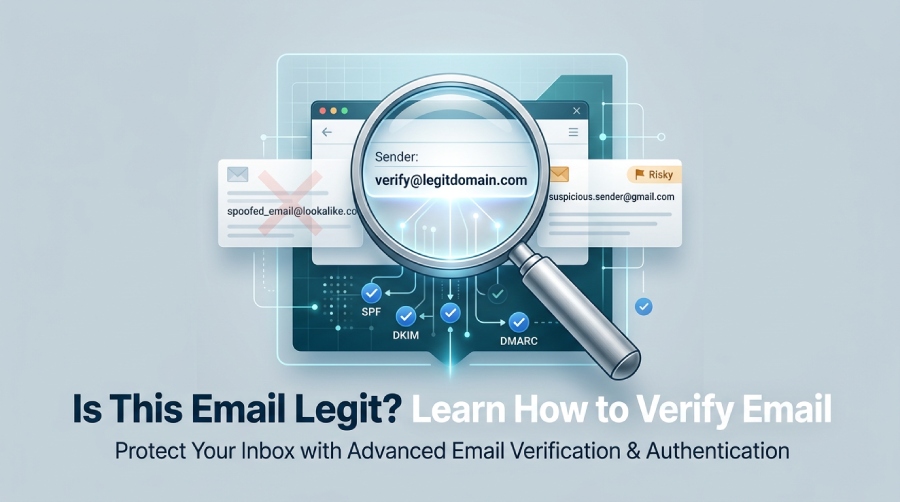
Email remains one of the most common channels for phishing, invoice fraud, account takeover attempts, malware delivery, and credential theft. Attackers know that people trust familiar brands, business domains, transactional mail services, and even internal-looking messages from a CRM or ESP. That is why email verification is no longer just a marketing operations task”it is part of fraud prevention, data quality, and everyday security awareness.
For organizations, email verification helps identify whether a message or sender is associated with valid email addresses, suspicious domains, spam traps, disposable email address services, or invalid email addresses that should not be trusted. For marketers, email address validation protects a mailing list from bounces, improves deliverability, and helps reduce the bounce rate that can damage sender reputation. For security teams, an email verifier service can add email risk signals, scoring, and email intelligence to broader risk assessment workflows.
What Email Verification Actually Checks
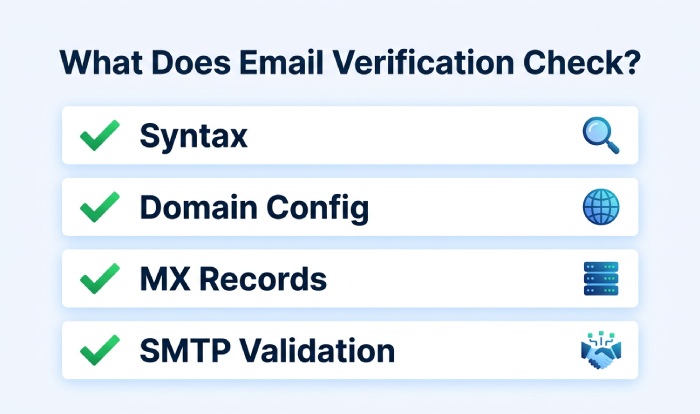
A reliable email address verifier does more than check whether an address contains an @ symbol. Modern email verification technology may examine syntax, domain checking, MX records, SMTP verification, mail exchange servers, role-based email addresses, free email addresses, business email addresses, disposable email provider patterns, and whether the domain appears to be a catch-all server or part of catch-all domains.
Email verification tools can check whether an email address is properly formatted, whether its domain has valid mail exchange (MX) records, and whether the receiving mail server appears capable of accepting messages. Some services also provide APIs and real-time verification for signup forms, contact databases, and marketing platforms. However, verifying that an email address exists does not prove that a message is trustworthy. To assess email authenticity, organizations should also examine SPF, DKIM, DMARC, domain alignment, and message headers.
Verification and Deliverability Are Connected
Email deliverability depends heavily on list quality. If a mailing list contains invalid email addresses, spam traps, temporary email accounts, or abandoned mailboxes, the bounce rate rises. A hard bounce usually means the address or domain does not exist, while a soft bounce may indicate a mailbox full condition, greylisting, temporary mail server fault, or a transient issue at the recipient mail server. Too many bounces, hard bounce events, and soft bounce responses can hurt sender reputation and sender status with email service providers.
A strong email verifier service helps verify email addresses, remove invalid emails, reduce bounces, support bounce removal, and protect the deliverability rate of email marketing campaigns. Bulk email verification, a list checker, or a free email verification tool can be useful for checking older mailing list data, while real-time verification is better for sign-up forms and fraud prevention. Strong email security measures help protect businesses from phishing, spoofing, malware, and unauthorized access.
Common Signs an Email May Be Fake or Suspicious
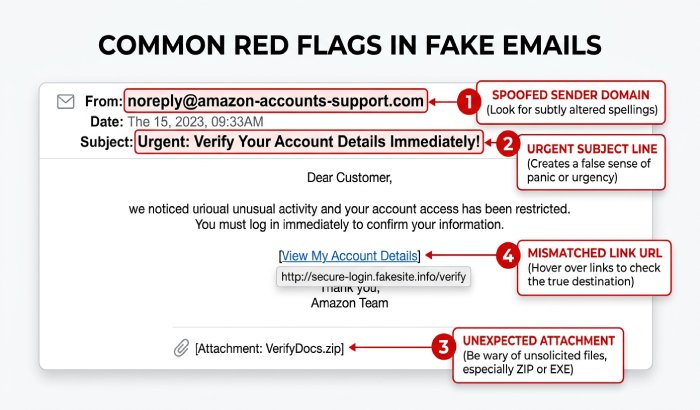
Suspicious emails often rely on urgency, fear, or authority. A message may claim that your account will be closed, your cloud storage is full, a payment failed, or a delivery is waiting. These emails often push you to click immediately, open an attachment, or provide credentials. Even if the email appears to come from a known brand, ESP, bank, or colleague, you should verify email addresses and inspect the message before taking action.
Red Flags in the Message Content
Watch for:
- Unexpected password reset requests or login alerts
- Poor grammar, unusual formatting, or mismatched branding
- Requests to bypass normal payment or approval processes
- Attachments you did not request
- Links that do not match the stated company domain
- A reply-to address that differs from the sender address
- Claims that create panic, such as final warning or account locked
- Messages sent from temporary email or free email addresses when a business domain is expected
Email address validation can help determine whether an email address is properly formatted, whether its domain is configured to receive email, and whether the address appears deliverable. However, email verification alone cannot determine whether a message is trustworthy. A technically valid email address can still be used to send spam, phishing attempts, or malicious content. For stronger verification, users should also examine the sender domain, SPF, DKIM, DMARC, and message headers.
Suspicious Patterns in Business Email
Business email compromise often looks more polished than ordinary spam. A fake invoice may come from a domain that differs by one character from the real vendor. A payroll request may appear to come from a senior executive but use a reply-to field controlled by the attacker. A security-aware team should use email authentication signals”SPF, DKIM, and DMARC”alongside email address verifier checks and email validation service results.
Why Valid Does Not Always Mean Safe
Valid email addresses simply mean the mailbox or domain appears capable of receiving mail. Email verification confirms technical indicators, but it does not guarantee the senders intent. A compromised business mailbox can pass SMTP checks, have proper MX record configuration, and still be used for fraud. That is why risk assessment, enriched data, segmentation, and email engagement signals matter when reviewing verification results.
Check the Sender Address, Domain, and Reply-To Field
The sender address is one of the first things to inspect. Attackers often use lookalike domains, subdomains, or display-name spoofing. For example, the display name may say Microsoft Support, but the actual address may come from an unrelated domain. Always expand the full sender details and compare the sender address with the reply-to field.
Domain and Mail Server Checks
Domain checking helps identify whether a senders domain is legitimate, newly registered, misconfigured, or missing critical DNS records. An email address verifier or email checker may inspect MX records, identify no MX servers found, and confirm whether mail exchange servers are configured to receive email. If there are no valid MX records, the domain may not be able to receive replies, which can be a warning sign.
SMTP verification can also help check email addresses without sending a message. It queries the receiving mail server to determine whether the mailbox may exist. However, greylisting, catch-all server behavior, internationalized email addresses, and anti-spam solutions can limit certainty. Some mail servers intentionally obscure mailbox status to prevent harvesting and protect against spam traps.
Authentication Signals: SPF, DKIM, and DMARC
Email authentication records help receiving mail systems determine whether a message is authorized to use a domain and whether its authentication checks pass. SPF identifies the servers authorized to send email for a domain, DKIM uses a cryptographic signature to verify the message’s integrity and domain association, and DMARC uses SPF and DKIM results with domain alignment to determine how receiving systems should handle messages that fail authentication. Together, these mechanisms help protect against spoofing, support email deliverability, and improve domain reputation.
A suspicious email may fail SPF, DKIM, or DMARC checks, or it may come through infrastructure unrelated to the claimed sender. Advanced teams may use diagnostic commands and header analysis to inspect authentication paths, non-delivery reports, sender status, and mail server behavior. For everyday users, the safer approach is to avoid clicking and independently visit the official website.
Inspect Links Before You Click Anything
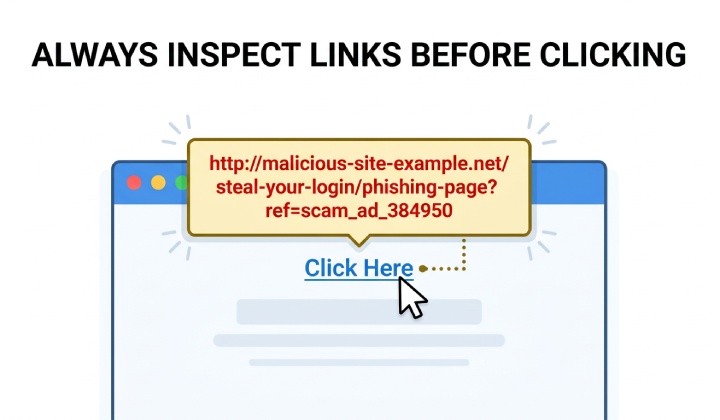
Links are a primary phishing mechanism. A message may show a familiar URL while hiding a completely different destination. Before clicking, hover over the link on desktop or long-press on mobile to preview the actual address. Look for misspellings, extra hyphens, strange subdomains, URL shorteners, or domains that do not match the sender.
Link Risk and Email Intelligence
Email verifier service platforms and security tools can combine email verification, email address validation, and email intelligence to evaluate link and sender risk. Some systems use AI, data enrichment services, enriched data, and risk assessment platform signals to identify suspicious online services, disposable email address activity, temporary email use, or domains associated with spam traps.
For email marketing teams, link trust also affects deliverability. If campaigns repeatedly point to suspicious domains, generate low email engagement, or reach spam traps, the sender reputation system may downgrade future messages. Maintaining a clean mailing list, performing list cleaning, and using bulk email verification can reduce bounce rate, protect deliverability, and keep messages out of the junk folder.
General Manager
General Manager of DuoCircle. Product strategy and commercial lead for AutoSPF's 2,000+ customer base.
LinkedIn Profile →