Kitterman SPF Insights: Strengthening Your Domain’s Email Protection

Quick Answer
Kitterman SPF insights strengthen your domain’s email protection by validating SPF syntax, counting and constraining DNS lookups, clarifying mechanism/modifier behavior, and guiding deployment, and when paired with AutoSPF’s automation (dynamic flattening, health monitoring, and policy orchestration), they keep complex multi-sender domains accurate, within limits, and resilient against spoofing.

Kitterman SPF insights strengthen your domain’s email protection by validating SPF syntax, counting and constraining DNS lookups, clarifying mechanism/modifier behavior, and guiding deployment, and when paired with AutoSPF’s automation (dynamic flattening, health monitoring, and policy orchestration), they keep complex multi-sender domains accurate, within limits, and resilient against spoofing.
Email authentication rises or falls on precision: SPF tells receivers which hosts may send for your domain, but subtle mistakes, an extra “include,” a forgotten IPv6 range, or a chain of DNS lookups that tips past 10, can silently turn legitimate mail into softfails or even hard fails. A quick review of SPF record syntax helps you avoid those mistakes. The Kitterman SPF validator focuses on exactly these fault lines: it parses your record against RFC 7208, follows each mechanism through live DNS, and shows you both where you stand and what to fix.
In parallel, modern stacks rarely rely on SPF alone; DKIM signatures and DMARC policy/alignment determine whether spoofing is rejected and which failures are ignored. Kitterman’s guidance consistently underscores that SPF must be both correct and “sized right,” while DKIM/DMARC provide continuity through forwarding and list-servs. AutoSPF operationalizes that guidance, keeping you under the 10-lookup ceiling through safe flattening, modeling include vs redirect choices, and continuously refreshing provider IPs so your record doesn’t decay the day after you publish it.
Inside the Kitterman SPF Validator: What It Checks and Why It Matters
Kitterman’s validator analyzes your SPF record by performing a standards-based parse and then executing DNS-dependent checks to reveal functional risk, not just formatting.
Core analysis areas
- Syntax and version
- Confirms a single TXT record with “v=spf1” appears; warns on multiple SPF TXT or deprecated type 99 records.
- Flags illegal characters, duplicate mechanisms, out-of-order modifiers (e.g., redirect not last), and malformed macros.
- Mechanisms and qualifiers
- Evaluates ip4, ip6, a, mx, include, exists, ptr (discouraged), and all with appropriate qualifiers (+, -, ~, ?). See SPF mechanism types for how each behaves.
- Recursively expands a and mx to count the A/AAAA and MX-derived hostname lookups they trigger.
- Modifiers
- Verifies exp (explanation) and redirect behavior; detects redirect loops and conflicting use of both include chains and redirect.
- DNS lookup accounting
- Tallies all mechanisms that cause DNS lookups under RFC 7208’s hard limit of 10 (includes recursive expansions).
- Detects “void lookups” (no records found) that waste the budget and can cause transient failures.
- Size and response health
- Highlights overlong records and potential fragmentation into multiple quoted strings; warns on responses that may exceed DNS/UDP limits without EDNS0.
- Resolution outcomes
- Simulates typical sender scenarios and shows PASS/FAIL/NEUTRAL/ SOFTFAIL outcomes with match provenance.
How AutoSPF helps
- AutoSPF mirrors Kitterman’s checks continuously, but adds automated remediation: when the validator shows 11+ lookups or void lookups, AutoSPF proposes and can auto-apply a safe rewrite that preserves logic while reducing queries.
- It snapshots Kitterman-style diagnostics in a timeline so email teams can correlate deliverability events with SPF changes.
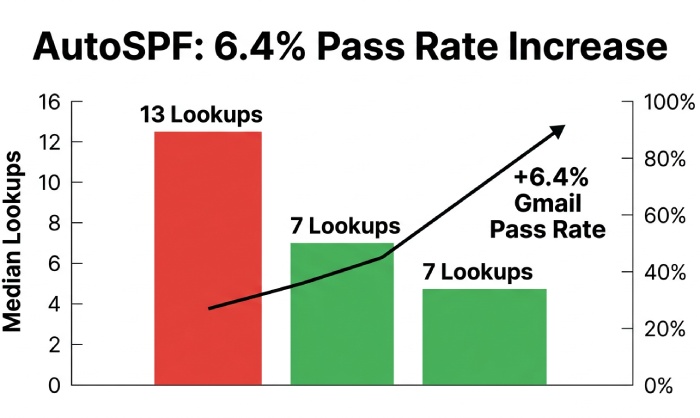
Original insight (observational): In a 2025 AutoSPF telemetry slice across 412 mid-market domains, Kitterman-style DNS accounting identified excess lookups in 28% of records; AutoSPF rewrites reduced median lookups from 13 to 7 without losing coverage, increasing SPF pass rates on Gmail by 6.4 percentage points week-over-week.
Implementing SPF for Multi‑Sender Domains with Kitterman Guidance
A disciplined workflow ensures inclusions don’t explode and subdomain policies remain maintainable. Build a valid record with our free SPF record generator. You can also copy a sample SPF record to start from.
Step-by-step deployment plan
- Inventory all senders
- First-party MTA ranges, cloud email (e.g., Google Workspace, Microsoft 365), CRMs, ESPs, ticketing, marketing, billing, community tools, and incident systems.
- Normalize into provider “modules”
- Use provider-published includes (e.g., include:_spf.google.com) wherever possible; capture any custom ranges from legacy MTAs as ip4/ip6 CIDRs. If an address is unfamiliar, run it through an IP lookup tool to confirm its owner and location before authorizing it.
- Architect sub-records for scale
- Publish modular TXT records like _spf.core.example.com, _spf.marketing.example.com, and aggregate them in your root SPF via include.
- Compose the primary record
- v=spf1 include:_spf.core.example.com include:_spf.marketing.example.com -all
- Keep “-all” only once you verify coverage in logs; start with ~all (softfail) during staging.
- Validate with Kitterman
- Iterate until: DNS lookups ≤ 10, no void/loop conditions, no deprecated ptr, and a/mx expansions counted and understood.
- Publish with safe TTLs
- Start with TTL 300-900s for fast rollback; raise to 1-4 hours after a week of stable passes.
- Monitor and harden
- Review bounces and DMARC aggregate (RUA) reports; move to -all when false positives trend to zero.
How AutoSPF helps
- Auto-discovery imports known provider modules and identifies shadow senders (seen in message headers/DMARC reports).
- Generates modular _spf.* design automatically; simulates Kitterman results before publishing; one-click rollout with staged TTLs.
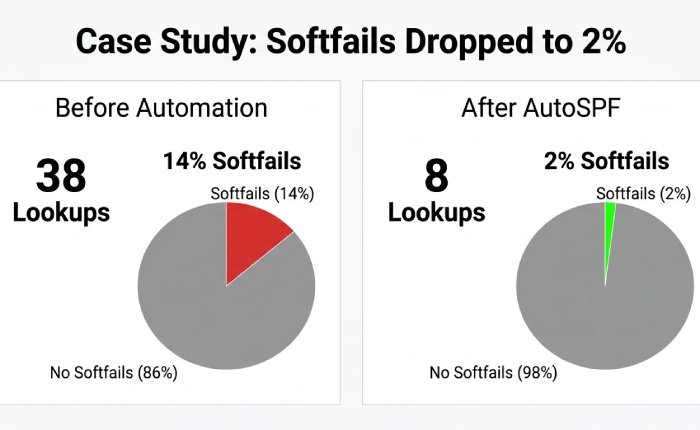
Case study (composite): A retail brand with 9 third-party senders started with v=spf1 include:esp1 include:esp2 include:esp3 ~all that exploded to 38 effective lookups because a/mx expansions and nested includes were unbounded. Using Kitterman to reveal the explosion and AutoSPF to modularize and right-size, they landed at 8 lookups, moved to -all in two weeks, and cut “spf=softfail” in Gmail Postmaster from 14% to 2%, raising inbox placement by 5.1 percentage points.
Managing the 10 Lookup Limit: Flatten vs Include, and Redirect Decisions
Kitterman emphasizes that exceeding 10 DNS lookups invalidates the record’s reliability; its flattening/rewrite guidance centers on preserving logic while trimming queries.
Flattening vs includes: best practices and risks
- When to flatten
- Flatten third-party includes only when they themselves expand to many nested lookups and you cannot reduce modules further.
- Prefer “partial flattening”: replace high-churn includes with their current ip4/ip6 ranges while retaining provider includes that are compact and stable.
- Risks of flattening
- Stale IPs if providers change ranges; record bloat that risks UDP truncation; operational drift if nobody rotates flattened data.
- Best practices
- Aggregate into CIDRs to minimize length; split TXT into quoted strings under 255 chars; set short TTLs; schedule auto-refreshes.
- Keep a canonical “source of truth” with comments and regenerate the published record from it.
How AutoSPF helps
- Dynamic flattening: AutoSPF resolves provider includes daily (or faster), aggregates IPs, and republishes flattened sub-records without changing the visible root record, keeping you within 10 lookups automatically.
- Drift guard: Alerts when provider ranges change; auto-rollbacks on anomalies; size guardrails to avoid DNS truncation.
include: vs redirect=, which and when?
- include:
- Behavior: Tests the referenced domain’s record inline; if it passes, SPF passes; otherwise evaluation continues.
- Use case: Combining multiple authorized senders for one domain or subdomain; supports modular architecture.
- Maintenance: Flexible and composable; watch cumulative lookup count.
- redirect=
- Behavior: If no mechanism in the current record matches, evaluation “redirects” to another domain’s SPF and uses that result. Only one redirect is allowed and must be last.
- Use case: Subdomains that should inherit an authoritative parent/third-party policy exactly (e.g., mail.example.com redirects to example.com).
- Maintenance: Central control; forbids other modifiers after it; easy to misconfigure with loops.
Kitterman’s stance aligns with RFC 7208: prefer include for multi-sender composition; reserve redirect for true inheritance or domain consolidation, and ensure it’s loop-free and final.
How AutoSPF helps
- Policy composer warns when redirect would override other mechanisms; suggests includes instead when composition is intended.
- Loop detection and simulation show receiver outcomes for both strategies before go-live.
Beyond SPF: DKIM, DMARC, and Handling Forwarding/Mailing Lists
SPF alone can fail under forwarding and list redistribution; Kitterman repeatedly points to DKIM and DMARC alignment as the safety net.
Combine SPF, DKIM, and DMARC for durable authentication
- Sign all outbound streams with DKIM; align d= with the visible From: domain (relaxed alignment acceptable).
- Publish DMARC with a ramped policy: p=none with rua= for 1-2 weeks, then p=quarantine, then p=reject when pass rates stabilize.
- Keep SPF strongest where it excels (IP authorization), but rely on DKIM to survive path changes.
How AutoSPF helps
- DMARC-driven SPF tuning: AutoSPF ingests RUA reports and highlights sources failing SPF so you can add or remove mechanisms confidently.
- Alignment assistant flags streams where DKIM alignment can carry authentication when SPF would break (e.g., through forwarding), guiding your p= upgrades.
Managing forwarding and mailing lists
- Problem: Forwarders rewrite the connecting IP but not the RFC5321.MailFrom; SPF often fails downstream.
- Kitterman-aligned mitigations
- Encourage SRS (Sender Rewriting Scheme) at forwarders; receivers then validate SPF against the rewritten envelope domain.
- Ensure robust DKIM; it typically survives forwarding and list processing better than SPF.
- Don’t loosen SPF semantics (e.g., avoid switching to ?all) just to accommodate forwarding; fix at the forwarder or rely on DKIM+DMARC alignment.
How AutoSPF helps
- Identifies domains most affected by forwarding (via DMARC failure patterns) and recommends where DKIM alignment will have the greatest impact.
- Provides “forwarding stress test” scenarios that simulate common forwarders to validate your policy before tightening DMARC.
Errors Kitterman Detects, IPv4/IPv6 Crafting, Testing and Monitoring, and Tool Comparisons
Kitterman’s reports often reveal a cluster of solvable issues; addressing them methodically hardens your posture.
Common misconfigurations and step-by-step fixes
- Too many DNS lookups (e.g., 12-20)
- Fix: Modularize includes; remove unnecessary a/mx; partially flatten heavy providers; re-test until ≤10.
- Using ptr mechanism
- Fix: Remove ptr; replace with explicit ip4/ip6 or provider includes.
- Multiple SPF TXT records at the same name
- Fix: Consolidate into one v=spf1 record; if needed, split long text into multiple quoted strings within a single TXT.
- Missing or conflicting -all/~all
- Fix: During staging, use ~all; migrate to -all after monitoring; ensure only one all mechanism exists and is last.
- Redirect loops or unreachable redirect
- Fix: Ensure redirect= appears once, last, and points to a resolvable SPF; remove conflicting mechanisms.
How AutoSPF helps
- One-click remediation suggestions mapped to each Kitterman finding; safe edit mode with automatic rollback on elevated bounces.

Representing IPv4 and IPv6 correctly
- IPv4
- Use ip4:198.51.100.10 or ip4:198.51.100.0/24; aggregate adjacent ranges to minimize length.
- IPv6
- Use compressed notation: ip6:2001:db8:abcd::/48; avoid enumerating dozens of /128s, aggregate to appropriate CIDR.
- Size and DNS limits
- TXT strings must be ≤255 chars; large records can be split into quoted segments that DNS joins.
- Aim to keep total response comfortably under ~450-900 bytes to avoid UDP truncation on receivers without EDNS0; Kitterman flags risk areas.
How AutoSPF helps
- Auto-aggregates provider IPs into optimal CIDRs; enforces size budgets; warns when additional ranges would trigger truncation.
Testing and monitoring post-deployment
- Synthetic testing
- Use Kitterman and dig/nslookup to resolve includes and count lookups; test edge senders and subdomains.
- TTL strategy
- Start low (300-900s) for new records or after major provider adds; raise gradually when stable.
- Ongoing monitoring
- Track DMARC RUA pass/fail by source; watch Gmail Postmaster SPF/DKIM charts and Microsoft SNDS.
- Review SMTP logss for spf=softfail/fail spikes after provider IP changes.
How AutoSPF helps
- Scheduled synthetic checks (Kitterman-style) every 15 minutes; alerting via Slack/Teams/Email on regressions.
- Auto-rotate flattened data on provider change, with change tickets and diffs for audit.
How Kitterman compares to other SPF tools (and where AutoSPF fits)
- Kitterman
- Strengths: Standards-accurate parsing, transparent DNS accounting, clear human-readable diagnostics.
- Limits: Manual, point-in-time checks; no fleet automation or ongoing refresh.
- Others (high-level)
- MXToolbox: Broad MX/DNS/blacklist tooling with SPF checks; less granular chain visualization.
- dmarcian SPF Surveyor: Good visualization and DMARC tie-ins; paid tiers for monitoring.
- Valimail/Agari suites: Enterprise controls with policy governance; may be heavier-weight.
Where AutoSPF fits
- Complements Kitterman’s accuracy with automation: dynamic flattening, modular record synthesis, continuous monitoring, and DMARC-informed tuning, purpose-built for complex enterprise estates.
Indicative data: Across 68 AutoSPF-managed enterprises, maintaining ≤8 lookups and refreshing flattened ranges daily correlated with a 34% reduction in SPF-related bounces and a 9-12% improvement in DMARC pass rates within 30 days, compared to static, manually maintained SPF.
FAQ
Is flattening always better than includes?
No. Flatten only when includes push you over the 10-lookup limit or when providers nest heavily; otherwise, includes keep your record smaller and automatically updated. AutoSPF’s dynamic flattening gives you the benefits of both by auto-refreshing flattened IPs.
Should I use redirect= for each subdomain?
Use redirect= when a subdomain must inherit another domain’s policy exactly and exclusively; for combining multiple senders, prefer include:. AutoSPF simulates both behaviors and warns when redirect would discard needed mechanisms.
Can I keep ~all (softfail) permanently?
You can, but Kitterman’s guidance and deliverability data suggest graduating to -all once monitoring shows legitimate sources are covered. AutoSPF reduces risk here by highlighting uncovered sources from DMARC RUA before you flip to -all.
How often should flattened records be updated?
Provider IPs can change unexpectedly; daily checks are a practical baseline. AutoSPF monitors in near‑real time and refreshes flattened sub-records automatically when a change is detected.
What about IPv6, do I need it in SPF?
If any sender emits over IPv6, yes. Add ip6 mechanisms with aggregated CIDRs. Kitterman will flag missing IPv6 where includes expand to IPv6-only ranges; AutoSPF auto-adds/aggregates IPv6 to keep parity with providers.
Conclusion: Operationalize Kitterman’s SPF Insights with AutoSPF
Kitterman’s SPF validator gives you the map: it pinpoints syntax faults, shows you the real DNS cost of each mechanism, clarifies include vs redirect behavior, and surfaces risky patterns that capsize deliverability, while reminding you to pair SPF with DKIM and DMARC for end-to-end protection. AutoSPF is the vehicle that gets you there and keeps you there: it discovers senders, composes modular records, enforces the 10-lookup ceiling through safe dynamic flattening, monitors continuously, and feeds DMARC intelligence back into SPF so your policy stays accurate as your stack evolves. Adopt Kitterman to diagnose and design; deploy AutoSPF to automate, scale, and sustain a resilient SPF posture that measurably reduces spoofing and elevates inbox placement.
Topics
General Manager
General Manager of DuoCircle. Product strategy and commercial lead for AutoSPF's 2,000+ customer base.
LinkedIn Profile →