Outlook DMARC Requirements: Microsoft’s New Email Authentication Rules Explained

Quick Answer
Microsoft’s Outlook DMARC requirements ask high-volume senders to configure SPF and DKIM, publish a DMARC record, and maintain proper alignment. Monitoring DMARC reports helps identify authentication failures, protect domains, and support reliable email delivery.
Try Our Free DMARC Checker
Validate your DMARC policy, check alignment settings, and verify reporting configuration.
Check DMARC Record →
What Microsoft’s New Outlook DMARC Requirements Mean
Microsoft’s updated Outlook email authentication requirements reflect a broader industry shift toward stronger sender verification. For high-volume senders delivering email to Microsoft consumer services such as Outlook.com, Hotmail, Live.com, and MSN, Microsoft requires SPF and DKIM to be published and pass, a DMARC record to be published, and messages to pass DMARC validation through aligned SPF and/or DKIM.
For organizations using Microsoft 365, Office 365, or third-party email platforms, understanding how SPF, DKIM, and DMARC work together is essential for meeting these requirements and reducing authentication-related delivery failures.
For high-volume senders delivering email to Outlook.com, Hotmail.com, Live.com, and other Microsoft consumer email services, maintaining valid email authentication is essential. Microsoft requires these senders to have SPF and DKIM configured and passing, publish a DMARC record, and meet DMARC alignment requirements. The DMARC policy is published as a DNS TXT record at the _dmarc hostname for the sending domain.
DMARC, defined in RFC 7489, helps receiving mail systems verify whether a message is legitimately associated with the domain shown in the visible From address. It strengthens email security by helping protect users from phishing, business email compromise, and email spoofing.
Microsoft’s Authentication Requirements for High-Volume Senders
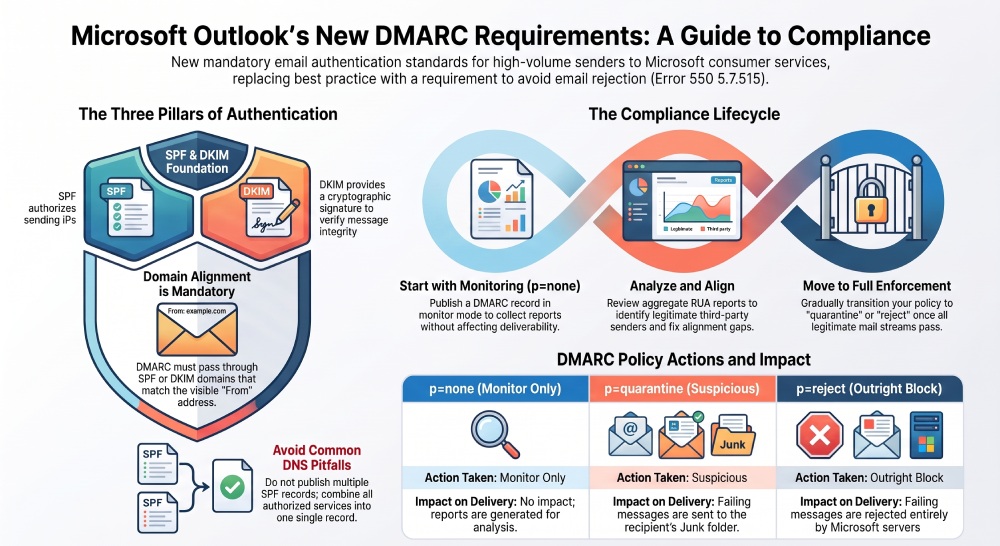
Microsoft’s Outlook requirements place greater emphasis on authenticated email for high-volume senders. For senders subject to these requirements, SPF and DKIM must be published and pass, a DMARC record must be published, and DMARC must pass through aligned SPF and/or DKIM.
Key authentication requirements include:
- SPF: Publish an SPF record that authorizes the servers and services sending email for the domain.
- DKIM: Enable DKIM signing so outbound messages can be authenticated using a public key published in DNS.
- DMARC: Publish a DMARC TXT record at the
_dmarchostname. - DMARC alignment: Ensure that either the SPF-authenticated domain or DKIM signing domain aligns with the domain in the visible From address.
- DMARC monitoring: Review aggregate DMARC reports to identify legitimate senders, authentication failures, and potential unauthorized sources.
These requirements can apply to organizations sending through Microsoft 365, Office 365, SMTP relays, marketing platforms, CRMs, and other third-party email services when they meet Microsoft’s high-volume sender criteria.
What Enforcement Looks Like for Outlook Senders
 For high-volume senders that do not meet Microsoft’s email authentication requirements, messages may be rejected. Microsoft documents the 550 5.7.515 error for messages from domains that fail to meet the required authentication level. Meeting SPF, DKIM, and DMARC requirements can help senders avoid authentication-related rejection when delivering mail to Microsoft consumer email services.
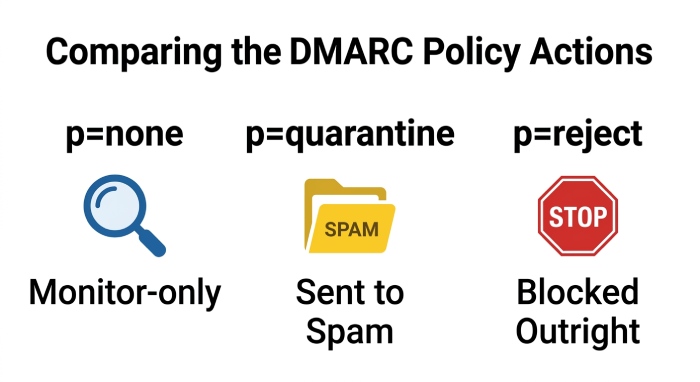
A DMARC policy tells receivers what to do when DMARC validation fails. The three core policy options are:
DMARC Policy Actions: None, Quarantine, and Reject
p=none: Monitor-only mode. Mail is not blocked solely because of the DMARC policy, but reports are generated.p=quarantine: Failing messages should be treated as suspicious and may go to spam or junk.p=reject: Failing messages should be rejected outright.
Starting with p=none can be a useful approach, while mature domains should move toward p=quarantine or p=reject after confirming that all legitimate mail streams are properly aligned.
Why DMARC, SPF, and DKIM Matter for Outlook Deliverability
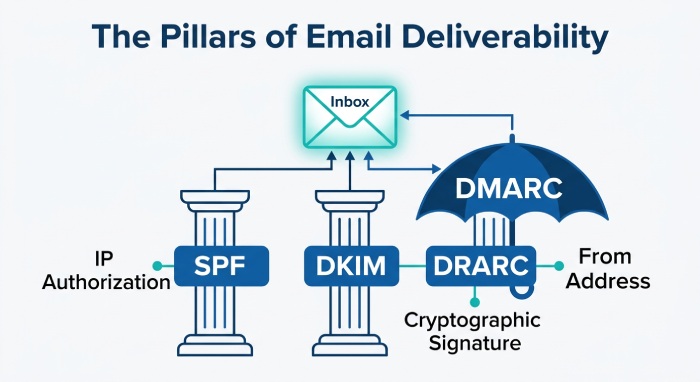
DMARC, SPF, and DKIM work together to help Microsoft distinguish legitimate mail from abuse. SPF verifies whether the sending IP address is authorized to send for a domain. DKIM verifies that the message was signed by an authorized domain and was not materially altered in transit. DMARC connects SPF and DKIM to the visible From address that users actually see in their email client.
For Outlook deliverability, this combined authentication matters because Microsoft Defender for Office 365, Microsoft Security systems, and Outlook filtering evaluate multiple trust signals. Strong email authentication improves the likelihood that legitimate messages reach the inbox, while weak authentication increases the risk of filtering.
Organizations that care about email security should treat DMARC, SPF, and DKIM as foundational controls rather than compliance checkboxes.
SPF and DKIM as the Foundation
SPF depends on a properly published SPF record in DNS. This record lists the mail servers or services permitted to send on behalf of a domain. For example, a company using Microsoft 365, Office 365, and a marketing platform must ensure all authorized outbound mail sources are included without exceeding SPF lookup limits.
DKIM uses public-private key cryptography. The sending service signs messages with a private key, and the receiving server checks the DKIM signature against a public key stored in DNS. In Microsoft 365, DKIM signing can be enabled through the Microsoft 365 admin center or PowerShell. Microsoft typically uses DKIM selectors, often referenced as selector records, to locate the correct DKIM key.
How DMARC Validation Connects SPF and DKIM
DMARC validation passes when either SPF or DKIM passes and the authenticated domain aligns with the visible From address domain. Alignment is the key concept. SPF may authenticate the mail from the address, also called the envelope sender, while DKIM authenticates the signing domain. DMARC checks whether one of those authenticated domains matches the organizational domain in the From address.
Alignment Is What Makes DMARC Different
A message can technically pass SPF but still fail DMARC if the SPF-authenticated domain does not align with the From address. Similarly, a DKIM signature from a third-party domain may pass DKIM but fail DMARC alignment if it does not match your domain.
Example: contoso.com and Microsoft 365
If a company sends as user@contoso.com through Microsoft 365, the domain contoso.com should have SPF, DKIM, and a DMARC TXT record. If the tenant also has contoso.onmicrosoft.com, that onmicrosoft.com domain may be part of Microsoft’s default routing, but the custom domain shown to recipients still needs its own DNS configuration for DMARC, SPF, and DKIM.
Who Is Affected by the Updated Outlook Email Authentication Rules
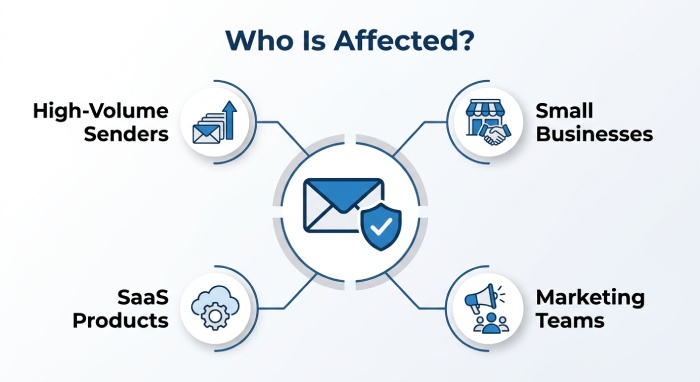
The updated Outlook email authentication rules affect any sender delivering mail to Microsoft-hosted consumer recipients and, indirectly, many business environments using Microsoft 365 and Office 365 filtering. High-volume senders are the clearest target, but smaller organizations are also affected because Outlook’s filtering systems increasingly rely on authentication signals.
Organizations Using Microsoft 365, Office 365, and Custom Domains
Businesses using custom domains in Microsoft 365 or Office 365 need to verify that each domain has correct DNS records. This includes primary domains, aliases, parked domains used for outbound mail, and subdomains used by departments or applications.
Affected senders include:
- Companies sending invoices, alerts, or notifications from Microsoft 365.
- Marketing teams using third-party platforms with a company domain.
- SaaS products sending email on behalf of customers.
- Organizations using SMTP relays or hybrid Exchange environments.
- Security-conscious teams managing Microsoft Defender for Office 365.
- Domains listed in the Microsoft 365 admin center under the Domains page.
 If you send as
 contoso.com, Microsoft expects authentication forcontoso.com, not just proof of domain ownership in the Admin portal. Proof of domain ownership is required to add a domain to Microsoft 365, but it is not the same as having complete SPF, DKIM, and DMARC.
How to Set Up or Update DMARC for Outlook Compliance
Setting up DMARC for Outlook compliance requires careful coordination between DNS, Microsoft 365, Office 365, and any third-party senders. The goal is to publish a correct DMARC TXT record, ensure SPF and DKIM are working, and monitor reports before moving to stricter enforcement.
Step-by-Step DNS and Microsoft 365 Configuration
Start by identifying every service that sends outbound mail using your domain. This includes Microsoft 365, Office 365, marketing platforms, ticketing tools, billing systems, and internal applications.
Then follow these steps:
-
Review SPF in DNS Confirm your SPF record includes Microsoft 365 and all authorized senders. A common Microsoft 365 SPF entry includes
include:spf.protection.outlook.com, but your exact SPF record depends on your mail routing. -
Enable DKIM signing In the Microsoft 365 admin center, go to the appropriate DKIM settings for your domain. You may need to create CNAME records for each selector at your DNS hosting service. DKIM signing should be active for the custom domain, not only the default onmicrosoft.com address.
-
Create the DMARC TXT record At your domain registrar or DNS hosting provider, create a TXT record named
_dmarc. A monitoring-mode DMARC TXT record may look like:
v=DMARC1; p=none; rua=mailto:dmarc-aggregate@contoso.com; ruf=mailto:dmarc-forensic@contoso.com-
Add reporting addresses The
ruatag defines the report URI for aggregate reports. Theruftag defines the report URI for forensic reports, though not all receivers send forensic reports due to privacy concerns. -
Analyze DMARC reports Use DMARC reports to identify legitimate and unauthorized senders. Some teams process these reports with Power BI for visibility across domains, subdomains, sources, and authentication results.
-
Move toward enforcement After confirming legitimate mail passes DMARC validation, update the DMARC policy from
p=nonetop=quarantine, and eventually top=rejectwhere appropriate.
Microsoft 365 administrators can also use PowerShell and the Admin portal to review domain status, DKIM configuration, and mail flow behavior.
Common DMARC Mistakes and Best Practices for Staying Compliant
Even organizations with mature IT teams often make DMARC mistakes. The most common issue is publishing a DMARC policy before SPF and DKIM are fully aligned. Another frequent problem is assuming that Microsoft 365 automatically handles all DNS records for every domain. Microsoft provides the email platform, but the domain owner is responsible for DNS accuracy.
Mistakes That Break Authentication or Delivery
Common mistakes include:
- Publishing multiple SPF records for one domain instead of a single combined SPF record.
- Forgetting to enable DKIM signing for custom domains in Microsoft 365 or Office 365.
- Creating the DMARC TXT record at the wrong DNS hostname, such as the root domain instead of
_dmarc. - Using
p=rejecttoo early and blocking legitimate mail. - Ignoring subdomains that send application or transactional mail.
- Failing to align the DKIM signing domain with the visible From address.
- Not monitoring aggregate reports after publishing a DMARC policy.
- Assuming
onmicrosoft.comauthentication protects all branded mail from a custom domain.
Best practices include starting with p=none, validating all outbound email sources, reviewing DMARC reports regularly, and gradually moving to p=quarantine and then p=reject. Organizations with complex email environments should also document sending services, monitor authentication alignment, and use ARC where appropriate to support message authentication across trusted forwarding paths.
ARC, or Authenticated Received Chain, may also matter when messages are forwarded through intermediaries. An ARC sealer can preserve authentication context when mail is forwarded, although ARC does not replace DMARC, SPF, or DKIM.
Ultimately, Outlook DMARC compliance depends on maintaining accurate DNS, a valid DMARC TXT record, correct SPF and DKIM configuration, and a DMARC policy that reflects the real state of your email system.
General Manager
General Manager of DuoCircle. Product strategy and commercial lead for AutoSPF's 2,000+ customer base.
LinkedIn Profile →