Phishing or Pharming? The Key Differences Every Email User Should Know

Quick Answer
Phishing tricks users into clicking malicious links or sharing sensitive information, while pharming silently redirects them to fake websites through DNS manipulation. Strong email security, MFA, secure DNS, browser checks, and user awareness help reduce both risks.
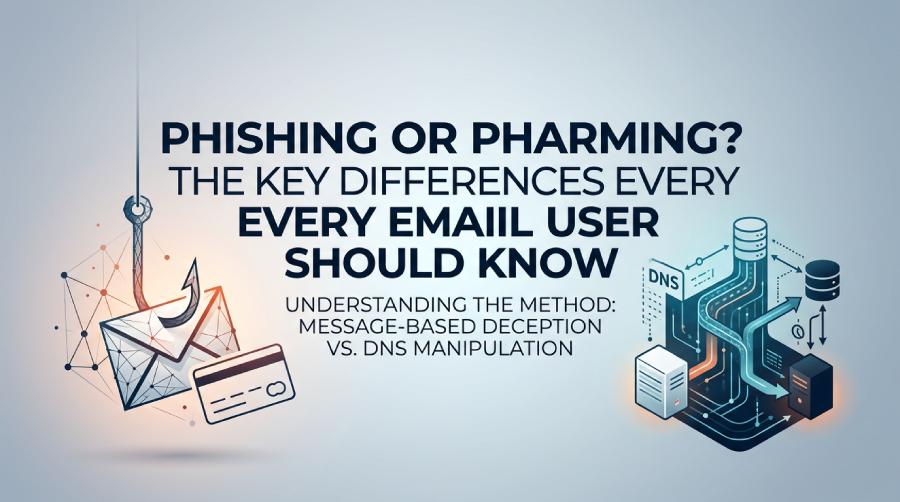
What Phishing Is: How Fake Emails, Messages, and Login Pages Trick Users
Phishing is a social engineering attack that uses deceptive electronic communications—such as fraudulent emails, instant messages, text messages, or fake login pages—to trick users into revealing sensitive information. This may include usernames and passwords, banking details, personal information, or business data that could lead to credential theft, financial fraud, or a broader data breach.
In a typical email phishing scenario, the victim receives a message that appears to come from a bank, email provider, social media platform, or another trusted service. The message may claim that an account is locked, a payment has failed, or a document is waiting for review. The goal is to persuade the recipient to click a malicious link, open a malicious attachment, or enter credentials into a fake website.
Phishing remains one of the most common forms of email fraud because it depends on urgency, trust, and human behavior. The difference between phishing and pharming starts here: phishing usually requires the user to take an action, such as clicking a website link or responding to a scam message.
Common phishing signals
Warning signs of phishing include misspelled domains, suspicious sender addresses, threatening language, unexpected attachments, and login pages that ask for more personal details than usual. A fraudulent email may also use domain spoofing to make the sender look legitimate. In mail fraud and bank fraud scenarios, hackers often impersonate financial institutions to capture sensitive information and user credentials.
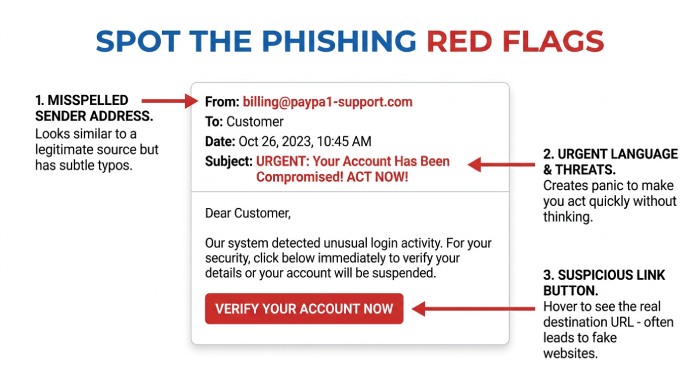
Why fake login pages work
A fake website can copy logos, forms, colors, and other visual elements from a legitimate site to appear trustworthy. Attackers may build these pages using common web technologies or compromised websites. Because the page looks familiar and authentic, victims may enter their usernames and passwords without realizing they are being targeted by a phishing attack.
What Pharming Is: How DNS Hijacking and Redirects Send Users to Fake Websites
Pharming is a cyber security attack that redirects users from a legitimate website to a fake website without relying on a visible malicious link. Instead of persuading the user to click a suspicious website link, pharming manipulates how the browser finds a website.
This attack often involves DNS, the system that translates domain names into IP addresses. If hackers compromise a DNS server, alter DNS records, or poison a local DNS cache, they can redirect traffic from a real domain to a fraudulent domain. Techniques include DNS hijacking, DNS spoofing, and DNS cache poisoning. In advanced cases, pharming may target routers, Internet Service Providers, Telecommunications infrastructure, ISPs, ESPs, or vulnerable computer system configurations.
The difference between phishing and pharming is especially important because pharming can affect users even when they type the correct web address. A user may visit what appears to be a trusted Bank portal but silently land on a fake website designed for website spoofing and credential theft.
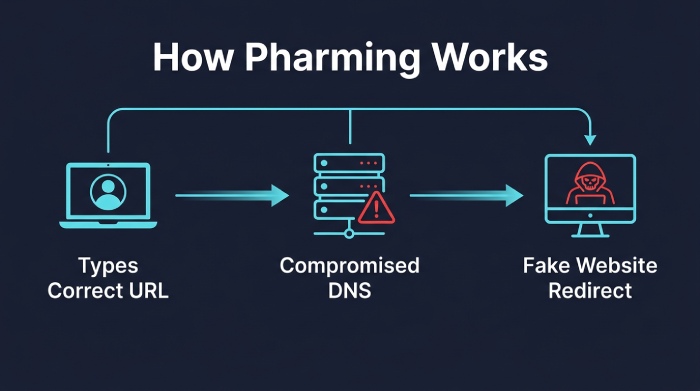
How redirecting users happens
Pharming works by redirecting users at the infrastructure level. A compromised DNS server may return the attacker’s IP address instead of the legitimate one. Malware on a computer system or router may also alter DNS settings, causing every browser request to redirect traffic to a fake website. This makes pharming an advanced technique and a serious website security concern.
Phishing vs. Pharming: The Key Differences in Method, User Involvement, and Warning Signs
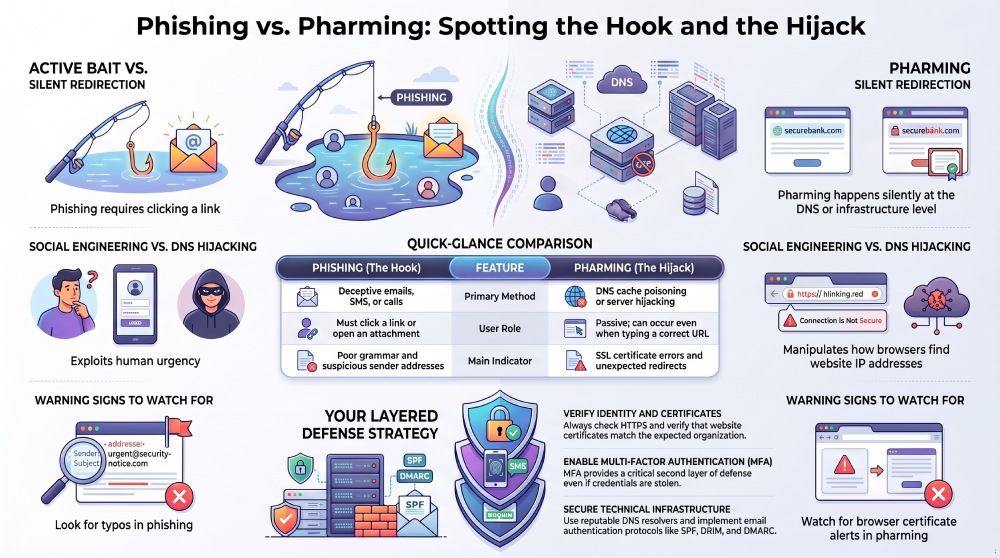
Understanding the difference between phishing and pharming helps users choose the right preventive measures. Both phishing and pharming aim to steal sensitive information, personal information, user credentials, and financial data. Both can lead to fraud, data theft, email fraud, and a data breach. However, they differ in how the attack is delivered and how visible the warning signs are.
Method: message-based deception vs. DNS manipulation
Phishing relies on a fraudulent email, smishing text, vishing call, or another electronic communication that pushes the victim toward a malicious link. The attack method is psychological: fear, urgency, reward, or impersonation.
Pharming relies on DNS manipulation, DNS hijacking, DNS spoofing, or DNS cache poisoning. Instead of tricking the user into clicking a malicious link, pharming compromises the path between the browser and the real website.
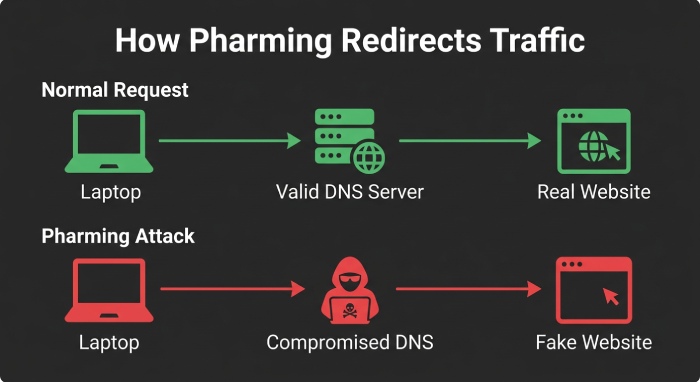
User involvement: active click vs. silent redirect
In phishing, the targeted user usually clicks a malicious link, downloads malicious attachments, or submits credentials to a fake website. In pharming, the user may do everything correctly—typing the correct URL, using a bookmark, or following normal browser habits—but still be redirected.
This is a core difference between phishing and pharming: phishing often needs user interaction, while pharming can occur with little or no obvious user action.
Warning signs: obvious clues vs. subtle technical indicators
Phishing warning signs include unusual sender addresses, grammar errors, mismatched links, unexpected invoices, and urgent account warnings. Pharming warning signs are subtler: browser certificate alerts, unexpected login prompts, changed DNS settings, odd redirects, or a website that looks slightly different.
Email Fraud Beyond the Inbox: Smishing, Vishing, and Domain Abuse
Email fraud does not exist in isolation. Attackers combine phishing, smishing, vishing, domain spoofing, and website spoofing to increase success rates. A fraudulent email may be followed by a phone call, or a malicious link may be sent through an email or instant message.
Attackers may combine phishing messages with malicious redirects to make fraudulent websites harder to identify. During an investigation, cybersecurity teams may examine email headers, DNS records, sender authentication, browser behavior, and redirect activity to determine how a phishing or pharming attack was carried out.
How to Protect Yourself: Email Safety Habits, Browser Checks, MFA, and Secure DNS Tools
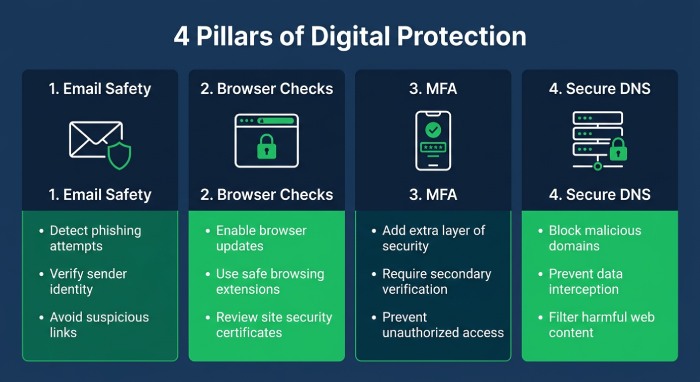 Effective attack prevention requires layered security measures. Because phishing and pharming use different techniques, users and organizations need controls that address both human deception and technical redirection.
Email Safety Habits That Reduce Phishing Risk
Treat unexpected requests for sensitive information with suspicion. Do not click a malicious link in a message asking you to verify credentials, update billing, or unlock an account. Instead, visit the site directly using a trusted bookmark or manually typed address.
Check the sender domain carefully, especially with financial services, cloud accounts, and Mailbox Hosting Providers. Be alert for fraudulent email patterns, unexpected attachments, and messages that pressure you to act immediately. These preventive measures reduce exposure to phishing, email fraud, mail fraud, and social engineering.
Browser Checks That Help Detect Pharming
Before entering personal information or user credentials, confirm that the site uses HTTPS and that the certificate belongs to the expected organization. Watch for browser warnings, strange redirects, and login pages that look different from normal.
Browser checks are especially important for pharming because the user may not see a malicious link. If a legitimate site suddenly asks for unusual personal details, reauthentication, or payment data, stop and verify the destination through another trusted channel.
MFA and Password Hygiene
Multi-factor authentication helps limit damage if credentials are stolen. Even if a phishing attack captures a username and password, MFA can block unauthorized access. Use unique passwords for every account and store them in a reputable password manager.
However, MFA is not perfect. Some phishing kits now proxy login sessions in real time, making cyber security awareness and secure browsing habits essential. The difference between phishing and pharming still matters: MFA helps after credential theft, while DNS protection helps stop silent redirection.
Secure DNS Tools and Website Security Controls
Use reputable DNS resolvers with filtering, DNSSEC validation where available, and router-level protection. Organizations should monitor DNS records, lock registrar accounts, and investigate unauthorized changes quickly. Secure DNS reduces the risk of pharming, DNS spoofing, DNS cache poisoning, and DNS hijacking.
Businesses should also deploy email authentication and domain protection. SPF, DKIM, and DMARC help reduce spoofing by ESPs and ISPs, while monitoring tools can detect suspicious sending behavior. For SPF record management, organizations can use AutoSPF as part of broader email authentication hygiene.
Organizational Monitoring and Abuse Intelligence
Security teams should combine email filtering, DNS monitoring, web traffic analysis, and threat intelligence to detect phishing and pharming attempts early. Monitoring can help identify suspicious senders, compromised domains, malicious infrastructure, unusual DNS activity, and other signs of email or website abuse.
Organizations should also regularly review their email authentication, DNS configuration, website security, and domain activity. Compromised websites or domains can be used to create fake login pages, redirect users to malicious destinations, or support phishing campaigns. A layered defense that includes SPF, DKIM, DMARC, secure DNS, multi-factor authentication, browser protection, user awareness, and continuous monitoring can reduce the risk of phishing, pharming, email fraud, domain spoofing, and suspicious redirects.
General Manager
General Manager of DuoCircle. Product strategy and commercial lead for AutoSPF's 2,000+ customer base.
LinkedIn Profile →