SPF All Records: -All Vs ~All Syntax, Differences, And Best Practices

Quick Answer
SPF -all rejects email from unauthorized senders, while ~all marks them as soft failures. Learn the syntax, key differences, and best practices to choose the right SPF all mechanism for stronger email authentication, improved deliverability, and protection against spoofing.
Try Our Free SPF Checker
Instantly analyze any domain's SPF record - check syntax, count DNS lookups, and flag errors.
Check SPF Record →
The Sender Policy Framework (SPF) is a critical component of modern email authentication, enabling domain owners to specify which servers are authorized to send mail on their behalf. At the heart of any SPF record”and instrumental to determining its impact”is the all mechanism. The all mechanism acts as a policy assertion at the end of your SPF record, instructing mail transfer agents (MTAs) how to handle messages that do not match any of the designated authorized servers.
Fundamentally, the all mechanism is a catch-all directive. After evaluating the prior rules within an SPF record, an all qualifier (such as -all or ~all) tells receiving MTAs what to do if an email sender hasnt been matched with an authorized server. Proper SPF implementation relies on correctly configuring this mechanism as part of your overall SPF policy, laying the foundation for robust domain security and email sender verification.
SPF Syntax Basics: How -all and ~all Fit into TXT Records
An SPF record is typically published in DNS as a TXT record and is designed to specify exactly which internet servers are permitted to send SPF-compliant email for a particular SPF domain. The SPF syntax, detailed and specific, requires that you declare mechanisms and qualifiers that define your policy assertion.
The all mechanism appears at the end of the SPF record syntax and is seldom”if ever”used elsewhere in the record. Its context is always preceded by a qualifier, determining the action for failed verifications:
- SPF -all: The minus (-) qualifier creates a fail scenario, commonly known as a hard fail. This directs receiving MTAs to mark the message as failing SPF authentication if it doesnt originate from an authorized server.
- SPF ~all: The tilde (~) qualifier constitutes a softfail. This signals that messages from unauthorized email sources should NOT PASS without scrutiny, but the response from the MTA is typically more lenient than with -all.
Example of SPF Record Syntax:
v=spf1 ip4:203.0.113.5 include:*dmarcian*.com ~all
In this sample, only the listed IP and those included via *dmarcian*.com are marked as authorized servers. All others will result in a softfail due to the ~all directive.
The precise use of SPF ~all or SPF -all dramatically impacts both SPF results and the SPF enforcement behavior at the receiving end, making correct SPF configuration an SPF management priority.
-all vs ~all: Key Differences Between Hard Fail and Soft Fail
Clarifying the distinction between SPF -all and SPF ~all is indispensable for ensuring effective email authentication, minimizing SPF failures, and mitigating email security risks.
What Is SPF -all (Hard Fail)?
When the -all mechanism is used at the end of the SPF record, it initiates a definitive fail response (SPF fail) if the email is sent from any server not specifically identified as an authorized server for the SPF domain. This instructs MTAs to flag such emails as NOT PASS, and in many anti-spam implementations, results in discarding email or placing it in the recipients spam folder.
- Typical SPF failure response: Mark as failed, often quarantined or rejected.
- Use case: Appropriate for organizations with tightly controlled outbound email infrastructure, e.g., Financial Services, Technology Services, and Utilities, where the risk of unauthorized email must be minimized.
What Is SPF ~all (Soft Fail)?
The ~all softfail mechanism issues a less stringent verdict. SPF softfail tells the MTA that messages from non-authorized servers should NOT PASS with full trust, but typically only a warning is issued. The emails may still be delivered, often to spam, with an SPF softfail flag.
- Typical SPF failure response: Mark as softfail; generally delivered but flagged or placed in junk mail.
- Use case: Common during initial SPF implementation or for organizations with complex SPF management challenges (e.g., Nonprofit Organizations, Educational Services) or in transition, where outright rejection may disrupt legitimate communications.
Functional Difference Table
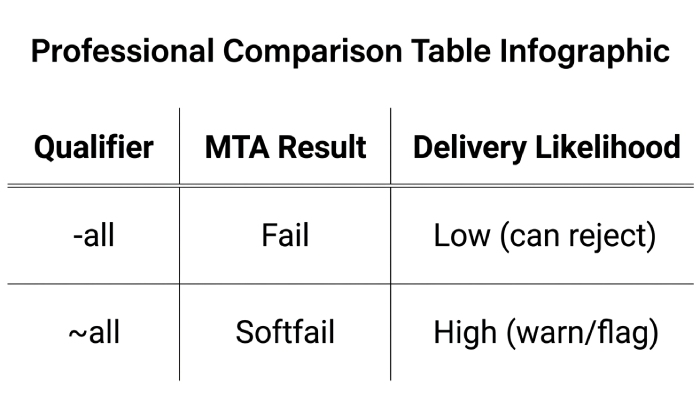
The -all SPF qualifier returns a Fail result when an email originates from a server that is not authorized in the SPF record. Because it indicates a hard failure, the likelihood of successful delivery is low, as receiving mail servers may reject the message outright. This qualifier is best suited for organizations that have complete control over their email infrastructure and have accurately listed all authorized sending sources.
In contrast, the ~all SPF qualifier returns a Softfail result for unauthorized email sources. Messages are typically accepted but may be flagged, quarantined, or assigned a higher spam score, resulting in a high likelihood of delivery. The ~all qualifier is ideal for organizations that are still transitioning to a strict SPF policy and need time to identify and authorize all legitimate email senders before enforcing a hard fail.
Understanding SPF fail and SPF softfail and their impact allows email administrators to tune the SPF policy in alignment with business needs and domain security posture.
When to Use -all or ~all: Common Scenarios and Best Practices
Applying the correct all mechanism in your SPF configuration is pivotal to effective SPF enforcement and robust domain security. The choice between SPF -all and SPF ~all hinges on your organizations operational environment, staffing, and risk tolerance around fraudulent messages and unauthorized email.
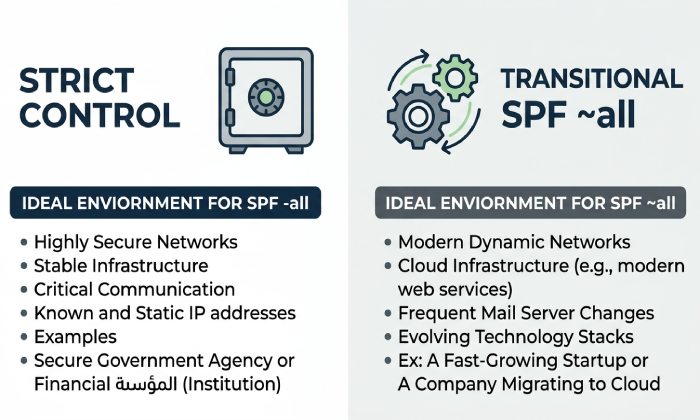
When to Use SPF -all
Best for Strict Environments
- Organizations with a stable, well-defined list of authorized servers.
- Where rapid and unequivocal rejection of fraudulent messages is essential.
- When the business impact of potential SPF mismatches is less severe than the damage caused by spoofed email.
When to Use SPF ~all
Best for Evolving or Uncertain Environments
- During SPF implementation or testing when the full inventory of legitimate email senders is still being established.
- For businesses engaging MSPs & IT agencies, or those without dedicated IT resources, where SPF management and SPF records troubleshooting is ongoing.
- When the domain may delegate email sending rights to third parties (e.g., marketing platforms, DMARC Data Providers) or is in the midst of an SPF survey to discover all legitimate mail sources.
Supplementing SPF with DMARC and Other Email Security Controls
Both SPF -all and SPF ~all should be complemented by comprehensive DMARC enforcement, ensuring that SPF matches align with aligned policy settings through tools like DMARC Inspector or DMARC Record Wizard. Entities such as dmarcian offer supports like Domain Overview, Detail Viewer, and Source Viewer to validate real-world SPF results, monitor SPF challenges, and quickly detect SPF failures.
Always consider potential SPF Pitfalls such as character limits and include mechanism recursion within your SPF input. Leverage tools like SPF Surveyor, Alert Central, and dmarc.io for ongoing SPF verification and proactive management.
Testing, Monitoring, and Updating SPF Records Safely
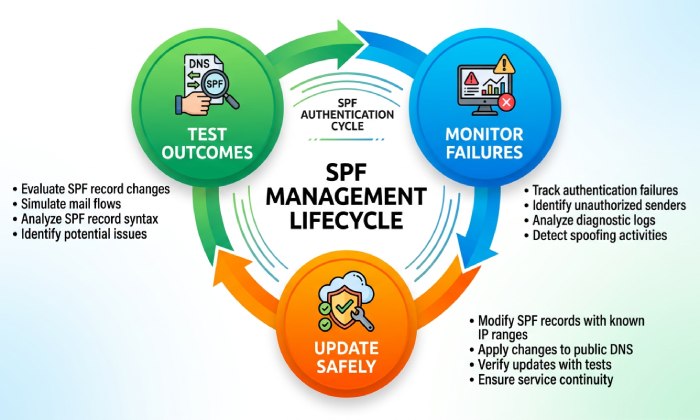
Effective SPF management does not end with initial configuration; it is an ongoing process of testing, monitoring, and updating to adapt to organizational changes and the evolving email threat landscape. Improper SPF input or lapses in policy assertion can result in unexpected SPF failures, impacting legitimate communications or exposing the SPF domain to unauthorized email.
How to Safely Test and Validate SPF Records
- Use Testing Tools: Utilize platforms like dmarcians SPF Surveyor, DKIM Inspector, and Domain Overview, or third-party SPF check utilities to verify SPF records validity and SPF authentication results. You can validate your record instantly with our SPF checker.
- Simulate Outcomes: Experiment with test SPF records using softfail (~all) first when deploying a new policy assertion. Review SPF results before shifting to a stricter -all directive.
Monitoring SPF Failures and SPF Flag Events
- SPF results tracking: Monitor email logs and integrate with tools such as Alert Central or dedicated DMARC Academy reports to track SPF flag events, SPF failures, and trends in email sender verification.
- Regular Reviews: Schedule periodic SPF overview checks and SPF management surveys to ensure all authorized servers (including those managed by technology partners, MSPs, or marketing SaaS providers) are covered.
General Manager
Founder and General Manager of DuoCircle. Product strategy and commercial lead for AutoSPF's 2,000+ customer base.
LinkedIn Profile →