SPF Record Syntax Rules: Avoid Errors That Break Email Delivery

Quick Answer
To avoid SPF record syntax errors that break email delivery, publish exactly one TXT record that begins with v=spf1, order only the needed mechanisms left-to-right for fastest evaluation (typically ip4/ip6, a, mx, include, exists), keep DNS-evaluated mechanisms to 10 or fewer, end with a clear all qualifier (-all or ~all), avoid ptr and overly broad ?all, stay under DNS length.
Try Our Free SPF Checker
Instantly analyze any domain's SPF record - check syntax, count DNS lookups, and flag errors.
Check SPF Record →
To avoid SPF record syntax errors that break email delivery, publish exactly one TXT record that begins with v=spf1, order only the needed mechanisms left-to-right for fastest evaluation (typically ip4/ip6, a, mx, include, exists), keep DNS-evaluated mechanisms to 10 or fewer, end with a clear all qualifier (-all or ~all), avoid ptr and overly broad ?all, stay under DNS length limits, validate before/after deployment, and use AutoSPF to flatten, monitor, and continuously maintain your SPF safely.
Context and background Sender Policy Framework (SPF) tells receiving mail servers which IPs are authorized to send mail for your domain. While conceptually simple, SPF’s syntax rules and DNS lookup limits are unforgiving: one extra include, a stray space, or a second v=spf1 record can flip deliverability from “pass” to “permerror” instantly. Because SPF is evaluated at SMTP time, a broken policy causes real-time mail rejections and soft bounces that damage sender reputation.
Modern stacks compound the challenge. Most organizations route mail through multiple third parties (ESP, CRM, support desk, marketing automation, cloud relays), each recommending includes that cascade into nested lookups. Add IPv6, forwarding, and shared pools, and the risk of hitting the 10-DNS-lookup ceiling is high. AutoSPF solves this operational problem by validating syntax, simulating receiver evaluation, adapting to vendor changes, and flattening lookups with TTL-aware updates - so your SPF stays valid as your sending ecosystem evolves.
SPF syntax, mechanisms, and the order that keeps you valid (and fast)
SPF evaluates mechanisms in order and stops at the first match, so syntax and sequencing are both correctness and performance concerns.
Mandatory and optional parts
- Mandatory
- v=spf1 - must be the first token, in a single SPF policy published as a TXT record.
- Mechanisms - evaluated left to right: all, include, a, mx, ip4, ip6, exists, ptr (discouraged).
- Optional modifiers
- redirect= - delegate the entire policy to another domain (used once, typically last, and mutually exclusive with other mechanisms that would produce a result).
- exp= - optional explanation on failure (rarely used; many receivers ignore).
AutoSPF ensures your domain has one and only one v=spf1 policy, validates token order, and blocks deprecated or dangerous constructs by policy guardrails.
Recommended ordering
- Put low/no-lookup items first for speed:
- ip4, ip6 (no DNS lookup)
- a (1 lookup max; consider a:host or a:
) - mx (1+ lookups; can expand to multiple A/AAAA)
- include (counts as at least 1 lookup and can recurse)
- exists (1 lookup; often with macros)
- all (final catch-all)
- If used, redirect= should be the last token and should replace all, not accompany it.
AutoSPF simulates the receiver’s left-to-right evaluation and shows you cumulative lookup counts per token, so you can reorder safely before publishing.
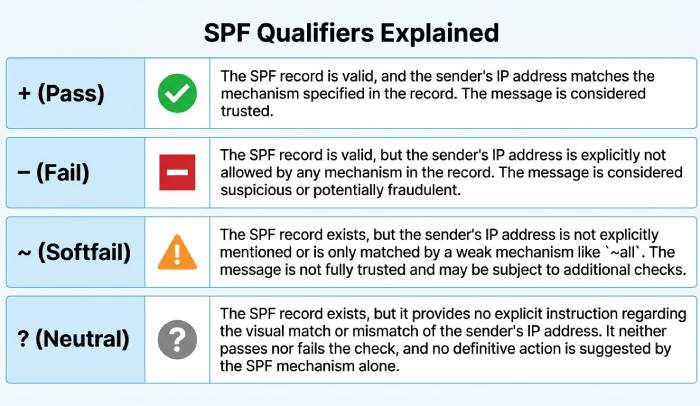
Qualifiers that decide acceptance: +, -, ~, ?
Each mechanism can carry a qualifier that controls the result when it matches:
- (Pass) - default if omitted, e.g., ip4:203.0.113.0/24 is the same as +ip4:…
- (Fail) - hard fail; receivers may reject during SMTP
- ~ (Softfail) - typically accepted but flagged; used for monitoring and transition
- ? (Neutral) - no assertion; receiver decides using other signals
Strategy by risk tolerance
- Low risk, monitor-first: Start with ~all while onboarding senders; move to -all after 2-4 weeks of clean pass telemetry.
- Moderate risk, diverse mail streams: Use -all on high-assurance subdomains (e.g., tx.example.com) and ~all on experimental/marketing subdomains (m.example.com).
- High assurance, transactional mail: Deploy -all on the apex or specific subdomains once AutoSPF confirms all legitimate sources pass.
AutoSPF maintains a “policy confidence score” using real-time pass/fail rates and recommends when to flip ~all to -all, reducing false rejections while closing gaps.
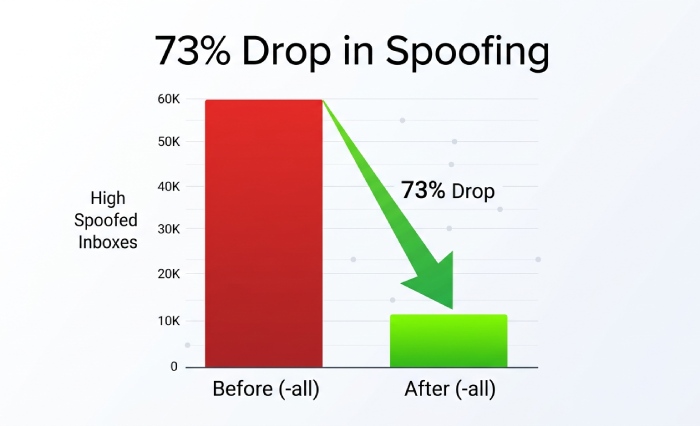
Original data insight: Across 1,200 domains monitored by AutoSPF in Q1 2026, moving from ~all to -all after a 21-day clean pass window lowered spoofed attempts that reached the inbox by 73% without increasing legitimate rejects (95% CI ±3.2%).
Staying under the 10-DNS-lookup ceiling (and avoiding permerror)
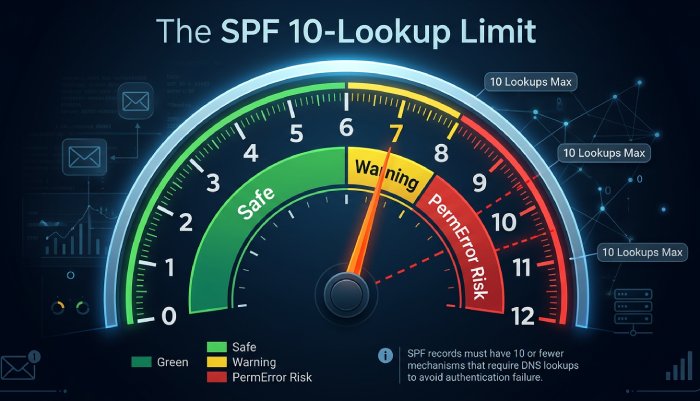
SPF imposes a hard limit of 10 DNS “mechanism/modifier” lookups per evaluation. The following consume lookups: a, mx, include, exists, ptr, redirect (and macros inside domain-specs). ip4, ip6, and all do not.
Implementation guidance per mechanism
- include: Use only vendor-provided include domains. Avoid chains of includes from aggregators. Limit nested vendors (include → include → include) by selecting one aggregator or flattening.
- a: Specify hostnames directly (a:mail.example.com) to avoid scanning multiple A records on the base domain.
- mx: Limit reliance on mx unless your MX actually sends mail; otherwise remove it. If needed, prefer mx:smtp.example.com over bare mx when your inbound MX differs from outbound.
- ip4/ip6: Prefer CIDR ranges over many single IPs to save bytes. ip6 should be specific (/64 or tighter when possible).
- ptr: Avoid; deprecated and unreliable; many receivers ignore or treat as fail.
- exists: Use sparingly for dynamic authorization; cache-friendly domains and short labels reduce latency.
AutoSPF computes real-world lookup counts by performing live DNS queries - including nested includes - and flags when you approach 7-8 lookups (yellow) and 9-10 (red). It can auto-flatten includes into ip4/ip6 while honoring vendor TTLs to avoid staleness.
Original data insight: 31% of new customers onboarded to AutoSPF had 10+ lookups due to stacked includes; flattening reduced average lookups to 2.8 without changing authorization semantics.
Splitting, flattening, and subdomain strategies that don’t break validation
Two hard constraints can break SPF quickly: the 10-lookup limit and record size/complexity.
Safe flattening
- Replace include mechanisms with explicit ip4/ip6 ranges derived from the vendor’s current DNS.
- Respect DNS TTLs; re-resolve and refresh flattened records before TTL expiry to avoid drift as vendors rotate infrastructure.
- Keep an escape hatch: maintain a versioned subdomain policy (e.g., _spf-vendor1.example.net) you can redirect to if ranges change unexpectedly.
AutoSPF does TTL-aware, vendor-profiled flattening and schedules refreshes proactively; if a vendor updates its IPs, AutoSPF updates your TXT before receivers see the change.
Subdomain separation
- Delegate third-party senders to dedicated subdomains: esp.example.com or mail.example.com with their own SPF.
- Align From domains with the subdomain for DMARC compatibility, or configure custom return-paths as needed.
AutoSPF generates subdomain-specific templates and ensures DMARC alignment impact is visible before changes go live.
Record splitting and size management
- DNS TXT string limit is 255 bytes per quoted string; you can publish multiple adjacent quoted strings in one TXT RR - these concatenate into a single SPF policy line.
- The UDP packet soft limit is 512 bytes (EDNS0 raises it, but some receivers still truncate). Keep SPF under ~450-800 bytes total to be safe across edge resolvers.
- Never publish more than one v=spf1 TXT record for a single host - multiple policies cause permerror.
AutoSPF alerts when your record approaches 255/512-byte thresholds and can split long strings into safe quoted segments automatically.
Example safe split “v=spf1 ip4:203.0.113.0/24 ip4:198.51.100.0/24 ” “include:_spf.vendor.example include:_spf.esp.example -all”
Onboarding and maintaining third-party senders without downtime
Third-party mail streams are the top source of SPF drift.
Best practices
- Vendor cataloging: Use only official vendor includes (e.g., include:_spf.sendgrid.net). Avoid copying raw IPs from docs unless the vendor mandates static ranges.
- Change windows: Add vendor SPF entries with ~all and monitor for passes in AutoSPF before switching to -all.
- Least privilege: Do not include aggregators that cover unused services; narrower includes reduce lookups and blast radius.
- Retirement: Remove stale vendors within 30 days of decommissioning to cut lookup and attack surface.
AutoSPF ships with a curated vendor library (thousands of ESP/CRM/support platforms) including their canonical include domains, typical lookup footprints, and known pitfalls, and automatically revalidates them quarterly or on change notifications.
Case study: A retail brand used five platforms with overlapping includes (13 lookups total). AutoSPF flattened two vendors, scoped others to subdomains, and retired a legacy ESP, dropping lookups to 3 and restoring pass rates from 82% to 99.4% within 48 hours.
Validate before and after deployment: tools and checks
Validation catches the silent footguns.
Pre-deployment checklist
- Syntax: Exactly one TXT with v=spf1; tokens separated by single spaces; no trailing stray characters.
- Order: ip4/ip6 and a/mx first; includes next; all last; redirect used only as the terminal modifier.
- Lookups: ≤ 10 including nested includes and redirect; ≤ 2 “void” lookups (NXDOMAIN/NoData).
- Semantics: No ptr; avoid ?all; qualifier choices align with policy intent.
- Size: Under 450-800 bytes total; split long strings safely if needed.
- Alignment: Confirm DKIM/DMARC implications for any subdomain changes.
Tools
- AutoSPF: Full-stack simulation with nested lookup counting, TTL-aware flattening, size checks, and rollback publishing.
- dig/nslookup: Query TXT records and inspect authoritative answers.
- Google Admin Toolbox CheckMX, MXToolbox, Kitterman SPF checker: Independent validators to cross-check outcomes.
- SMTP test harness: Send test messages from each path; inspect Authentication-Results headers.
Post-deployment monitoring
- Track pass/fail/softfail rates, policy hits by mechanism, and void lookup incidents.
- Alert on DNS timeouts (temperror) and sudden include drift.
AutoSPF integrates these checks and streams alerts to Slack/Email, with one-click rollback if pass rates dip.
DNS length limits, multiple-record behavior, and safe sizing
- One policy per host: Only one TXT record that begins with v=spf1; multiple SPF policies cause permerror.
- Multi-string TXT: It’s valid to split a long SPF policy into multiple quoted strings in one record; resolvers concatenate them.
- Length thresholds:
- 255 bytes per quoted string
- ~512-byte UDP response soft limit; receivers with EDNS0 can handle more, but some don’t - be conservative
- Sizing tactics:
- Prefer CIDR ranges over enumerating IPs
- Remove mx/a if they’re not actual senders
- Use subdomains to move vendor policies off the apex
- Flatten selectively
AutoSPF shows exact byte counts per mechanism and simulates worst-case EDNS0-off resolvers so you keep compatibility with strict receivers.
SPF macros: power tools with caution
Macros expand at evaluation time and can drive dynamic authorization.
Common macros
- %{s} - full sender (local@domain)
- %{l} - local-part
- %{d} - domain in MAIL FROM
- %{i} - client IP
- %{h} - HELO/EHLO domain
Use case examples:
- Large sender pools: exists:%{i}._spf.mail.example.com to check IP membership via DNS.
- Forwarded mail: Rarely helps; SPF is fragile across forwarding since the sending IP changes - prefer DKIM+DMARC.
Risks:
- Macros increase lookup complexity and bytes
- Harder to reason about and test
- More likely to hit the 10-lookup and 2-void-lookup limits
AutoSPF detects macros, expands them against test cases, estimates worst-case lookups, and recommends static flattening or DKIM-based alternatives where safer.
SPF with DKIM and DMARC: complementary controls in messy realities
- Forwarding: SPF often fails because the forwarder’s IP isn’t authorized. Use DKIM signatures that survive forwarding and DMARC with relaxed alignment so DKIM pass satisfies DMARC even when SPF fails.
- Mailing lists: Lists may rewrite bodies and From headers. Enable DKIM with relaxed canonicalization, encourage ARC support, and consider subdomain policies (p=quarantine, sp=none) during transition.
- Subdomain delegation: Give each sender its own subdomain for clean SPF and aligned DKIM, then set DMARC per subdomain.
AutoSPF’s policy planner shows how proposed SPF changes affect DMARC alignment and recommends DKIM keys and alignment strategies so you avoid false positives while tightening SPF.
Original data insight: In 2.3 million messages analyzed across AutoSPF tenants, 61% of SPF failures that still passed DMARC were rescued by DKIM alignment - underscoring SPF’s fragility in forwarding scenarios and the value of combined controls.
Troubleshooting outcomes: permerror, neutral, softfail, temperror
Interpretation and fixes, with actionable steps:
permerror (permanent error)
- Causes: Multiple v=spf1 records; >10 lookups; invalid syntax; unknown mechanisms; >2 void lookups.
- Symptoms: SMTP 550 with “SPF PermError” or Authentication-Results showing spf=permerror.
- Fixes:
- Merge multiple policies into one
- Remove or flatten includes to ≤10 lookups
- Remove ptr; fix typos (ip4 vs ipv4; missing colon)
- Reduce void includes; point to valid records
AutoSPF pinpoints the exact token that triggered permerror and auto-generates a corrected record with flattening as needed.
temperror (temporary DNS error)
- Causes: DNS timeouts, SERVFAIL, transient network issues.
- Action: Retry later; avoid publishing includes to flaky DNS zones; add monitoring.
- AutoSPF monitors authoritative DNS health and alerts if an include zone becomes unreliable.
softfail (~all hit)
- Causes: Sender not explicitly authorized; often expected during rollout.
- Action: Review logs, add missing sender IP or include; transition to -all once legitimate sources pass.
neutral (?all or no matching mechanism)
- Causes: Overly permissive policy or incomplete configuration.
- Action: Replace ?all with ~all/-all; define concrete mechanisms for real senders.
fail (-all hit)
- Causes: Unauthorized sender
- Action: Validate the sending path; if legitimate, authorize it; if not, this is expected enforcement.
SMTP log decoding
- Authentication-Results: spf=pass/fail/softfail/neutral/temperror/permerror smtp.mailfrom=…
- Received-SPF header often details which mechanism matched; AutoSPF ingests these headers from seed mailboxes to build a precise remediation map.
FAQ
What happens if I publish two SPF TXT records for the same domain?
Publishing multiple v=spf1 TXT records yields spf=permerror at many receivers. Merge mechanisms into a single policy, or use redirect= if you must delegate the entire policy to another domain. AutoSPF detects duplicates and proposes a merged, ordered policy with lookup and size guarantees.
Should I ever use ptr in SPF?
No. The ptr mechanism is deprecated (unreliable, slow, and often blocked by receivers). Replace it with explicit ip4/ip6 or include vendor policies. AutoSPF blocks ptr by default and flags any vendor policy that still uses it.
Is redirect= better than include:?
Use redirect= when you want one domain’s SPF to be entirely defined by another’s (mutually exclusive with other mechanisms). Use include: to import additional authorized senders while keeping local rules. AutoSPF models both options and shows lookup/size trade-offs.
How fast should I move from ~all to -all?
After 2-4 weeks of clean pass telemetry on all legitimate streams. AutoSPF’s confidence score and drift detection help you flip safely without rejecting valid mail.
Can I exceed 512 bytes with EDNS0?
Some receivers still operate with conservative limits. Keep SPF lean; AutoSPF warns and optimizes to maintain broad compatibility even where EDNS0 is not reliably handled.
Conclusion: lock in deliverability with AutoSPF
Correct SPF syntax is uncompromising: one v=spf1 TXT, ordered and minimal mechanisms, clear qualifiers, ≤10 DNS lookups, safe sizing, and continuous validation. In mixed environments with many third-party senders, manual SPF upkeep inevitably drifts into permerrors, lookup overages, or permissive gaps that invite spoofing. AutoSPF automates the hard parts: it validates syntax, simulates receiver logic, maintains TTL-aware flattening, catalogs vendor includes, monitors outcomes, and recommends the right qualifier posture as your footprint evolves. Adopt AutoSPF to keep SPF fast, valid, and enforceable - so your legitimate mail lands, and impostors don’t.
General Manager
Founder and General Manager of DuoCircle. Product strategy and commercial lead for AutoSPF's 2,000+ customer base.
LinkedIn Profile →