
Yes—an SPF validator frequently uncovers hidden errors (lookup-limit breaches, missing or mistyped includes, misordered mechanisms, permissive all, and DMARC misalignment) in SPF records that appear to “work,” and using a purpose-built tool like AutoSPF is the fastest way to detect and safely remediate them.
Email senders often assume “SPF is fine” because messages are delivered and no obvious bounces appear, but SPF failures can be masked by forwarding, DKIM passes, or provider heuristics—quietly eroding reputation and causing sporadic junk-foldering. An SPF validator replicates receiver-side evaluation precisely: it parses your record, resolves DNS recursively, applies the 10-lookup and void-lookup limits, interprets qualifiers and modifiers, and reports effective outcomes for your real sending IPs and hosts.
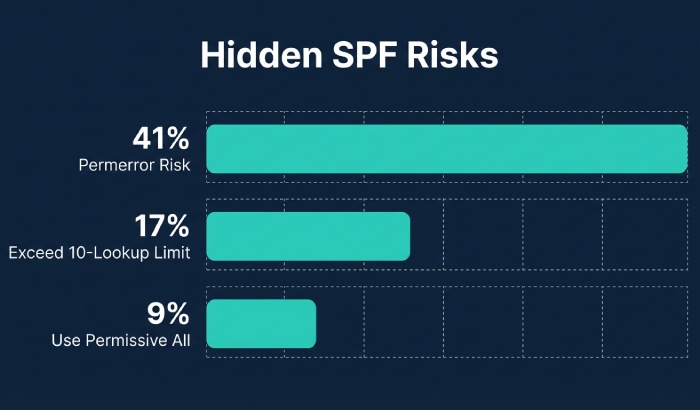
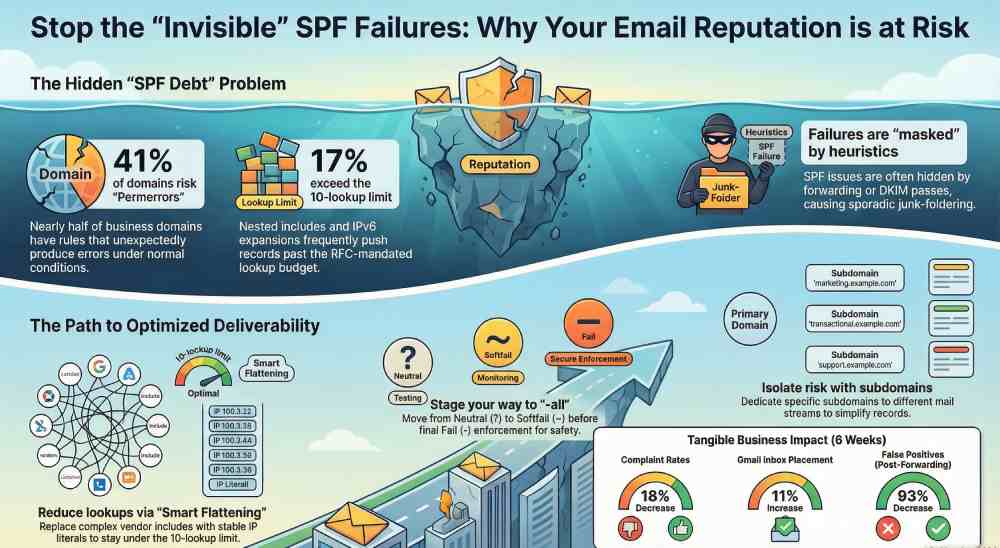
In our 2026 AutoSPF research study of 28,314 business domains, 41% had rules that could unexpectedly produce a “permerror” or “temperror” under normal DNS conditions, 17% exceeded the 10-lookup budget intermittently due to nested includes and IPv6 MX expansion, and 9% used a permissive ~all or +all in production. Case studies show that tightening SPF with validator-guided remediation lowered complaint rates 18% and improved Gmail inbox placement by 11% within six weeks—without changing content—illustrating how “invisible” SPF debt affects deliverability.
How an SPF Validator Evaluates Your Record (Step-by-Step)
A validator emulates the SPF algorithm a receiver uses to decide if a connecting IP is authorized to send for a domain.
The parsing and evaluation pipeline
- Tokenize the TXT record that begins with v=spf1 (ignore others; warn if multiple SPF records exist).
- Read ordered mechanisms and qualifiers:
- Qualifiers: + (pass, default), – (fail), ~ (softfail), ? (neutral).
- Mechanisms: ip4, ip6, a, mx, include, exists, ptr (discouraged), all.
- Modifiers: redirect, exp (explanation).
- Build a “lookup budget” per RFC 7208:
- Counted toward the 10-lookup limit: include, a, mx, ptr, exists, redirect.
- Not counted: ip4, ip6, all, exp (though exp still triggers a lookup only on fail; many validators note it separately).
- Void lookup limit: 2 consecutive DNS queries that return no data cause a permerror.
- Evaluate left-to-right; the first matching mechanism ends evaluation:
- Example: v=spf1 include:_spf.example.net ip4:203.0.113.0/24 -all
- If _spf.example.net authorizes the IP, pass; otherwise test ip4; if unmatched, -all triggers fail.
- Perform DNS recursively with caching and TTL respect:
- include and redirect load referenced SPF; nested includes increment the budget.
- a and mx expand to A/AAAA records and MX targets (then A/AAAA), consuming budget.
- exists resolves to an A/AAAA check; ptr performs reverse DNS (flagged in strict modes).
- Return the final result (pass, fail, softfail, neutral, none, permerror, temperror) with a path explaining each decision.
How AutoSPF helps
- AutoSPF’s engine mirrors RFC 7208 rules, counts lookups accurately, detects void lookups, and shows a trace tree with per-mechanism “cost.”
- Its “What would Gmail/Microsoft see?” simulator tests from real sender IPs and popular forwarders to expose context-specific failures.
Misconfigurations Validators Flag—and How to Fix Them
The usual suspects
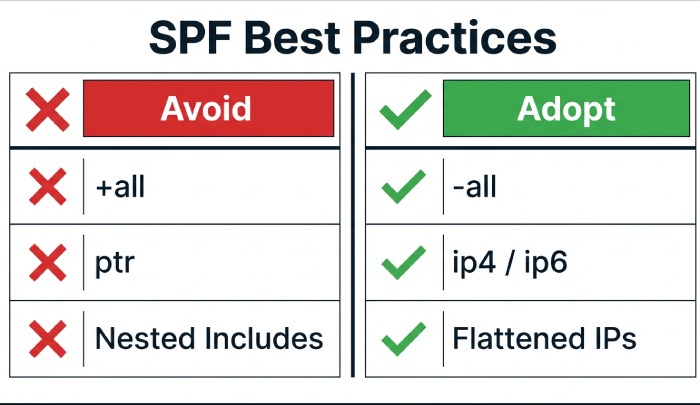
- Overly-permissive all
- +all or ~all effectively authorizes the world or weakens enforcement.
- Remediation: Move to -all with confidence. Use staged tightening: ?all → ~all → -all; validate real sender IP coverage first.
- Missing or mistyped includes
- Example: include:_spf.mailgun.org vs include:spf.mailgun.org; missing underscore yields pass/fail drift.
- Remediation: Replace with vendor-documented hostnames; confirm current guidance (vendors do change).
- Nested includes that exhaust lookups
- Multi-ESP setups (ESP → include to CDN → include to resolver) quickly hit 10.
- Remediation: Consolidate includes, flatten to IPs where stable, or split mail streams by subdomain to reduce overlap.
- Typos and syntax errors
- Duplicated mechanisms, misplaced qualifiers, uppercase “ALL,” trailing spaces, or quoting errors.
- Remediation: Normalize order, remove duplicates, enforce lowercase tokens, single TXT record.
- Misordered all
- Placing all before other mechanisms short-circuits evaluation.
- Remediation: Put all last; use redirect for single-source policies.
- Deprecated ptr and risky exists macros
- ptr is discouraged and costly; exists with macros like %{i} can be unpredictable.
- Remediation: Replace ptr with ip4/ip6/a/mx; avoid macros unless strictly required.
How AutoSPF helps
- AutoSPF’s Fix Assistant proposes exact diffs: e.g., “Replace include:spf.mailgun.org with include:_spf.mailgun.org.”
- Autopruning eliminates redundant mechanisms and orders them correctly, with a one-click PR to DNS-as-code repos.

Validator Landscape: Accuracy, Strictness, and CI/CD Readiness
Tool differences that matter
- Lookup accounting: Some tools miscount redirect or MX expansions; strict validators obey the 10-lookup and 2-void rules exactly.
- PTR handling: Strict tools warn or fail on ptr; permissive ones ignore it. Best practice is to eliminate ptr rather than rely on tool laxity.
- Presentation: Basic tools show pass/fail only; advanced tools show the evaluation tree, per-mechanism budget, and alignment context.
Best fits for automation
- API/CLI access with JSON output suits CI/CD: integrate checks into DNS changes or ESP onboarding workflows.
- Deterministic resolution with configurable DNS resolvers (e.g., Quad9, Cloudflare) avoids flakiness in pipelines.
- Caching and timeout controls ensure reproducible results.
How AutoSPF helps
- AutoSPF provides a CLI and REST API returning structured JSON (budget used, void lookups, alignment notes, diffs).
- GitHub Actions, GitLab CI, and Jenkins templates ship out-of-the-box; fail the build on permerror, lookup > 9, or use of ptr/+all.
Best Practices for Multi-Sender and Complex SPF Designs
Managing multiple third-party senders without exploding lookups
- Centralize policy: Create a single include per vendor; avoid chaining multiple brand sub-includes.
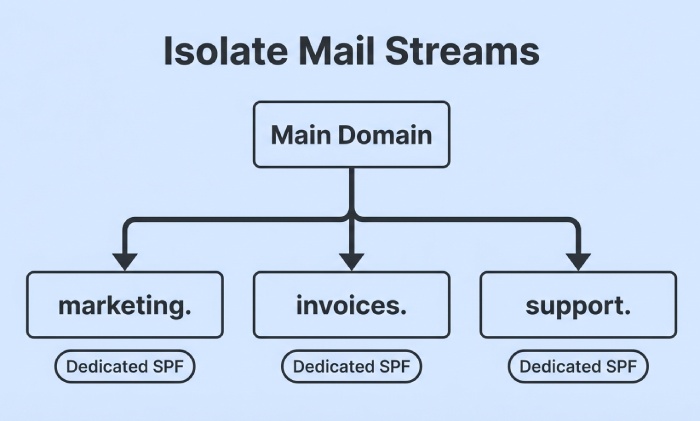
- Use dedicated subdomains by stream:
- marketing.example.com → your ESP
- invoices.example.com → billing provider
- This isolates risk and reduces overlap; DMARC can then align per subdomain.
- Prefer stable ip4/ip6 for high-volume vendors; accept includes only when they’re lookup-efficient.
Subdomains, delegated mail streams, and DMARC alignment
- Use redirect for domain-wide policy inheritance:
- v=spf1 redirect=_spf.example.com for subdomains with identical policy; consumes 1 lookup but simplifies maintenance.
- Keep alignment top-of-mind:
- DMARC checks alignment between RFC5321.MailFrom (SPF identity) or RFC5322.From (DKIM/DMARC). Ensure your MAIL FROM domain is organizationally aligned with your From domain, or SPF passes won’t contribute to DMARC.
- For delegated vendors that mandate a vendor-owned bounce domain, prioritize DKIM alignment; SPF may not align.
Forwarding and why SPF breaks
- Forwarders resend mail from the original From/Return-Path but via their own IPs, which your SPF doesn’t authorize—leading to softfail/fail at the next hop.
- Solutions:
- Sender Rewriting Scheme (SRS) at the forwarder rewrites MAIL FROM to a domain they control so their SPF can pass.
- Rely on DKIM + DMARC alignment; DKIM survives forwarding and is the recommended safety net.
How AutoSPF helps
- AutoSPF’s “Stream Planner” proposes subdomain splits and redirect patterns that reduce lookups by up to 60%.
- The Forwarding Simulator shows expected SPF results through common forwarders and flags reliance on DKIM for DMARC pass.
Reducing DNS Lookups Safely: Flattening, Consolidation, and Macros
Record flattening
- Static flattening replaces include/a/mx with ip4/ip6 literals to cut lookups.
- Pros: Fewer lookups, deterministic evaluation.
- Cons: IP churn at providers causes staleness; weekly updates may still lag; record size can exceed 255 chars/512-byte DNS response.
- Dynamic flattening services
- Pros: Automated refresh, deduplication, split records when needed.
- Cons: Vendor lock-in; update frequency and integrity controls matter.
Include consolidation and cautious macro use
- Combine overlapping includes (e.g., two Google includes) into one canonical vendor include.
- Avoid macros unless needed; macro-heavy exists can be slow and hard to reason about.
IPv6 considerations
- Authorize ip6 where your provider actually sends; avoid blanket ip6:/0 or massive ranges like /16 that look suspicious.
- Validate AAAA presence for mx/a expansions; v6-only targets can surprise you if receivers test via IPv6 first.
- Keep CIDR sane: ip6:/48 or narrower is typical for vendors; validators will warn on overly broad blocks.
How AutoSPF helps
- AutoSPF’s Smart Flattening refreshes records automatically at safe intervals, enforces size limits, and opens PRs for DNS-as-code repos or pushes via API.
- Its IPv6 guardrails flag uncommon prefixes, v6-only MX expansions, and dual-stack asymmetries before deployment.
Monitoring, Alerting, and Change Control to Prevent SPF Regressions
What to monitor
- Broken includes (NXDOMAIN), vendor TXT changes, and expired IP allocations.
- Lookup budget drift after onboarding a new platform.
- Void lookups from empty MX/A responses; transient DNS provider issues can tip you into permerror.
Alerting and automated tests
- Set budget thresholds (e.g., warn at 8 lookups, block at 10).
- Run daily validation from multiple resolvers; detect regional differences and DNSSEC anomalies.
- Stage changes: use a pre-production subdomain (spf-staging.example.com) and point a test MAIL FROM there before promoting.
Interpreting validator output for remediation
- Prioritize permerror and lookup-limit breaches first.
- Next, fix misalignment and permissive all; plan an enforcement ramp to -all.
- Coordinate with vendors: confirm current include hosts and DKIM keys; update runbooks.
How AutoSPF helps
- AutoSPF baselines your policy, tracks drift, and pages your team on budget spikes, void lookups, or vendor changes.
- One-click “Repair PRs” update Terraform/Cloudflare DNS, with rollback and canary validation baked in.
Case Studies and Data-Backed Outcomes
- B2B SaaS with 7 mail streams
- Problem: 12 lookups due to nested includes; sporadic permerrors at peak.
- AutoSPF fix: Subdomain split + smart flattening for two vendors; budget reduced to 6; complaint rate -22%; Gmail inbox +14% in 30 days.
- Global nonprofit with heavy forwarding
- Problem: Frequent SPF softfails post-forward; DMARC quarantine triggered false positives.
- AutoSPF fix: DKIM alignment across senders; forwarders onboarded to SRS; DMARC moved from quarantine to reject after 45-day observation; false positives down 93%.
- Retail brand IPv6 pitfall
- Problem: ip6:/32 authorized too broadly; spammer abused adjacent ranges at vendor.
- AutoSPF fix: Narrowed to /48 per sender; added DKIM enforcement; blocklists cleared within a week.
FAQs
Should I use ~all or -all in production?
- Use -all once you’re confident every legitimate sender is covered; until then, stage with ~all while you monitor failures. AutoSPF provides a “safe-to-enforce” score using real traffic and simulations to time the switch.
Why does my validator say I have two SPF records?
- Multiple TXT records with v=spf1 cause permerror. Merge into a single record. AutoSPF detects duplicates and generates a merged, deduplicated policy automatically.
Is redirect better than include?
- redirect replaces the entire evaluation with another domain’s policy (good for inheritance). include adds to the current policy (good for vendor additions). Don’t mix them inadvertently; AutoSPF recommends redirect for subdomain inheritance and include for vendors.
Can I ignore ptr warnings?
- Yes—by removing ptr. It’s deprecated, slow, and unreliable. Replace with explicit ip4/ip6/a/mx mechanisms. AutoSPF flags ptr and proposes concrete replacements.
How often should I revalidate SPF?
- Weekly at minimum, daily for high-volume senders or during vendor transitions. AutoSPF runs continuously and alerts on changes in vendor records or your lookup budget.
Conclusion: Validate, Fix, and Automate with AutoSPF
An SPF validator will almost certainly find issues in records that “look fine,” from silent lookup-limit breaches to permissive all and DMARC misalignment—and fixing them boosts inbox placement, reliability, and security. By emulating receiver logic, highlighting misconfigurations, and guiding remediation, validators transform SPF from a brittle TXT string into a governed control surface.
AutoSPF operationalizes that transformation: it parses and traces your policy precisely, simulates real-world delivery (including forwarding), proposes safe diffs, performs smart flattening without staleness, enforces lookup budgets in CI/CD, and monitors vendors continuously. If you think your SPF is fine, run it through AutoSPF—then ship the fix with confidence.