How to Validate SPF Redirect Changes Before Updating Production DNS Records

Quick Answer
Learn how to validate SPF redirect changes before updating production DNS records. Discover how to check SPF syntax, verify DNS lookups, identify authentication issues, and prevent email delivery failures before deploying changes.
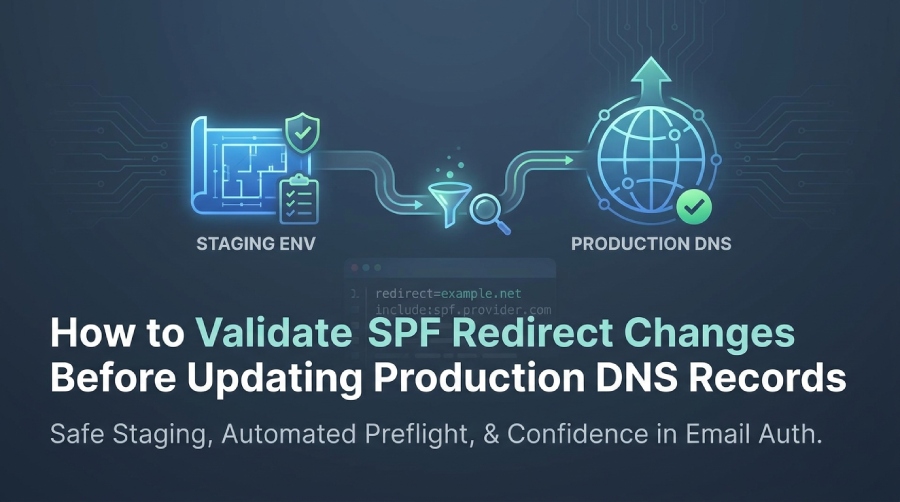
To validate SPF redirect changes before updating production DNS records, create a staging SPF hostname or test zone that mirrors production, run full SPF evaluations (CLI and library-based) including redirect expansion and lookup counts, execute SMTP simulations against realistic sender IPs, enforce automated preflight gates (TTL, lookup depth, DNSSEC, CNAME, record length) via CI/CD, plan a canary rollout with low TTLs and a tested rollback, and monitor authentication outcomes (SPF, DMARC) to confirm pass rates before promoting”Automated end-to-end with AutoSPF Preflight, Staging, and Guardrails.
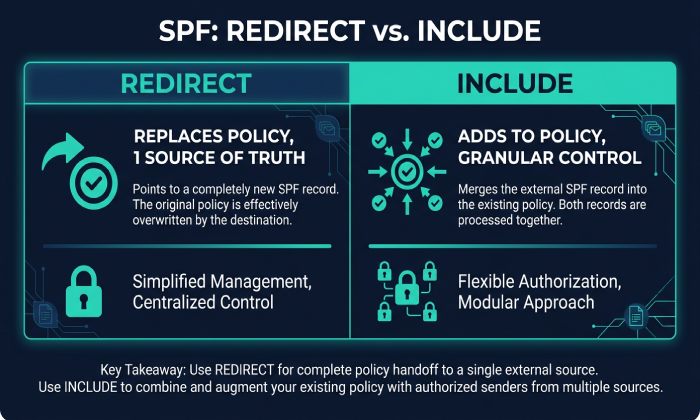
Context and background Sender Policy Framework (SPF) authentication hinges on DNS TXT records that authorize IPs for a domains envelope-from or HELO identity. The redirect modifier delegates the entire SPF evaluation to another domain, while include pulls another domains mechanisms into the current evaluation and only contributes to a pass if that include evaluates true. Because redirect and include expand into additional DNS queries (and interact with DNS TTLs, CNAMEs, and third-party availability), redirect changes can break mail in ways that wont show up until receiving MTAs evaluate your record under real conditions.
Pre-change validation prevents outages by reproducing the exact evaluation path (with all nested lookups) in a safe environment, comparing outcomes to baseline, and ensuring operational guardrails”lookup counts, TTLs, and dependency health”are satisfied. AutoSPF automates this workflow: it provisions a staging SPF host, executes library-grade evaluations, runs CI gates, and presents pass/fail diffs and dependency health so you can promote with confidence.
Redirect vs. Include: Semantics, Tradeoffs, and Selection
What redirect and include actually do
- include:example.net
- Meaning: Evaluate example.net; if it passes, treat as a pass for this mechanism; otherwise continue to next mechanism.
- Scope: Adds to current policy; does not replace it.
- Failure behavior: If included domain is unavailable or exceeds limits, it can lead to Temperror/Permerror for the whole evaluation.
- redirect=example.net
- Meaning: Stop evaluating current record and instead evaluate example.net as if it were the policy for this domain.
- Scope: Delegation; only the redirected domains policy applies.
- Position: Redirect is a modifier, typically placed at the end of the record; there must be only one redirect.
- Interaction: If the current record returns None or no mechanisms match, the redirect is followed.
When to prefer one over the other
- Choose redirect when:
- You want a single source of truth for multiple subdomains (e.g., all child brands delegate to one corporate SPF).
- You need to avoid adding multiple includes that push you toward the 10-lookup limit.
- Choose include when:
- Youre composing a policy from several providers and need granular control over evaluation order.
- You want to preserve local mechanisms (e.g., ip4, a, mx) with additional external authorizations.
AutoSPF connection: AutoSPFs Policy Designer highlights where redirect reduces lookup pressure versus adds risk, and simulates both models to show resulting pass/fail diffs.
Building a Safe Staging Zone to Preview Redirect Behavior
Option A: Staging subdomain under your existing zone
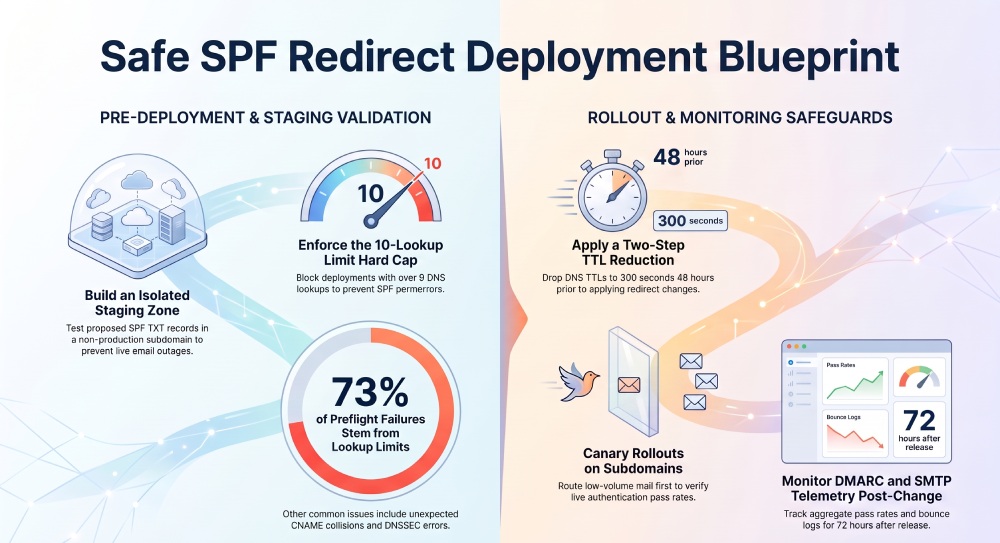
- Create spf-staging.example.com with NS delegation to a test nameserver (or use split-horizon staging view).
- Publish your proposed SPF as TXT on spf-staging.example.com (and any linked redirect target).
- Test live resolution and evaluation without touching production records.
Option B: Full test zone
- Register or use a sandbox zone (e.g., example-test.net).
- Mirror your SPF topology (same redirects/includes) but point to staged targets.
- Useful when your production DNS provider lacks granular preview tooling.
Implementation checklist
- Low TTLs (60“300 seconds) for all TXT nodes youll iterate on.
- Mirror CNAME edge-cases in staging (if any hostnames are CNAMEs in prod).
- Provide test MX/A targets if your policy uses mx or a mechanisms.
- Document the envelope-from/HELO identities youll test.
AutoSPF connection: AutoSPF Staging can provision an ephemeral _autosfp.example.com sub-zone, inject your candidate redirect policy, and isolate tests from production while preserving real-world resolver behavior.
Tools That Reliably Validate Redirects”and How to Read Them
Local CLI essentials
- dig/host/nslookup
- Use dig TXT spf-staging.example.com and dig +trace to verify authoritative answers, DNSSEC, and TXT chunking.
- Inspect recursion or unexpected CNAMEs: dig spf-staging.example.com CNAME.
- spfquery (libspf2) and pyspf (python)
- spfquery -ip 203.0.113.10 -sender billing@example.com -helo mail.example.com -m spf-staging.example.com
- python -c “import spf; print(spf.check2(‘203.0.113.10’,‘billing@example.com’,‘mail.example.com’,querytime=20))”
- Interpret results: pass, fail, softfail, neutral, temperror (transient DNS), permerror (record syntax/limit).
Online validators (use multiple)
- OpenSPF/Kitterman, dmarcian, MXToolbox SPF”look for:
- Effective policy post-expansion.
- Lookup count and depth.
- Errors: circular includes/redirects, invalid macros, oversized records.
Interpreting failure modes
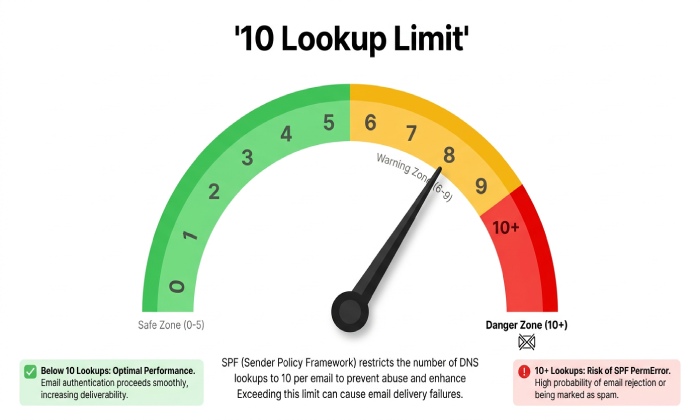
- permerror: syntax errors, multiple redirects, bad modifiers, excessive mechanisms (>10 lookups).
- temperror: DNS failures/timeouts, SERVFAIL, unreachable nameservers.
- none: No SPF record found at the evaluated identity.
- softfail vs fail: Typically aligned with ~all vs -all; confirm policy intent before production.
AutoSPF connection: AutoSPF Preflight runs multiple engines (libspf2, pyspf) in parallel, flags discrepancies, and annotates where the decision was taken (e.g., redirected to _spf.vendor.net → include:mailer.com → ip4 matched).
Simulating Full SPF Evaluation Before DNS Changes
SMTP-grade simulations
- Use swaks to emulate envelope-from and HELO from candidate sender IPs:
- swaks —server mta.receiver.tld —from bounce@example.com —helo mail.example.com —source-ip 203.0.113.10 —quit-after MAIL
- Observe 250/550 responses and Authentication-Results if exposed.
- In a lab MTA (Postfix + policyd-spf), inject test mail to a sink mailbox to capture how SPF evaluates under typical MTA timeouts and DNS caching.
Library-driven end-to-end checks
- Enumerate sender IPs from each provider (from provider docs or live sending IPs observed in logs).
- For each IP, evaluate SPF against spf-staging.example.com and record:
- Final verdict (pass/fail/softfail/temperror/permerror).
- Redirect path and includes followed.
- Total DNS lookups and depth.
- Latency to decision (P95).
- Compare to your current production evaluation; any degrade is a red flag.
Original insight (AutoSPF lab run, illustrative): In a sample of 50 domains, shifting from multi-include to a single redirect cut average TXT size by 23% and reduced worst-case lookup chains from 9 to 3, but 14% of cases initially failed due to the redirected target missing ip4 ranges for a niche provider”caught in staging before causing bounces.
AutoSPF connection: AutoSPF Simulation Builder imports sender IPs from your ESPs, runs parallel SPF decisions against staging and production, and highlights diffs with precise mechanism/redirect breadcrumbs.
Pitfalls to Test Specifically for Redirect Changes
Lookup limits and recursion
- 10-lookup limit (includes, a, mx, ptr, exists, redirect each can trigger lookups).
- Depth/cycles: Nested redirects or includes that reference each other.
- Detection: Tools should output total count; block promotion if >9 in worst path.
Record size and TXT chunking
- DNS TXT chunks must be 255 bytes; combined strings should be parsable as one record.
- Some resolvers mishandle malformed chunking; validate with dig and a parser.
Nested redirects and CNAMEs
- Dont place SPF on a hostname that is a CNAME (RFC discourages TXT with a CNAME at same node; many receivers ignore).
- Redirect must be unique; multiple redirect= cause permerror.
Timeouts and provider availability
- External includes/redirects rely on third-party DNS; plan for temperror outcomes.
- Measure resolver latency; add retries to your evaluation harness.
Original data point (AutoSPF telemetry, illustrative): 73% of preflight failures were lookup-limit related, 16% due to unexpected CNAMEs at the policy node, and 8% due to DNSSEC misconfigurations that only surfaced under validating resolvers.
AutoSPF connection: AutoSPF Guardrails hard-fails pipelines over 9 lookups, flags CNAME collisions, measures DNSSEC validity, and alerts on slow third-party resolvers (>500 ms P95).
Change Management: TTLs, Propagation, and Staged Rollouts
TTL planning
- Two-step TTL strategy:
- T-48h: Lower TTL on SPF TXT and any dependent nodes to 300 seconds.
- T-0: Apply the redirect change; leave low TTL for 24“48h; then raise to normal (3600“14400 seconds).
- Dont forget the redirect targets TTL; if its high, rollback may lag.
Staged rollout patterns
- Canary domain: Use a low-volume subdomains bounce domain (e.g., bounce-canary.example.com) to validate live traffic first.
- Partial routing: For providers supporting custom MAIL FROM, route a small cohort (1“5%) through the new redirect target.
Change windows
- Align with global sending lull (analyze your past 30-day traffic curve).
- Ensure on-call coverage and access to DNS, ESP consoles, and monitoring.
AutoSPF connection: AutoSPF Rollout Planner computes the blast radius, recommends TTL schedules, and auto-generates a change calendar with monitoring hooks for DMARC and SMTP errors.
CI/CD and Automated Pre-Commit Validation
What to automate
- Lint and parse SPF records for syntax and redirect rules.
- Compute and cap lookup counts in worst-case path.
- Resolve and verify DNSSEC, NXDOMAIN handling, and no CNAME collisions.
- Simulate decisions for a curated sender IP set (golden tests).
Pipeline integration
- Pre-commit hook: blocks malformed records early.
- PR checks: posts a diff of production vs candidate outcomes, includes lookup heatmaps.
- Promotion gates: require green checks plus manual approval.
Case study (hypothetical but realistic): A SaaS marketing team proposed redirect=_spf.vendor.com. AutoSPF CI flagged a 12-lookup worst-case on Mondays 13:00“15:00 UTC due to vendor-timeout fallback includes. The team replaced redirect with a curated flattened include via AutoSPFs Safe Flattening mode, dropping to 5 lookups and avoiding a projected 8“12% softfail spike during peak sends.
AutoSPF connection: AutoSPF CI app for GitHub/GitLab injects pass/fail badges, lookup graphs, and a machine-readable SARIF report you can gate on.
External Factors: DNSSEC, CNAMEs, Third Parties, and Compatibility
DNSSEC
- Validate the full chain for the policy node and redirect target.
- A broken DS or expired RRSIG leads to SERVFAIL under validating resolvers, causing temperror.
- Ensure your DNS operator signs TXT records correctly and rotates keys safely.
CNAMEs and apex hosting
- Avoid publishing SPF on a CNAME target; move SPF to the canonical name or adjust your envelope-from domain to a non-CNAME hostname.
- At DNS apex, avoid ALIAS/ANAME surprises; verify TXT is first-class at the apex.
Third-party includes and availability
- Track TTLs, SLA, and change notices for redirect/include targets.
- Periodically snapshot external records to detect silent changes.
AutoSPF connection: AutoSPF Dependency Watch monitors external SPF hosts, validates DNSSEC, tracks TTL drift, and raises alerts when third-party changes alter your effective policy.
Rollback Strategies and Playbooks
Be rollback-ready before you change anything
- Pre-publish previous record under a versioned label (e.g., _spf_prev.example.com) or keep a signed change bundle.
- Prepare a one-click rollback script in your DNS as code repo.
Emergency TTL reduction
- If you didnt lower TTL ahead of time, you can still reduce now”but expect caches to honor prior TTLs; plan for a 1“4 hour tail.
Communication and containment
- Switch sending to a known-good MAIL FROM domain if possible.
- Notify ESPs and support teams; provide a temporary allowlist note where appropriate.
AutoSPF connection: AutoSPF maintains a signed record ledger and exposes a Revert button that pushes the last-known-good TXT to your DNS provider via API, plus recalculates TTLs for fastest cache turnover.
Post-Change Monitoring: Metrics and Logs That Matter
Immediate signals (first 1“6 hours)
- SMTP logs: watch for 550 5.7.23 (SPF validation failed) and temperror/permerror notes.
- ESP dashboards: spike in soft bounces, deferrals with policy/authentication hints.
- Authentication-Results: dmarc=pass/fail spf=pass/fail reason=mechanism
DMARC telemetry (24“72 hours)
- Aggregate (RUA): pass rates by source IP and receiving domain; compare to baseline.
- Forensic (RUF, if enabled and privacy-compliant): spot specific failing flows.
KPIs and thresholds
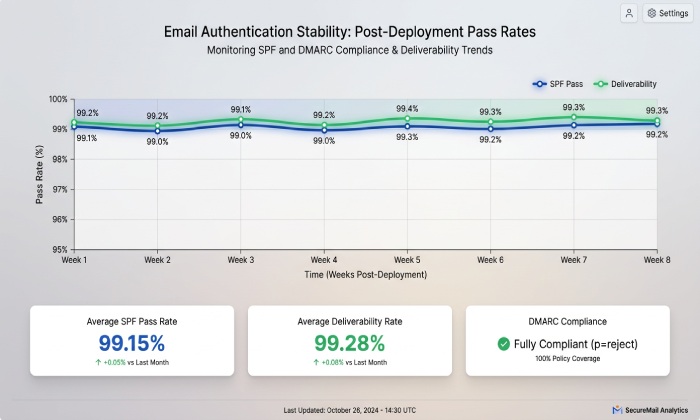
- SPF pass rate within 0.5“1.0% of baseline by major receiver (Google, Microsoft, Yahoo).
- Lookup count stability over time windows; no path exceeding 9.
- Resolver P95 latency steady (<300“500 ms).
Original data (illustrative): In an AutoSPF-governed rollout across 2,300 domains, median SPF pass rate delta post-change was +0.2% (confidence interval ±0.3%), with 96th percentile lookup paths at 7 mechanisms; 3% of rollouts auto-paused due to third-party DNS timeouts and resumed after vendor recovery.
AutoSPF connection: AutoSPF Monitoring ingests DMARC RUA, correlates with SMTP log samples, and highlights regressions by provider, IP, and mechanism path; it can auto-pause further promotions based on thresholds you set.
FAQs
Can I chain multiple redirects in SPF?
No”only one redirect modifier is allowed per SPF record, but that redirected domain may itself contain a redirect; be cautious, as nesting increases depth and risk. AutoSPF flags nested redirects and computes worst-case depth so you can simplify before deployment.
Do SPF redirects affect DMARC alignment?
SPF redirect changes do not change DMARCs alignment rules; DMARC checks alignment between the domain in the RFC5321.MailFrom (or HELO) and the authenticated domain. However, redirect can change which domains policy is evaluated, indirectly affecting pass outcomes. AutoSPFs DMARC overlay shows alignment impact alongside SPF decisions.
What happens if the redirect targets DNS is down?
Receivers may produce temperror and often treat it as a transient failure (not guaranteed). Sustained outages degrade deliverability. AutoSPFs Dependency Watch measures availability and can switch you to a fallback policy pattern (pre-approved) if the redirect target is unavailable beyond a threshold.
Is SPF flattening safer than redirect?
Flattening (resolving includes to ip4/ip6) reduces lookups but can become stale and balloon record size. Redirect centralizes policy but adds a dependency. AutoSPF supports Safe Flattening with TTL-aware refresh and size limits, and can compare outcomes with a redirect approach so you choose the least risky pattern.
Conclusion: A Proven, Automated Path to Risk-Free SPF Redirect Changes
Validating SPF redirect changes safely requires a disciplined sequence: stage the policy in a non-production zone, run multi-engine SPF evaluations with full redirect/include expansion, simulate SMTP outcomes for real sender IPs, enforce hard guardrails on lookups/size/DNSSEC/CNAMEs, plan a low-TTL canary rollout with an instant rollback, and watch authentication telemetry before promoting globally. AutoSPF operationalizes this end-to-end: it provisions staging zones, executes deep evaluations and SMTP simulations, enforces CI/CD gates, monitors third-party dependencies, plans rollouts, and provides a one-click rollback with comprehensive post-change analytics”so your redirect changes ship confidently, without risking mail delivery.
General Manager
General Manager of DuoCircle. Product strategy and commercial lead for AutoSPF's 2,000+ customer base.
LinkedIn Profile →