What Does the Blue Check Mark Mean? A Complete Guide to Gmail, Google & Social Media

Quick Answer
A blue check mark shows that an account or email sender has been verified according to a platform's rules. In Gmail, it confirms authenticated senders using SPF, DKIM, DMARC, and BIMI. On social media, it may indicate identity verification, authenticity, or a paid subscription.
What Is a Blue Check Mark? The Basic Meaning of Verification
A blue checkmark is a visual verification badge that indicates an account or email sender has passed a platform’s verification process. While social media platforms use it to verify accounts, Gmail uses it to identify authenticated email senders through standards such as SPF, DKIM, DMARC, and BIMI.
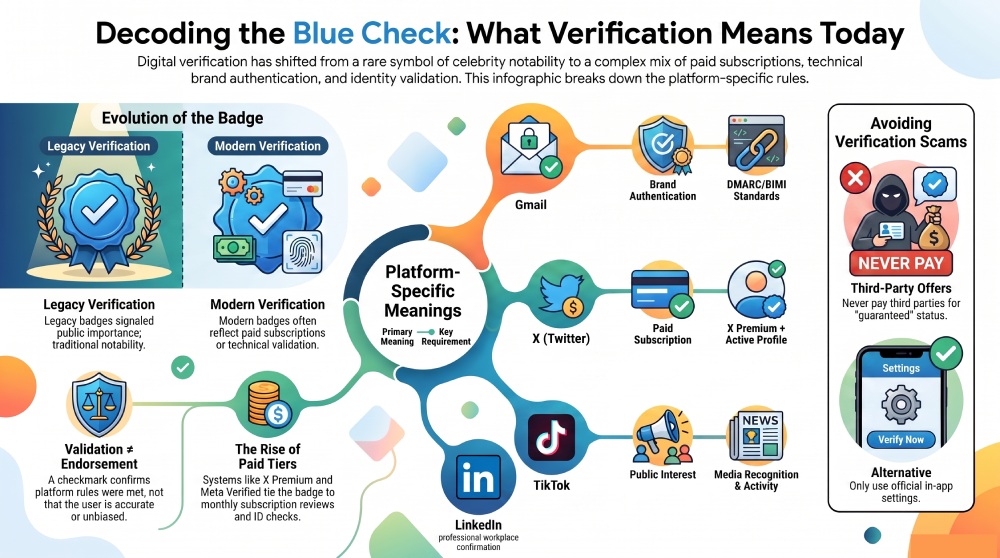
On some services, being verified still means the account has gone through a credibility-based review process. On others, the blue checkmark is tied to a paid subscription, such as X Premium, where a Premium user may receive a check after meeting eligibility requirements. Because of these policy changes, users should not assume every blue checkmark represents endorsement, expertise, or public importance.
Verification vs. Paid Badges
Traditional verification focused on identity, public interest, and risk of impersonation. This was the model behind the legacy Verification program on X, formerly Twitter. Under the legacy Verification program, accounts were often verified because they represented journalists, governments, celebrities, brands, or other high-interest entities.
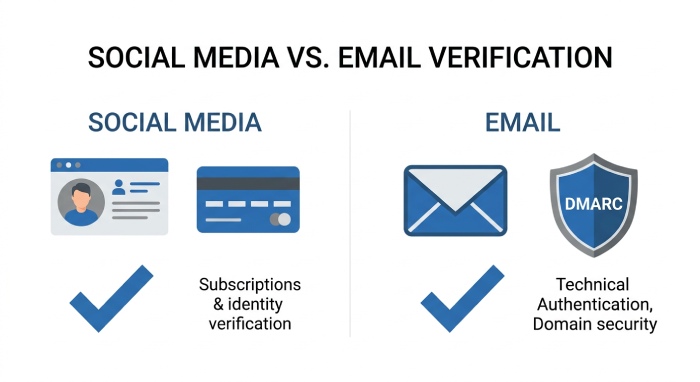
Verification works differently across platforms. Social media services may rely on identity verification or paid subscriptions, while Gmail verifies email senders using authentication standards such as SPF, DKIM, DMARC, and BIMI. This technical verification helps protect users from spoofed and phishing emails. You can create a signing key for your domain with our DKIM generator.
The Most Important Thing to Remember
A blue checkmark indicates that a platform has verified an account or sender according to its own rules. In Gmail, those rules focus on email authentication rather than account popularity or subscription status.
What the Blue Check Mark Means in Gmail and Google Services
In Gmail and some Google services, a blue checkmark works differently from social media verification. It is commonly associated with brand authentication, sender validation, and protections against impersonation. For brands, this can involve email authentication standards such as DMARC and BIMI, which help prove that an email actually comes from the organization it claims to represent. You can check your BIMI record to confirm it is published correctly.
For businesses, a blue checkmark in Gmail can improve trust because users are more likely to recognize an authentic sender. It also supports broader email security practices by helping reduce spoofing, phishing, and fraudulent messages.
Gmail Verification and Brand Trust
Google’s approach is less about creator status and more about whether a sender can be technically authenticated. These authentication protocols work together to verify that an email has not been forged during delivery. They help mailbox providers identify legitimate senders while reducing phishing, spoofing, and business email compromise (BEC) attacks.
This matters because email remains one of the most common channels for spam, phishing, and impersonation. A Gmail blue checkmark can help users distinguish legitimate brands from deceptive senders, though it should still be combined with caution. Users should check links, sender domains, and message content before sharing sensitive information. On the sending side, running an SPF record validator is a quick way to confirm your sender authorization is intact.
Blue Check Marks on Social Media Platforms: Instagram, X, Facebook, TikTok, and LinkedIn
Social media platforms use blue checkmarks in different ways. Instagram and Facebook offer Meta Verified in many regions, TikTok verifies public figures and brands, LinkedIn uses identity and workplace verification signals, and X has moved heavily toward subscription-based verification through X Premium.
X: X Premium, ID Verification, and the New Verification Model
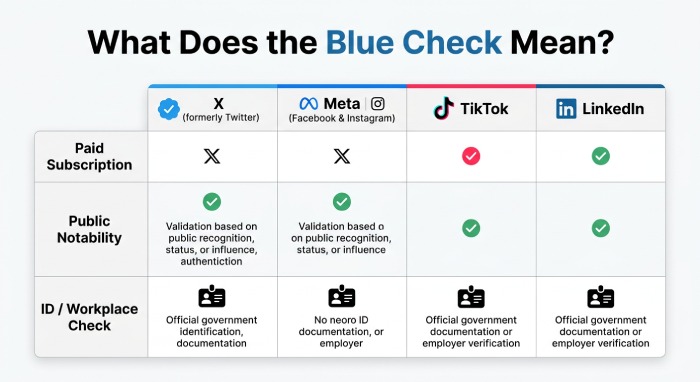
On X (formerly Twitter), the blue check mark is primarily associated with X Premium subscriptions and account eligibility requirements. Other platforms, including Instagram, Facebook, TikTok, and LinkedIn, use their own verification systems based on identity, authenticity, or subscriptions. Unlike Gmail, these badges verify user accounts rather than email senders.
To receive or keep a blue checkmark, a Premium user generally needs an active subscription and must satisfy eligibility requirements. These eligibility requirements may include a complete profile, a stable display name, a profile photo, active use, and a confirmed phone number. In some cases, ID verification may be available or required, and an account may show as ID verified or ID Verified after completing the process.
X also evaluates account integrity. Accounts involved in Platform Manipulation, impersonation, spam, or deceptive behavior may face checkmark removal, account suspension, or other Enforcement actions. The X Support Team may review violations of the X Rules, Terms of Service, and Purchaser Terms. X may also consider Sanctions and Trade Compliance Law, platform eligibility, and region-specific rules in the United States, EEA, and elsewhere.
The shift from the legacy Verification program to X Premium changed the meaning of the blue checkmark. Under the legacy Verification program, a check often implied the account was notable and authentic. Under the current model, a Premium user with an active subscription can receive a blue checkmark if the account meets the eligibility criteria and passes the review process. This means the blue checkmark on X is not simply a fame or importance marker.
Instagram, Facebook, TikTok, and LinkedIn
Instagram, Facebook, TikTok, and LinkedIn each use different verification processes based on identity, authenticity, public interest, or paid subscriptions. Their blue check marks indicate account verification and are not related to email authentication.
TikTok verification is still strongly associated with public interest, authenticity, and notable presence. The platform typically looks for consistent activity, media recognition, and account integrity. LinkedIn verification focuses more on professional identity, workplace confirmation, and account validation rather than celebrity-style status.
Across platforms, eligibility requirements differ. One service may require ID verification, another may emphasize active use, and another may prioritize brand recognition. A blue checkmark should always be interpreted within the platform’s specific rules.
Why Blue Check Marks Matter: Trust, Authenticity, Safety, and Brand Credibility
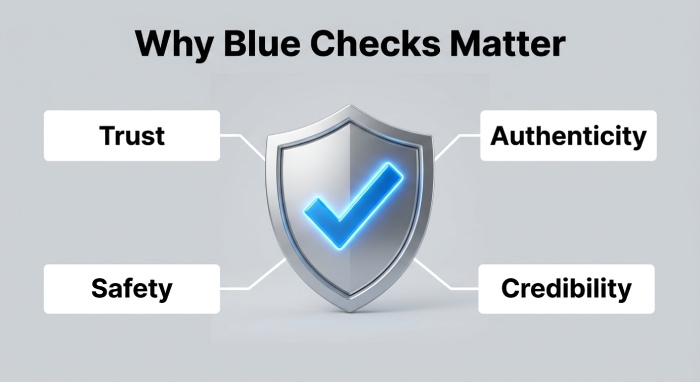 A blue checkmark matters because it reduces uncertainty. Users want to know whether an account claiming to be a bank, public official, journalist, executive, or brand is authentic. For companies, creators, and public figures, being verified can strengthen brand credibility and reduce impersonation risk.
Trust and Account Integrity
Verification helps platforms protect account integrity by discouraging impersonation and platform manipulation. A verified profile with a recognizable profile photo and consistent display name gives users more confidence that they are interacting with the intended person or organization.
However, verification is not perfect. A paid subscription can make a badge more accessible, but it can also make the meaning less clear. On X Premium, for example, the presence of a blue checkmark may indicate an active subscription and platform eligibility rather than public notability. That is why users should also evaluate content quality, history, affiliations, and behavior.
Safety, Policy, and Public Debate
Blue checkmarks also intersect with safety, moderation, and freedom of speech debates. The European Commission has examined platform accountability under the European Digital Services Act, particularly around transparency, advertising, and systemic risks. In the EEA, the European Digital Services Act can influence how platforms describe paid subscription products, verification systems, and risks related to misleading design.
Platforms must balance openness with safety. Enforcement actions may follow violations involving spam, fraud, impersonation, or abusive behavior. On X, a verified account can still face checkmark removal if it violates the X Rules, Terms of Service, or Purchaser Terms.
How to Get a Blue Check Mark—and How to Avoid Verification Scams
The safest way to get a blue checkmark is to use the official verification or subscription flow inside the platform. Never trust third parties that promise guaranteed verification, internal contacts, or secret shortcuts.
General Steps to Become Verified
Start by completing your profile. Use a real profile photo, accurate display name, and consistent bio information. Maintain active use and avoid misleading claims. If the platform requires a confirmed phone number, add one through official settings.
For X, subscribe through the official X Premium flow and keep an active subscription. Choose the appropriate subscription level, such as X Premium Basic, Premium tier, or X Premium+. After subscribing, your X account may enter a subscription review before the blue checkmark appears. If you make profile changes—especially to your profile photo, display name, or username—X may temporarily remove or re-review the badge.
If ID verification is available, complete it only through the platform’s official ID Verification process. A verified or ID verified label can provide additional trust, but you should still follow all eligibility requirements and maintain non-deceptive behavior.
Avoiding Verification Scams
Be skeptical of anyone selling an application for verification outside official channels. Scammers often claim they can bypass eligibility criteria, guarantee approval, or prevent checkmark removal. These offers are usually designed to steal money, personal documents, or login credentials.
Legitimate verification never requires sending your password to a stranger. It should not involve unofficial payment links, cryptocurrency transfers, or requests to disable security settings. Review the platform’s Terms of Service, Purchaser Terms, and verification policies before paying for any subscription.
Be cautious of third parties claiming they can guarantee Gmail verification or bypass authentication requirements. Gmail’s blue check mark is earned through proper email authentication, not unofficial services or paid shortcuts.
General Manager
General Manager of DuoCircle. Product strategy and commercial lead for AutoSPF's 2,000+ customer base.
LinkedIn Profile →