What is SPF flattening, and why is it important?
Quick Answer
If you only have a couple of email services, let’s say one or maybe two servers that send emails on your behalf, maintaining your SPF records is pretty straightforward. But in reality, that’s not really feasible, as most organizations have more than a handful of servers and third-party services that use their domain on your behalf.
What is SPF flattening, and why is it important?
Related: How to Create an SPF Record ·SPF Record Format ·SPF Too Many DNS Lookups
“The misconception about SPF flattening is that it’s a one-time fix,” says Adam Lundrigan, CTO of DuoCircle and architect of AutoSPF’s flattening engine. “Vendor IP ranges change constantly — Google rotated their _netblocks three times in 2025 alone. A flattened record that isn’t automatically re-resolved goes stale and silently de-authorizes legitimate senders. That’s why AutoSPF re-scans every 15 minutes.”
“The 10-lookup limit is the single most common reason enterprise SPF records silently break,” says Brad Slavin, CEO of DuoCircle and founder of AutoSPF. “In our experience managing SPF for 2,000+ customer domains, the failure mode is always the same: a team adds a new SaaS tool, its include pushes the total past 10, and legitimate email starts failing — but nobody notices until a customer complains about missing invoices or password resets.”
If you only have a couple of email services, let’s say one or maybe two servers that send emails on your behalf, maintaining your SPF records is pretty straightforward. But in reality, that’s not really feasible, as most organizations have more than a handful of servers and third-party services that use their domain on your behalf. These could include your CRM, marketing platform, helpdesk system, billing software, or even cloud services that process or forward emails.
Per RFC 7208, SPF evaluation is capped at 10 DNS mechanism lookups and 2 void lookups per check — exceeding either limit produces a PermError that fails authentication for every message from the domain.
Every time you add one of these services, you also add another “include:” to your SPF record. And when these start piling up, your SPF record becomes too long and complicated to handle. On top of that, SPF has a strict limit: it can only perform 10 DNS lookups. This means that every time SPF sees an “include:”, an “mx”, or anything else that requires it to fetch another DNS record, it counts toward that limit. And once you cross 10 lookups, SPF stops checking further and treats your record as invalid.
So, how do you incorporate all the sending services in your SPF record to ensure that they are considered legitimate by the receiving server? That’s where SPF flattening comes in.

What is SPF flattening?
SPF flattening is a way of making your long, complicated SPF record into a simple version that doesn’t rely on so many DNS lookups. What it does is, it takes all those” include” entries in your SPF record and converts them into a single list of IP addresses.
So, instead of asking the receiving server to go and check multiple DNS records, each for a different service, SPF flattening provides a single list of IP addresses that are allowed to send emails on your behalf. This keeps your SPF record light, easy to process, and well within the 10-lookup limit. It also reduces the chances of SPF failures caused by DNS timeouts or too many nested lookups.
Why is SPF flattening an important aspect of email deliverability and authentication?

As you know, the SPF record cannot accommodate everything directly when you use multiple email services. Once you reach the 10 DNS lookups limit, SPF stops working as it should. But this doesn’t mean you cannot use those services, or that they cannot be considered legitimate. SPF flattening makes it all possible.
Let’s understand how:
Fixes DNS lookup limitation
One of the biggest limitations of SPF is the 10-DNS lookup limit rule. That means it becomes challenging to include multiple services in your SPF record without accidentally crossing that limit. SPF flattening helps you get around this problem by removing the extra lookups. Instead of relying on multiple includes, flattening gives the receiving server a single, complete list of IP addresses. This prevents your SPF record from going over the lookup limit and stops legitimate emails from failing just because the record became too large.
Reduces the risk of email spoofing
When your SPF record is too long or unstructured, it becomes easier for attackers to spot gaps in your record and exploit them. Let’s say, if your SPF record does not include all the legitimate services you use, or part of it fails because of the lookup limit issue, receiving servers may not be able to clearly verify who is allowed to send emails on your behalf. This opens doors for attackers to send spoofed emails that look authentic.

SPF flattening helps you prevent this by giving the receiving server a clear and complete list of authorized IP addresses. When your SPF record is clean, accurate, and always within the lookup limit, mail providers can confidently check whether an email truly came from you.
Makes SPF management easier
As your brand grows, the number of platforms sending emails on your behalf also increases. You now probably need a CRM platform, marketing tool, or maybe even a separate billing or notification service. Managing all of these manually can be quite challenging. SPF flattening simplifies this by turning everything into one clean list of IP addresses that’s easy to read and update. You no longer have to worry about keeping track of a long chain of “includes” entries or dealing with the burden of staying within the limit.

How does SPF flattening work?
It works by breaking down your current SPF record, extracting everything that triggers extra lookups, and consolidating it into a single, clean list of IP addresses that receiving servers can verify instantly.
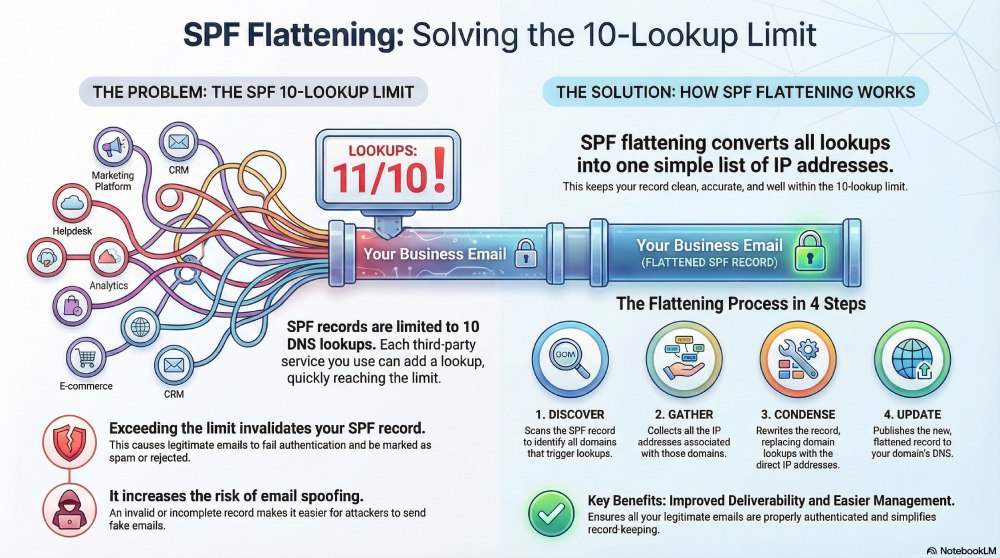
Here’s how SPF flattening helps you dodge the trouble of staying within the 10 DNS lookup limit.
Domain discovery
The first step is analyzing your current SPF record to identify all the domains referenced through mechanisms like include, a, or mx. These are the entries that typically trigger additional DNS lookups.

Gathering IP addresses
Once the domains are identified, the next step is to look up all the IP addresses behind them. This means checking their A and AAAA records to collect both IPv4 and IPv6 addresses, so nothing gets missed.
Condensing the record
After you have all the IPs, the SPF record is rewritten. This means all the “include”, “a”, and “mx” entries are replaced with actual IP addresses. This way, the receiving server doesn’t need to do any extra lookups.
Updating and maintenance
It is very important that the new, updated SPF record is added to your domain’s DNS as soon as possible so that the mail servers can refer to it when they authenticate your emails.
User Verification
The final step is to run verification checks to confirm everything works correctly. Once that’s done, make sure that you understand how to maintain the flattened record going forward so you can avoid future PermErrors.

How AutoSPF can help
We understand that email ecosystems have become denser and more complex, especially with so many tools and platforms that send emails on your behalf. This is why we are here to make things easier for you. By streamlining your SPF record, our automatic SPF flattening tool can help ensure that your legitimate sending services are properly authenticated without exceeding DNS lookup limits.
Topics
CTO
CTO of DuoCircle. Architect of AutoSPF's SPF flattening engine and DNS monitoring infrastructure.
LinkedIn Profile →Fix your SPF record in 60 seconds
Try AutoSPF free for 30 days. No credit card required.
Start Free Trial