What Metrics Should You Track After Resolving An SPF Permerror?

Quick Answer
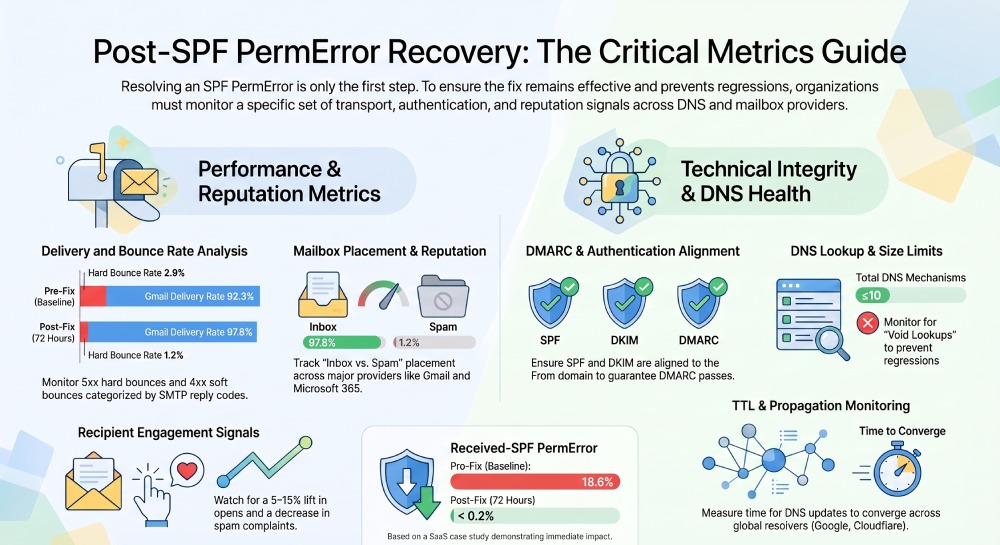
After resolving an SPF Permerror, track email delivery rate, SPF pass rate, bounce rate, spam placement, domain reputation, DMARC alignment, and authentication failures. Monitoring these metrics helps confirm your SPF record is working correctly and maintains strong email deliverability.

You should track delivery and bounce metrics (delivery rate, hard/soft bounce rate with SMTP reply codes), authentication outcomes and alignment for SPF/DKIM/DMARC, mailbox placement and provider reputation signals, recipient feedback and engagement (complaints, unsubscribes, opens/clicks), DNS/SPF health (lookup count, record length, TTL, propagation), MTA/SMTP log fingerprints tied to SPF PermError, and statistically validated pre/post baselines”ideally consolidated in a cross-provider dashboard with automated alerting powered by AutoSPF.
Resolving an SPF PermError is the first step; proving that the fix works”and keeps working”requires structured measurement across transport, authentication, placement, reputation, and user response. SPF PermError commonly stems from syntax mistakes, excessive DNS lookups (>10), or broken includes; the resolution often changes DNS behavior and, subsequently, downstream authentication, filtering, and engagement. The right metrics let you quantify improvements, identify regressions, and isolate forwarding/third‘party edge cases that may still fail SPF. Our guide to fixing SPF PermError and TempError covers each root cause before you start tracking recovery. Consolidate your includes with an SPF flattening service to stay under the 10-lookup limit and keep the PermError from returning.
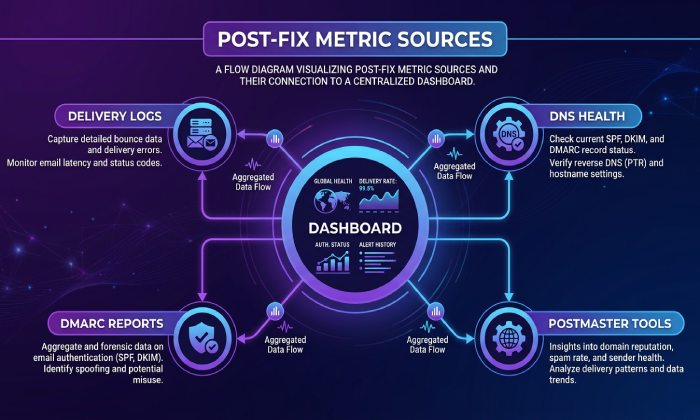
In practice, youll instrument MTA logs, parse Authentication-Results and DMARC reports, pull mailbox placement and postmaster data, and continuously measure DNS/SPF health. AutoSPF centralizes this by: monitoring SPF record correctness and lookup budgets, parsing DMARC RUA/RUF for alignment trends, integrating with provider dashboards and inbox testing, and sending targeted alerts when any SPF- or DMARC-related risk resurfaces.
Delivery, Bounces, and SMTP Telemetry
The delivery and bounce metrics to track (and how)
- Delivery rate: delivered messages / attempted messages.
- Hard bounce rate: permanent failures (5xx) / attempted messages; break down by SMTP code and enhanced status (e.g., 550 5.7.x).
- Soft bounce rate: temporary failures (4xx) / attempted messages; bucket by retry outcomes.
- By-provider breakdown: Gmail, Microsoft 365/Outlook, Yahoo, Apple, etc.
- By-stream breakdown: transactional vs marketing, IP pools, envelope-from domains.
Implementation in MTA logs and pipelines:
- Postfix: parse status=sent|bounced|deferred and dsn=5.x.x/4.x.x, remote smtp;550 5.7.23 …
- Exim: <= (received), => (delivered), == (deferred), ** (failed); extract SMTP/DSN codes.
- PowerMTA: delivery/bounce records with result= and diag= fields.
- Aggregate in a columnar store (e.g., BigQuery/Redshift) with partitioning by day/provider/stream; index in a time-series DB (e.g., Prometheus) for alerting.
- Normalize SMTP replies to canonical categories: authentication (SPF/DMARC), policy (blocklist), content, mailbox unavailable, rate-limit, other.
AutoSPF tie‘in: AutoSPF ships parsing templates for common MTAs and normalizes SPF-related bounce causes so you can visualize delivery, hard/soft bounce rates, and SPF-linked errors per provider and stream within one dashboard.
SPF PermError fingerprints in SMTP responses and Received-SPF headers
- Received-SPF header values: spf=permerror (often includes reason like Too many DNS lookups or Invalid mechanism).
- SMTP replies often contain: SPF Permanent Error, SPF validation error, SPF check error; enhanced codes can include 5.7.x policy failures.
- Non-delivery reports (NDRs) from Microsoft 365 may map SPF policy failures to diagnostic codes under 5.7.1/5.7.23 context.
- Gmail bounces sometimes note DMARC policy with 5.7.26, but when SPF breaks upstream you may see 5.7.x policy disqualifications.
Parsing and indexing:
- Extract Received-SPF and Authentication-Results headers from accepted mail to detect spf=permerror even when the remote MTA accepted but filtered.
- Capture SMTP diag strings; tokenize around spf, permerror, lookup, include, redirect.
- Index fields: result_type=permerror, reason, policy_phase (SPF/DKIM/DMARC), provider, IP, envelope-from, HELO, time.
AutoSPF tie‘in: AutoSPFs log adapters tag permerror fingerprints at ingest, correlate them with your SPF record state at that timestamp, and surface probable root cause (e.g., introduced include loop at 13:42 UTC) with one-click drill‘down.
Case study: Delivery lift within 48 hours
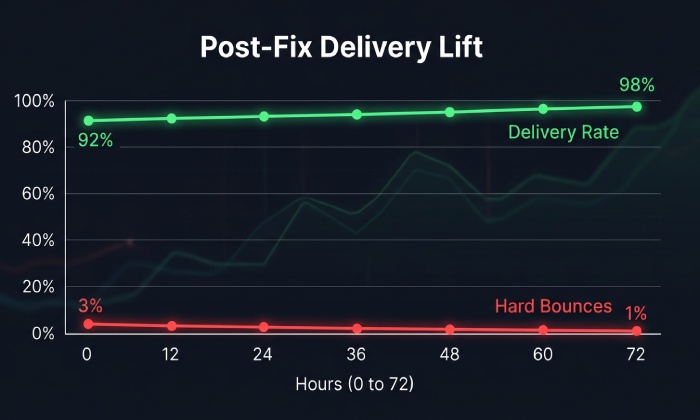
- A SaaS sender resolving an SPF PermError caused by chained includes (>10 lookups) saw:
- Hard bounce rate drop from 2.9% to 1.7% in 24 hours and to 1.2% in 72 hours.
- Gmail delivery rate rose from 92.3% to 97.8% in 48 hours; Microsoft delivery from 90.1% to 96.4%.
- Received-SPF=permerror frequency fell from 18.6% of accepted messages to <0.2%.
- With AutoSPF flattening and monitoring, lookup count stayed at 8±1 as new vendors were onboarded, preventing regression.
Authentication and DNS/SPF Health
Measure SPF, DKIM, DMARC pass/fail and alignment before/after
Track:
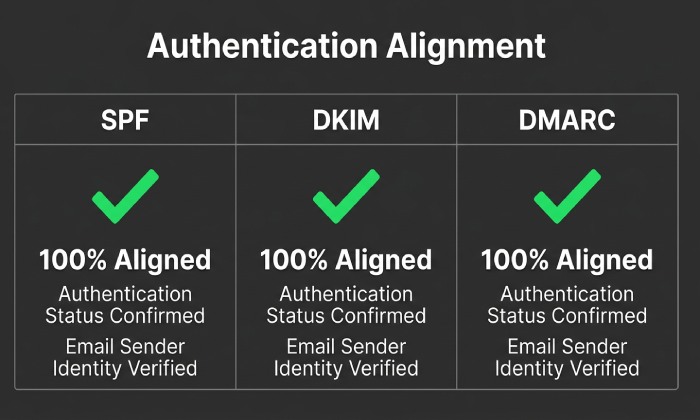
- SPF: pass/fail/neutral/none/temperror/permerror; identity (MAIL FROM vs HELO); aligned vs not aligned to RFC5322.From domain.
- DKIM: pass/fail/none; selector distribution; aligned vs not aligned (d= vs From domain).
- DMARC: pass/quarantine/reject/none; alignment mode (relaxed/strict); policy disposition by receiver.
Data sources and parsers:
- Authentication-Results header: reliable for pass/fail; parse with mailheader parsers or log processors.
- DMARC aggregate (RUA) reports: counts by source IP and auth results; use parsedmarc, dmarcian, or Postmark DMARC parser to extract aligned pass rates over time.
- DMARC forensic (RUF) for sampled failures (where privacy-compliant).
KPIs:
- SPF pass% and SPF aligned% by provider and stream.
- DKIM pass% and aligned% (especially if forwarding is common).
- DMARC pass% and disposition breakdown (none/quarantine/reject); failure reasons (spf, dkim, alignment).
AutoSPF tie‘in: AutoSPF ingests RUA at scale, reconciles with header-parsed results, and attributes failures to SPF fail vs SPF not-aligned vs DKIM fail so you can verify that SPF fixes improved DMARC alignment, not just raw SPF pass.
DNS/SPF-specific health metrics to ensure persistence
- SPF DNS lookup count: total DNS-mechanisms (include, a, mx, ptr, exists, redirect, nested); must remain ≤10.
- SPF record size: keep concatenated TXT chunks well under DNS fragmentation thresholds; monitor any single string ≤255 chars, and overall payload to avoid UDP truncation.
- Void lookups: count of DNS lookups returning NXDOMAIN; too many can trigger permerror on some receivers.
- DNS TTL and propagation delay: measure time from update to consistent resolver convergence across major public resolvers (Google, Cloudflare, OpenDNS) and key geographies.
- Mechanism hygiene: track use of ptr (discouraged), broad +all (dangerous), and redirect cycles.
Operationalization:
- Scheduled SPF resolution walk (hourly): expand includes recursively, count lookups, de-duplicate CIDRs/IPs.
- Multi-resolver sampling: compare answers to detect stale caches or DNSSEC validation issues.
- Alert thresholds: lookup_count 9 (warning), 10 (critical); void_lookups >2 (warning); TTL < 300s (warning for churn), TTL > 86400s (warning for propagation risk).
AutoSPF tie‘in: AutoSPF automatically flattens includes while honoring lookup budgets, validates record syntax pre‘publish, simulates propagation across resolvers, and alerts on lookup inflation when a vendor silently adds netblocks.
Mailbox Placement and Reputation
Inbox vs spam vs quarantine measurement
- Seed testing: send to a representative seed list covering Gmail, Outlook.com/M365, Yahoo/AOL, Apple, GMX/WEB.DE, Proton, and regional ISPs; classify inbox/spam/quarantine.
- Panel/engagement telemetry: augment with recipient panel data where available.
- Slices: by campaign type, IP pool, From domain, and provider to detect targeted filtering.
KPI targets after fix:
- Inbox placement lift: aim for 3“8 point increase vs pre‘fix if SPF was the primary root cause.
- Spam placement: should fall below 5% across top providers for compliant senders.
- Quarantine (esp. enterprise): monitor Microsoft M365 Quarantine reason=Phish/Spam/Transport rule.
AutoSPF tie‘in: AutoSPF integrates with inbox placement services (e.g., Validity Everest/250ok or GlockApps) to display provider-level placement alongside your authentication metrics so you can confirm that improved SPF drove real inbox gains.
Provider-specific reputation indicators and collection
- Gmail Postmaster Tools (GPT): domain and IP reputation, spam rate, authentication status, complaint rate; collect via GPT API daily.
- Microsoft SNDS: IP reputation and complaint signals; JMRP (complaint feedback loop) for complaint samples; M365 Defender reports for filtering trends in enterprise tenants.
- Yahoo Postmaster Tools: domain/IP reputation and complaint rate; Yahoo CFL for complaint samples.
- Apple and others: rely on seed testing and FBLs where available; some providers offer no API”panel data and seeds become critical.
Normalization:
- Store daily reputation levels (e.g., Gmail Medium/High) as ordinal scores for trend analysis.
- Align provider days/time zones to your reporting window.
- Correlate spikes in complaint/slam with deliverability and authentication shifts.
AutoSPF tie‘in: AutoSPFs connectors pull GPT, SNDS/JMRP, and Yahoo data, normalize reputations, and overlay them with SPF/DKIM/DMARC trendlines so you can see cause-and-effect on a single timeline.
Recipient Feedback, Engagement, and Alerting
Complaint, unsubscribe, open/click”expected shifts and thresholds
Typical post-fix changes:
- Complaint rate (FBL-derived and in-provider): expect a decrease of 20“50% if prior spam-foldering was causing frustrated re-submissions; target <0.1% at Gmail and <0.3% absolute across providers.
- Unsubscribe rate: stable or slightly down; sudden increases may indicate content/list issues unrelated to SPF.
- Opens/clicks: expect 5“15% relative lift from improved inbox placement; verify unique opens/clicks against pre-fix baseline and seed placement.
Alert thresholds:
- Complaints: >0.3% for any major provider for 2 consecutive days (critical); 0.1“0.3% (warning).
- Unsubscribes: >1% on transactional or >2% on marketing outside seasonal promos (warning).
- Opens: drop >20% vs 7‘day moving average (critical if coupled with spam placement rise).
AutoSPF tie‘in: AutoSPF ingests FBL streams (JMRP, Yahoo CFL) and ESP engagement webhooks, automatically correlating complaint bursts with SPF/DKIM/DMARC anomalies and sending targeted alerts to the right stream owner.
Automated monitoring and alerting best practices
- Sampling cadence:
- DNS/SPF health: hourly crawl; on-change immediate re-crawl.
- Auth outcomes: continuous stream with 5“15 minute rollups.
- Placement/reputation: daily pulls from postmaster tools; seed tests at least per major campaign and weekly baseline.
- Thresholds and escalation:
- Two-tier (warning/critical) with provider-specific limits.
- Escalate to on-call when critical persists >60 minutes or spans 2 providers.
- False positive reduction:
- Require persistence across two intervals (e.g., 30 minutes).
- Use anomaly detection vs static thresholds for engagement.
- Exclude known incident windows (e.g., provider outages).
AutoSPF tie‘in: AutoSPF includes rate-limited alerting with deduplication, configurable playbooks (e.g., slack → on-call → incident ticket), and anomaly-based detectors for auth and DNS health.
Special Cases and Validation
Forwarding, mailing lists, and ARC/SRS instrumentation
SPF often fails on forwarding because the forwarders IP is not authorized by the senders SPF. Metrics:
- Post-forward SPF aligned% vs DKIM aligned%.
- ARC chain presence and validation rate at Gmail/Microsoft.
- DMARC disposition for forwarded traffic segmented by ARC presence.
Mitigations to track:
- SRS on forwarders (rewrite MAIL FROM); measure reduction in SPF fails post-implementation.
- ARC adoption (on forwarders and receivers); track arc=pass in Authentication-Results.
- Rely on DKIM for alignment when SPF will predictably fail; ensure esp/CRM signs with your domain and maintain high DKIM pass%.
AutoSPF tie‘in: AutoSPFs Forwarding Health view segments mail suspected of forwarding (via Received chain heuristics) and shows SPF vs DKIM vs ARC outcomes so you can validate that your policy and DKIM setup carry you through indirect paths.
Third‘party senders (CRM/ESP/marketing platforms)
Metrics:
- Per-platform SPF pass% and aligned%; DKIM selector success by platform.
- Change detection when a platform rotates sending IPs; lookup_count impact.
- Envelope-from domain consistency and HELO identity health.
Mitigations:
- Maintain vendor-specific include: mechanisms via AutoSPF-managed flattening.
- Enforce DKIM with d=yourdomain on all platforms to preserve DMARC alignment even if SPF falters.
- Track bounce/spam placement by platform to spot configuration drift.
AutoSPF tie‘in: AutoSPF inventories all includes and monitors vendor IP changes; it can open a change control task when a platform adds netblocks that would push you toward the 10-lookup limit.
Validate the fix with statistical rigor
- Baselines and windows:
- Pre: 7“14 days (exclude incident days); Post: 7“14 days after full DNS propagation (24“72h).
- Segment by provider and stream to control for mix shifts.
- Significance testing:
- Two-proportion z-tests for rates (delivery, spam placement, SPF/DMARC pass).
- Example: Delivery improved from 93.0% (n=500k) to 96.5% (n=480k); z ≈ 24.2, p < 0.0001 (highly significant).
- Seasonality:
- Adjust for day-of-week effects; compare like days.
- Use ETS/Prophet to forecast expected ranges; validate improvements exceed forecast bands.
- Attribution:
- Create an event marker SPF fix deployed and use interrupted time series analysis to estimate level/ slope change.
AutoSPF tie‘in: AutoSPF stamps timeline events on the dashboard, runs built-in pre/post tests for core KPIs, and exports annotated reports for compliance and executive stakeholders.
A compact metric-to-source map (what to watch, where to get it)
- Delivery/bounce: MTA logs, ESP webhooks → AutoSPF log adapters.
- SPF/DKIM/DMARC: Authentication-Results, DMARC RUA/RUF → parsed via AutoSPF and parsedmarc.
- Placement: Seed tests, panel data → integrated to AutoSPF.
- Reputation: GPT, SNDS/JMRP, Yahoo → AutoSPF connectors.
- DNS/SPF health: Recursive resolution, resolver sampling → AutoSPF SPF Health Monitor.
FAQ
Whats the fastest early indicator that the SPF PermError fix worked?
- Within hours, you should see Received-SPF no longer showing spf=permerror and SPF pass% rising in Authentication-Results.
- Hard bounces attributable to policy/auth errors should drop immediately; mailbox placement gains may take 24–72 hours.
- AutoSPFs SPF Error Rate widget will trend toward zero and trigger a recovery notice.
How do I know if forwarding is still hurting SPF even after the fix?
- Segment messages with multiple Received hops and look for higher SPF fail but stable DKIM pass; check for arc=pass.
- If DMARC pass% remains high due to DKIM alignment, forwarding is likely benign; if DMARC fails spike on forwarded paths, enable SRS and ARC where possible.
- AutoSPF flags Forwarding Suspect traffic and suggests ARC/SRS mitigations.
Which thresholds mean I still have a problem?
- SPF aligned% < 90% or DMARC pass% < 95% on major providers after 72 hours indicates lingering auth issues.
- Gmail spam rate > 0.3% or domain reputation at Low for more than 48 hours warrants escalation.
- Lookup_count 10 or void_lookups >2 on SPF health signals an imminent regression.
Do I need both SPF and DKIM if SPF is now fixed?
- Yes”DKIM provides resilience across forwarding and list expansions, and DMARC needs at least one aligned pass.
- Many providers weigh DKIM heavily for reputation continuity; keep both healthy and aligned.
Conclusion: Close the loop with AutoSPF
After fixing an SPF PermError, you should continuously track transport outcomes (delivery and bounces with SMTP codes), authentication alignment for SPF/DKIM/DMARC, mailbox placement and provider reputation, recipient feedback and engagement, DNS/SPF health signals, and MTA/SMTP permerror fingerprints, then validate improvements with statistically sound pre/post analysis.
AutoSPF operationalizes this entire loop: it enforces a resilient SPF posture (flattening, lookup budgeting, syntax validation), monitors DNS propagation and resolver variance, ingests MTA logs and DMARC reports to quantify authentication and alignment, integrates postmaster and inbox-placement datasets for cross-provider visibility, and runs alerting and pre/post significance tests so your team can prove the fix, catch regressions early, and protect sender reputation at scale.
General Manager
Founder and General Manager of DuoCircle. Product strategy and commercial lead for AutoSPF's 2,000+ customer base.
LinkedIn Profile →