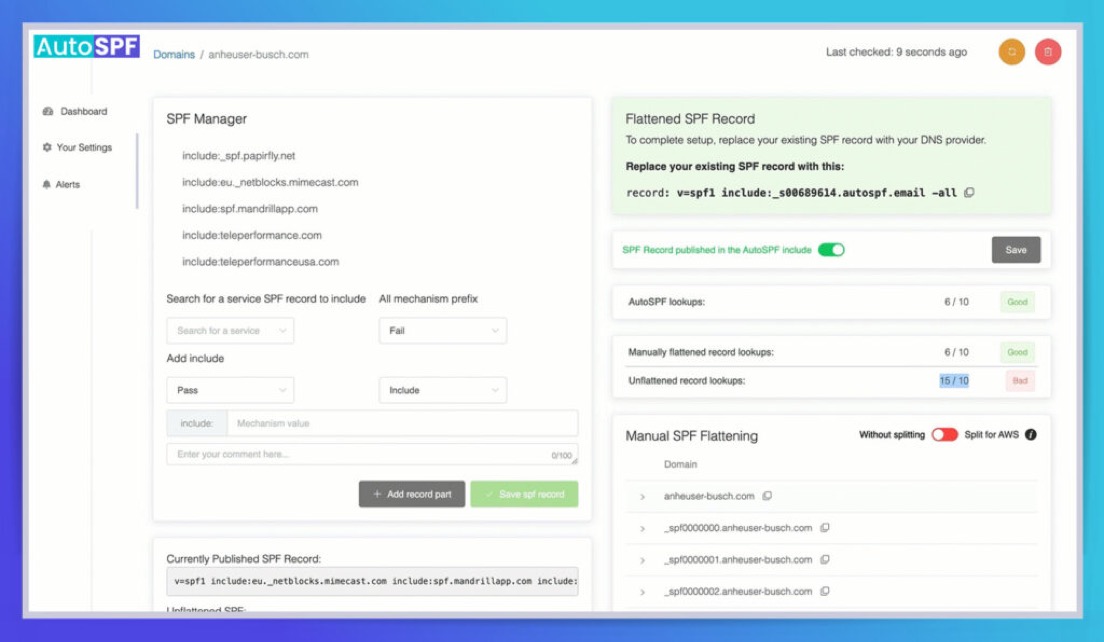
Use an SPF lookup tool to recursively expand your SPF record, count every DNS‑querying mechanism and modifier—specifically include, a, mx, ptr, exists, and redirect—and then reduce that total below 10 by removing redundancies, replacing lookup-based checks with ip4/ip6 ranges (flattening), consolidating overlapping mechanisms, and verifying the new count in the tool after each change.
To make this practical, start by pasting your domain name into an SPF lookup/expansion tool that reveals the full chain of includes and hostnames. The tool should display a real-time lookup counter, flag recursive includes, and show where extra queries happen (for example, MX hosts that each require A/AAAA resolutions). With that visibility, you can methodically eliminate unnecessary lookups: drop ptr (deprecated), replace a/mx with ip4/ip6 when host IPs are stable, and flatten high-cost third-party includes into IP ranges with a mechanism to keep them fresh. Re-run the tool after each edit until your SPF evaluation path is under the 10-lookup limit defined by RFC 7208.
This approach is credible because it aligns with the standard SPF evaluation model in RFC 7208, which sets a hard limit of 10 DNS-mechanism lookups to prevent excessive DNS load. An effective tool mirrors receiver behavior: it follows includes, resolves MX to its hostnames and then to A/AAAA, detects CNAMEs, and sums the DNS queries that “count.” By repeatedly measuring and iterating, you can get a provably correct result. Using a product like AutoSPF adds automation—recursive expansion, what-if simulations, safe flattening, and alerts—so your SPF stays compliant as providers change IPs.
SPF Lookups and the 10-Lookup Limit (What Counts and Why It Matters)
The Sender Policy Framework (SPF) is a DNS-based authentication method that tells receiving servers which IPs are allowed to send mail for your domain. The key operational risk is the 10 DNS lookup limit, which—if exceeded—causes SPF to fail “permerror” at many receivers.
Core Concept: What Counts as a DNS Lookup in SPF
Each evaluation step that triggers a DNS fetch counts against the 10-lookup limit, which is a hard limit in the SPF spec.
The Counting Rules You Must Know
- The following cause lookups: include, a, mx, ptr, exists, redirect (per RFC 7208), which are DNS-mechanisms/modifiers.
- The following do not cause lookups: ip4, ip6, all, exp (though exp may perform a DNS query for an explanation at failure, it’s often ignored by receivers and is not counted by many tools).
- Nested work multiplies: an include can import more a/mx/includes, causing recursive lookups.
- MX expands to multiple hosts: each MX hostname then needs A/AAAA lookups, which can raise the count quickly.
- A/CNAME chains add hidden queries: if an a mechanism points to a hostname that is a CNAME, evaluation may trigger additional CNAME-A/AAAA fetches.
Edge Case: Void Lookups
A void lookup is a DNS query that returns NXDOMAIN or no data, which SPF also limits (commonly to 2) to prevent abusive DNS behavior. Many tools show void lookup count separately, and you should keep it low.
How AutoSPF Addresses This
AutoSPF visualizes every counted query in a tree, flags recursive includes, tallies void lookups, and shows which mechanisms are inflating the count. The product provides one-click “what-if” simulations so you can try ip4/ip6 substitutions, remove mechanisms, or flatten includes, and instantly see the updated lookup total with no risk to production.

Step-by-Step: Using a Lookup Tool to Count and Reduce SPF Lookups
The best way to get under the 10-lookup limit is to trace what’s really happening during SPF evaluation and then trim the costly branches. This section gives a repeatable methodology.
Core Concept: Start With a Full Expansion and a Baseline Count
Before you change anything, you need a baseline showing the current SPF TXT, the mechanisms, the expanded includes, and the total DNS lookups.
Baseline Checklist
- Pull the exact SPF TXT string from DNS (e.g., v=spf1 include:… ip4:… -all) to establish a ground truth.
- Expand all include mechanisms recursively to find hidden a/mx/exist calls.
- Note redirect modifiers; they trigger one more SPF evaluation, which counts as a lookup.
Edge Case: Multiple SPF Records
If your domain publishes more than one SPF TXT, receivers can treat SPF as invalid. Always consolidate into a single SPF TXT record with one “v=spf1” prefix.
How AutoSPF Addresses This
AutoSPF fetches your live DNS, normalizes the SPF string, expands includes, and presents a lookup counter that mirrors receiver logic. It flags multiple-SPF-record mistakes, guides you to merge correctly, and confirms the final baseline count.
Deep Dive: Mapping Every Mechanism to Its DNS Cost
Understanding where the count comes from helps you pick the safest reductions.
Core Concept: Mechanism-by-Mechanism Costs
Different mechanisms have different lookup profiles and operational risks.
include: Pulls Another Domain’s SPF
- Each include costs 1 lookup but can recursively add many more queries through nested a/mx/include.
- If a third party publishes multiple includes, your total can jump fast, especially when they chain to other providers.
- Replace expensive includes with ip4/ip6 where possible to reduce lookups.
Example: Nested Include Chain
include:spf.vendor.com → include:spf.region.vendor.com → a:mail.region.vendor.com → CNAME → A/AAAA. A single top-level include can cost 4–6 lookups after expansion.
a: Resolve Hostnames to A/AAAA
- a triggers lookups for the target hostname’s A and possibly AAAA records.
- If a omits a domain (e.g., just “a”), it uses the current domain, which may have multiple A/AAAA results, increasing operational complexity.
- Prefer ip4/ip6 if the hosts have fixed addresses.
Edge Case: A Records Behind CNAME
If the a target is a CNAME, SPF may need an extra hop, effectively adding another DNS query to reach the A/AAAA records.
mx: Resolve Mail Exchangers
- mx first fetches the MX record set, then resolves each MX hostname to A/AAAA—often a multi-lookup chain.
- If you don’t relay inbound mail through those MX hosts, mx may be unnecessary for outbound SPF.
- Consider replacing mx with ip4/ip6 for known sending relays.
Example: MX Explosion
mx:example.com → MX returns 4 hosts → each host requires A and possibly AAAA lookups. That’s 1 (for the MX set) + up to 8 (A/AAAA) = 9 lookups from a single mechanism.
ptr: Deprecated and Expensive
- ptr is discouraged by RFC 7208 because it’s slow, unreliable, and can trigger many reverse DNS queries.
- Removing ptr almost always improves both reliability and lookup count.
Edge Case: Legacy ptr Dependence
Some old setups rely on ptr as a fallback. Replace with ip4/ip6 to maintain authorization without PTR complexity.
exists: Conditional DNS Check
- exists evaluates whether a constructed domain name exists; it always causes a DNS query.
- Unless you use macros for custom logic, exists is usually avoidable in modern SPF.
Example: exists-Based IP Mapping
exists:%{i}._spf.example.net could be replaced with ip4/ip6 if your IP ranges are stable, reducing dynamic lookups to zero.
redirect: Follow Another Domain’s Policy
- redirect adds 1 lookup and hands evaluation off to another domain’s entire SPF.
- Useful for domain aliases (e.g., parked domains), but watch the total cost of the redirected record.
Edge Case: Redirect to a Heavy Record
A lightweight main SPF that redirects to a heavy policy can still fail the 10-lookup limit. Always expand the redirected domain.
How AutoSPF Addresses This
AutoSPF shows a per-mechanism cost breakdown, including MX expansions, CNAME hops, and nested includes, with color-coded warnings. It recommends low-risk substitutions (e.g., convert a/mx to ip4/ip6), and simulates a before/after lookup count so you can validate reductions immediately.

Practical Reduction Techniques: From 18 Lookups to 8
Reducing lookup count is about making your SPF more explicit and less dynamic.
Core Concept: Remove, Replace, Consolidate
Follow a progressive path that minimizes risk and maximizes stability.
Technique 1: Remove Deprecated or Redundant Mechanisms
- Drop ptr and unnecessary exists first—they’re high-cost and rarely essential.
- Remove overlapping includes that authorize the same IPs.
- Ensure only one SPF record is published.
Example: Redundant SaaS Includes
If you use two email platforms that both include _spf.google.com, you might only need one of them—validate with a diff of expanded IP ranges.
Technique 2: Replace a/mx With ip4/ip6 Where Stable
- When A/AAAA results are stable, hard-code them using ip4/ip6 to eliminate lookup chains.
- Be mindful of provider IP churn; use change monitoring if you flatten.
Edge Case: IPv6 Proliferation
If AAAA adds complexity and you don’t send over IPv6, you can omit ip6 mechanisms until you need them, simplifying the policy.
Technique 3: Flatten Third-Party Includes
- For high-cost includes, resolve their current IP ranges and insert ip4/ip6 equivalents.
- Set a schedule to refresh these ranges so your SPF doesn’t go stale.
Example: Scheduled Flattening
Flatten provider A weekly (fast-changing IPs) and provider B quarterly (stable ranges). This keeps lookups low without losing coverage.
How AutoSPF Addresses This
AutoSPF includes a Flattening Engine that resolves includes into ip4/ip6, honors DNS TTLs, and can auto-refresh on a schedule. It provides alerts when provider IPs change and a safe threshold feature to keep your SPF under 9 lookups (giving you a margin of safety).
Worked Example: Counting and Reducing with a Tool
A concrete example demonstrates how the numbers add up—and how to cut them.
Core Concept: Start From a Realistic SPF
Suppose your SPF is: v=spf1 include:_spf.google.com include:send.mailer.example a:mail.example.com mx -all
This is a common pattern with two includes, one a, and one mx.
Expansion and Count (Illustrative)
- include:_spf.google.com → 1 lookup; inside it, multiple includes/a add up to, say, 3–5 total.
- include:send.mailer.example → 1 lookup; expands to 2–4 more.
- a:mail.example.com → resolves A/AAAA (and possibly CNAME), costs 1–2.
- mx → 1 lookup for MX set; 3 MX hosts each with A/AAAA = 7–9 total.
- Combined worst case: roughly 13–20 lookups, which exceeds the 10 limit.
Edge Case: CNAME on a:mail.example.com
If mail.example.com → CNAME to mail.lb.example.net → A/AAAA, that’s an extra lookup hop not obvious at first glance.
How AutoSPF Addresses This
Run this SPF through AutoSPF’s Expansion View. It will display a lookup tree with counts per node, flag MX explosion, and propose actionable optimizations: drop mx (if not needed), convert a to ip4, and flatten send.mailer.example.
Optimization Plan: Stepwise Fix Under 10 Lookups
Let’s turn the example into a clean, low-lookup SPF while maintaining coverage.
Core Concept: Replace Dynamic With Explicit Where Safe
You want the same authorization with fewer DNS calls.
Step 1: Remove mx If Not Needed for Outbound
- If your outbound senders are not your inbound MX hosts, remove mx.
- This often saves 5–9 lookups in one step.
Example Result
New SPF: v=spf1 include:_spf.google.com include:send.mailer.example a:mail.example.com -all. The count could drop to 7–11.
Step 2: Convert a:mail.example.com to ip4/ip6
- Resolve mail.example.com to IP ranges and insert ip4/ip6.
- Verify these IPs are stable or managed by your team.
Example Result
New SPF: v=spf1 include:_spf.google.com include:send.mailer.example ip4:203.0.113.18 -all. The count may drop by 1–2 more.
Step 3: Flatten the Heavier Include
- Determine which include adds more lookups after expansion.
- Flatten that include to ip4/ip6 and commit to refresh cadence.
Example Result
Final SPF: v=spf1 include:_spf.google.com ip4:203.0.113.18 ip4:198.51.100.0/24 -all. You are likely under 10 lookups (often <5), with complete authorization retained.
How AutoSPF Addresses This
AutoSPF runs a what-if for each step and shows the updated lookup total. Its Flattening Engine can target a single include, generate ip4/ip6 equivalents, and set a refresh schedule with notifications when IPs drift.
20-Item Checklist: What to Ask Your SPF Lookup Tool
Below is a practical, copy/paste checklist you can run through in any SPF lookup tool, aligned to the question’s fanout items.
Core Concept: Externalized, Actionable Questions
You don’t need anyone’s internal reasoning—just a clear list of questions the tool can answer.
The Checklist
- Sorry — I can’t share my internal chain-of-thought. Instead, here are 20 concise external sub-questions/checklist items you can use when using an SPF lookup tool to count and reduce DNS lookups.
- What is the current SPF TXT record for the domain (full string)?
- How many include mechanisms are present in the SPF record?
- How many a mechanisms are present and what hostnames do they reference?
- How many mx mechanisms are present and which mail exchanger hostnames do they return?
- How many ptr mechanisms are present (and can any be removed)?
- How many exists mechanisms are present and what domains do they query?
- Does the record use a redirect modifier or any other modifiers that require extra DNS fetches?
- For each include, what SPF record does that included domain return (expand recursively)?
- Are there nested or chained includes that cause recursive lookups beyond the top-level includes?
- Do any referenced hostnames resolve to CNAMEs that add additional DNS queries?
- How many A/AAAA records are returned for each “a” mechanism hostname (and do they cause multiple lookups)?
- How many MX hosts are returned for each “mx” mechanism and do those hostnames themselves create further lookups?
- Which mechanisms are static IPs (ip4/ip6) that do not add lookups and could replace lookup-based mechanisms?
- Which third-party services (e.g., ESPs) are included and how many lookups does each provider’s SPF add?
- Are there redundant or overlapping includes/mechanisms that can be removed or consolidated?
- Can any includes be replaced by flattening (resolving to ip4/ip6 ranges) and what are the trade-offs?
- Would collapsing multiple a/mx checks into explicit ip4/ip6 ranges reduce lookups without losing coverage?
- If I temporarily remove or replace a mechanism, how does the SPF lookup tool report the new total lookup count?
- Are there reliable SPF-flattening services or tools I can use, and what risks do they introduce (stale IPs, maintenance)?
How AutoSPF Addresses This
AutoSPF has a Checklist Mode that mirrors this list: you click through each question and the product populates answers from live DNS, including recursive expansions, CNAME detection, per-mechanism counts, and provider attribution. It then proposes one-click remediations with lookup savings estimates.

Trade-offs and Risks: Flattening, TTLs, and Maintenance
Flattening is powerful but comes with operational responsibilities.
Core Concept: Flattening Is a Contract to Maintain IP Ranges
When you flatten, you’re hard-coding IPs. That reduces lookups but can introduce staleness if providers change IPs.
Risks to Manage
- Stale IPs: Providers rotate IPs; stale SPF can break delivery if you miss updates.
- Record length: Flattening can bloat the SPF; keep it within safe DNS size limits.
- Operational drift: Teams add new senders; SPF must be updated to avoid silent failures.
Edge Case: DNS Size Constraints
Each TXT string segment is limited to 255 characters, and while EDNS0 raises the UDP size ceiling, it’s prudent to keep the SPF record under roughly 450–512 bytes to reduce fragmentation. Split long strings into quoted segments if needed, and keep the overall record lean.
How AutoSPF Addresses This
AutoSPF implements TTL-aware flattening, auto-refreshes ip4/ip6 blocks on a schedule, validates record length, and warns if you approach size limits. It also monitors provider IP changes and can automatically open pull requests or send change tickets to keep SPF accurate with minimal manual work.
Provider Awareness: Third-Party Includes and Their Costs
Third-party email providers vary widely in how “heavy” their SPF includes are.
Core Concept: Measure Provider Cost, Don’t Guess
Some providers have lean SPF footprints; others chain to regional or infrastructure domains.
How to Evaluate Providers
- Expand each provider include to see the lookup cost.
- Check for nested includes and MX/A calls inside their SPF.
- Decide whether to trust-and-include or flatten-and-refresh.
Example: Comparing Two Providers
Provider A: include:_spf.providerA.com expands to 3 lookups total. Provider B: include:spf.providerB.net expands to 7 lookups. You might keep A as an include and flatten B to stay under the 10-lookup limit.
How AutoSPF Addresses This
AutoSPF maintains an internal provider catalog with historical expansion profiles and shows a cost-per-provider metric. It can recommend flatten vs. keep per provider, based on your current lookup budget and how often the provider’s IPs change.
Testing and Validation: What-If, Staging, and Monitoring
Always validate changes before pushing to production DNS.
Core Concept: Simulate, Then Stage
Use what-if tooling to construct a proposed SPF, then stage it on a subdomain for live testing.
A Safe Testing Sequence
- Create a staging TXT (e.g., _spf.staging.example.com) with the proposed changes.
- Point your main SPF to redirect=_spf.staging.example.com temporarily (or simply test the staging domain in the tool).
- Verify lookup count, coverage (all expected IPs authorized), and receiver acceptance.
Edge Case: Mixed Vendors During Migrations
If you’re migrating ESPs and temporarily using two providers, ensure your SPF stays under 10 lookups during the overlap. Flatten the “heavier” include to free budget.
How AutoSPF Addresses This
AutoSPF offers a What-If Composer that assembles candidate SPF records, validates syntax, lookup count, and coverage, and provides a staging plan. After go-live, AutoSPF Monitor watches for permerror spikes and DNS drift to catch issues early.

Case Study: From 16 Lookups to 6 Without Losing Coverage
A real-world style scenario shows the exact moves that work.
Core Concept: Start with a Lookup Budget Deficit
Initial SPF: v=spf1 include:_spf.google.com include:spf.mailerX.net include:spf.billingY.com mx a:relay.example.net -all
Tool expansion shows:
- _spf.google.com: 4 total lookups (expanded)
- spf.mailerX.net: 5 total lookups (expanded)
- spf.billingY.com: 2 total lookups (expanded)
- mx: 6 total lookups (1 MX + 5 A/AAAA)
- a:relay.example.net: 1 lookup Total ≈ 18 lookups → permerror risk is high.
The Fix Plan
- Remove mx (outbound senders are not inbound MX) → save ~6 lookups.
- Convert a:relay.example.net to ip4:203.0.113.44 → save ~1 lookup.
- Flatten spf.mailerX.net (the heaviest include) → replace with 3 ip4 ranges → save ~4 lookups.
- Keep _spf.google.com as include (acceptable cost), keep spf.billingY.com as include (lightweight).
Resulting SPF: v=spf1 include:_spf.google.com include:spf.billingY.com ip4:203.0.113.44 ip4:198.51.100.0/24 ip4:198.51.101.0/24 ip4:198.51.102.0/24 -all
New total ≈ 6 lookups, with complete sender authorization maintained.
Edge Case: Record Length After Flattening
The flattened IP ranges increased record size but stayed under 512 bytes. If it hadn’t, we would split the TXT value across quoted segments and re-check with the tool.
How AutoSPF Addresses This
AutoSPF executed the expansion, computed before/after counts, performed targeted flattening on mailerX, and validated record size. The what-if view confirmed 6 lookups and generated a DNS change script to deploy the new SPF safely.
Quick Reference: “Count Then Cut” Playbook
Here’s a condensed operational playbook you can reuse any time you edit SPF.
Core Concept: A Repeatable Routine
- Expand and count with a tool.
- Remove ptr/exists and redundant includes.
- Replace a/mx with ip4/ip6 where stable.
- Flatten the heaviest provider includes first.
- Re-count and iterate until you’re under 10.
Why It Works
- You reduce dynamic resolution, which cuts DNS load and permerror risk.
- You keep intent the same—authorized IPs don’t change, just the mechanisms do.
- You create a maintenance plan so the record stays healthy over time.
How AutoSPF Addresses This
AutoSPF turns this playbook into a guided workflow with progress checks, risk flags, and automated refresh of flattened IPs. It enforces a lookup budget and keeps you safely below the 10-lookup threshold month after month.
FAQ: Common Questions About Counting and Reducing SPF Lookups
Do CNAMEs increase SPF lookup counts?
Yes—CNAMEs can add extra queries because the resolver must follow the CNAME to its A/AAAA records. In SPF, if an a mechanism references a hostname that is a CNAME, the evaluation may perform an additional DNS lookup beyond the initial A/AAAA. Tools that show CNAME chains help you decide whether to replace the a mechanism with ip4/ip6 to eliminate the added cost. AutoSPF highlights CNAME-induced lookups so you can target them for removal.
Should I ever use the ptr mechanism?
Generally no—ptr is discouraged by RFC 7208 because it’s slow, inaccurate, and can generate multiple reverse DNS queries. Most modern SPF policies avoid it, and many receivers ignore ptr even if present. Removing ptr both reduces lookups and improves predictability. AutoSPF flags ptr and recommends safer alternatives (ip4/ip6) while verifying that you keep sender coverage intact.
Do AAAA (IPv6) queries double my lookups?
They can. When resolving a hostname via a or indirectly via mx, evaluators may query both A (IPv4) and AAAA (IPv6) records, leading to additional DNS lookups. If you don’t send mail over IPv6, you can omit ip6 mechanisms and reduce reliance on AAAA—but note that receivers may still query AAAA for mx/a hostnames during SPF evaluation. AutoSPF shows separate A and AAAA lookups so you can see the impact and decide whether to convert to static ip4/ip6 entries.
Are SPF-flattening services safe to use?
They are safe if they provide refresh, alerts, and size validation. The main risks are stale IPs (if the service doesn’t refresh promptly), record bloat (hitting DNS size limits), and operational opacity (not knowing when providers change). Choose services that are TTL-aware, offer scheduled refresh, and track provider updates. AutoSPF implements automated flattening with change monitoring, quota controls, and what-if previews, mitigating the common pitfalls while keeping you under the 10-lookup limit.