

Protecting your entire email ecosystem and ensuring that an attacker cannot intercept or spoof your outgoing emails requires more than just cursory checks. It is also not about meeting specific compliance requirements; it’s about establishing firm controls over who is allowed to send emails on behalf of your domain and how these controls will be maintained as your email ecosystem becomes more complex.
Over the years, your email systems tend to grow as you adopt new services and tools for marketing, customer communication, financial transactions, and third-party integrations. As a result, different systems, each managed by different teams, begin sending emails on behalf of the same domain.

Since these services are often configured at different times and managed by different teams, their authentication practices vary. These inconsistencies do not make much of a difference in day-to-day operations, but when you dig deeper, these gaps come to the surface.
The challenge is not identifying these gaps, but deciding how to address them. Monitoring does provide the necessary insight, but you must follow up with gradual steps to achieve consistency and control.
What is DMARC monitoring, and what does it tell you?
When you authenticate your domain with protocols like SPF and DKIM, DMARC monitoring helps you see how those configurations perform in real situations. In theory, listing the right sending sources and setting up authentication should be sufficient. However, things are different when you actually start sending emails regularly, and that too, from multiple sending sources.
To stay on top of your email activity and understand how these systems behave over time, DMARC monitoring provides a consolidated view of sending sources and authentication results. It shows what systems are actively sending emails on behalf of your domain, whether they authenticated properly, and how they maintain this alignment over time. This makes it easier to identify sending sources that are misconfigured, only partially aligned, or no longer expected to be active. By showing how email is actually sent rather than how it was intended to be sent, DMARC monitoring helps you understand where adjustments are needed before moving toward enforcement.
Once you know what’s wrong, you can leverage that information to make informed decisions about your sending environment. This means confirming which systems are legitimate, fixing any authentication gaps, and identifying sources that should no longer be allowed to send email on behalf of your domain.
It also helps you understand if your authentication setup is stable enough to move to a stricter DMARC policy without disrupting the delivery of legitimate emails. AutoSPF automatically updates SPF records to block spoofing, protect domains, and improve email delivery.
Why staying in the monitoring mode is not a long-term approach
The thing about DMARC monitoring is that it provides visibility but not control. To truly protect your email ecosystem, you need to take measurable actions that fill in the gaps revealed by DMARC reports.

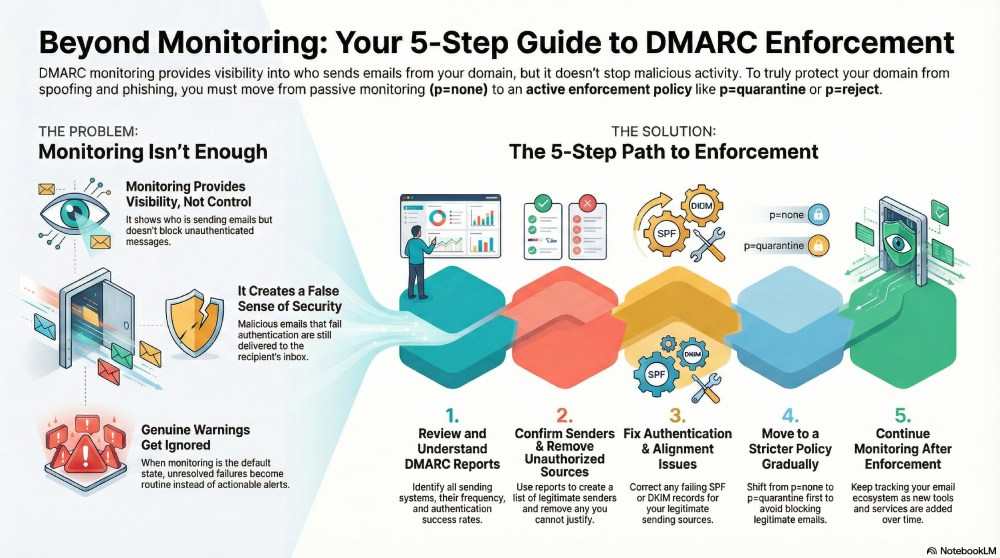
As long as your DMARC policy is configured at “p=none”, that is the monitoring mode, the receiving servers will only keep a tab of the authentication results; they will not do anything about the emails that fail authentication. Those emails will continue to deliver as is, even after being seen as red flags.
This only gives you a false sense of security that you have protected your emails with authentication protocols, when in reality, the same weaknesses remain exposed. Without enforcement, authentication failures do not really mean anything.
What’s worse is that if your DMARC policy stays put at “p=none”, eventually even genuine warnings start to be ignored. When monitoring remains the default state for too long, unresolved failures become routine rather than actionable.

Whether you have a complex email-sending ecosystem or not, the right thing to do is to gradually move to a stricter DMARC policy, such as “p=quarantine” or “p=reject.” Even that shift requires a strategic approach.
If you simply jump from one policy to another, without taking into account the DMARC reports, chances are that your enforcement efforts backfire. Without proper preparation, legitimate emails can start getting quarantined or rejected, causing delivery problems. This is why enforcement should not be rushed; it should move in sync with DMARC monitoring.
How do you move from DMARC monitoring to DMARC enforcement?

Clearly, you cannot fully protect your outbound emails while staying in monitoring mode. It’s essential that you gradually enforce a stricter DMARC policy— “p=quarantine” that allows you to take action against unauthenticated emails without being too aggressive.
Let’s go step by step to understand how you can move from monitoring to enforcement in a safe and structured way:
Properly review and understand your DMARC reports
When your DMARC setup is in monitoring mode, make the most of it by regularly reviewing those reports. These reports help you understand which systems are sending emails on behalf of your domain, how frequently they send, and whether they are passing SPF and DKIM authentication. It is important that you thoroughly assess this data to identify legitimate addresses, any misconfigurations, and recognise patterns that need attention, all before you move to the enforcement phase.

Confirm legitimate sending sources and remove unauthorized ones
DMARC reports give you visibility into all systems that are using your domain to send emails. Use this information to confirm which sources are legitimate and expected. This could be the marketing services, payment gateways, CRM platforms, and third-party services that you have authorized to send emails. And if you cannot justify any source or define its purpose, make sure that you review it properly and, if needed, remove it altogether.
Fix authentication and alignment issues
With DMARC reports, you can identify which legitimate sending sources are failing SPF or DKIM authentication, or are not properly aligned with your domain. These issues usually occur when your DNS records are incorrect or when you’ve made changes without updating authentication settings.
Move to a stricter policy gradually
Moving to a stricter policy cannot be sudden, or else your delivery rate will be affected. It is important that you follow a phased approach, gradually moving from “p=none” to “p=quarantine” while closely monitoring the impact, so that you can address remaining issues before progressing to full enforcement.
Continue monitoring even after full enforcement
Full enforcement does not mean that you stop monitoring altogether. If anything, monitoring becomes even more important. New tools, services, or system changes can introduce new sending sources over time, so keeping a track of what’s going on with your email ecosystem becomes non-negotiable.
Need help enforcing DMARC for your domain? Get in touch with us!