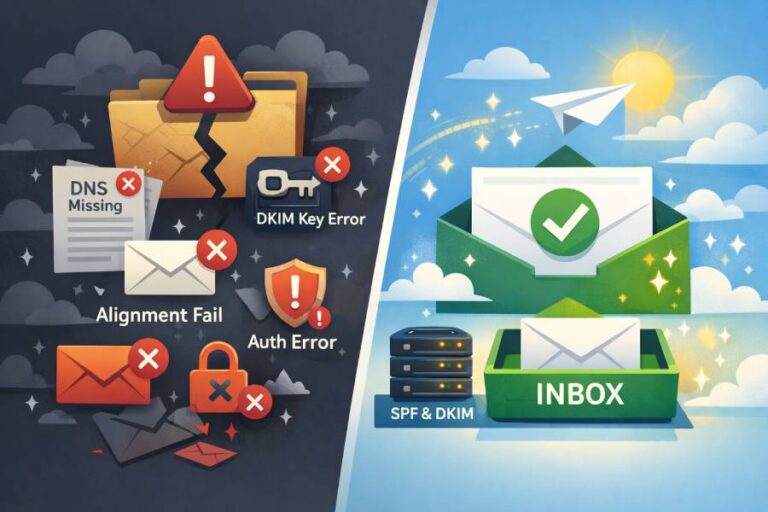


Most SPF records do not fail because they are missing or incorrectly added. They fail because they become too complicated over time. A domain starts with one or two email services, then slowly adds marketing platforms, CRMs, billing tools, and support systems. Each new service asks you to add another entry to your SPF record. On the surface, everything still looks fine, but behind the scenes, those additions quietly pile up.
This is where many organizations get caught off guard. Emails may suddenly start landing in spam folders or failing authentication, even though SPF appears to be present. One of the most common and least understood reasons for this is the 10-DNS lookup limit, a technical rule that inbox providers strictly enforce when checking SPF records.
In this blog, we break down what SPF lookups are, how include mechanisms work, and why a single overlooked syntax rule can quietly weaken your entire email authentication setup and hurt deliverability without obvious warning.
What are SPF lookups?

When an email server checks your SPF record, it does not simply read the text stored in your DNS. Instead, it follows a series of references to figure out which mail servers are actually allowed to send email for your domain. These references are known as SPF lookups.
Certain SPF mechanisms, such as include, a, mx, exist, and redirect, instruct the receiving mail server to fetch information from other domains. For example, when SPF encounters an ‘include’ statement, it tells the server to look at another domain’s SPF record and use its rules as part of the decision. To do this, the server has to perform a DNS query, and each of these queries counts as one lookup.
If the included domain itself refers to another service, an additional lookup is required. If that service points somewhere else, another lookup is triggered. This creates a chain of DNS requests that keeps growing. As the chain becomes longer, the risk of hitting technical limits increases, which is how many SPF records end up failing even though they look correct.
The function of the ‘include’ mechanism

When you add something like include:mailservice.com to your SPF record, you are not just allowing that single service to send emails on your behalf. You are telling receiving mail servers to trust every mail server that mailservice.com itself authorizes.
In simple terms, you are extending your trust to their entire sending network.
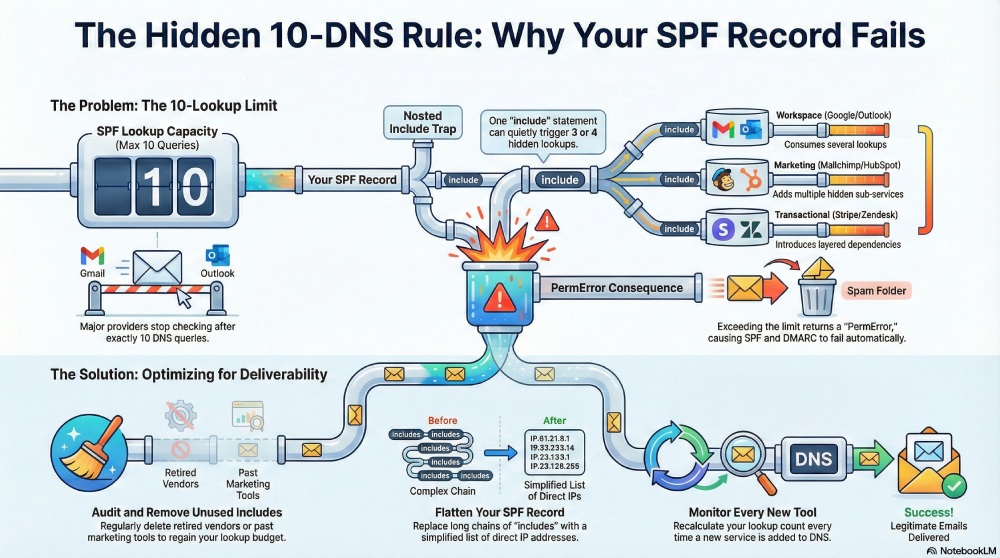
The problem is that most large email providers do not run on just one set of servers. Their own SPF records often include other services, cloud platforms, or delivery partners. Each of those adds another layer of DNS lookups behind the scenes. So one ‘include’ statement in your SPF record can quietly expand into three or four lookups without you ever seeing them.

This is why many domain owners believe they have only added two or three email tools, but in reality, their SPF record has grown much larger and more complex. Under the hood, SPF keeps pulling in more and more data, which is how records hit technical limits and start failing without any obvious warning.
What is the 10 DNS lookup limit
When an inbox provider checks your SPF record, it is only allowed to make up to 10 DNS queries to complete the verification. These queries include everything triggered by include, a, mx, exists, and redirect mechanisms. This limit is strictly enforced by major providers like Gmail, Outlook, and Yahoo.
If checking your SPF record requires 11 or more lookups, the evaluation stops and returns a PermError, which stands for permanent error. When this happens, SPF is treated as a failure, even though your record is still published in DNS. Because SPF fails, DMARC alignment also fails, and receiving servers may start treating your messages as suspicious or even as spoofed. This is why a record can look correct on the surface but still quietly break email delivery behind the scenes.

When you go past 10 lookups:
- SPF evaluation stops
- Receivers cannot verify your sending IP
- Your domain loses trust
- Phishing protection weakens
- Deliverability drops
Why modern companies hit the SPF lookup limit so fast
The way businesses send email today is very different from how it worked a few years ago. Most organizations no longer rely on just one mail server. Instead, they use a growing mix of platforms, cloud services, and automation tools, all of which need permission to send email on the company’s behalf. Each of these services usually adds its own entry to the SPF record, and that is how the lookup count quietly begins to grow.

Google Workspace
Google Workspace is often used for everyday employee emails. Its SPF record includes multiple sending systems and infrastructure layers, which already consume several DNS lookups before anything else is added.
Outlook
Microsoft 365 and Outlook use a large global mail network. When added to SPF, they bring their own nested includes, which increases the number of lookups even if you only added one service.
Marketing platforms
Tools for newsletters and campaigns, such as Mailchimp or HubSpot, send mail through shared delivery networks. Their SPF records usually include multiple sub-services, adding several hidden lookups at once.
CRM tools

CRMs send sales emails, follow-ups, and automated notifications. These platforms often rely on third-party email infrastructure, which introduces more SPF includes behind the scenes.
Payment emails
Billing and invoicing systems send receipts, reminders, and transaction alerts. These tools often use outsourced email delivery providers, which adds another layer of SPF references.
Support tools
Help desk platforms send ticket updates and replies from your domain. Many of these systems run on their own mail servers, which must be added to SPF and contribute to lookup usage.
Transactional email
Password resets, verification codes, and app notifications usually come from transactional email services. These providers are heavily layered and bring multiple SPF dependencies with them.
When all these systems are combined under a single domain, the SPF record can quickly exceed the 10-DNS-lookup limit. Even though each tool seems harmless on its own, together they push SPF beyond what inbox providers are willing to process.
How to stay within SPF limits
Keeping your SPF record within the 10-DNS lookup limit is not about adding fewer tools. It is about managing how those tools are represented inside your SPF syntax. With the right approach, even domains that use many email platforms can stay compliant and avoid authentication failures.
Remove unused includes
Over time, most companies stop using certain email services but forget to clean up their SPF records. Old marketing tools, retired CRMs, or past vendors often remain listed as allowed senders even though they no longer send any mail. Each of these unused entries still triggers DNS lookups, quietly wasting your lookup budget. Regularly reviewing your SPF record and removing anything that is no longer needed helps reduce unnecessary complexity and keeps your SPF record efficient and easier to maintain.
Avoid adding duplicate providers
Many organizations accidentally add the same email provider multiple times in different forms. For example, a marketing tool might already be included through another service, but it gets added again manually. These duplicates do not improve security or deliverability. Instead, they simply increase the number of DNS lookups required to process your SPF record. A careful review can reveal overlapping entries that should be consolidated or removed.
Flatten SPF when needed
SPF flattening is a technique where all the IP addresses from your included services are pulled into one simplified record. Instead of relying on long chains of includes, your SPF record directly lists the sending IPs. This drastically reduces DNS lookups and helps keep you under the limit, especially when you rely on multiple large email platforms.
Monitor SPF whenever a new tool is added
Every time a new email service is connected to your domain, your SPF record changes. Without checking the lookup count after each update, you may cross the limit without realizing it. Regular monitoring ensures that your SPF record stays valid as your email ecosystem grows.
Together, these practices help keep your SPF record clean, compliant, and reliable for long-term email delivery.

Final words
SPF syntax is not just about writing v=spf1 and adding a few include statements. It is about building an SPF record that stays small, efficient, and within the technical limits that inbox providers actually enforce. A record can look perfectly fine in your DNS and still fail behind the scenes if it becomes too complex. This is why many deliverability problems do not start with spam filters or content issues. They begin much earlier, at the DNS level, where authentication is either evaluated correctly or silently breaks.
SPF is one of the first checks every receiving server performs. If it fails due to excessive lookups, your emails lose trust before they are even read.
If your SPF record has already crossed the 10-DNS lookup limit and you are struggling to clean it up, AutoSPF’s automatic SPF flattening tool can handle it for you. It simplifies your record, removes lookup overload, and keeps your sending infrastructure compliant without manual effort, so your emails stay authenticated, trusted, and inbox-ready.